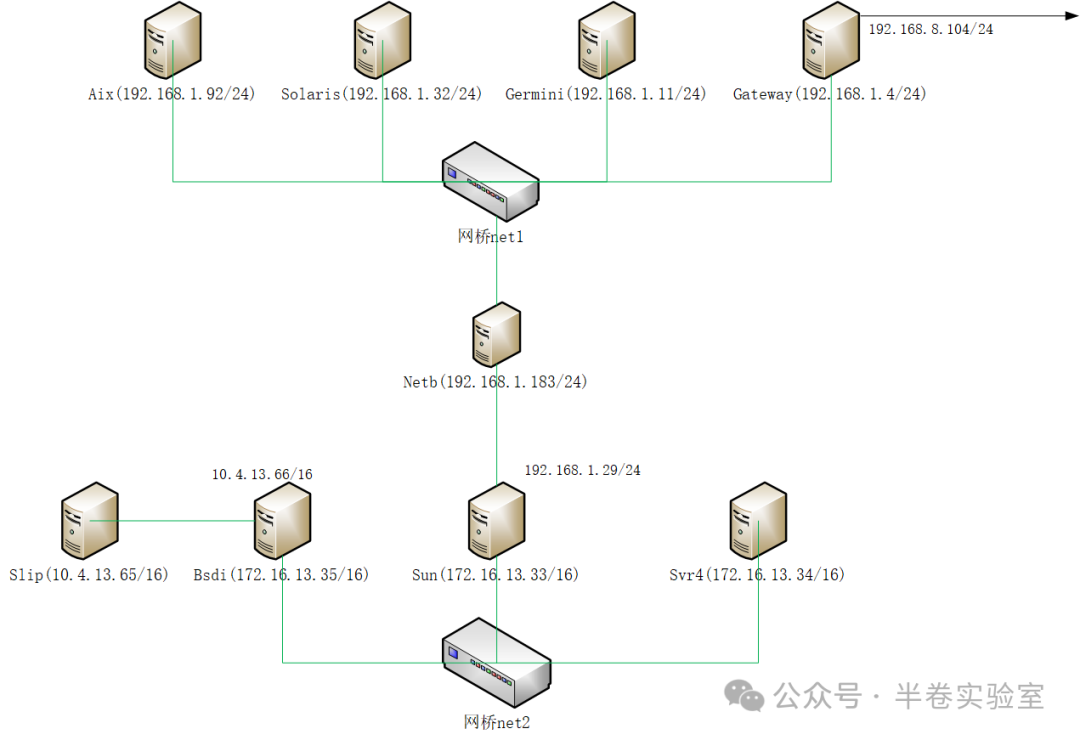
Note:
1. AIX Solaris and Gemini Gateway NetB belong to the same subnet, accessed externally through the gateway’s port 8.104.
2. SLIP and BSDI network card 2 are point-to-point connections (13.65 — 13.66).
3. BSDI network card 1 and Sun network card 1 SVR4 are in the same subnet.
4. Sun network card 2 (1.29) is point-to-point connected to NetB.
1. Create an Image
docker pull ubuntu:18.04
docker run -itd –privileged=true –net none -e “TERM=xterm-256color” –name centos-eqt ubuntu:18.04 /bin/bash
pipework br0 -i ens33 centos-eqt 192.168.18.81/[email protected]
Enter the container
docker exec -it centos-eqt env TERM=xterm bash
Install necessary software
apt-get -y update && apt-get install -y iproute2 iputils-arping net-tools tcpdump curl telnet iputils-tracepath traceroute
Commit the image
docker commit -m “Completed installation of common commands” centos-eqt my_ubuntu:v1
2. Create Two Bridges: net1, net2
ip link add name net1 type bridge
ip link add name net2 type bridge
ip link set net1 up
ip link set net2 up
3. Create Containers
docker run -itd –privileged=true –net none -e “TERM=xterm-256color” –name aix my_ubuntu:v1 /bin/bash
docker run -itd –privileged=true –net none -e “TERM=xterm-256color” –name solaris my_ubuntu:v1 /bin/bash
docker run -itd –privileged=true –net none -e “TERM=xterm-256color” –name gemini my_ubuntu:v1 /bin/bash
docker run -itd –privileged=true –net none -e “TERM=xterm-256color” –name gateway my_ubuntu:v1 /bin/bash
docker run -itd –privileged=true –net none -e “TERM=xterm-256color” –name netb my_ubuntu:v1 /bin/bash
docker run -itd –privileged=true –net none -e “TERM=xterm-256color” –name sun my_ubuntu:v1 /bin/bash
docker run -itd –privileged=true –net none -e “TERM=xterm-256color” –name svr4 my_ubuntu:v1 /bin/bash
docker run -itd –privileged=true –net none -e “TERM=xterm-256color” –name bsdi my_ubuntu:v1 /bin/bash
docker run -itd –privileged=true –net none -e “TERM=xterm-256color” –name slip my_ubuntu:v1 /bin/bash
4. Add Nodes to the Network
pipework net1 aix 192.168.1.92/24
pipework net1 solaris 192.168.1.32/24
pipework net1 gemini 192.168.1.11/24
pipework net1 gateway 192.168.1.4/24
pipework net1 netb 192.168.1.183/24
pipework net2 bsdi 172.16.13.35/16
pipework net2 sun 172.16.13.33/16
pipework net2 svr4 172.16.13.34/16
5. Establish a P2P Network from BSDI to SLIP
1. Create a pair of veth devices
ip link add name slipside mtu 1500 type veth peer name bsdiside mtu 1500
2. Add slipside to the network namespace of the slip container
docker inspect ‘–format={{.State.Pid}}’ slip # Get the container’s PID
ln -s /proc/pid/ns/net /var/run/netns/pid
ip link set slipside netns pid
3. Add bsdiside to the network namespace of the BSDI container
docker inspect ‘–format={{.State.Pid}}’ bsdi # Get the container’s PID
ln -s /proc/pid/ns/net /var/run/netns/pid
ip link set bsdiside netns pid
4. Assign IPs to slipside and bsdiside
docker exec -it slip ip addr add 10.4.13.65/16 dev slipside
docker exec -it slip ip link set slipside up
docker exec -it bsdi ip addr add 10.4.13.66/16 dev bsdiside
docker exec -it bsdi ip link set bsdiside up
6. Add Gateways
1. For SLIP, the external gateway is the BSDI machine, with the network card bsdiside (10.4.13.66/16)
docker exec -it slip ip route add default via 10.4.13.66 dev slipside
2. For the BSDI machine, the external gateway is the Sun machine (172.16.13.33/16)
docker exec -it bsdi ip route add default via 172.16.13.33 dev eth1
3. For Sun, to access the P2P network, a routing table needs to be added
docker exec -it sun ip route add 10.4.0.0/16 via 172.16.13.35 dev eth1
4. For the SVR4 machine, the external gateway is the Sun machine (172.16.13.33/16)
docker exec -it svr4 ip route add default via 172.16.13.33 dev eth1
5. For SVR4, to access the P2P network, a routing table needs to be added
docker exec -it svr4 ip route add 10.4.0.0/16 via 172.16.13.35 dev eth1
7. Establish a P2P Connection from NetB to Sun, Similar to Point 3
ip link add name sunside mtu 1500 type veth peer name netbside mtu 1500
SUN_PID=`docker inspect ‘–format={{.State.Pid}}’ sun`
ln -s /proc/${SUN_PID}/ns/net /var/run/netns/${SUN_PID}
ip link set sunside netns ${SUN_PID}
NETB_PID=`docker inspect ‘–format={{.State.Pid}}’ netb`
ln -s /proc/${NETB_PID}/ns/net /var/run/netns/${NETB_PID}
ip link set netbside netns ${NETB_PID}
8. Add IP to Sun
docker exec -it sun ip addr add 192.168.1.29/24 dev sunside
docker exec -it sun ip link set sunside up
9. Configure Routing for Sun and NetB, Default via Gateway
docker exec -it sun ip route add default via 192.168.1.4 dev sunside
docker exec -it netb ip route add default via 192.168.1.4 eth1
10. Since the P2P end of NetB has not set an IP, it needs to configure routing rules separately
docker exec -it netb ip link set netbside up
docker exec -it netb ip route add 192.168.1.29/32 dev netbside
docker exec -it netb ip route add 172.16.0.0/16 via 192.168.1.29 dev netbside
docker exec -it netb ip route add 10.4.0.0/16 via 192.168.1.29 dev netbside
11. Configure ARP Proxy for NetB
Since netbside does not have a broadcast address, when Sun wants to access the gateway, the ARP request fails.
Therefore, configure ARP for NetB to provide its MAC address to Sun (a friendly deception).
# Enable ARP proxy in the kernel
docker exec -it netb bash -c “echo 1 >/proc/sys/net/ipv4/conf/eth1/proxy_arp”
docker exec -it netb bash -c “echo 1 >/proc/sys/net/ipv4/conf/netbside/proxy_arp”
#2. Configuration
docker exec -it netb bash -c “arp -s 192.168.1.29 -i eth1 -D eth1 pub”
docker exec -it netb bash -c “arp -s 192.168.1.92 -i eth1 -D netbside pub”
docker exec -it netb bash -c “arp -s 192.168.1.32 -i eth1 -D netbside pub”
docker exec -it netb bash -c “arp -s 192.168.1.11 -i eth1 -D netbside pub”
docker exec -it netb bash -c “arp -s 192.168.1.4 -i eth1 -D netbside pub”