“From today on, study hard and make progress every day”
Repetition is the best method for memory; spend one minute every day to remember the basics of C language.
“Mastering C Language:C Language Graphical Programming and Game Development“
Preface to this Series
For those who are unclear about this series or unfamiliar with the concept of C language graphical interface programming, please first read the introductory article I shared earlier to grasp some common knowledge and understand why graphical programming requires third-party libraries.
“Mastering C Language Series” shows how simple it is to write the first cross-platform C language graphical interface!
Mastering C Language: Developing a Simple Soccer Bouncing Animation with Over 100 Lines of C Code!
Introduction
Learning C language every day and always writing command-line black window programs is not very interesting. Recently, I wrote a graphical interface program to implement a simple soccer bouncing animation in C language. The code is minimal, with only over 100 effective lines. Interested readers can take a look.
Implementation Tools
- • C Language: Syntax follows the C99 standard; C89 is too old, and now it is basically C99 and above.
- • raylib: A very simple, actively updated, cross-platform 2D game development library that supports multiple platforms including Windows, Linux, and MacOS.
- • VSCode: A cross-platform editor developed by Microsoft, which can be considered a universal development tool.
- • Computer: Can be Windows, MacOS, or Linux.
Implementation Approach
The implementation approach is very simple:
- • Soccer: Download any soccer image, load it, and draw it on the screen.
- • Soccer Bouncing: The program continuously changes the position coordinates of the soccer ball to achieve animation effects.
- • Physics: Requires some basic physics knowledge, such as gravitational acceleration, speed, time, etc.
- • Pressing the R key on the keyboard resets the soccer ball’s position, and the left mouse button can accelerate the soccer ball.
As everyone has noticed, physics is also very important for programming, especially in animation and game programming. The better the physics knowledge, the more realistic the animation and game effects will be.
Implementation Effect Video
Directly viewing images and videos provides a more intuitive effect.
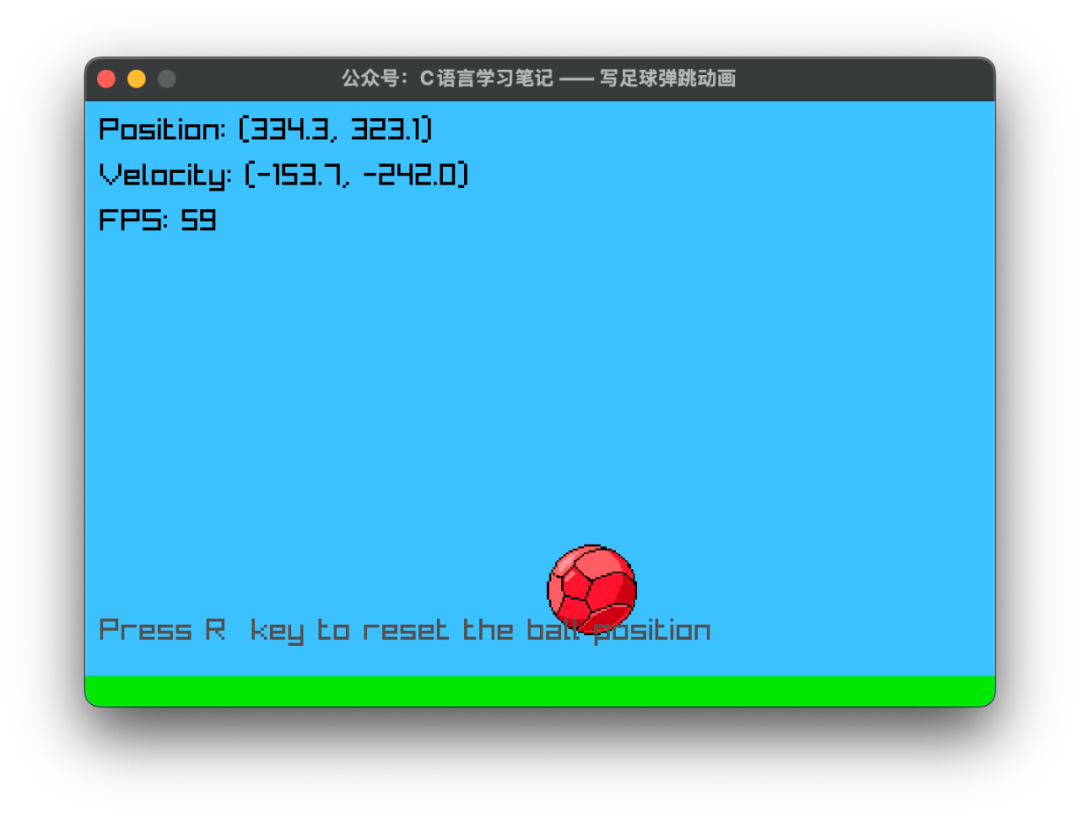
Animation Source Code, Can Be Run Directly, Save If Interested
#include "raylib.h"
#include <math.h>

int main(void)
{
    const int screenWidth = 600;
    const int screenHeight = 400;

    InitWindow(screenWidth, screenHeight, "Official Account: C Language Learning Notes - Writing Soccer Bouncing Animation");
    SetTargetFPS(60);

    // Initial position of the soccer ball
    Vector2 ballPosition = {screenWidth / 2, screenHeight / 4};
    Vector2 ballVelocity = {200.0f, 0.0f}; // Initial speed
    // Radius of the soccer ball
    float ballRadius = 30.0f;

    // Physical parameters of the soccer ball
    const float gravity = 9.8f * 50; // Gravitational acceleration (amplified effect)
    const float damping = 0.8f;      // Elastic damping
    const float friction = 0.98f;    // Friction

    // Soccer ball texture, can use soccer image
    Texture2D ballTexture = {0};
    // Try to load the soccer texture image, if it fails, use direct drawing method
    ballTexture = LoadTexture("resources/ball.png");

    while (!WindowShouldClose())
    {
        float deltaTime = GetFrameTime();
        // Update the physical parameters of the soccer ball: speed and position
        ballVelocity.y += gravity * deltaTime;
        ballPosition.x += ballVelocity.x * deltaTime;
        ballPosition.y += ballVelocity.y * deltaTime;

        // Soccer boundary collision detection, change soccer position and speed
        // Left and right boundaries of the screen
        if (ballPosition.x <= ballRadius)
        {
            ballPosition.x = ballRadius;
            ballVelocity.x = -ballVelocity.x * damping;
        }
        else if (ballPosition.x >= screenWidth - ballRadius)
        {
            ballPosition.x = screenWidth - ballRadius;
            ballVelocity.x = -ballVelocity.x * damping;
        }

        // Bottom boundary of the screen (ground)
        if (ballPosition.y >= screenHeight - ballRadius)
        {
            ballPosition.y = screenHeight - ballRadius;
            ballVelocity.y = -ballVelocity.y * damping;
            ballVelocity.x *= friction; // Ground friction
        }

        // Top boundary of the screen (ceiling)
        if (ballPosition.y <= ballRadius)
        {
            ballPosition.y = ballRadius;
            ballVelocity.y = -ballVelocity.y * damping;
        }

        // Drawing
        BeginDrawing();
        ClearBackground(SKYBLUE);

        // Draw ground
        DrawRectangle(0, screenHeight - 20, screenWidth, 20, GREEN);

        // Draw soccer ball
        if (ballTexture.id != 0)
        {
            // Use texture to draw soccer ball
            DrawTexturePro(ballTexture,
                           (Rectangle){0, 0, ballTexture.width, ballTexture.height},
                           (Rectangle){ballPosition.x, ballPosition.y, ballRadius * 2, ballRadius * 2},
                           (Vector2){ballRadius, ballRadius}, 0.0f, WHITE);
        }
        else
        {
            // Draw a simple soccer pattern
            DrawCircle(ballPosition.x, ballPosition.y, ballRadius, WHITE);
            DrawCircle(ballPosition.x, ballPosition.y, ballRadius - 2, BLACK);

            // Draw the pattern of the soccer ball
            DrawLine(ballPosition.x - ballRadius * 0.7f, ballPosition.y,
                     ballPosition.x + ballRadius * 0.7f, ballPosition.y, BLACK);
            DrawLine(ballPosition.x, ballPosition.y - ballRadius * 0.7f,
                     ballPosition.x, ballPosition.y + ballRadius * 0.7f, BLACK);
            DrawCircle(ballPosition.x, ballPosition.y, ballRadius * 0.2f, BLACK);
        }

        // Display speed and position information
        DrawText(TextFormat("Position: (%.1f, %.1f)", ballPosition.x, ballPosition.y), 10, 10, 20, BLACK);
        DrawText(TextFormat("Velocity: (%.1f, %.1f)", ballVelocity.x, ballVelocity.y), 10, 40, 20, BLACK);
        DrawText(TextFormat("FPS: %d", GetFPS()), 10, 70, 20, BLACK);

        // Press R key to reset soccer position
        DrawText("Press R key to reset the ball position", 10, screenHeight - 60, 20, DARKGRAY);

        EndDrawing();

        // Reset soccer position
        if (IsKeyPressed(KEY_R))
        {
            ballPosition = (Vector2){screenWidth / 2, screenHeight / 4};
            ballVelocity = (Vector2){200.0f, 0.0f};
        }

        // Left mouse button click applies force to the soccer ball, equivalent to kicking the ball
        if (IsMouseButtonPressed(MOUSE_LEFT_BUTTON))
        {
            Vector2 mousePos = GetMousePosition();
            Vector2 direction = (Vector2){
                mousePos.x - ballPosition.x,
                mousePos.y - ballPosition.y};

            // Normalize direction and apply force
            float length = sqrtf(direction.x * direction.x + direction.y * direction.y);
            if (length > 0)
            {
                direction.x /= length;
                direction.y /= length;
                ballVelocity.x += direction.x * 300.0f;
                ballVelocity.y += direction.y * 300.0f;
            }
        }
    }

    // Clean up resources
    if (ballTexture.id != 0)
    {
        UnloadTexture(ballTexture);
    }
    CloseWindow();

    return 0;
}
Some readers contacted me, wanting to have a study and communication group. Previously, I was worried about advertisements, so I didn’t create a group. Considering that having a group is indeed more convenient, I will create a group this time to try it out.
If you need it, hurry up and join; the validity period is 7 days.

———- End ———-
[Special Statement: All articles in this public account are original or authorized by the author. Some content and images are sourced from the internet. Please feel free to consume them. The views are for learning reference only,with limited abilityand if there are any errors or omissions, please forgive me~~]


“If you like C, please like it” Click the lower right corner to view
 “
“