 Ansible is an automation tool written in Python that enables automated management of clusters and performs common operational tasks.Many companies today utilize cluster deployment services, ranging from a few virtual machines to hundreds or thousands. Sometimes, it is necessary to perform operational tasks on a single cluster or multiple clusters simultaneously, and this is where Ansible can facilitate batch operations.My primary responsibility at the company involves automated deployment and operations of services. The company itself is a cloud service provider with a wide variety of deployments, and I have encountered several automation platforms, including:
-
An automation deployment and upgrade platform primarily based on Ansible scripts
-
An automation build and deployment platform similar to Jenkins pipelines
-
An operations platform based on SDK packages, primarily executed with Python scripts
-
Docker containers + orchestration
This article shares my experience with using Ansible to automate the installation of Docker and Docker Compose.
1. Installing Ansible
The management machine for Ansible must have Python 2 installed, but an important point is that Windows cannot be used as the management machine. The host operating systems can be various versions of Red Hat, Debian, CentOS, OS X, or BSD.
Installation using pip
Since Ansible is a Python package, it can be installed as a regular third-party library by simply running the command:
sudo pip install ansible
Installation using yum or apt-get
Ansible can also be installed directly using the system’s package management tools, such as the yum command for CentOS:
sudo yum install ansible
For Ubuntu systems, the apt-get command is as follows:
sudo apt-get install software-properties-common
sudo apt-add-repository ppa:ansible/ansible
sudo apt-get update
sudo apt-get install ansible
2. Basic Usage of Ansible
Using ansible-playbook
ansible-playbook, also known as a playbook, is a module that combines a series of automated operations in a specific execution order and logic, making it easier to manage Ansible tasks.The ansible-playbook command can be used to start an Ansible task. For specific usage, you can refer to the help; the following is a typical startup command:
ansible-playbook docker.yml -i hosts -u alex -k -K
This command specifies an operating user, and you will need to enter the user’s password and the sudo command afterward.Since Ansible has many useful modules and commands, no one can remember every module command. However, Ansible has a very useful command to query documentation, allowing you to view the usage of a specific module and examples directly:
# List all modules
ansible-doc -l
# List usage of the yum module
ansible-doc yum
Directory Structure of ansible-playbook
Below is the basic directory structure of an ansible-playbook project, with the specific roles and file functions annotated:
├── group_vars           <- Location for storing public variables for all hosts
│   └── all
├── hosts                <- List of hosts to be managed
├── roles                <- Roles store modules, currently with etcd, initial, and loop modules
│   ├── etcd
│   │   ├── files                    <- Files to be directly copied to clients
│   │   │   └── etcd-proxy.service            <-- Configuration is the same for each host
│   │   ├── handlers                     <- Control files for service management
│   │   │   └── main.yml
│   │   ├── tasks                        <- Ansible task files
│   │   │   ├── config.yml
│   │   │   ├── main.yml
│   │   │   ├── package.yml
│   │   │   └── service.yml
│   │   └── templates                <- Template files to be copied to clients, configured with variables
│   │       └── etcd-proxy.conf       <-- Configuration may differ for each host
│   ├── initial
│   │   ├── files
│   │   │   ├── hosts
│   │   │   ├── resolv.conf
│   │   │   └── updatedb.conf
│   │   ├── handlers
│   │   ├── tasks
│   │   │   ├── main.yml
│   │   │   ├── mlocate.yml
│   │   │   ├── package.yml
│   │   │   ├── sysctl.yml
│   │   │   └── yumrepo.yml
│   │   └── templates
│   │       ├── centos7.repo
│   │       └── docker.repo
│   └── loop
│       ├── files
│       ├── handlers
│       ├── tasks
│       │   ├── main.yml
│       │   └── t1.yml
│       └── templates
└── site.yml                           <- Main control entry file
Installing Docker with Ansible
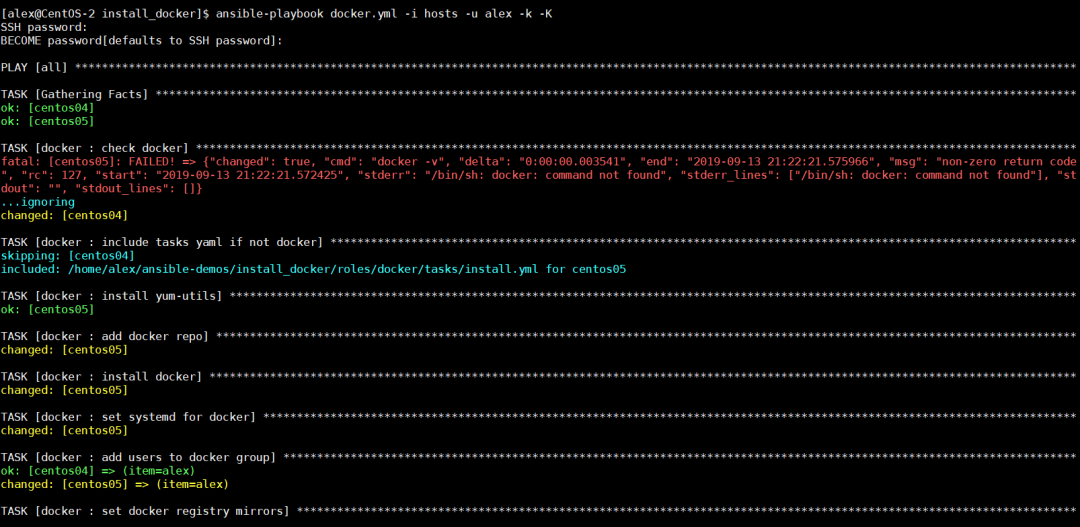
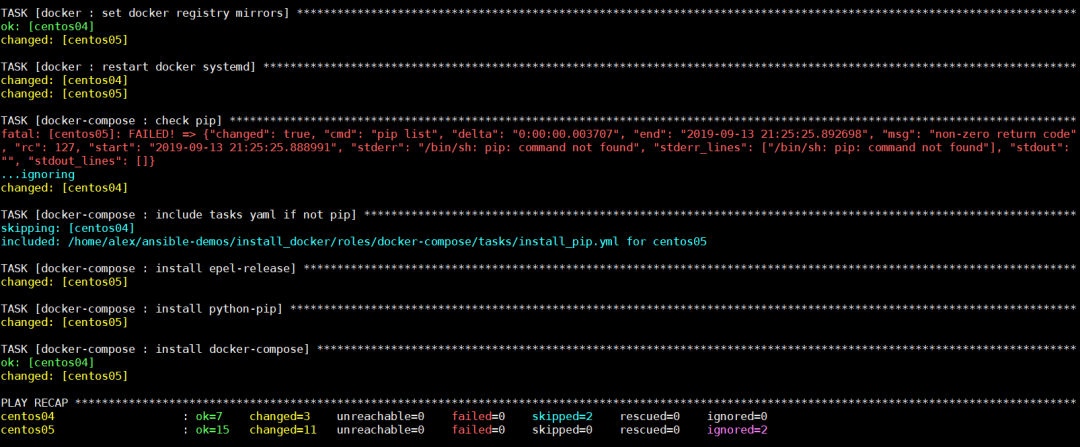
I have written a playbook to automate the installation of Docker using Ansible, the project address is: https://github.com/Hopetree/ansible-demos/tree/master/install_dockerThis is suitable for executing Docker installation on CentOS systems. The playbook performs tasks such as checking if Docker is available, installing Docker, adding users to the Docker group, and installing pip and Docker Compose. The playbook directory is as follows:
Prefer Using Built-in Modules
The term “prefer using built-in modules” means that when you can use the shell module to execute commands, you should prefer to use built-in modules instead. For example, the following shows the difference between using command line to install a package and using the yum module directly:
# Install using shell command
- name: install yum-utils
  shell: yum install yum-utils
# Install using yum module
- name: install yum-utils
  yum:
    name: yum-utils
    state: present
And the following shows the direct use of the pip module:
- name: install docker-compose
  pip:
    name: docker-compose
    extra_args: "-i {{ pip.index_url }} --trusted-host {{ pip.trusted_host }}"
Using register + when
The register can be used to assign the execution result of a step to a variable, while when can be used to evaluate the result of a variable. Therefore, these two modules are often used together. For example, in the following segment, the first step uses<span><span>docker -v</span></span> to check the Docker version, and the second step checks if Docker is unavailable, then executes the Docker installation.
- name: check docker
  shell: docker -v
  register: result
  ignore_errors: True
- name: include tasks yaml if not docker
  include_tasks: install.yml
  when: result is failed
Execution Results
 Source: https://cloud.tencent.com/developer/article/2123531