1. Change File or Directory Permissions
chmod  # change the permissions mode of a file
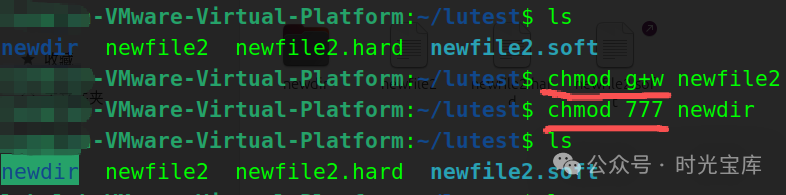
chmod [{ugo}{+-=}{rwx}][file or directory]  # u: file owner, g: group, o: others, +: add permission, -: remove permission, =: set permission exclusively      [mode=421][file or directory]          # 4=r, 2=w, 1=x; represent read, write, execute permissions for owner, group, and others respectively, 7 represents full permissions      chmod g+w file1  # grant write permission to group for file file1
chmod 777 dir1  # set directory dir1 to have all permissions for all users
Summary of File and Directory Permissions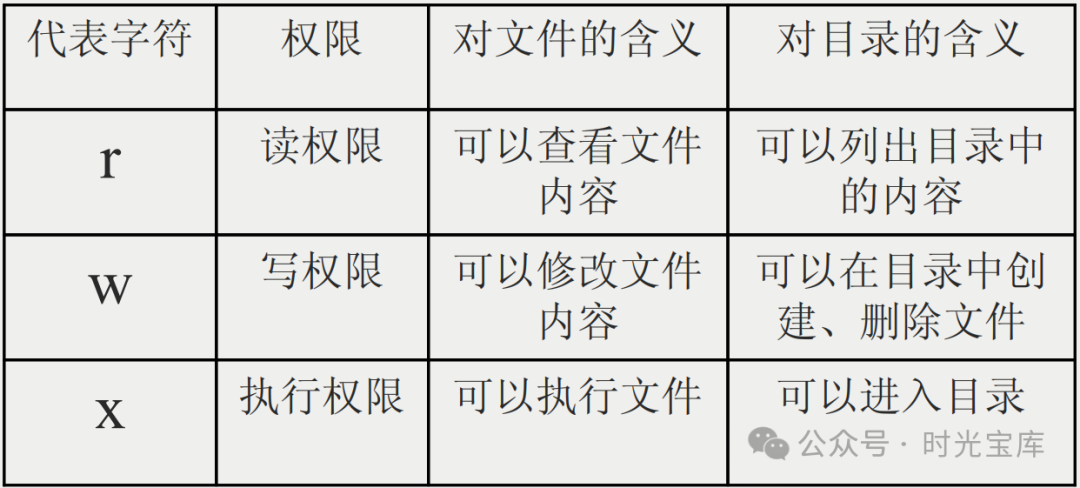
 2. Change File or Directory Owner
chown # change file ownership
chown [user][file or directory]
chown nobody file1 # change the owner of file file1 to nobody 3. Change File or Directory Group Ownership
chgrp  # change file group ownership
chgrp [group][file or directory]
chgrp adm file1  # change the group of file file1 to adm
 4. Display and Set Default File Permissions
umask
umask [-S] # -S displays the default permissions for newly created files or directories in rwx format If you like it, please give a follow~