In high-concurrency network scenarios, have you ever encountered confusion such as: “The network card is not fully utilized, yet throughput is bottlenecked” or “Ping occasionally drops packets, but packet captures show no anomalies”? If you are involved in Linux operations, you have likely stumbled upon these “mystical” pitfalls. The real culprit often lies within the kernel: the skb buffer is quietly dropping packets. As the “transport vehicle” of the Linux networking subsystem, skb encapsulates all data from the network card to the application layer. If its buffer encounters issues, it is akin to a delivery truck “losing items” at a transfer station; there are no visible anomalies, yet the business suffers greatly. Many people focus solely on the network card and protocols, neglecting this core link.
This article will start with the working mechanism of the skb buffer, dissecting the three major sources of packet loss: driver layer Ring Buffer overflow, kernel queue overflow, and CPU interrupt imbalance. Coupled with practical commands using tools like ethtool and softnet_stat, we will help you quickly locate issues and provide practical solutions such as kernel parameter tuning and multi-queue configuration, allowing you to thoroughly understand this “invisible killer” hidden behind performance bottlenecks.
1. What is the skb Buffer?
1.1 What is the skb Buffer?
skb, short for socket buffer, is the core data structure used in the Linux kernel networking subsystem for encapsulating network packets, serving as the “transport truck” for network packets flowing within the system. It is like a meticulously designed container that not only carries the payload of the network packet but also includes a series of key information for network protocol processing, such as headers for the link layer, network layer, and transport layer. Additionally, skb is linked to other buffers through a pointer linked list, constructing an efficient data transmission link.
Among the many features of skb, the application of zero-copy technology is particularly critical, with typical examples being Generic Segmentation Offload (GSO) and Generic Receive Offload (GRO). GSO allows large packets to be segmented into multiple smaller packets at the sender, with fragmentation completed at the network card hardware level, avoiding multiple copies of data by the kernel; GRO, on the other hand, merges multiple small packets into a large packet at the receiver, reducing the number of times the protocol stack needs to process, significantly improving network transmission efficiency.
From the lifecycle of a network packet, each packet is received from the network card into the system (via DMA transfer technology directly moving data into memory), parsed and processed at various layers of the protocol stack (link layer, network layer, transport layer), and finally delivered to the application layer socket. Throughout this process, skb consistently carries the data, ensuring its accurate and efficient flow, making it the cornerstone of network communication.
1.2 Overview of the Receiving Process
When a network packet arrives at the network card, it is first stored in the hardware cache FIFO of the network card, then transferred via DMA to the driver buffer (Ring Buffer), triggering a CPU hardware interrupt. At this point, the kernel allocates an skb buffer for the network packet, copying the packet’s data from the Ring Buffer into the skb and setting the relevant parameters of the skb. Subsequently, the network packet enters the protocol stack processing phase, where the kernel retrieves the skb from the Ring Buffer and, based on the protocol type recorded in the skb, passes it sequentially to the link layer, network layer, transport layer, and other protocol layers for processing. During this process, each protocol layer may modify or add to the data and header information in the skb.
Finally, the processed network packet is sent to the transport layer buffer (TCP/UDP receive window), then enters the socket receive queue, waiting for the user-space application to call the recv() function to retrieve the packet. In this lengthy and complex process, the critical bottleneck lies in the matching of skb allocation speed (driver layer) and protocol stack processing efficiency (kernel layer). If the skb allocation speed is too slow to provide a buffer for newly arriving network packets in a timely manner, or if the protocol stack processing efficiency is low, causing the skb to wait in the queue for an extended period, packet loss may occur.
(1) Receiving Process: The “Entry Path” of the Packet
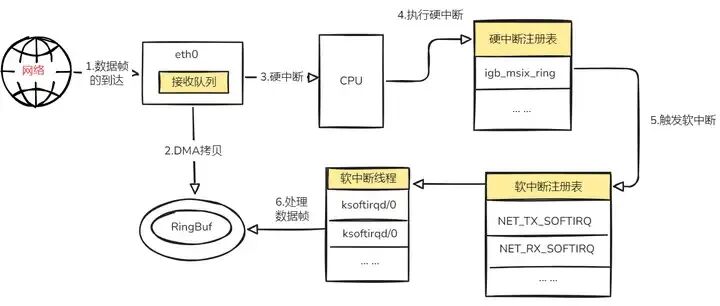
When the network card receives a message, this “entry journey” begins. First, the network card uses DMA (Direct Memory Access) technology to efficiently copy the packet into the RingBuf (ring buffer), akin to quickly unloading goods into a temporary warehouse. Next, the network card triggers a hardware interrupt to the CPU, like sounding an emergency assembly call, notifying the CPU that data has arrived at the “border”.
The CPU quickly responds, executing the corresponding hardware interrupt handling routine, where it places the relevant information of the packet into each CPU variable poll_list, then triggers a soft interrupt for packet reception, handing over the subsequent detailed tasks to the soft interrupt. The corresponding CPU’s soft interrupt thread ksoftirqd then comes into play, responsible for handling the network packet reception soft interrupt, specifically executing the net_rx_action() function.
Under the “command” of this function, the packet is carefully retrieved from the RingBuf and enters the protocol stack, starting a series of challenges. Beginning at the link layer, it checks the validity of the message, stripping off the frame header and footer, then moving to the network layer to determine the packet’s direction. If it is destined for the local machine, it is passed to the transport layer. Ultimately, the packet is securely placed in the socket’s receive queue, waiting for the application layer to collect it, thus completing its receiving process.
(2) Sending Process: The “Exit Journey” of the Packet
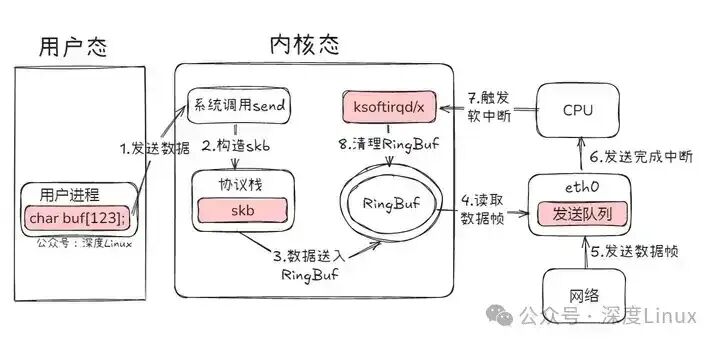
When an application program wants to send data, the “exit journey” of the packet begins. First, the application calls the Socket API (such as sendmsg) to send the network packet, triggering a system call that copies the data from user space to kernel space. At the same time, the kernel allocates an skb (sk_buff structure, which serves as the “representative” of the packet in the kernel, carrying various key information) and encapsulates the data within it. Next, the skb enters the protocol stack, beginning its “level-up” journey from top to bottom.
At the transport layer, TCP or UDP headers are added, along with congestion control, sliding window, and other detailed operations; at the network layer, the routing table is consulted based on the destination IP address to determine the next hop, filling in key information such as source and destination IP addresses and TTL in the IP header, and possibly fragmenting the skb, while also undergoing “security checks” by the netfilter framework to determine compliance with filtering rules.
Subsequently, the destination MAC address is filled in by the neighbor subsystem, and the skb enters the network device subsystem, where it is placed in the sending queue RingBuf, waiting for the network card to send it. Once the network card completes the sending, it issues a hardware interrupt to the CPU, notifying that the “task is complete”. This hardware interrupt will again trigger a soft interrupt, where the soft interrupt handling function cleans up the RingBuf, removing the residual information of successfully sent packets, akin to cleaning the truck after transport, preparing for the next shipment. Thus, the packet successfully “exits”, completing its sending process.
1.3 Core Metrics of Buffer Management
Ring Buffer Capacity: This refers to the size of the hardware buffer of the network card. Different models of network cards have varying Ring Buffer capacities; for example, the Intel i210 network card has a default of 256 entries. The Ring Buffer acts as a “temporary warehouse” for the network card to receive network packets, and its size directly determines the instantaneous receiving capacity of the network card. When network traffic surges, if the Ring Buffer capacity is insufficient, newly arriving network packets may not be stored, leading to packet loss.
netdev_max_backlog: This parameter indicates the length of the skb queue before the kernel soft interrupt processing, with a default value typically set to 1000. When network packets enter the kernel from the network card, they are first placed in this queue waiting for soft interrupt processing. If the queue length exceeds netdev_max_backlog, subsequent arriving network packets will be unable to enter the queue and will be dropped, similar to a temporary storage area in a warehouse being full, where new incoming goods can only be rejected.
netdev_budget: This specifies the maximum number of skbs that can be processed in a single soft interrupt, with a default value of 300. This parameter affects the efficiency of CPU resource allocation; during each soft interrupt processing, the kernel will take netdev_budget skbs from the queue for processing. If set too low, it will lead to frequent soft interrupts, increasing system overhead; if set too high, it may cause the soft interrupt processing time to be too long, affecting the execution of other tasks.
2. Three Core Causes of skb Buffer Packet Loss
Having understood the core mechanisms and receiving processes of the skb buffer, we can delve into the specific causes of packet loss. Overall, skb buffer packet loss primarily stems from collaborative issues at the driver layer, kernel layer, and hardware layer. Below, we will analyze each in turn.
2.1 Driver Layer: Imbalance Between Ring Buffer and skb Allocation
At the driver layer, packet loss mainly arises from the imbalance between the Ring Buffer and skb allocation, specifically manifested as hardware buffer overflow and skb allocation failure.
First Scenario: Hardware Buffer Overflow (RX_OVERRUNS)
When the packet reception rate of the network card exceeds the speed at which the driver allocates skbs, hardware buffer overflow occurs. Taking a 10G network card under burst traffic as an example, its packet reception rate is extremely fast. If the driver cannot respond in time and allocate skb buffers, the FIFO (First-In, First-Out) buffer inside the network card hardware will quickly overflow. Once the FIFO buffer is filled, newly arriving data packets cannot enter the Ring Buffer and will be ruthlessly dropped at the physical layer of the network card, leading to RX_OVERRUNS.
To troubleshoot this type of issue, we can check the <span>/proc/net/dev</span> file, focusing on the <span>fifo</span> field. If the value of this field continues to grow, it indicates a potential hardware buffer overflow. Additionally, using the <span>ifconfig</span> command to check the network card status, an increase in the <span>overruns</span> metric can also serve as important evidence of hardware buffer overflow.
#include <iostream>#include <fstream>#include <string>#include <chrono>#include <thread>#include <sstream>#include <vector>#include <algorithm>#include <cstdio>void split(const std::string &s, std::vector<std::string> &tokens, char delim = ' ') { std::stringstream ss(s); std::string item; while (std::getline(ss, item, delim)) { if (!item.empty()) { tokens.push_back(item); } }}void check_proc_net_dev() { std::ifstream file("/proc/net/dev"); std::string line; int line_num = 0; while (std::getline(file, line)) { if (line_num < 2) { line_num++; continue; } std::vector<std::string> parts; split(line, parts); if (parts.size() >= 17) { std::string interface = parts[0]; interface.pop_back(); // Remove colon std::string rx_fifo = parts[5]; std::string tx_fifo = parts[11]; std::cout << "Network card " << interface << ": RX FIFO=" << rx_fifo << ", TX FIFO=" << tx_fifo << std::endl; } }}void check_ifconfig_overruns() { std::cout << "\nifconfig overruns check:" << std::endl; FILE* pipe = popen("ifconfig", "r"); if (!pipe) return; char buffer[128]; while (fgets(buffer, sizeof(buffer), pipe) != nullptr) { std::string line(buffer); if (line.find("overruns") != std::string::npos) { std::cout << line; } } pclose(pipe);}int main() { while (true) { check_proc_net_dev(); check_ifconfig_overruns(); std::cout << "----------------------------------------" << std::endl; std::this_thread::sleep_for(std::chrono::seconds(5)); } return 0;}Second Scenario: skb Allocation Failure (RX_DROPPED)
When the kernel fails to allocate skb from the slab cache due to fragmentation, insufficient memory, or other issues, skb allocation may fail. When this occurs, although the data packet has entered the Ring Buffer, it will be dropped during the copying process to memory due to the inability to obtain a valid skb buffer. This portion of packet loss will be counted in the <span>RX_DROPPED</span> metric.
To troubleshoot skb allocation failure issues, we can check the system logs for records related to memory allocation failures. Typically, the kernel will log errors such as “skb allocation failed”. By searching for these keywords, we can pinpoint the specific failure reasons and take targeted measures, such as optimizing memory allocation strategies or adjusting memory parameters.
#include <iostream>#include <fstream>#include <string>#include <chrono>#include <thread>#include <cstdio>void check_skb_allocation_errors() { // Check system logs for skb allocation failure information FILE* pipe = popen("dmesg | grep -i 'skb allocation failed'", "r"); if (!pipe) { std::cerr << "Unable to execute command" << std::endl; return; } char buffer[256]; bool found = false; std::cout << "=== SKB Allocation Failure Logs ===" << std::endl; while (fgets(buffer, sizeof(buffer), pipe) != nullptr) { std::cout << buffer; found = true; } pclose(pipe); if (!found) { std::cout << "No skb allocation failure records found" << std::endl; }}void check_rx_dropped() { // Read RX_DROPPED metric from /proc/net/dev std::ifstream file("/proc/net/dev"); std::string line; int line_num = 0; std::cout << "\n=== RX_DROPPED Statistics ===" << std::endl; while (std::getline(file, line)) { if (line_num < 2) { line_num++; continue; } size_t pos = line.find(':'); if (pos == std::string::npos) continue; std::string iface = line.substr(0, pos); // Split fields to extract RX_DROPPED (4th numeric field) size_t start = pos + 1; int count = 0; std::string rx_dropped; while (start < line.size()) { size_t end = line.find(' ', start); if (end == std::string::npos) end = line.size(); std::string field = line.substr(start, end - start); if (!field.empty()) { count++; if (count == 4) { // RX_DROPPED is the 4th statistic rx_dropped = field; break; } } start = end + 1; } if (!rx_dropped.empty()) { std::cout << "Network card " << iface << ": RX_DROPPED=" << rx_dropped << std::endl; } }}int main() { while (true) { check_skb_allocation_errors(); check_rx_dropped(); std::cout << "\n------------------------\n" << std::endl; std::this_thread::sleep_for(std::chrono::seconds(10)); } return 0;}2.2 Kernel Layer: Queue and Soft Interrupt Processing Bottlenecks
The kernel layer is the core area for processing the network protocol stack, and bottlenecks in queue and soft interrupt processing here are also significant factors leading to skb buffer packet loss.
First Reason: Receiving Queue Overflow (Softnet Backlog)
The netdev_max_backlog parameter controls the length of the skb queue before kernel soft interrupt processing, with a default value of 1000. When the network packet reception rate exceeds the processing capacity of the protocol stack, skbs will continue to accumulate in this queue. Once the queue overflows, subsequent arriving skbs will be dropped, triggering packet loss.
We can check for receiving queue overflow by examining the /proc/net/softnet_stat file. Each line in this file represents the status statistics of a CPU core, starting from CPU0; each column represents various statistics for each CPU core, where an increase in the second column value indicates an increase in the number of backlog overflow drops.
#include <iostream>#include <fstream>#include <string>#include <vector>#include <chrono>#include <thread>void split(const std::string &s, std::vector<std::string> &tokens, char delim = ' ') { std::stringstream ss(s); std::string item; while (std::getline(ss, item, delim)) { if (!item.empty()) { tokens.push_back(item); } }}void check_softnet_stat() { std::ifstream file("/proc/net/softnet_stat"); std::string line; int cpu_core = 0; std::cout << "=== Softnet Backlog Overflow Statistics ===" << std::endl; while (std::getline(file, line)) { std::vector<std::string> stats; split(line, stats, ' '); if (stats.size() >= 2) { // The second column indicates the number of backlog overflow drops (hexadecimal to decimal) unsigned long overflow = std::stoul(stats[1], nullptr, 16); std::cout << "CPU" << cpu_core << ": backlog overflow drop count=" << overflow << std::endl; } cpu_core++; }}void check_netdev_max_backlog() { std::ifstream file("/proc/sys/net/core/netdev_max_backlog"); std::string value; if (file >> value) { std::cout << "\nCurrent netdev_max_backlog value: " << value << std::endl; }}int main() { while (true) { check_softnet_stat(); check_netdev_max_backlog(); std::cout << "\n------------------------\n" << std::endl; std::this_thread::sleep_for(std::chrono::seconds(5)); } return 0;}Second Reason: Insufficient Soft Interrupt Processing (NET_RX_SOFTIRQ Bottleneck)
The netdev_budget (default value of 300) limits the maximum number of skbs that can be processed in a single soft interrupt. If this value is set too low, the number of skbs that can be processed in a single soft interrupt will be limited, leading to a large number of skbs remaining in the queue. As the number of retained skbs increases, network latency will continue to rise, retransmission mechanisms will be frequently triggered, and ultimately, packet loss may occur.
By using the command mpstat -P ALL 1, we can check the usage of single-core soft interrupts (si%). If the single-core soft interrupt usage remains above 50% for an extended period, it indicates insufficient soft interrupt processing capability, potentially indicating a NET_RX_SOFTIRQ bottleneck, necessitating appropriate adjustments to the netdev_budget parameter.
#include <iostream>#include <fstream>#include <string>#include <chrono>#include <thread>#include <cstdio>void check_netdev_budget() { std::ifstream file("/proc/sys/net/core/netdev_budget"); std::string value; if (file >> value) { std::cout << "Current netdev_budget value: " << value << std::endl; }}void check_softirq_usage() { std::cout << "\n=== Single-Core Soft Interrupt (SI%) Usage ===" << std::endl; FILE* pipe = popen("mpstat -P ALL 1 1 | grep -E 'CPU|si%'", "r"); if (!pipe) { std::cerr << "Unable to execute mpstat command" << std::endl; return; } char buffer[256]; while (fgets(buffer, sizeof(buffer), pipe) != nullptr) { std::cout << buffer; } pclose(pipe);}int main() { while (true) { check_netdev_budget(); check_softirq_usage(); std::cout << "\n------------------------\n" << std::endl; std::this_thread::sleep_for(std::chrono::seconds(5)); } return 0;}2.3 Hardware Layer: Uneven Interrupt Load on Multi-Core CPUs
At the hardware layer, uneven interrupt load on multi-core CPUs is another key factor leading to skb buffer packet loss, primarily manifested in two aspects: RSS queue not being enabled and incorrect interrupt affinity configuration.
(1) RSS Queue Not Enabled
For single-queue network cards, if multi-queue load balancing (RSS, Receive Side Scaling) is not enabled, all skbs will be concentrated on CPU0 for processing. In high-concurrency network environments, CPU0 will quickly become overloaded and unable to process skbs in a timely manner, while other CPU cores remain idle, ultimately leading to packet loss.
To resolve this issue, we can check the queue information of the network card using the command ethtool -l to ensure that the RSS queue is enabled. If it is not enabled, we can configure it using ethtool -L to bind different queues to different CPU cores, achieving load balancing.
(2) Incorrect Interrupt Affinity Configuration
If the IRQ (Interrupt Request) of the network card is bound to a frequently used CPU core, it will compete for CPU resources with application processes. When a large number of network interrupt requests arrive, the CPU will prioritize processing interrupts, causing application processes to receive insufficient CPU time slices, thereby affecting the speed of network packet processing and leading to packet loss.
By using the command cat /proc/interrupts, we can check the distribution of interrupts across various CPU cores. If we find that network interrupts are abnormally concentrated on a particular CPU core, we need to check whether the interrupt affinity configuration is reasonable and use the command echo mask > /proc/irq/xxx/smp_affinity to adjust it, evenly distributing interrupt requests across all CPU cores to avoid resource competition.
3. Precise Troubleshooting Three-Step Method: From Metrics to Root Cause Localization
When suspecting that the system has skb buffer packet loss issues, we need a scientific troubleshooting method to quickly locate the root cause of the problem, allowing us to take targeted solutions. Below, we will introduce a precise three-step troubleshooting method to help you start from metrics and gradually delve into the root cause of the problem.
3.1 Quickly Locating Packet Loss Types
When troubleshooting skb buffer packet loss issues, the first step is to clarify the level at which packet loss occurs, which can be achieved through some key metrics and tool commands.
| Metric | Tool Command | Anomalous Features | Packet Loss Level |
| RX overruns | ifconfig, /proc/net/dev | Value continues to grow | Driver Layer (Hardware) |
| RX dropped | ifconfig, /proc/net/dev | Significantly higher than RX-OK | Kernel Layer (Allocation) |
| softnet_stat[1] | /proc/net/softnet_stat | Second column non-zero | Kernel Layer (Queue) |
Using the ifconfig command, we can view the basic status information of the network card, where RX overruns indicate the number of packets lost due to hardware buffer overflow. If this value continues to grow, it indicates that the network card’s reception speed exceeds the driver’s processing speed, and packet loss occurs in the hardware buffer at the driver layer. Similarly, RX dropped indicates the number of packets lost due to memory allocation and other reasons. When it is significantly higher than RX-OK (the number of packets received normally), it indicates that there is a problem with the kernel layer in allocating skb buffers.
The /proc/net/softnet_stat file records the status information of the kernel network receiving queue, where the second column represents the number of packets lost due to receiving queue overflow (softnet_stat [1]). If this column’s value is non-zero, it indicates that the receiving queue at the kernel layer has overflowed, causing skb to accumulate in the queue and leading to packet loss.
3.2 In-Depth Diagnosis of Driver and Kernel
After initially locating the type of packet loss, it is necessary to conduct a more in-depth diagnosis of the driver layer and kernel layer to determine the specific issues.
(1) Driver Health Check
For the driver layer, we can use the ethtool tool to check the health status of the network card driver. By using the command ethtool -S, we can obtain detailed statistics of the network card, including error counts, packet loss counts, etc. For example, rx_dropped and tx_dropped indicate the number of packets lost due to driver issues in the receiving and sending directions, respectively. If these values increase abnormally, it indicates that the driver may have faults.
Additionally, we can check the driver logs for more detailed error information. In log files such as /var/log/messages or /var/log/syslog, we can search for keywords related to the network card driver, such as the network card model, driver name, etc., to see if there are any error messages. For example, if we see “driver xyz error: skb allocation failed”, it clearly indicates that the driver encountered an error while allocating skb buffers, necessitating further checks on driver configuration or updating the driver version.
#include <iostream>#include <string>#include <chrono>#include <thread>#include <cstdio>void check_ethtool_stats(const std::string& iface) { std::cout << "=== " << iface << " Network Card Driver Statistics ===" << std::endl; std::string cmd = "ethtool -S " + iface + " | grep -E 'rx_dropped|tx_dropped'"; FILE* pipe = popen(cmd.c_str(), "r"); if (!pipe) { std::cerr << "Unable to execute ethtool command" << std::endl; return; } char buffer[256]; while (fgets(buffer, sizeof(buffer), pipe) != nullptr) { std::cout << buffer; } pclose(pipe);}void check_driver_logs(const std::string& driver_keyword) { std::cout << "\n=== Driver Related Log Information ===" << std::endl; std::string cmd = "grep -E '" + driver_keyword + "|error|failed' /var/log/syslog /var/log/messages 2>/dev/null | tail -20"; FILE* pipe = popen(cmd.c_str(), "r"); if (!pipe) { std::cerr << "Unable to read log files" << std::endl; return; } char buffer[256]; bool found = false; while (fgets(buffer, sizeof(buffer), pipe) != nullptr) { std::cout << buffer; found = true; } if (!found) { std::cout << "No relevant driver error logs found" << std::endl; } pclose(pipe);}int main() { std::string iface = "eth0"; // Network card interface name std::string driver_key = "e1000"; // Driver keyword or network card model while (true) { check_ethtool_stats(iface); check_driver_logs(driver_key); std::cout << "\n------------------------\n" << std::endl; std::this_thread::sleep_for(std::chrono::seconds(10)); } return 0;}(2) Kernel Parameter Verification
Packet loss issues at the kernel layer are often closely related to kernel parameter configurations, so it is necessary to verify relevant kernel parameters. For example, net.core.netdev_max_backlog controls the length of the skb queue before kernel soft interrupt processing, and net.core.netdev_budget limits the maximum number of skbs that can be processed in a single soft interrupt.
We can use the sysctl command to view and adjust these parameters. For example, executing sysctl net.core.netdev_max_backlog allows us to check the current queue length. If this value is too small, it may lead to queue overflow packet loss in high-concurrency network environments. In this case, we can increase it by executing sysctl -w net.core.netdev_max_backlog=4096. Similarly, for net.core.netdev_budget, if we find insufficient soft interrupt processing capability, we can appropriately increase this value to improve the number of skbs processed in a single soft interrupt.
#include <iostream>#include <string>#include <chrono>#include <thread>#include <cstdio>void check_kernel_params() { std::cout << "=== Current Kernel Network Parameter Configuration ===" << std::endl; // Check netdev_max_backlog FILE* pipe1 = popen("sysctl net.core.netdev_max_backlog", "r"); if (pipe1) { char buffer[256]; while (fgets(buffer, sizeof(buffer), pipe1) != nullptr) { std::cout << buffer; } pclose(pipe1); } // Check netdev_budget FILE* pipe2 = popen("sysctl net.core.netdev_budget", "r"); if (pipe2) { char buffer[256]; while (fgets(buffer, sizeof(buffer), pipe2) != nullptr) { std::cout << buffer; } pclose(pipe2); }}void show_adjustment_example() { std::cout << "\n=== Parameter Adjustment Example ===" << std::endl; std::cout << "Adjust netdev_max_backlog: sysctl -w net.core.netdev_max_backlog=4096" << std::endl; std::cout << "Adjust netdev_budget: sysctl -w net.core.netdev_budget=600" << std::endl;}int main() { while (true) { check_kernel_params(); show_adjustment_example(); std::cout << "\n------------------------\n" << std::endl; std::this_thread::sleep_for(std::chrono::seconds(10)); } return 0;}3.3 Practical Case: Sudden Packet Loss in Cloud Server
Below, we will demonstrate how to apply the above troubleshooting methods to resolve skb buffer packet loss issues through a practical case. A cloud server experienced sudden network packet loss during peak business hours, with a packet loss rate reaching 10%, severely affecting normal business operations. By using the ping command and netstat -s command, we found that the TCP retransmission rate soared, initially judging that there was an issue in the network receiving link.
Further examination of the /proc/net/softnet_stat file revealed that the second column value was rapidly increasing, indicating that the kernel receiving queue had overflowed. After analysis, it was confirmed that the net.core.netdev_max_backlog parameter was set too low, leading to skb queue overflow under high-concurrency traffic, resulting in packet loss.
To address this issue, we temporarily adjusted the net.core.netdev_max_backlog parameter, increasing its value from the default 1000 to 4096. After the adjustment, we observed the system status again and found that the packet loss rate significantly decreased to below 1%, restoring normal business operations. This case fully demonstrates the effectiveness of the precise three-step troubleshooting method in resolving skb buffer packet loss issues.
#include <iostream>#include <fstream>#include <string>#include <vector>#include <chrono>#include <thread>#include <cstdio>void check_softnet_overflow() { std::cout << "=== Check softnet receiving queue overflow ===" << std::endl; std::ifstream file("/proc/net/softnet_stat"); std::string line; int cpu_core = 0; while (std::getline(file, line)) { std::vector<std::string> stats; size_t pos = 0; while ((pos = line.find(' ')) != std::string::npos) { std::string token = line.substr(0, pos); if (!token.empty()) stats.push_back(token); line.erase(0, pos + 1); } if (!line.empty()) stats.push_back(line); if (stats.size() >= 2) { unsigned long overflow = std::stoul(stats[1], nullptr, 16); std::cout << "CPU" << cpu_core << ": backlog overflow count=" << overflow << std::endl; } cpu_core++; }}void check_netdev_max_backlog() { std::cout << "\n=== Current netdev_max_backlog Configuration ===" << std::endl; FILE* pipe = popen("sysctl net.core.netdev_max_backlog", "r"); if (pipe) { char buffer[256]; while (fgets(buffer, sizeof(buffer), pipe) != nullptr) { std::cout << buffer; } pclose(pipe); }}void show_adjustment() { std::cout << "\n=== Parameter Adjustment Operation ===" << std::endl; std::cout << "Temporary adjustment command: sysctl -w net.core.netdev_max_backlog=4096" << std::endl; std::cout << "Permanent effect: echo 'net.core.netdev_max_backlog=4096' >> /etc/sysctl.conf && sysctl -p" << std::endl;}void check_tcp_retrans() { std::cout << "\n=== Check TCP Retransmission Rate ===" << std::endl; FILE* pipe = popen("netstat -s | grep -i retrans", "r"); if (pipe) { char buffer[256]; while (fgets(buffer, sizeof(buffer), pipe) != nullptr) { std::cout << buffer; } pclose(pipe); }}int main() { std::cout << "=== Cloud Server Sudden Packet Loss Troubleshooting Case ===\n" << std::endl; check_tcp_retrans(); check_softnet_overflow(); check_netdev_max_backlog(); show_adjustment(); return 0;}4. Performance Optimization Strategies: From Parameter Tuning to Architecture Upgrades
4.1 Kernel Parameter Optimization Combinations (Production Environment)
(1) Buffer Capacity Expansion
In a production environment, reasonably expanding buffer capacity is a key step in enhancing network performance. By increasing net.core.rmem_max (maximum receive buffer size) and net.core.wmem_max (maximum send buffer size), network throughput can be significantly improved. For example, setting net.core.rmem_max to 268435456 (256MB) and net.core.wmem_max to 268435456 (256MB) can accommodate the transmission needs of large data volumes in high-concurrency network scenarios.
Simultaneously, optimizing net.ipv4.tcp_rmem (TCP receive buffer size range) and net.ipv4.tcp_wmem (TCP send buffer size range), such as setting net.ipv4.tcp_rmem=”4096 87380 268435456″ and net.ipv4.tcp_wmem=”4096 65536 268435456″, ensures efficient allocation and use of buffer resources under different network loads.
(2) Improving Soft Interrupt Efficiency
To enhance soft interrupt processing efficiency, it is necessary to optimize net.core.netdev_budget (maximum number of skbs processed in a single soft interrupt) and net.core.netdev_max_backlog (skb queue length before kernel soft interrupt processing). In high-concurrency scenarios, the value of net.core.netdev_budget can be appropriately increased, such as setting it to 1000, to increase the number of skbs processed in a single soft interrupt and reduce skb accumulation in the queue.
At the same time, increasing the value of net.core.netdev_max_backlog, such as setting it to 4096, can prevent skb from being dropped due to insufficient queue length. Through the synergistic optimization of these two parameters, soft interrupt processing efficiency can be effectively improved, reducing network latency and packet loss rates.
4.2 In-Depth Hardware and Driver Optimization
(1) Driver and Firmware Upgrades: Outdated drivers (e.g., e1000e < 3.4.0) may have skb allocation bottlenecks, necessitating checking and upgrading to the latest version from the vendor using ethtool -i eth0. For example, a certain enterprise server using the e1000e driver version 3.3.0 frequently experienced packet loss due to skb allocation failures in high-concurrency network environments. By upgrading the driver to the latest version 3.5.0 and synchronously updating the network card firmware, the skb allocation bottleneck issue was effectively resolved, reducing the packet loss rate from 5% to below 0.1%.
(2) Interrupt Load Balancing: By using the irqbalance service or manually configuring interrupt affinity, network card interrupts can be evenly distributed across multiple CPU cores, avoiding overload on a single core. For example, using the command echo mask > /proc/irq/xxx/smp_affinity, network card IRQs can be evenly bound to multiple CPU cores, ensuring that each core can participate in network interrupt processing, fully leveraging the performance advantages of multi-core CPUs and improving network packet processing efficiency while reducing packet loss risks.
4.3 Building a Monitoring System
1. Real-time Metric Monitoring: Collect metrics such as netdev_rx_dropped (number of received packet losses) and netdev_rx_overrun (number of packet losses due to hardware buffer overflow) and display buffer utilization and soft interrupt latency through Grafana. For example, in a certain e-commerce server cluster, operations personnel can visually see the skb buffer utilization and soft interrupt latency of each server through the Grafana real-time monitoring panel. Once it is found that the buffer utilization of a certain server exceeds 80% or the soft interrupt latency exceeds 5ms, timely optimization measures can be taken to effectively prevent packet loss issues.
2. Log and Alert Configuration: Configure dmesg -w | grep -i ‘skb|drop’ to monitor allocation failure logs in real-time, triggering alerts when the packet loss rate exceeds 1%. For example, by integrating with monitoring systems like Zabbix or Prometheus, set the packet loss rate alert threshold to 1%. Once the packet loss rate exceeds this threshold, the system will immediately send SMS, email, or DingTalk notifications to operations personnel for timely troubleshooting and resolution of packet loss issues, ensuring stable business operations.
5. Practical Case Exercise
5.1 Case Background
On an otherwise ordinary workday, our operations team was closely monitoring the operational status of the company’s core business server as usual. This server, built on the Linux system, handles a large number of user access requests and runs critical business applications. However, the calm was soon disrupted as users reported that the system response had become abnormally slow, with pages that previously loaded in a few seconds now taking over ten seconds or longer, and some users frequently encountering application errors indicating data request failures.
The operations team quickly became alert and began a comprehensive investigation of the issue. Through preliminary checks of the system logs, they discovered a large number of abnormal messages related to the network, indicating signs of packet loss. Further analysis using network monitoring tools revealed that network throughput was significantly below normal levels, and the packet loss rate continued to rise, peaking at an astonishing 20%. This was akin to a city with smooth traffic suddenly experiencing a large number of vehicles going missing, leading to chaos and severely impacting the overall operational efficiency of the city. We realized that the severity of the problem far exceeded expectations, and we had to quickly identify the root cause of the packet loss and resolve it, or it would result in significant business losses.
5.2 Investigating Packet Loss Causes
Step One: Check Network Status: To identify the cause of packet loss, the operations team first used the ping command to test the network connectivity between the server and other key nodes. By sending ICMP (Internet Control Message Protocol) packets to multiple external servers and internal network devices and observing the response, they found that the ping response time for some target addresses was extremely long, with many requests timing out, further confirming that there were serious network issues. Next, the operations personnel used the ifconfig command to check the configuration and status information of the server’s network card.
From the command output, they noticed a significant discrepancy between the number of packets received and sent, with the number of received packets being far below expectations, and the “RX dropped” field value continuously increasing, indicating that a large number of packets were being dropped during the network card’s data reception process, akin to a busy delivery station continuously rejecting packages. These preliminary findings provided important clues for further in-depth investigation, like finding a glimmer of hope in the dark, allowing us to take a crucial step toward solving the problem.
Step Two: Delve into the skb Buffer: Although the initial checks revealed some anomalies, they were insufficient to determine the root cause of the packet loss. Therefore, the operations team decided to delve deeper into the skb buffer. They first checked the system logs, searching for keywords related to the network, such as “drop”, “skb”, and “network”, and discovered some key information. The logs repeatedly showed errors like “skb buffer full, dropping packet”, indicating that the skb buffer might be the culprit behind the packet loss.
To further verify this assumption, the operations personnel began checking relevant kernel parameters. Among them, the netdev_max_backlog parameter caught their attention. This parameter indicates the maximum number of packets that can be cached before the network device passes them to the upper protocol stack. By checking the /proc/sys/net/core/netdev_max_backlog file, they found that the current value of this parameter was 1000, which seemed too low in a high-concurrency network environment. When network traffic suddenly increased, the skb buffer would quickly fill up, causing newly arriving packets to have nowhere to be stored and thus dropped, akin to a warehouse with limited capacity where too many goods can only be piled outside.
Additionally, they checked other kernel parameters related to the skb buffer, such as netdev_budget (the maximum number of packets that can be processed in a single soft interrupt), and found that these parameters were also not configured reasonably for the current business scenario. The unreasonable configuration of these parameters collectively led to the skb buffer being overwhelmed in the face of high traffic, ultimately resulting in significant packet loss.
5.3 Code Implementation: Simulating Packet Loss Scenarios
To better understand the skb buffer packet loss issue, we simulated the network data sending and receiving process through a piece of C++ code, demonstrating the packet loss situation. This code primarily implements a simple network data sending and receiving program, simulating the potential loss of data packets in a real network environment by setting a certain packet loss rate. In the code, we used socket programming-related functions and libraries to create a UDP socket for data transmission.
The sender continuously sends data to the receiver, while the receiver attempts to receive this data. At the same time, we introduced a random number generation mechanism to decide whether to drop a certain data packet based on the set packet loss rate, simulating the packet loss behavior of the skb buffer under high load or other abnormal conditions.
#include <iostream>#include <string>#include <cstring>#include <sys/socket.h>#include <arpa/inet.h>#include <unistd.h>#include <ctime>#include <cstdlib>#define SERVER_IP "127.0.0.1"#define SERVER_PORT 8888#define BUFFER_SIZE 1024#define DROP_RATE 0.1 // Set packet loss rate to 10%int main() { // Create UDP socket int sockfd = socket(AF_INET, SOCK_DGRAM, 0); if (sockfd == -1) { perror("socket creation failed"); return -1; } // Set server address struct sockaddr_in server_addr; memset(&server_addr, 0, sizeof(server_addr)); server_addr.sin_family = AF_INET; server_addr.sin_port = htons(SERVER_PORT); server_addr.sin_addr.s_addr = inet_addr(SERVER_IP); char buffer[BUFFER_SIZE]; srand(static_cast<unsigned int>(time(nullptr))); // Initialize random seed while (true) { // Generate data to send std::string data = "Hello, Server!"; // Simulate packet loss if (static_cast<double>(rand()) / RAND_MAX < DROP_RATE) { std::cout << "Packet dropped" << std::endl; continue; } // Send data if (sendto(sockfd, data.c_str(), data.size(), 0, (struct sockaddr *)&server_addr, sizeof(server_addr)) == -1) { perror("sendto failed"); break; } std::cout << "Sent: " << data << std::endl; // Receive server response socklen_t addr_len = sizeof(server_addr); ssize_t recv_len = recvfrom(sockfd, buffer, BUFFER_SIZE - 1, 0, (struct sockaddr *)&server_addr, &addr_len); if (recv_len == -1) { perror("recvfrom failed"); break; } buffer[recv_len] = '\0'; std::cout << "Received: " << buffer << std::endl; sleep(1); // Send data once per second } close(sockfd); // Close socket return 0;}5.4 Problem Resolution: Strategies for Addressing Packet Loss
Based on the investigation results, we first tackled the issue by adjusting kernel parameters. To resolve the packet loss caused by skb buffer overflow, we decided to increase the netdev_max_backlog value. By modifying the <span>/etc/sysctl.conf</span> file, we added or modified the following line:
net.core.netdev_max_backlog = 5000Here, we increased the value of netdev_max_backlog from the default 1000 to 5000, allowing the network device to cache a greater number of packets before passing them to the upper protocol stack. After making the modification, we executed the sysctl -p command to make the configuration effective. This is akin to expanding the warehouse’s capacity, allowing more “data deliveries” to be temporarily stored, preventing them from being dropped due to a full warehouse.
In addition to netdev_max_backlog, I also optimized other related kernel parameters. For example, I appropriately increased the value of netdev_budget to enhance the maximum number of packets that can be processed in a single soft interrupt, improving data processing efficiency. By reasonably adjusting these kernel parameters, we provided the skb buffer with a stronger “pressure resistance”, effectively reducing the packet loss caused by buffer overflow.
For the C++ code simulating the packet loss scenario, I also made optimizations. First, in the data sending section, we can increase the size of the sending buffer to reduce the likelihood of data sending failures due to a buffer that is too small. For example, increasing the sending buffer size from the original 1024 bytes to 4096 bytes:
#define SEND_BUFFER_SIZE 4096//...char send_buffer[SEND_BUFFER_SIZE];//...This can alleviate the data sending pressure under high concurrency to some extent, reducing the risk of packet loss. Secondly, in the data processing logic, we can adopt more efficient algorithms and data structures. For instance, when receiving data, using a circular buffer to store the received data can avoid frequent memory allocation and deallocation operations, improving data processing efficiency. Additionally, when handling packet loss situations, we can introduce a retransmission mechanism that automatically retransmits when a data packet is detected as lost, ensuring reliable data transmission.
// Add retransmission count counterint retransmit_count = 0;while (true) { std::string data = "Hello, Server!"; if (static_cast<double>(rand()) / RAND_MAX < DROP_RATE) { std::cout << "Packet dropped" << std::endl; // Add retransmission logic if (retransmit_count < 3) { std::cout << "Retransmitting packet..." << std::endl; if (sendto(sockfd, data.c_str(), data.size(), 0, (struct sockaddr *)&server_addr, sizeof(server_addr)) == -1) { perror("retransmit sendto failed"); break; } retransmit_count++; continue; } else { std::cout << "Max retransmit attempts reached, giving up" << std::endl; retransmit_count = 0; } } // Send data normally if (sendto(sockfd, data.c_str(), data.size(), 0, (struct sockaddr *)&server_addr, sizeof(server_addr)) == -1) { perror("sendto failed"); break; } std::cout << "Sent: " << data << std::endl; // Receive server response //...}Through the above code-level improvements, we further optimized the network data transmission process, enhancing the stability and reliability of the program in simulating packet loss scenarios.