Have you ever experienced that “frustrating” moment?
Your friend sends you a Douyin link in WeChat: “Check out this cute pet! It’s so healing!” You tap the link with your finger — no response! Tap again, and the screen remains unresponsive; or a PDD friend sends a bargain link, and it only shows “Loading,” remaining blank for ages. At this moment, you start to wonder: Is the link broken? Or is there a problem with my phone?
Don’t panic! I have been through this too, and after trying dozens of times, I figured out all the tricks. Today, I will teach you the “WeChat Link Opening Emergency Guide.” Whether it’s Douyin, PDD, or Taobao links, just follow these steps, and you’ll be able to open them. After reading this, you won’t have to stare blankly at the screen anymore!
1. Don’t Panic! Try These 3 Methods in Order, One of Them Will Work
Method 1: Just Click! Try the Blue Link First
First, let’s look at the link — if it’s blue (like the common “Douyin share link” or “Taobao product link” in WeChat), the first step is to click it directly!
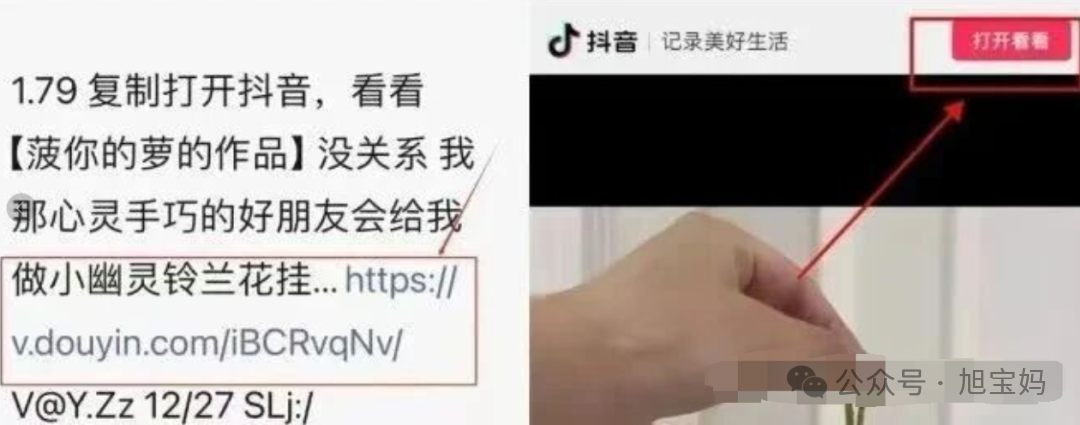
Often, after clicking, a small window pops up saying “Open to see,” with the corresponding APP (like “Open with Douyin” or “Open with Pinduoduo”). At this point, click “Open to see,” and your phone will automatically jump to the corresponding APP, allowing you to see the content shared by your friend in just a few seconds — super convenient!
However, some links have become “lazy” and do not redirect after clicking, instead showing a prompt saying “Please copy the URL and open it in the corresponding APP.” In this case, don’t panic; just switch to the next two methods!
Method 2: Copy and Paste! Move the Link to the APP
This is the most commonly used “universal method.” No matter what the link is, copying and pasting usually works, but the key is “don’t forget to copy everything!”
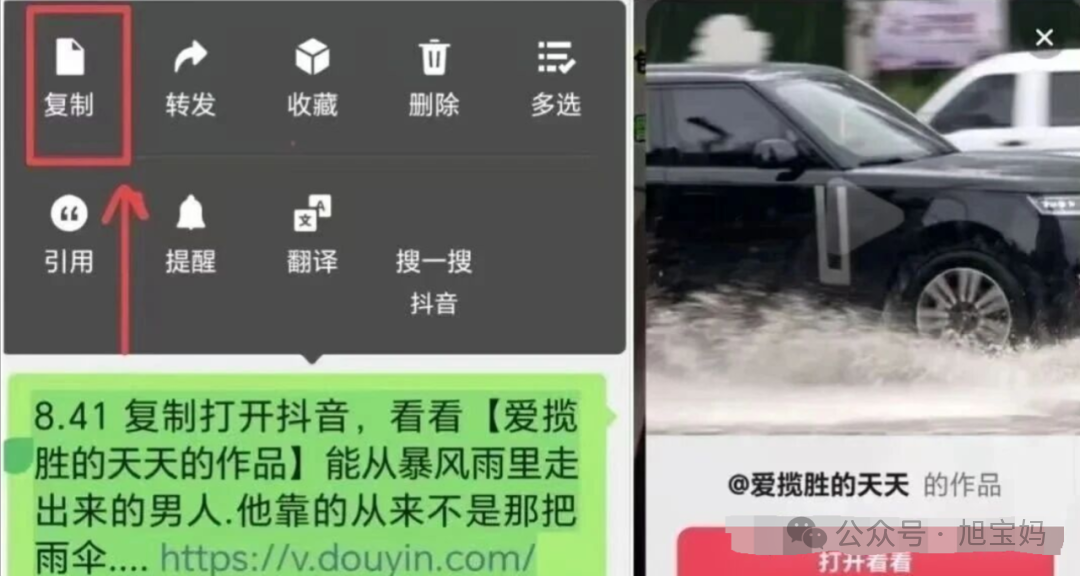
① First, copy the entire content: Long press the link in WeChat, and a “Copy” option will pop up. Make sure to copy everything — for example, Douyin links often include “https://v.douyin.com/XXXX/” and sometimes add “₤XXXX₤” as a command symbol. Missing even one character will not work; PDD links may include “【XX Product】https://p.pinduoduo.com/XXXX,” so you need to select and copy everything from the beginning text to the end URL, not just half!
② Open the corresponding APP directly: After copying, don’t close WeChat; directly open Douyin, PDD, or Taobao. For example, when you open Douyin, a small window will likely pop up saying “Detected clipboard link, do you want to open it?” Click “Open” to jump; if no window pops up, go to the APP’s “Search” (the magnifying glass in the upper right corner of Douyin’s homepage, the search bar in PDD’s homepage), paste the copied content, and as soon as you paste, the APP will automatically recognize it and pop up “Do you want to jump to the shared content?” Just click it, and you’re done!
③ Use a browser as a “bridge”: If the above two steps still don’t work, try using a browser. Open your phone’s built-in browser (like Huawei Browser or Safari), paste the copied link in the address bar, click “Go,” and after loading, it will pop up “Do you want to open with other applications?” Select the corresponding APP (like Douyin), click confirm, and you can jump to the shared content. This method has been tested and is effective!
Method 3: Image Recognition! How to Use QR Code Commands
Many people now share Douyin using “QR code commands” — which is an image with black and white squares. Don’t click it directly; first, save it to your photo album!
① First, save the image: Long press the QR code image in WeChat, click “Save Image,” and save it to your phone’s photo album;
② Recognize it in the APP: Open the corresponding APP (like Douyin), click the “Search” (magnifying glass icon) on the homepage, then look to the right of the search bar for a small camera icon (Douyin calls it “Scan,” PDD calls it “Scan Code”). Click this icon, then select “Album,” find the saved QR code image, and the APP will automatically recognize it, jumping to the shared work or product page in just a few seconds — even more convenient than copying!
2. 3 “Must-Note” Points! Don’t Let Small Issues Delay You
1. Don’t Wait! Links Have a “Shelf Life,” Open Them Within 24 Hours
The links sent by friends are not “permanently valid”! Especially for Douyin and PDD shared links, most are only valid for 24 hours — if you click a link sent today two days later, it will likely show “Link has expired,” and you’ll have to ask your friend to resend it, wasting your time. So when you receive a link, if you can’t view it immediately, copy it down and save it in your notes, and open it later that day; don’t wait until it expires!
2. Permissions Not Enabled? Adjust Settings for Android and Apple
Sometimes, it’s not the link’s problem; it’s that the phone permissions are not set correctly, preventing the APP from reading your copied content, so it can’t open!
- For Android users: Go to your phone’s “Settings,” find “Security” or “Privacy Protection,” and check if “Pure Mode” is enabled — this mode prevents the APP from reading the clipboard, just turn it off; then go to “Settings → Apps → Corresponding APP (like Douyin) → Permissions” and ensure that “Clipboard Reading Permission” is enabled;
- For Apple users: Open your phone’s “Settings,” scroll down to find the corresponding APP (like Douyin), click in and check the “Paste” permission, change it to “Allow”; also check the “Clipboard Access” permission to ensure it’s not disabled, so the APP can read your copied link!
3. Be Careful! Don’t Click on These Types of Links
When opening links, you also need to be cautious; don’t click on any link!
- First, check the beginning: A legitimate Douyin link must start with “https://v.douyin.com/”; PDD starts with “https://p.pinduoduo.com/”; Taobao starts with “https://m.tmall.com/” or “https://item.taobao.com/”. If it doesn’t start with these, be cautious;
- Next, check the content: If you click in and it loads, then immediately pops up a box asking for your bank card number, ID number, or says “Verify your identity to view,” or asks for your payment password, don’t hesitate — exit immediately! Quickly delete this link and remind your friend: “Your account may have been hacked!” This is likely a phishing link sent by a scammer using your friend’s account, so don’t fall for it!
Conclusion
In fact, the reason links in WeChat can’t be opened is mostly due to “incorrect operations” or “permissions not set,” not because the phone is broken or the link is invalid. Remember the order of “click first, then copy, and finally recognize the image,” and pay attention to the validity period, permissions, and security. Whether it’s Douyin, PDD, or Taobao links, you can easily open them!
If you have tried other useful methods or have any questions, let me know in the comments, and let’s exchange ideas to help more people avoid detours!