1. Desktop Kernel Compilation
a. Environment Preparation
# Update apt package sources
sudo apt update

# Install compilation software environment
apt install git fakeroot build-essential ncurses-dev xz-utils libssl-dev bc flex libelf-dev bison dwarves u-boot-tools xxd  libncurses5-dev   openssl
Explanation:
- fakeroot: A tool for simulating a fake root environment
- build-essential: Basic compilation tools and environment, including: C, C++, gcc, and g++
- ncurses-dev: A programming library providing APIs for text-based terminals
- xz-utils: Provides fast file compression and decompression
- libssl-dev: Supports SSL and TSL encrypted data, ensuring the security of network connections
- bc (Basic Calculator): A mathematical scripting language that supports interactive execution of statements
- flex (Fast Lexical Analyzer Generator): Generates lexical analysis programs that convert characters into tokens
- libelf-dev: Releases shared libraries for managing ELF files (executable files, core dumps, and object code)
- bison: A GNU parser generator that converts grammar descriptions into C programs
b. Download Source Code
wget https://cdn.kernel.org/pub/linux/kernel/v6.x/linux-6.9.4.tar.xz
tar -xvf linux-6.9.4.tar.xz
cd linux-6.9.4/
c. Modify Kernel Compilation Configuration as Needed
Use the current system’s .config file as a template
make defconfig      # Use the default configuration file
cp arch/arm64/configs/defconfig  .config  # Choose to use a specific configuration
Configure the kernel, if there are no specific needs, just save and exit
make menuconfigYou can add your required source patches in between…
d. Compile && Install
ⅰ. Method 1 – deb Package Installation
# Install dependencies
apt install -y debhelper dh-virtualenv

# Compile using make bindeb-pkg
make -j$(nproc) bindeb-pkg

# Cross-compilation (requires cross-compiler to be installed)
make ARCH=arm64 CROSS_COMPILE=aarch64-linux-gnu- -j$(nproc)  bindeb-pkg

# Specify kernel version
make ARCH=arm64 CROSS_COMPILE=aarch64-linux-gnu- -j$(nproc)   KERNELRELEASE="5.4.96-39" bindeb-pkg
After execution, three files will be generated in the parent directory of the source code
- linux-headers-5.4.96-39_5.4.96-39-3_arm64.deb
- linux-image-5.4.96-39_5.4.96-39-3_arm64.deb
- linux-libc-dev_5.4.96-39-3_arm64.deb
# Install new kernel
sudo dpkg -i *.deb

# Update grub
sudo update-grub
ⅱ. Method 2 – make install Installation
# Compile and install
sudo make -j$(nproc)
sudo make modules -j$(nproc)
# sudo make INSTALL_MOD_STRIP=1 modules_install -j8
sudo make modules_install -j$(nproc)
sudo make install -j$(nproc)

# Update grub
sudo update-grub
ⅲ. Kernel Packaging
Includes: .config, bzImage, System.map, and the system/lib/modules/linux-3.12.5 directory
- Copy /lib/modules/ to the target system’s /lib/modules/
- Copy arch/arm64/boot/zImage to the target system’s /boot
- Copy System.map to the target system’s /boot
(Refer to arch/arm64/boot/install.sh installation script)
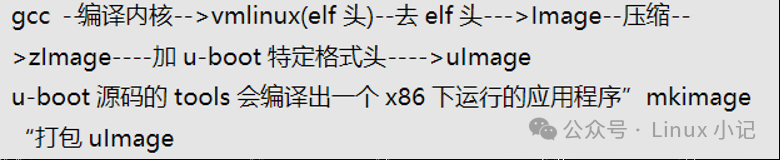
Supplement: Relationships of several kernel image files
- vmlinux: The most original kernel file compiled, uncompressed.
- zImage: bzImage is the vmlinux file compressed with gzip (use zImage for smaller kernels and bzImage for larger kernels).
- uImage: An image file specifically for U-boot, which adds a 0x40 length tag (file type, load position, generation time, size, etc.) before the zImage.
e. Uninstall Kernel
Check the installed kernel versions, where we can find the corresponding headers and images.
dpkg --get-selections | grep imageUninstall image and headers
# First uninstall headers:
sudo apt-get purge linux-headers-6.9.2
# Then uninstall image:
apt-get purge linux-image-6.9.2
# Update grub
sudo update-grub
2. Install Cross Compilation Environment
a. Download Cross Compilation Toolchain
- Official path for toolchain:
http://releases.linaro.org/components/toolchain/binaries/
- You can also download from domestic source websites for faster access:
https://mirrors.tuna.tsinghua.edu.cn/armbian-releases/_toolchain
The toolchain for arm64 contains the aarch64 keyword, choose the latest version to download and extract:
wget  https://mirrors.tuna.tsinghua.edu.cn/armbian-releases/_toolchain/gcc-linaro-7.4.1-2019.02-x86_64_aarch64-linux-gnu.tar.xz
tar -xvf gcc-linaro-7.4.1-2019.02-x86_64_aarch64-linux-gnu.tar.xz
b. Install Cross Compilation Environment
Create a path to store the toolchain: /usr/bin/toolchain, copy the entire directory to this path:
mkdir /usr/bin/toolchain
cp gcc-linaro-7.4.1-2019.02-x86_64_aarch64-linux-gnu /usr/bin/toolchain/ -rf
Set environment variables, add the path where the toolchain is stored
export PATH=$PATH:/usr/bin/toolchain/gcc-linaro-7.4.1-2019.02-x86_64_aarch64-linux-gnu/bin/
echo $PATH
/usr/local/sbin:/usr/local/bin:/usr/sbin:/usr/bin:/sbin:/bin:/usr/games:/usr/local/games:/:/usr/bin/toolchain/gcc-linaro-7.4.1-2019.02-x86_64_aarch64-linux-gnu/bin/
Check if the toolchain has been added correctly
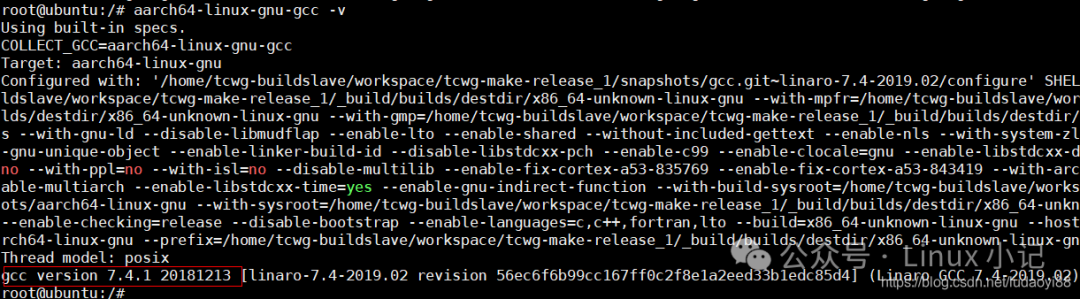
Subsequently, when using make, you need to specify the architecture and compiler
make ARCH=arm64 CROSS_COMPILE=aarch64-linux-gnu-3. Server Compilation
a. Environment Preparation
yum -y install gcc bc gcc-c++ ncurses ncurses-devel cmake elfutils-libelf-devel openssl-devel - Install dwarves
# Clone dwarves source code locally
git clone https://gitee.com/zhangjinyu/dwarves.git

# Install tools related to compiling dwarves
yum install cmake

# Start compilation
cd dwarves/
mkdir build
cd build
cmake -D__LIB=lib ..
make install

# Check pahole version
pahole --version

# If the following error message appears:
pahole: error while loading shared libraries: libdwarves_emit.so.1: cannot open shared object file: No such file or directory

vim /etc/ld.so.conf
Add: /usr/local/lib
# Reload dynamic library links
Execute command: /sbin/ldconfig- https://blog.csdn.net/fish332/article/details/134884806
b. Compilation
make -j26
make modules_install -j26
make install
4. Reference Links:
- Linux Kernel Compilation Tutorial: From Downloading Source Code to Module Loading Detailed – CSDN Blog
- https://blog.csdn.net/ludaoyi88/article/details/115633849
- https://blog.csdn.net/zklth/article/details/6920148