Clickthe blue text to follow us
Click to see more historical publications!!!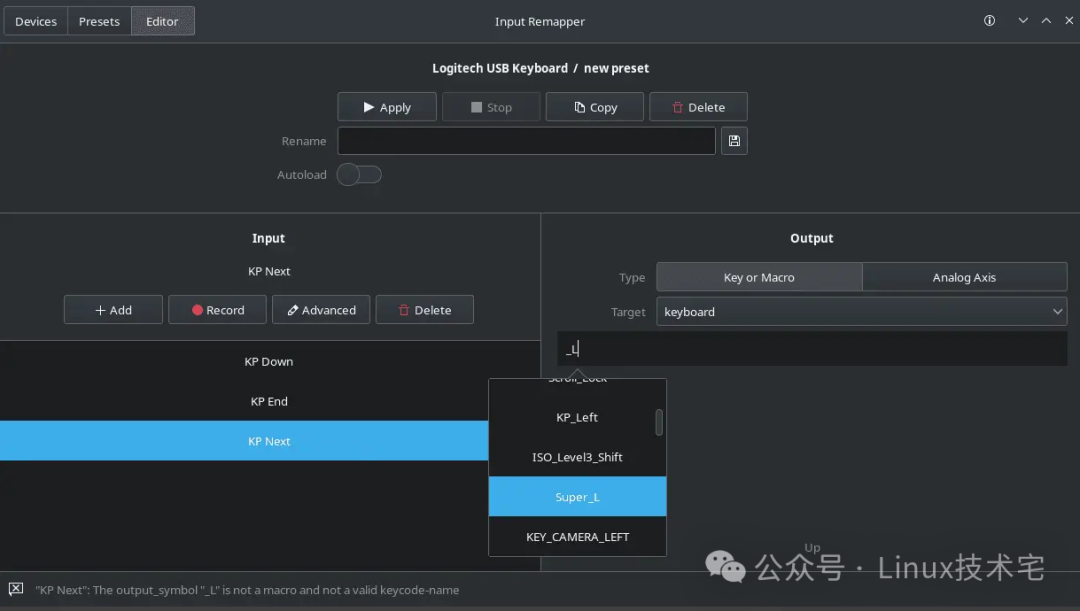
1. Tool Overview
Input Remapper is an open-source Linux tool designed for remapping the key behavior of input devices such as keyboards, mice, and game controllers. Its core features include:
•Multi-device support: Covers input devices including mice, keyboards, and game controllers.•Cross-window system compatibility: Supports both X11 and Wayland display protocols simultaneously.•Advanced mapping features:
•Supports mapping of key combinations (e.g., <span>Ctrl+A</span>).•Programmable macros (e.g., mapping a single key to a complex sequence of operations).•Mapping non-keyboard events (e.g., mouse wheel, joystick movements) to keyboard keys.
•Underlying technology: Directly filters and redirects input signals from physical devices through the <span>evdev</span> interface to achieve virtual device output.
2. Deployment and Installation
1. Installation on Debian/Ubuntu
•Install from official repository (recommended):
sudo apt update
sudo apt install input-remapper-gtk  # GUI version
# or
sudo apt install input-remapper # Command line version•Manual installation of the latest version:
•Download the .deb package (e.g., <span>input-remapper-2.1.1.deb</span>).•Execute the installation:
sudo apt install -f ./input-remapper-2.1.1.deb2. Installation on Fedora
•Install the stable version from the Fedora official repository:
sudo dnf install input-remapper•Supported versions: Fedora 41 to Rawhide (latest development version).
3. Source Code Compilation Installation (General Method)
•Dependencies: <span>git</span>, <span>python3-setuptools</span>, <span>gettext</span>.•Compilation steps:
git clone https://github.com/sezanzeb/input-remapper.git
cd input-remapper
./scripts/build.sh
sudo apt purge input-remapper input-remapper-daemon input-remapper-gtk python3-inputremapper  # Clean up old versions
sudo apt install -f ./dist/input-remapper-2.1.1.deb
4. Launching and Configuration
•Graphical interface: Run <span>input-remapper-gtk</span> to create and edit mapping presets through a visual interface.•Command line: Use the <span>input-remapper</span> command to manage configurations (command line version must be installed).•Preset storage: User configurations are saved in the <span>~/.config/input-remapper-2/presets/</span> directory, supporting export as <span>.json</span> files for cross-device synchronization.
3. Open Source Information
•Project address: GitHub – sezanzeb/input-remapper[1]•Development language: Python 3•License: GPL v3 (open source and free, allows modification and distribution)•Latest version: 2.1.1 (released on February 16, 2025)•Multilingual support: The interface provides support for English, Russian, German, Spanish, French, etc.
4. Feature Highlights and Applicable Scenarios
1.Game Optimization:
•Map controller buttons to keyboard actions, adapting to Linux games that do not support controllers.•Create macros for quick execution of complex skill combinations (e.g., <span>F1</span> mapped to <span>Ctrl+Shift+Q</span>).
2.Productivity Enhancement:
•Customize shortcuts (e.g., mapping <span>Caps Lock</span> to <span>Esc</span> or <span>Ctrl</span>).•Map mouse side buttons to copy/paste operations.
3.Accessibility Adaptation:
•Remap keys for users with disabilities to reduce operational difficulty.
5. User Reviews and Comparisons
•Advantages:
•Ease of use: The graphical interface is intuitive and suitable for beginners.•Flexibility: Supports the low-level <span>evdev</span> interface, providing strong compatibility.•Cross-platform: Covers major Linux distributions (Debian, Ubuntu, Fedora, etc.).
•Comparison with competitors:
•<span>keyd</span>: Lighter, but relies on kernel-level input primitives (<span>evdev</span>/<span>uinput</span>), with complex configuration.•<span>evremap</span>: Focuses on keyboard remapping, requires manual editing of configuration files (<span>/etc/evremap.toml</span>), suitable for advanced users.
6. Frequently Asked Questions
1.Installation Failure:
•Ensure system dependencies are installed (e.g., <span>python3</span>, <span>git</span>).•Check if the distribution is compatible (e.g., Zorin Lite 16.3 needs to wait for an upgrade to Ubuntu 22.04 base).
2.Permission Issues:
•First run requires granting access to input devices (usually prompted through <span>polkit</span> or <span>sudo</span>).
3.Wayland Compatibility:
•Ensure the display server supports the virtual keyboard protocol (e.g., GNOME’s Mutter or KDE’s KWin).
7. Conclusion
Input Remapper is a versatile tool for Linux users to customize input devices, combining the convenience of a graphical interface with the powerful capabilities of low-level technology. Whether for gamers, developers, or users with accessibility needs, its flexible mapping solutions can enhance operational efficiency. It is recommended to install the stable version from the official repository or obtain the latest feature updates from GitHub.
References
<span>[1]</span> GitHub Releases: https://github.com/sezanzeb/input-remapper/releases<span>[2]</span> GitHub – sezanzeb/input-remapper: https://github.com/sezanzeb/input-remapper
END
Request likes

Request shares

Request likes