In the data-driven era, web data collection (commonly known as “web scraping”) has become an important means of obtaining information. Proper use of this technology can significantly enhance work efficiency, but it must be based on compliance as a fundamental premise.
1. Legality of Web Scraping: Boundaries and Principles of the Gray Area
1. Gray Area of Web Scraping: Strictly Adhering to Legal Boundaries
Currently, there are no explicit legal provisions that directly define web scraping as “legal” or “illegal”; the legal positioning is in a gray area, but it is essential to strictly adhere to the legal bottom line:
From the perspective of legal applicability, the principle of “what is not prohibited by law is permitted” determines that writing web scraping programs and engaging in web scraping technology learning does not constitute illegal activity, but one must guard against the legal risks of “disrupting the normal operation of website servers”. If the website can provide evidence that the scraping activity has caused server bandwidth overload, service interruption, or downtime, or if there is a situation of illegally obtaining data by bypassing security measures (such as CAPTCHA, login restrictions), the actor may bear civil liability, and in severe cases, may also involve criminal liability.
2. Gentlemen’s Agreement: The Role and Limitations of robots.txt
Almost all standard websites have a `robots.txt` file in their root directory, such as:
`https://www.douban.com/robots.txt`
which serves as the “scraping protocol” to inform scrapers which content can be scraped and which cannot.
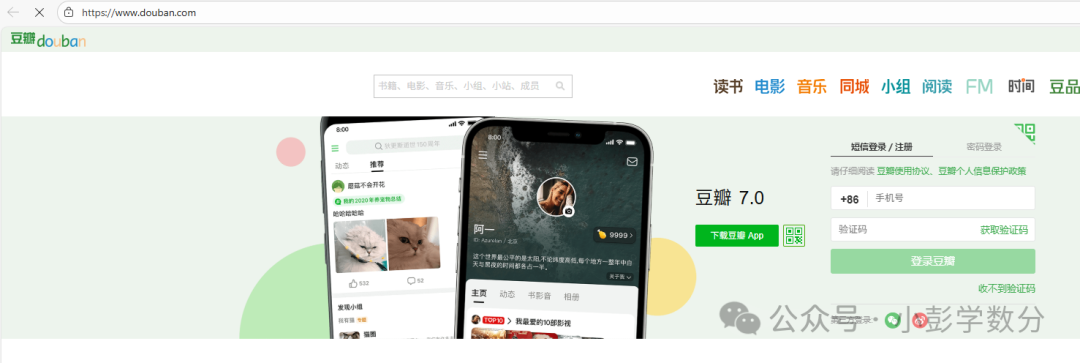 (Image: Screenshot from Douban homepage)
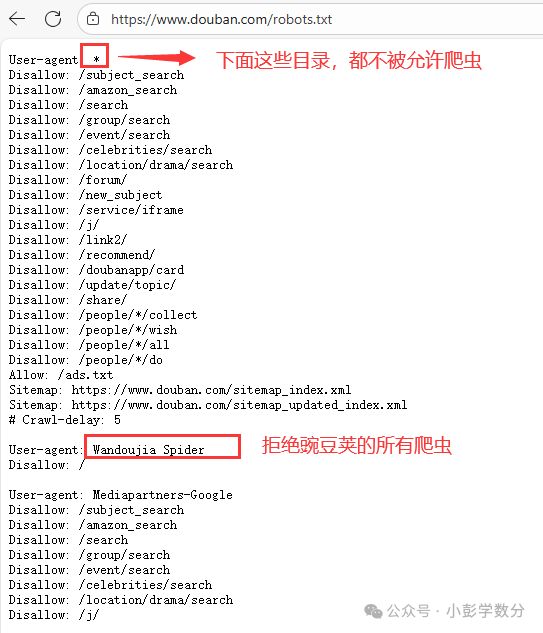 (Image: Content of Douban’s robots.txt)We can also take a look at Taobao:
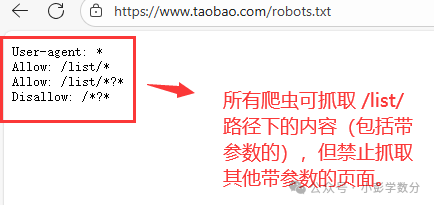 (Image: Content of Taobao’s robots.txt)
(1) Interpretation of robots.txt Rules
Using Douban’s `robots.txt` as an example, the core rules are represented using wildcards and directives:
-
`User-agent: *` means all scrapers (`*` is a wildcard);
-
`Disallow: /xxx` means scraping of content under the `/xxx` path is prohibited;
-
Specific scraper restrictions: For example, `User-agent: Wandoujia Spider` corresponds to `Disallow: /`, meaning the Wandoujia scraper is completely prohibited from scraping the entire site;
-
Search engine exceptions: Douban does not prohibit Baidu’s scraper (`User-agent: BaiduSpider`), so Baidu can scrape its content normally (search engines are essentially “the largest scrapers”).
(2) Limitations of robots.txt: Only a “Gentlemen’s Agreement”
robots.txt has no technical enforcement power; websites cannot force scrapers to comply with this “gentleman’s agreement”, but if scrapers violate its provisions and engage in excessive scraping or infringe on the legitimate rights and interests of the website, they may face IP bans and other anti-scraping restrictions, and in severe cases, may even violate the law.
2. Core Foundations of Web Data Collection: URL and HTTP Protocol
To implement web scraping, we must first understand “how to access web resources”, which involves the two core concepts of URL (Uniform Resource Locator) and HTTP (HyperText Transfer Protocol).
1. URL: The “Identity Card” of Web Resources
The term “website address” is professionally known as URL (Uniform Resource Locator), which is the unique address that identifies web resources. URL belongs to URI (Uniform Resource Identifier), which also includes URN (Uniform Resource Name, such as the ISBN number of a book), but in daily scraping, we only need to focus on URL.
The complete structure of a URL, taking Baidu’s homepage as an example, is:
https://www.baidu.com:443/index.html
The meanings of each part are as follows:
`https`: Protocol (the secure version of HTTP, based on SSL encryption);
`www.baidu.com`: Domain name (can be replaced with an IP address, such as obtaining Baidu’s IP through `ping www.baidu.com`);
`443`: Port number (the default port for HTTPS is 443, and for HTTP, it is 80; browsers will automatically complete this);
`index.html`: Resource path (the default resource for the website’s homepage; if not specified, the browser will automatically request it).
2. HTTP Protocol: The “Dialogue Rules” Between Scrapers and Servers
HTTP (HyperText Transfer Protocol) is the standard protocol for communication between scrapers and servers, adopting a “request-response” model: the scraper sends a request, and the server returns a response, with the entire process needing to follow a fixed format.
(1) Structure of an HTTP Request
A complete HTTP request consists of four parts: request line, request header, empty line (
, i.e., carriage return and line feed), and message body.
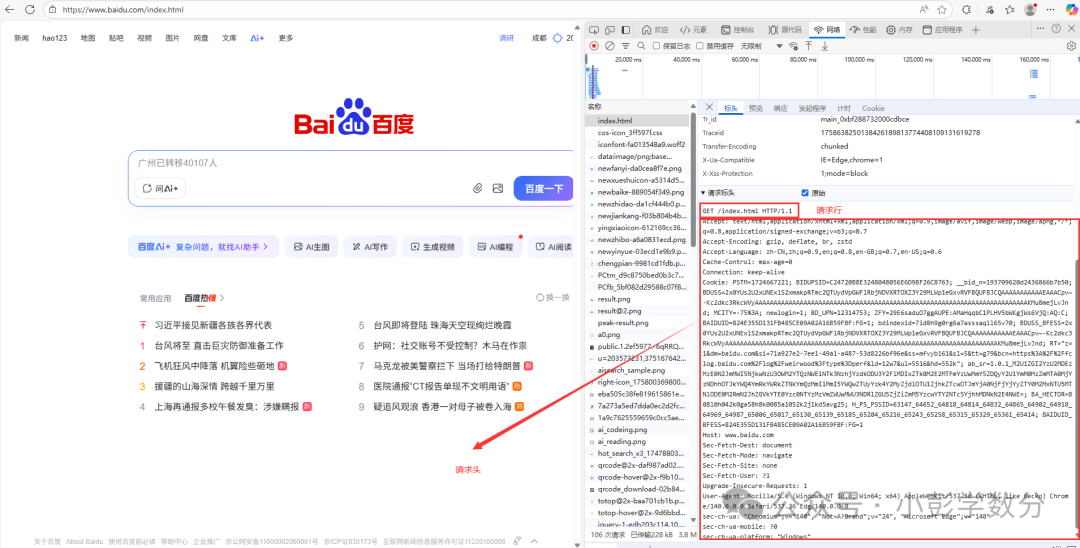
If it is a POST request, the message body (data to be sent to the server)
(2) Structure of an HTTP Response
After receiving the request, the server returns a response that also contains four parts: response line, response header, empty line, and message body.
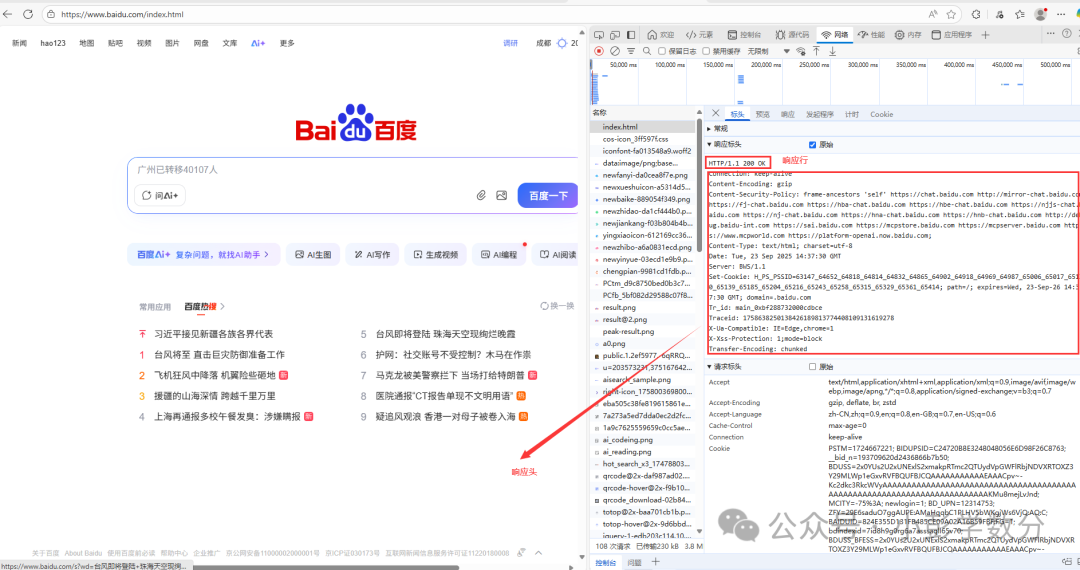 The message body (the code in the response, which corresponds to Baidu’s homepage, while our browser acts as the interpreter, ultimately presenting the page we see):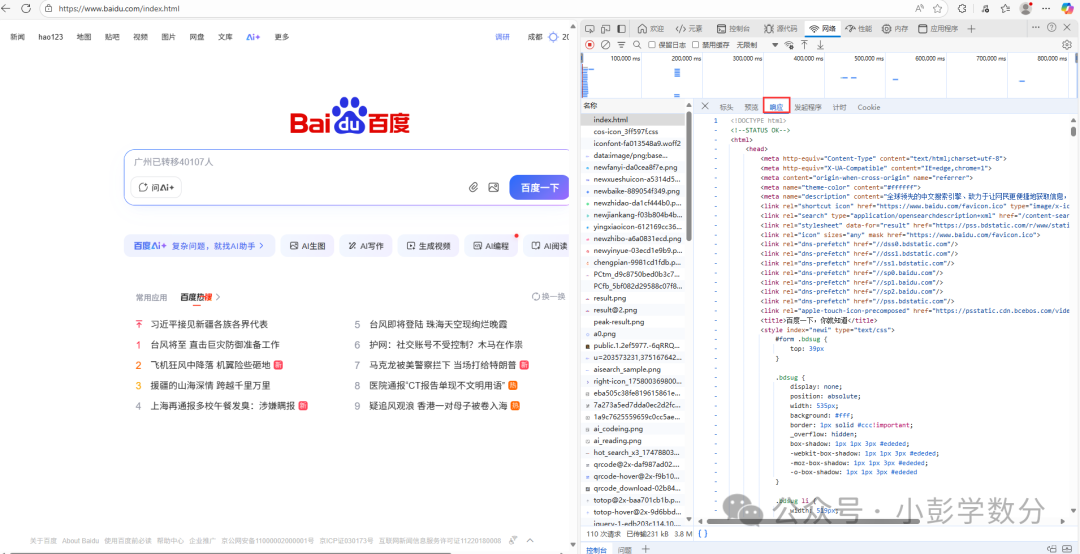
(3) Developer Tools: Viewing the HTTP Interaction Process
In the Chrome browser, press `F12` to open the “Developer Tools”, switch to the [Network] panel, and refresh the page to view all HTTP requests and responses:
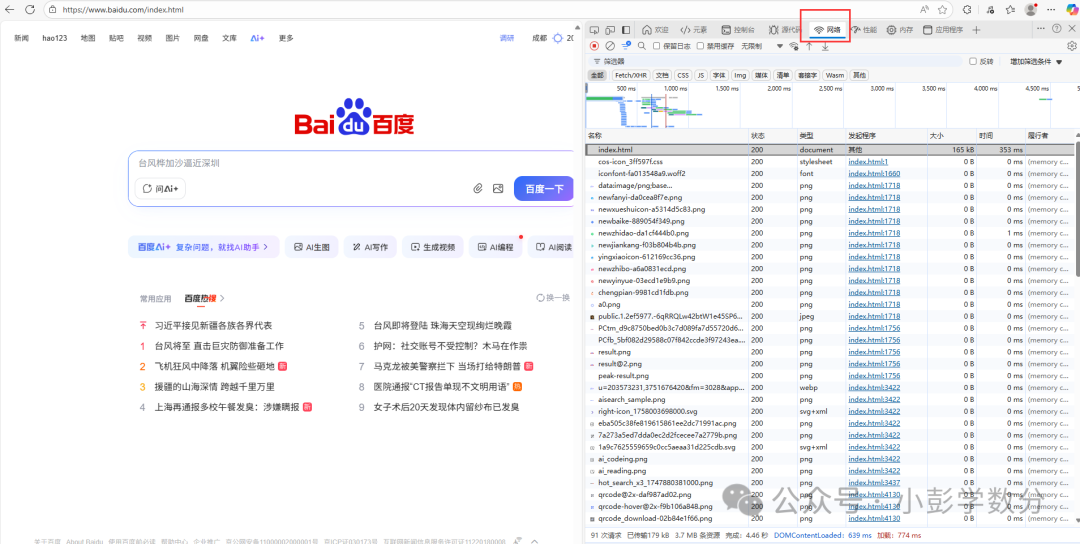
Filter resource types: Use labels like `Doc` (webpage), `Img` (image), `Script` (JS code) to filter target resources;
View details: Click on a request to view the request/response headers in `Headers`, and the message body (such as HTML code, JSON data) in `Response`.
3. Practical Web Scraping: Using Python for Web Data Collection
Currently, Python is widely used in the field of web scraping, thanks to its mature technical ecosystem and convenient programming experience, making it the mainstream tool in this field, primarily relying on the third-party library `requests` (which simplifies HTTP requests). Below, we will simulate exercises based on three scenarios: obtaining webpage code, downloading binary resources, and parsing JSON interfaces.
Scenario 1: Obtaining HTML Code of a Webpage (Taking Baidu’s Homepage as an Example)
Objective: Send a GET request to Baidu’s homepage to obtain its HTML code and handle potential encoding issues.
import requests# Send request to obtain Response objectresp = requests.get( url='https://www.baidu.com/')# Check response status codeprint(resp.status_code)# Obtain HTML code of the homepageprint(resp.content.decode('utf-8'))Thus, we can obtain the HTML code of Baidu’s homepage (as shown in the image):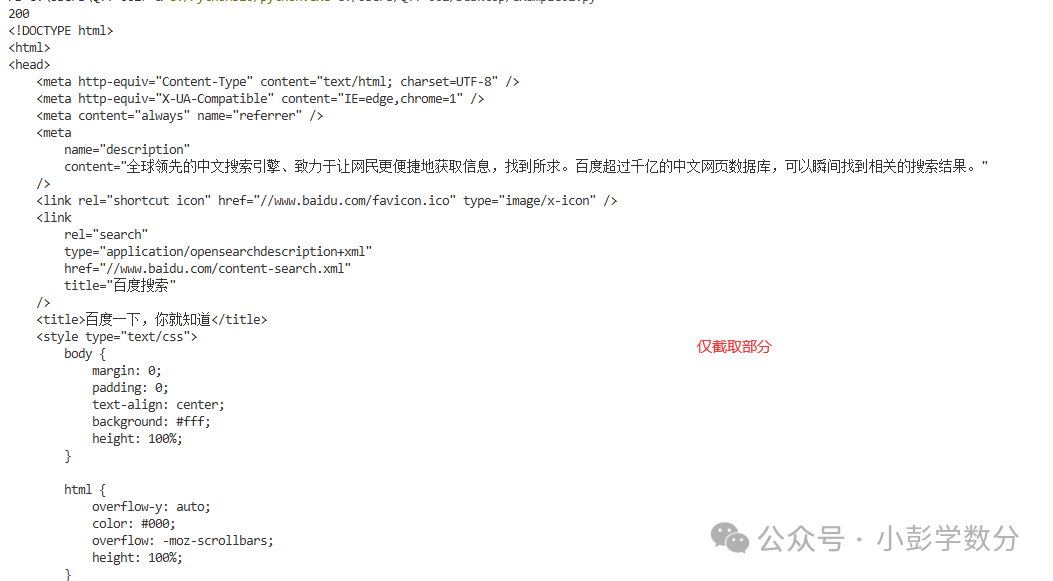
Scenario 2: Downloading Binary Resources (Images, Audio, Video, Compressed Files)
Objective: Download Baidu’s “Bear Paw Icon” from its homepage, or songs and movies from the internet (note copyright), focusing on obtaining the binary data from the response body and writing it to a file.
(1) Code to Download Baidu’s Icon
import requestsresp = requests.get( url='https://www.baidu.com/img/PCtm_d9c8750bed0b3c7d089fa7d55720d6cf.png')if resp.status_code == 200: with open('baidu_logo.png', 'wb') as file_obj: file_obj.write(resp.content)else: print(resp.status_code) (Image: Source from Baidu homepage)At this point, it may seem redundant, but it is not; this is a single image, and you can also hover the mouse over the image and then right-click to select [Save Image As]. However, what if you want to batch download multiple images?
(2) General Download Function Encapsulation
If you need to batch download resources (such as multiple images or songs), you can encapsulate it into a function to improve code reusability:
import requestsimport osfrom os.path import join

def download_resource(url, save_dir):    """    Download web resources (images, audio, video, compressed files, etc.)    :param url: Resource URL    :param save_dir: Save directory (relative or absolute path)    """    # 1. Check if the save directory exists; if not, create it    if not os.path.exists(save_dir):        os.makedirs(save_dir)  # Create directory
    # 2. Parse the filename from the URL (take the content after the last "/")    file_name = url.split("/")[-1]  # For example, parse "https://xxx/abc.png" to "abc.png"
    # 3. Concatenate the full save path (use os.path.join to avoid path separator issues)    save_path = join(save_dir, file_name)
    # 4. Send request and save file    try:        response = requests.get(url, timeout=10)  # Timeout of 10 seconds to avoid hanging        if response.status_code == 200:            with open(save_path, "wb") as f:                f.write(response.content)            print(f"Successfully downloaded: {file_name}")        else:            print(f"Download failed ({file_name}), status code: {response.status_code}")    except Exception as e:        print(f"Download exception ({file_name}): {str(e)}")

# Call the function: Download Baidu's icon to the "images" directorydownload_resource("https://www.baidu.com/favicon.ico", "images")
(3) Key Notes
`response.content`: Obtains the response body in binary form, suitable for images, audio, video, compressed files, and other non-text resources;
`os.makedirs(save_dir)`: Creates the save directory to avoid “directory does not exist” errors;
`os.path.join()`: Automatically handles path separators (“\” for Windows, “/” for Linux/macOS), avoiding errors in manual concatenation.
Scenario 3: Parsing JSON Interface Data (Taking Open API as an Example)
Many websites (such as government open platforms, data interface platforms) provide JSON format interface data, which has a clear structure and does not require HTML parsing; it can be extracted directly. Taking the “Headline News” interface from “Tianxing Data” as an example (registration is required to obtain an API key).
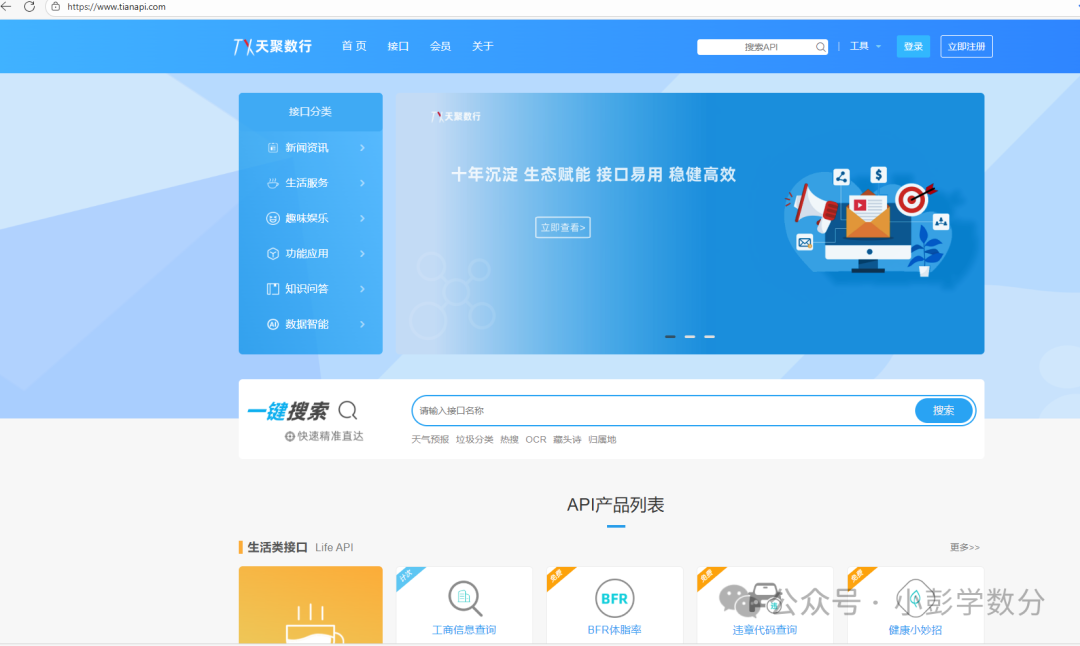
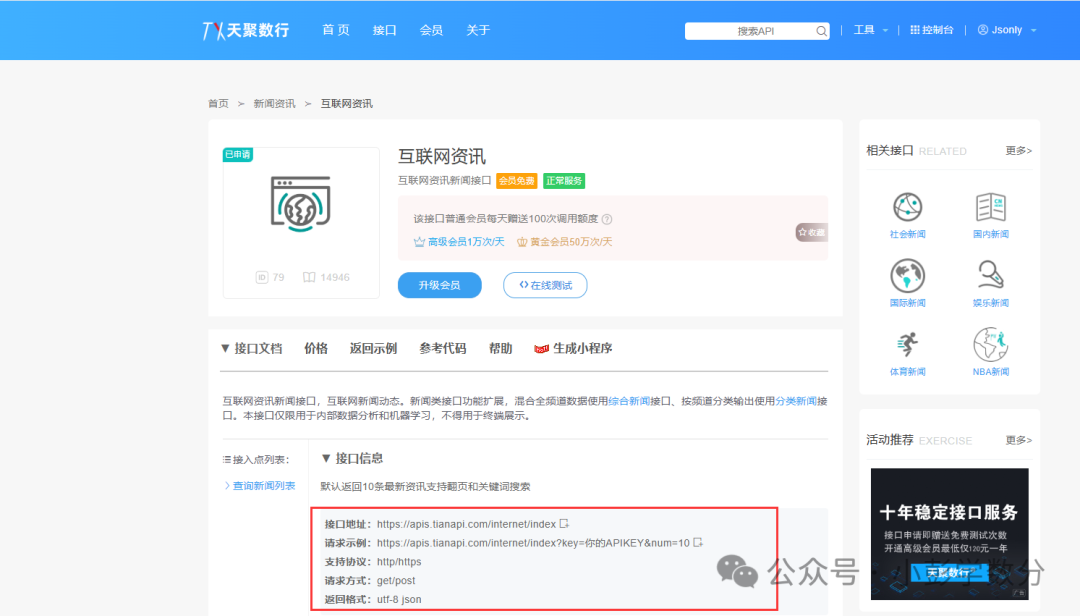 (Image: Screenshot from Tianxing Data homepage & Internet News)
(1) Code to Obtain JSON Data
import requestsfor page in range(1, 6): resp = requests.get( url='https://apis.tianapi.com/internet/index', params={ 'key': '7e2bc577eebcd9194c09d75bd0d7046d', 'num': 10 } ) print(resp.status_code) # Obtain JSON format data and process it into a dictionary result = resp.json()['result'] news_list = result['newslist'] for news in news_list: print(news['title']) print(news['url']) print(news['source']) print('-' * 50)Code execution result (partial):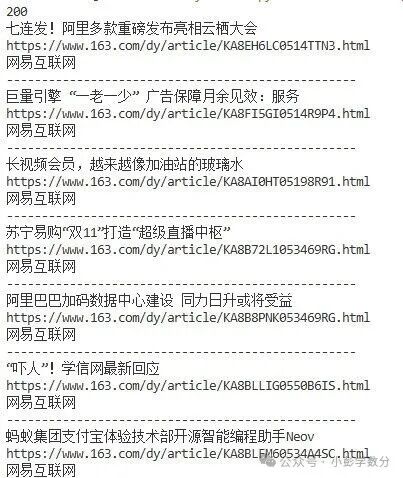
(2) Key Notes
`params` parameter: Used to pass the query parameters required by the interface (such as API key, page number), `requests` will automatically concatenate it into the URL query string (e.g., `http://xxx?key=xxx&num=10`);
`response.json()`: Directly converts the JSON format response body into a Python dictionary without manual parsing;
Interface documentation dependency: The parameter format and data path (e.g., `json_data[“result”][“newslist”]`) must be determined according to the documentation provided by the interface provider (such as Tianxing Data’s “Internet News” interface documentation).
4. Extracting Data from HTML Code (Taking Douban Movie Top 250 as an Example for Reference)
 (Image: Screenshot from Douban Movie Top 250 interface)
If we want to obtain the names of the top 250 movies, let’s first take a look at the source code of the webpage:
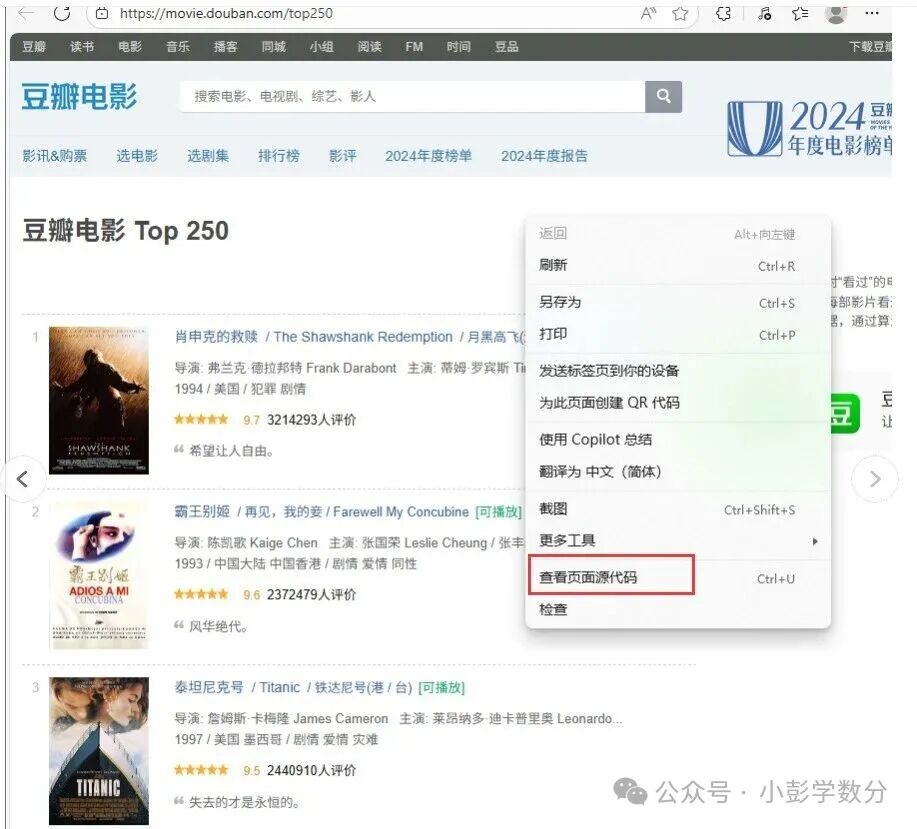 (Image: Viewing the source code of Douban Movie Top 250 page)
The following content will appear (partial):
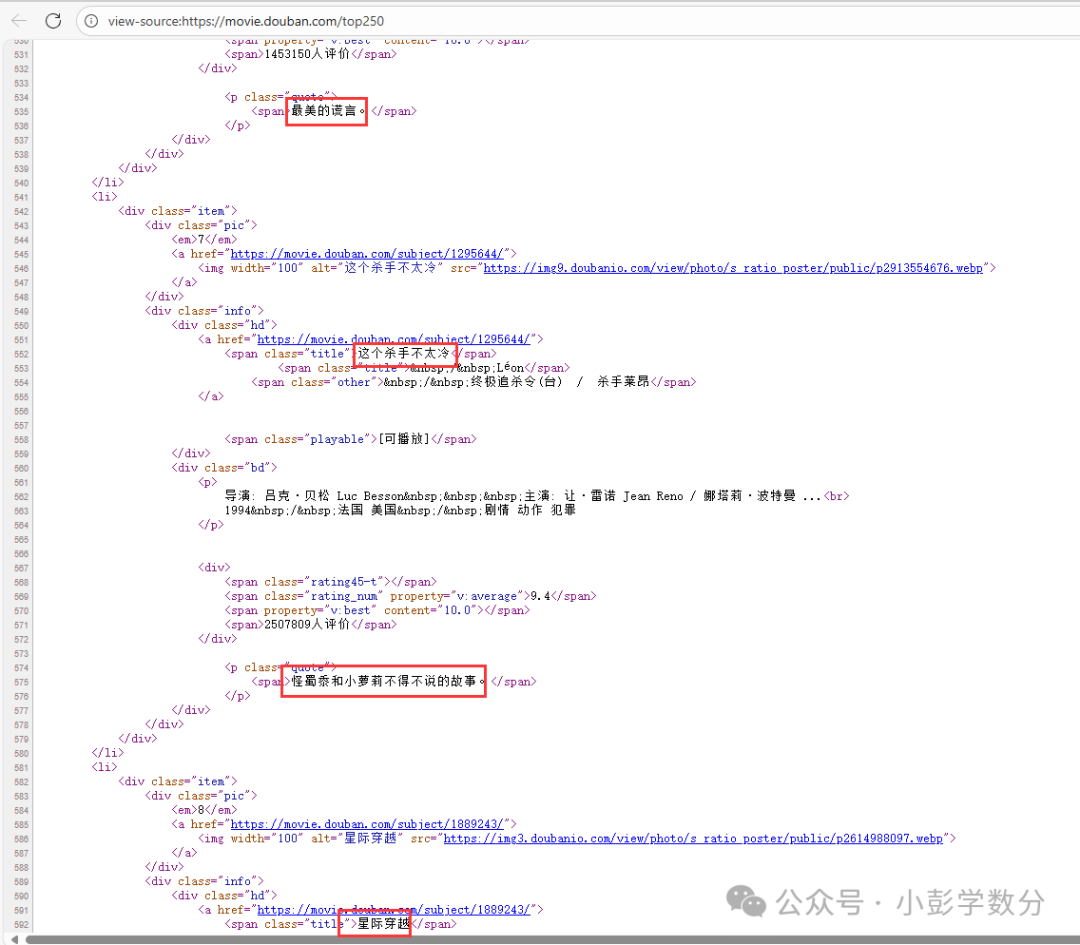 (Image: Viewing movie information in tags)How do we parse the page and obtain the data we want?1. We can use fuzzy matching, primarily using regular expressions (good performance)
# Import required libraries: random for generating random numbers, time for controlling request intervals, re for regular expression matching, requests for sending HTTP requestsimport randomimport timeimport reimport requests# Initialize line number counter to record the movie's serial numberrow_num = 0# Open file to write Douban Top 250 movie data, using utf-8-sig encoding to avoid Chinese garbled charactersfile_obj = open('top250_movies.csv', 'w', encoding='utf-8-sig')# Write the header of the CSV file: serial number, title, link, score, number of commentsprint('no,title,link,score,comment', file=file_obj)# Loop to get data for 10 pages (Douban Top 250 displays 25 movies per page)for page in range(10): # Send HTTP GET request to get the current page's data resp = requests.get( # The start parameter in the URL controls pagination; each page has 25 entries, the starting index for page `page` is page*25 url=f'https://movie.douban.com/top250?start={page * 25}', # Set request headers to simulate browser access, avoiding being blocked by anti-scraping mechanisms headers={ 'User-Agent': 'Mozilla/5.0 (Macintosh; Intel Mac OS X 10_15_7) AppleWebKit/537.36 (KHTML, like Gecko) Chrome/120.0.0.0 Safari/537.36' } ) # Check if the request was successful (status code 200 indicates success) if resp.status_code == 200: # Define regular expression pattern to match movie titles (only match titles starting with Chinese or numbers) title_pattern = re.compile(r'<span class="title">([-].*?)</span>') # Extract all matching movie titles from the response content titles = title_pattern.findall(resp.text) # Define regular expression pattern to match movie detail page links hlink_pattern = re.compile(r'<a href="(https://movie\.douban\.com/subject/\d+/)"') # Extract all matching links from the response content hlinks = hlink_pattern.findall(resp.text) # Define regular expression pattern to match movie ratings rankn_pattern = re.compile(r'<span class="rating_num" property="v:average">(.*?)</span>') # Extract all matching ratings from the response content rankns = rankn_pattern.findall(resp.text) # Define regular expression pattern to match number of reviews count_pattern = re.compile(r'<span>(+)人评价</span>') # Extract all matching review counts from the response content counts = count_pattern.findall(resp.text) # Iterate through the extracted movie information and write each movie's data to the CSV file for x in zip(titles, hlinks, rankns, counts): row_num += 1 # Increment serial number # Write the serial number and movie information in CSV format to the file print(row_num, *x, sep=',', file=file_obj) page += 1 # Increment page number (actually can be omitted, as the for loop will control it automatically) else: # If the request fails, print the error status code print(resp.status_code) # Randomly sleep for 0-3 seconds to simulate human browsing behavior, avoiding being blocked by frequent requests time.sleep(random.random() * 3)# Close the file object to release resourcesfile_obj.close 2. Use CSS selectors to locate tags on the HTML page and then obtain the text or attributes of the tags
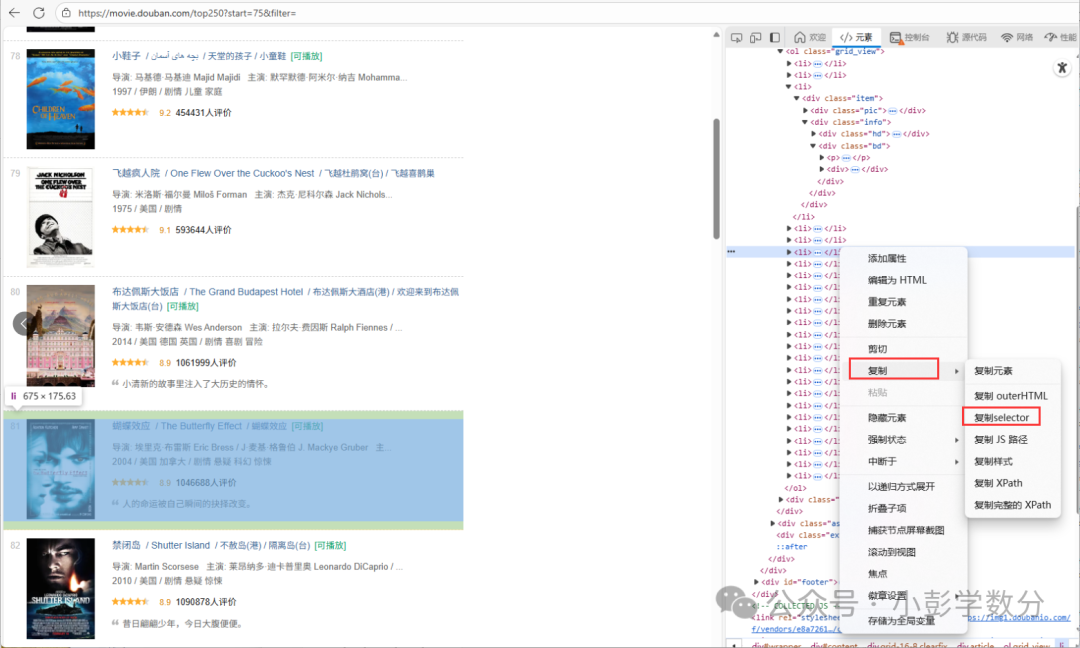 (Image: Each li tag corresponds to a movie’s information)
# Import required libraries: random for random sleep, time for controlling request intervalsimport randomimport time# bs4 for parsing HTML, requests for sending network requests, tqdm for displaying progress barimport bs4import requestsimport tqdm# Initialize line number counter for CSV serial numberrow_num = 0# Open CSV file to prepare for writing data, using utf-8-sig encoding to handle Chinesefile_obj = open('top250_movies.csv', 'w', encoding='utf-8-sig')# Write CSV file headerprint('no,title,link,score,comment,subject', file=file_obj)# Loop to get data for 10 pages, tqdm.trange is used to display the progress barfor page in tqdm.trange(10): # Send request to get Douban Top 250 page content resp = requests.get( url=f'https://movie.douban.com/top250?start={page * 25}', # Pagination parameter, 25 entries per page headers={ 'User-Agent': 'Mozilla/5.0 (Macintosh; Intel Mac OS X 10_15_7) AppleWebKit/537.36 (KHTML, like Gecko) Chrome/120.0.0.0 Safari/537.36' } ) # Check if the request was successful if resp.status_code == 200: # Use BeautifulSoup to parse HTML content root = bs4.BeautifulSoup(resp.text, 'html.parser') # Select all movie item elements movie_items = root.select('#content > div > div.article > ol > li') # Iterate through each movie item to extract information for item in movie_items: row_num += 1 # Increment serial number # Extract movie title, link, rating, number of comments, and summary title = item.select_one('div > div.info > div.hd > a > span:nth-child(1)').text hlink = item.select_one('div > div.info > div.hd > a').attrs['href'] rankn = item.select_one('div > div.info > div.bd > div > span.rating_num').text count = item.select_one('div > div.info > div.bd > div > span:nth-child(4)').text[:-3] quote_span_tag = item.select_one('div > div.info > div.bd > p.quote > span') quote = quote_span_tag.text if quote_span_tag else '' # Handle cases with no summary # Write the extracted information to the CSV file print(row_num, title, hlink, rankn, count, quote, sep=',', file=file_obj) else: # Print status code if the request fails print(resp.status_code) # Randomly sleep for 0-3 seconds to avoid frequent requests time.sleep(random.random() * 3)# Close the filefile_obj.close()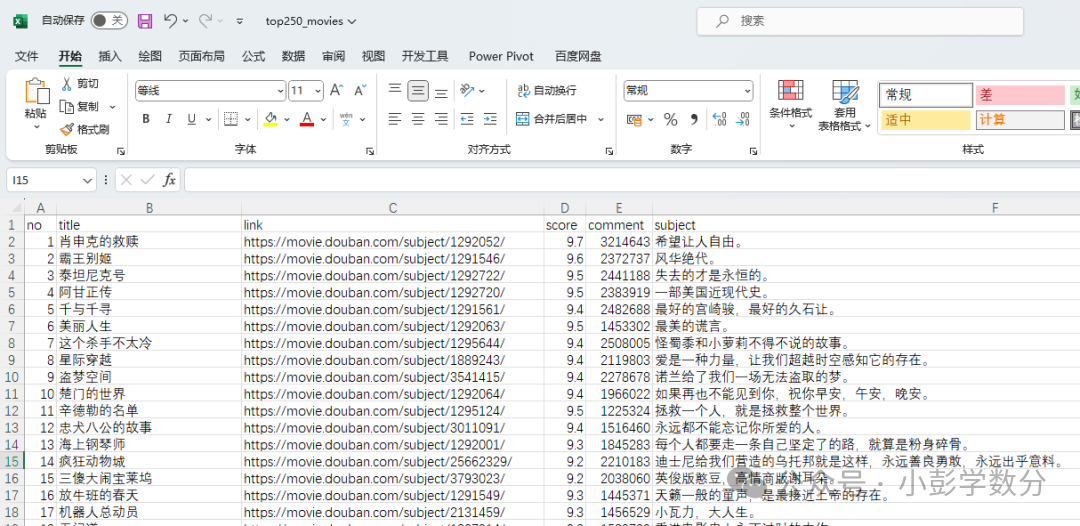 3. Parsing through XPath (also direct copying)Compared to regular expression text matching and CSS selector style positioning, XPath is better at handling deeply nested pages with complex attributes, especially when multiple dimensions of filtering based on position, attributes, and text are required:Path-based positioning: Locate elements through hierarchical paths similar to file directories (e.g., /html/body/div) or relative paths (e.g., //div[@class=”content”]) for clear structure and easy understanding.Powerful filtering capabilities: Supports filtering nodes through tag attributes (e.g., //a[@href=”/movie”]), text content (e.g., //span[text()=”Rating”]), position index (e.g., //li[3]), and other multi-dimensional conditions for precise matching.Cross-tool compatibility: In Python, libraries like lxml and BeautifulSoup (with lxml parser) support XPath syntax; in browser developer tools, XPath expressions can also be directly validated for positioning, facilitating debugging.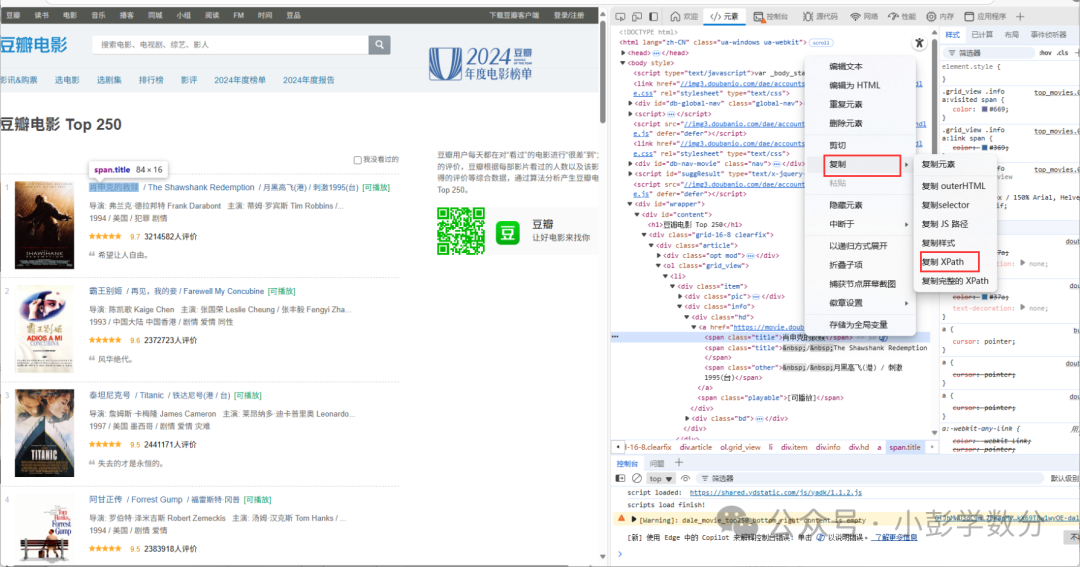
import randomimport timeimport tqdmfrom lxml import etreeimport requestsrow_num = 0# Open file to prepare for writing, using utf-8-sig encoding to handle Chinesefile_obj = open('top250_movies_xpath.csv', 'w', encoding='utf-8-sig')# Write CSV headerprint('no,title,link,score,comment,subject', file=file_obj)# Loop to scrape data for 10 pages, using tqdm to display progress barfor page in tqdm.trange(10): # Send request, each page has 25 entries, control pagination through start parameter resp = requests.get( url=f'https://movie.douban.com/top250?start={page * 25}', headers={ 'User-Agent': 'Mozilla/5.0 (Macintosh; Intel Mac OS X 10_15_7) AppleWebKit/537.36 (KHTML, like Gecko) Chrome/120.0.0.0 Safari/537.36' } ) if resp.status_code == 200: # Parse HTML content html = etree.HTML(resp.text) # Use XPath to locate all movie items movie_items = html.xpath('//*[@id="content"]/div/div[1]/ol/li') for item in movie_items: row_num += 1 # Use XPath to extract each field's information title = item.xpath('.//div[@class="hd"]/a/span[1]/text()')[0] hlink = item.xpath('.//div[@class="hd"]/a/@href')[0] rankn = item.xpath('.//div[@class="bd"]//span[@class="rating_num"]/text()')[0] count = item.xpath('.//div[@class="bd"]//span[4]/text()')[0].replace('人评价', '') # Handle potential absence of summary information quote_list = item.xpath('.//p[@class="quote"]/span/text()') quote = quote_list[0] if quote_list else '' # Write to CSV file print(row_num, title, hlink, rankn, count, quote, sep=',', file=file_obj) else: print(f"Page request failed, status code: {resp.status_code}") # Randomly sleep for 0-3 seconds to avoid frequent requests time.sleep(random.random() * 3)# Close filefile_obj.close()We can also obtain the top 250 data (as shown in the image):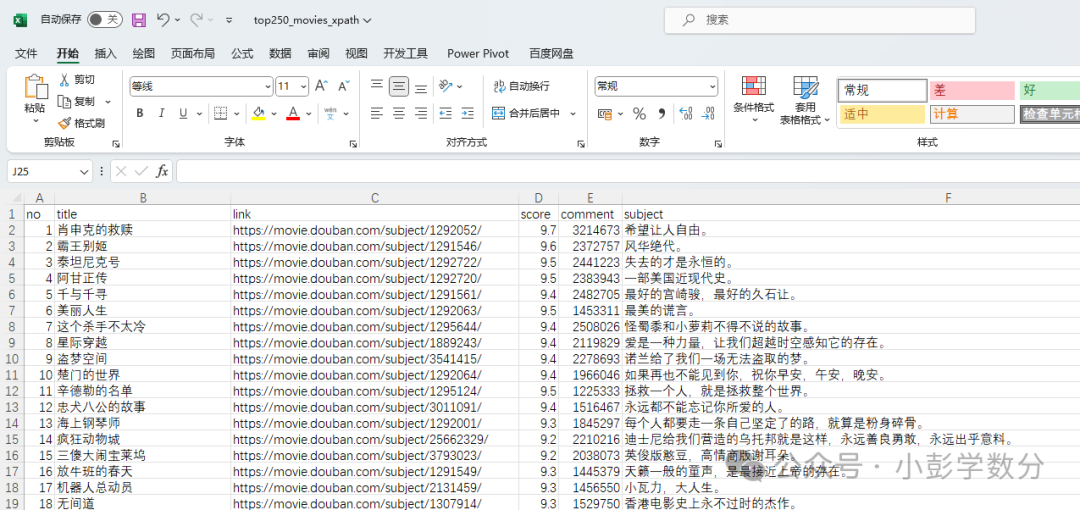 Conclusion
Web data collection, as an important means of information acquisition in the data-driven era, always needs to find a balance between “efficiency” and “compliance”. Whether writing scraping code in Python, using visual tools like Octoparse, Houyi Collector, Jianshu Collector, or leveraging RPA tools like Yingdao, Automa for automated collection, “compliance” is always an unbreakable bottom line — it is necessary to respect the robots.txt protocol of websites, avoid excessive scraping that occupies server resources, and never touch the legal red lines of data privacy and copyright protection. Only by strictly adhering to boundaries can data collection truly serve reasonable needs.
At the same time, it should be noted that the core of technology selection lies in “adapting to the scenario”: simple collection needs can be quickly realized through visual tools, while complex or customized needs are suitable for flexible development in Python, and scenarios involving simulated human operations (such as form filling and multi-step interactions) can leverage the unique advantages of RPA tools. In the future, as anti-scraping technologies and data security regulations continue to improve, data collection will also develop towards a more standardized and efficient direction. Only by continuously learning technology and adhering to compliance principles can we walk more steadily and further in the exploration of data value.