Introduction to C++ Programming 03 – Branching Structure Programming
In real life, we often need to perform operations such as comparing sizes and determining equality, and then make corresponding decisions based on the results. The branching structure in C++ programming allows us to easily implement these operations.
(1) Relational Operators and Relational Expressions
In mathematics, the relationships between numbers are often represented using symbols such as “>”, “<”, and “=”. C++ has corresponding methods for these representations.
1. Concept of Relational Operators and Relational Expressions
C++ provides 6 relational operators for comparing numbers. Since characters are represented using ASCII codes, these operators can also be applied to characters. An expression formed by connecting two expressions with a relational operator is called a relational expression. The general form of a relational expression is: <expression><relational operator><expression>. For example: x > y, x == y, x > ‘a’.
2. Value and Meaning of Relational Expressions
The relational operator first compares the two expressions. If the comparison result is true, its value is true (represented by 1 in C++), otherwise it is false (represented by 0 in C++). In C++, 0 is considered false, while any non-zero value is considered true.
For example, if the value of variable x is 10 and the value of variable y is 20, observe the values of the C++ expressions in the table below.
[Programming Knowledge] C++ Relational Operator Reference Table
Dear readers, today we have organized the C++ Relational Operators and their corresponding algebraic operators to help you clearly understand their meanings and usages.
For example, if the value of variable x is 10 and the value of variable y is 20, observe the values of the C++ expressions in the table below.| Algebraic Operator | C++ Relational Operator | Example | Meaning | Value of C++ Expression |
|---|---|---|---|---|
| > | > | <span>x > y</span> |
x greater than y is true | 0 |
| < | < | <span>x < y</span> |
x less than y is true | 1 |
| ≥ | >= | <span>x >= y</span> |
x greater than or equal to y is true | 0 |
| ≤ | <= | <span>x <= y</span> |
x less than or equal to y is true | 1 |
| = | == | <span>x == 'A'</span> |
x equals ‘A’ with ASCII value 65 is true | 0 |
| ≠ | != | <span>x != y</span> |
x not equal to y is true | 1 |
3. Priority of Relational Operators
Relational operators are binary operators and are evaluated from left to right. The relational operators for equality (==) and inequality (!=) have the same priority. The relational operators >, >=, <, <= also have the same priority. The priority of the relational operators >, >=, <, <= is higher than that of == and !=.
Note:
-
(1) The priority of arithmetic operators is higher than that of relational operators, and the priority of relational operators is higher than that of assignment operators.
-
(2) “=” is the assignment operator, while “==” is the relational operator for equality.
-
(3) Floating-point numbers cannot be stored precisely in computers, so they may appear equal, but the binary representation stored in the computer may not be equal. Therefore, when comparing floating-point numbers for equality, it is generally recommended to subtract the two floating-point numbers and take the absolute value; if the absolute value is within a certain range, they are considered equal. The range depends on the specific situation.
For example: the expression z == x > y is equivalent to z == (x > y), and z = x <= y is equivalent to z = (x <= y).
[Example 1] Read the following program and think about the output result after the program runs.
#include<iostream>
using namespace std;
int x,y;
int main()
{
 x = 5;
 y = 10;
 cout << (x < y) << endl;
 return 0;
}
[Problem Analysis] Since the value of variable x is 5 and the value of y is 10, x less than y is true, so the output is 1.
[Example 2] Read the following program and think about the output result after the program runs.
#include<iostream>
using namespace std;
int x,y;
int main()
{
  x = 95;
  y = x > 'a';
  cout << y << endl;
  return 0;
}
[Problem Analysis] Since the value of variable x is 95 and the ASCII value of character ‘a’ is 97, 95 is not greater than 97, so the output is 0.
[Example 3] Read the following program and think about the output result after the program runs.
#include<iostream>
using namespace std;
char x,y;
int main()
{
  x = 'B';
  y = 65 + (x > 'a');
  cout << y << endl;
  return 0;
}
[Problem Analysis] Since the value of variable x is the character ‘B’, and the ASCII value of ‘B’ is 66, which is not greater than the ASCII value of ‘a’ (97), the value of the expression x > ‘a’ is 0. Therefore, the character variable y is assigned the ASCII value of ‘A’ (65), so the output is the character ‘A’.
(2) Logical Operators and Logical Expressions
Let a be 5, b be 10, and x be a positive integer between a and b, mathematically represented as a < x < b. For the expression a < x < b, C++ evaluates from left to right, first checking the expression a < x. If true, the value is 1; otherwise, it is 0, and finally compares 1 or 0 with b. This is clearly not the correct representation.
How can we represent it correctly? We need to use logical operators and logical expressions in C++.
1. Concept of Logical Operators and Logical Expressions
In C++, there are three logical operators: && (logical AND), || (logical OR), and ! (logical NOT). Among them, && and || are binary operators, while ! is a unary operator. C++ also provides alternative keywords not, and, or to represent !, &&, and || respectively. An expression connected by logical operators is called a logical expression.
2. Value and Meaning of Logical Expressions
(1) Logical Operators and Their Meanings
This is a table explaining C++ logical operators, clearly presenting the key information of the three core logical operators:
| Operator | Alternative Keyword | Meaning | Example | Explanation |
|---|---|---|---|---|
<span>!</span> |
<span>not</span> |
Logical NOT | <span>!x</span> |
If x is true, the result is false; if x is false, the result is true. |
<span>&&</span> |
<span>and</span> |
Logical AND | <span>x && y</span> |
The result is true only if both x and y are true. |
<span>||</span> |
<span>or</span> |
Logical OR | <span>x || y</span> |
The result is true if either x or y is true. |
x && y can be written as x and y, x || y can be written as x or y, and !x can be written as not x. Using the keywords not, and, or in C++ programming can help avoid logical errors caused by using only & or !, and can effectively enhance the readability of the program. However, this style is not commonly used in actual programming.
(2) Truth Table for Logical Operations The value of a logical expression is also a logical value of “true” (1) or “false” (0).
(3) Priority of Logical Operators
Among the three logical operators, ! (not) has the highest priority, && (and) has the next highest priority, and || (or) has the lowest priority.
- Note:
(1) The ! operator has a higher priority than relational operators, while && and || operators have a lower priority than relational operators.
[Example 1] Read the following program and think about the output result after the program runs.
#include<iostream>
using namespace std;
int x,y;
int main()
{
   x=15;    y=20;
   cout << (!x) << endl;
   cout<<(x>=10 && x<=20)<<endl;
   cout<<(x<10 || x>20)<<endl;
   return 0;
}
Program Output: 0 1 0
[Problem Analysis] Since the value of x is 15, which is a non-zero value, so !x is 0; the value of x being greater than or equal to 10 and less than or equal to 20 is true, so the expression x >= 10 && x <= 20 is 1; the value of x being less than 10 or greater than 20 is false, so the expression x < 10 || x > 20 is 0.
[Example 2] Read the following program and think about the output result after the program runs.
#include<iostream>
using namespace std;
int main()
{
   cout<<(5 && 0)<<endl;
   cout <<(-1 || 0)<< endl;
   return 0;
}
Program Output: 0 1
[Problem Analysis]5 is a non-zero value, so the value of the expression 5 && 0 is 0; -1 is a non-zero value, so the value of the expression -1 || 0 is 1.
(3) Short-Circuit Evaluation of && and ||
The short-circuit evaluation of && and || means that if the result of the entire expression can be determined at the current point, the subsequent expressions will not be evaluated.
[Example 3] Read the following program and think about the output result after the program runs.
#include<bits/stdc++.h>
using namespace std;
int x=0,y=5,z;
int main()
{
z=x && y++;
z=100 || x++;
cout<<x<<" "<<y<<endl;
return 0;
}
Program Output: 0 5
[Problem Analysis] Since the value of x is 0, the expression x && y++ is evaluated to false, so y++ is not executed, and y remains unchanged. Since 100 is a non-zero value, the expression 100 || x++ is evaluated to true, so x++ is not executed, and x remains unchanged. Note: The priority only determines the order of expression evaluation, not the order of operations! In the above example, although the priority of the ++ operator is high, it does not execute first.
[Additional Thought] If a person’s age is greater than or equal to 15 and less than or equal to 24, then they are considered a youth; otherwise, they are not. The expression can be written as: age >= 15 && age <= 24 or !(age < 15 || age > 24).
This is an explanation of the knowledge regarding the if statement in C++, which can be divided into the following two parts:
1. The Role of the if Statement
It is used to allow the program to decide which segment of code to execute based on conditions, such as determining whether a score is passing or whether a game can be played based on the date.
2. Two Forms of the if Statement
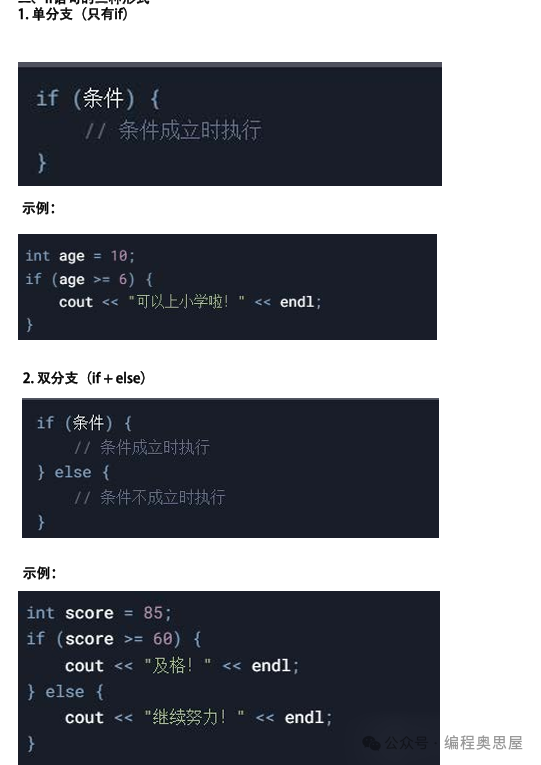
The if statement is the basic structure for implementing branching logic in C++, allowing the program to execute different operations based on different conditions, giving the code flexible logical judgment capabilities.
[Example 3] Comparing Two Integers
[Problem Description] Input two integers x and y, and compare their sizes.
[Input Format] One line, containing two integers x and y, separated by a space.
[Output Format] If x > y, output “greater”; if x and y are equal, output “equal”; if x < y, output “less”.
[Input Example] 5 6
[Output Example] less
[Problem Analysis] The size relationship between x and y has only three possibilities, which can be represented by three statements.
#include<bits/stdc++.h>
using namespace std;
int x,y;
int main()
{
   cin>>x>>y;
   if(x>y)
   cout<<"greater"<<endl;
   if(x==y)
   cout<<"equal"<<endl;
   if(x<y)
   cout<<"less"<<endl;
   return 0;
}
Other Forms of the if Statement
     if(expression A)
     {
       execute statement A
     }
     else if(expression B)
     {
       execute statement B
     }
     else if(expression C)
     {
     execute statement C
     }
     else
     {
     if none of the conditions are met, execute other statements
     }
Program to Determine Odd or Even Numbers
#include<bits/stdc++.h>
using namespace std;
int main()
{
    int x;
    cin>>x;
    if(x%2==0)
    {
    cout<<x<<" is even";
    }
    else
    {
    cout<<x<<" is odd";
    }
}
(4) Ternary Operator
- C++ provides the conditional operator “? :”, which requires three operands and is called the ternary operator, the only ternary operator in C++.
- The general form of the conditional expression is: <expression 1> ? <expression 2> : <expression 3>
- First, evaluate the value of expression 1,
- If its value is true (non-zero), then take the value of expression 2 as the value of the entire expression;
- If its value is false (0), then take the value of expression 3 as the value of the entire expression. For example:
#include<bits/stdc++.h>
using namespace std;
int a,b,c;
int main()
{
 cin>>a>>b>>c;
 (a==b && b==c) ? cout<<"Yes"<<endl : cout<<"No"<<endl;
 return 0;
}
(5) Switch Statement
The if statement is generally used to construct a binary branching structure. If a multi-branch structure is needed, it usually requires nesting. When handling multi-branch structures, C++ also provides another option: the switch statement, which has the general form:
switch(expression)
{
case constant expression 1: statement group 1; [break;]
case constant expression 2: statement group 2; [break;]
……
case constant expression n: statement group n; [break;]
default: statement group n+1]
}
-
Note:
-
(1) The value of the expression can be of integer, character, or enumeration type.
-
(2) The switch statement starts checking from the first case; if it does not match, it continues to the next case.
-
(3) When encountering a break, it exits the switch statement.
-
(4) The default is generally executed when there are no matching items, and is usually placed at the end of the switch statement. If there are no matches during execution, or if the previous matching item does not have a break statement, then the default will be executed.
Read the following program and think about the output result.
#include<bits/stdc++.h>
using namespace std;
int main()
{
int day=5;
 switch(day)
 {
   case 1:cout<<"Monday"<<endl;break;
   case 2:cout<<"Tuesday"<<endl;break;
   case 3:cout<<"Wednesday"<<endl;break;
   case 4:cout<<"Thursday"<<endl;break;
   case 5:cout<<"Friday"<<endl;break;
   case 6:cout<<"Saturday"<<endl;break;
   case 7:cout<<"Sunday"<<endl;break;
 }

return 0;
}
Program Output: Friday. Analysis: Since the value of day is 5, it executes cout<<“Friday”<<endl;break;
Welcome to follow our public account and learn programming knowledge together!

If you like it, please “share” it!
Basic Syntax: Directory =
<Next: C++ Introduction to Programming 04 – Loop Structure Programming