1 Introduction
The Model Context Protocol (MCP) is transforming large language models (LLMs) from isolated inference engines into real-world agents capable of interacting with edge devices, local environments, and sensors. This article provides a practical step-by-step guide on how to deploy a high-security, low-latency MCP server on hardware such as Raspberry Pi, microcontrollers, RISC-V, or NVIDIA Jetson. You will learn how to abstract local sensors into type-safe, permission-controlled structured tools, enabling LLMs to read environmental data in real-time, control actuators, and perform closed-loop operations—all without relying on cloud services.
2 Understanding the Architecture
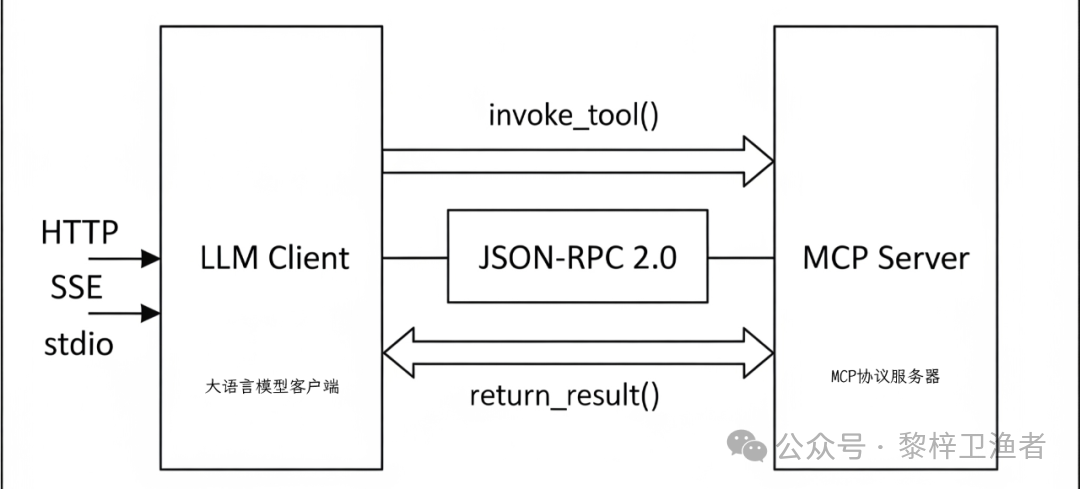
- On the left is the LLM client, which typically communicates with the MCP server using HTTP/SSE/stdio protocols. Among these, HTTP (Hypertext Transfer Protocol) and SSE (Server-Sent Events) are common network communication protocols, while stdio refers to the standard input/output interface for local communication. Note that upon the first connection, the server can push
<span>/mcp/capabilities</span>JSON, listing all tools, JSON-Schema, and required permission scopes. - In the middle is the communication protocol. The invoke_tool() is a function or method called by the client to request the MCP server to execute a certain tool or service; JSON-RPC 2.0 is a remote procedure call (RPC) protocol based on JSON format, version 2.0, used to pass request and response messages between the client and server. Note that following JSON-RPC 2.0 supports session recovery, where the client carries the
<span>sessionToken</span>during<span>initialize</span>, allowing reconnection within 5 minutes without needing to re-handshake. - On the right is the MCP server. It runs on top of the PREEMPT_RT real-time kernel and interacts with hardware through libiio/libgpiod, ensuring <100µs jitter. The MCP server is a server-side component that receives requests from the LLM client and processes these requests; it is responsible for managing the model’s context information, such as the model’s state, inputs, and outputs.
The core of the Model Context Protocol (MCP) follows a bidirectional client-server architecture, where the AI client (typically an LLM agent) interacts with a locally or remotely hosted MCP server to perform real-world operations or retrieve context. The communication protocol used is JSON-RPC 2.0, chosen for its simplicity, low overhead, and method-oriented semantics—making it very suitable for tool-based calls.
2.1 Core Responsibilities of the MCP Server
- Tool Registration and Management maintains an internal tool registry that binds each Python function (e.g.,
<span>read_temp</span>) to a descriptor that conforms to JSON Schema, allowing clients to discover and invoke them. - Protocol Adapter (Transport Adapter) is responsible for handling the underlying network communication of different transport protocols (SSE/HTTP/stdio) and parsing incoming JSON-RPC 2.0 requests into a unified internal call format. This is where your
<span>invoke_tool()</span>occurs in the diagram. - Scheduling and Execution Engine receives parsed requests, looks up the corresponding tool function based on the method name, validates input parameters, executes the function, and captures return values or exceptions.
- Response Serialization re-packages the execution results or error messages into a response message that conforms to the JSON-RPC 2.0 specification and returns it to the client via the protocol adapter.
3 The MCP Server as an Edge Coordinator
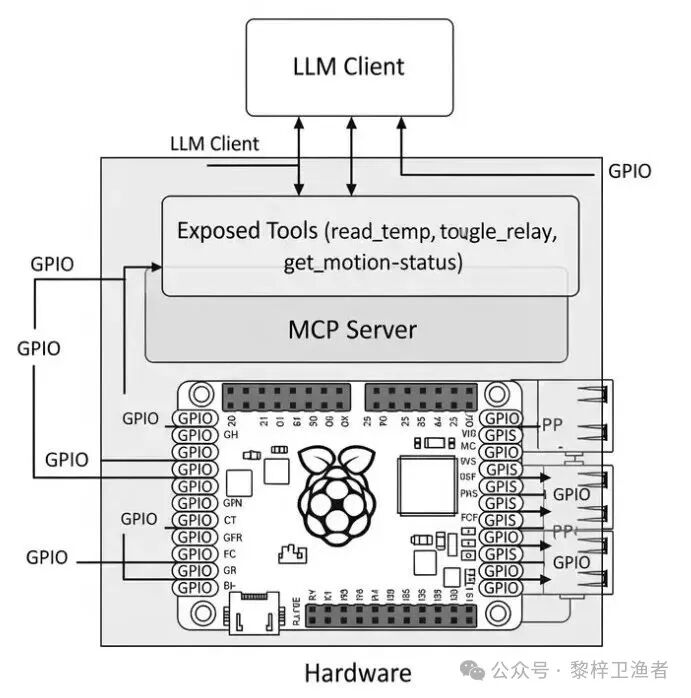
On edge devices such as Raspberry Pi 5, ESP32, or similar microcontroller platforms, the MCP server acts as a runtime abstraction layer for device I/O interfaces.
| Platform | Typical Power Consumption | AI Computing Power (TOPS) | Applicable Scenarios |
|---|---|---|---|
| Raspberry Pi 5 | 6–8 W | 0 (CPU) | General Sensor Gateway |
| RISC-V Milk-V Duo S | < 1W | 0 | Battery-powered, ultra-long standby |
| NVIDIA Jetson Orin Nano | 10–20W | 40 (GPU) | Local LLM + Visual Inference |
Server Responsibilities:
- Expose strong-typed tools via Zod/JSON Schema, such as
<span>read_temp</span>,<span>toggle_relay</span>,<span>get_motion_status</span>. - Support three transports: HTTP/2-WebSocket, SSE, stdio, and built-in TLS 1.3 + ALPN with SPIFFE/SPIRE mTLS identity.
- Implement scope-based ABAC authorization via Open Policy Agent (OPA).
4 Tool Registration and Execution
Each exposed function—whether reading GPIO pins, fetching I2C sensor data, or executing actuator commands—is modeled as a tool. These tools register relevant metadata, such as:
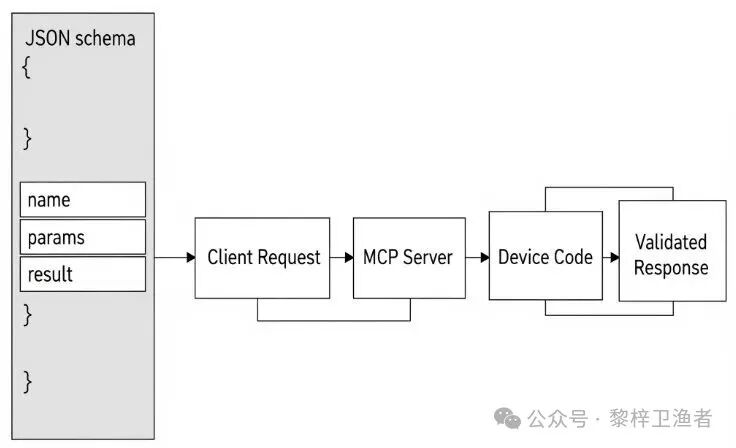
<span>name</span>method identifier (e.g.,<span>"getHumidity"</span>)<span>params</span>structured input schema<span>result</span>typed output schema<span>description</span>natural language explanation for LLM
When the AI agent makes a request, the MCP server calls the corresponding handler, executes device-level code (e.g., using <span>onoff</span> to control GPIO or <span>smbus</span> to control I2C), and returns the validated result.
Factors to consider for actual registration and execution include:
- Input Validation and Schema use Pydantic models or JSON Schema to strictly define and validate input parameters, which is fundamental for production-grade applications. For example, add length and character validation for the
<span>city</span>parameter of<span>get_current_weather</span>. - Error Handling and Retry Mechanism in tool functions, IoT operations (like reading sensors) are likely to fail. The code should include comprehensive
<span>try...except</span>blocks and return structured error messages instead of letting Python exceptions directly throw and crash the server. For unstable operations, implement retry logic. - Resource Management and Cleanup for tools that require hardware initialization (like opening GPIO), consider using context managers (
<span>with</span>statements) or handling in server lifecycle hooks to ensure resources are properly released.
4.1 Example of Tool Registration and Execution
{
  "name": "read_onewire_temp",
  "params": {
    "type": "object",
    "properties": {
      "sensor_id": {"type": "string", "pattern": "^28-[0-9a-f]{12}$"}
    },
    "required": ["sensor_id"]
  },
  "result": {"type": "number"},
  "description": "Read the temperature (°C) of the specified DS18B20 sensor",
  "scope": ["sensor:temp"]
}
Upon receiving the call, the server:
- Validates permissions for
<span>sensor:temp</span>. - Triggers 1-Wire ROM matching via libgpiod, performing a 16-bit CRC check on the scratchpad.
- Returns a floating-point temperature value; if the sensor is offline, returns a structured error
<span>{ "error": "ENODEV", "message": "sensor not found" }</span>.
5 Step-by-Step Deployment Guide
5.0 Prerequisites
- A Raspberry Pi 5 (or Jetson Orin / RISC-V development board)
- Flashed PREEMPT_RT kernel (
<span>uname -r</span>with<span>-rt</span>suffix) - User has joined
<span>gpio</span>,<span>i2c</span><span> groups: </span><code><span>sudo usermod -aG gpio,i2c $USER</span>
5.1 Installation<span>uv</span>: A fast Rust-based Python package manager
Access your Raspberry Pi terminal and run:
curl -LsSf https://astral.sh/uv/install.sh | sh
Then restart the terminal to make <span>uv</span> available in your PATH. <span>uv</span> simplifies Python project setup, providing virtual environments, lock files, and fast dependency management on edge platforms.
5.2 Initialize Your MCP Project
mkdir mcp-edge
cd mcp-edge
uv init
uv pip install fastmcp==2.11.3
uv add requests
This will set up a reproducible project and install the lightweight Python MCP server <span>FastMCP</span> along with the <span>requests</span> for API integration.
5.3 Write the MCP Server Script
Create the file <span>server.py</span>:
import subprocess, re  # Import subprocess and regex modules
import requests  # Import the module for HTTP requests
from mcp.server.fastmcp import FastMCP  # Import FastMCP class from fastmcp

# Initialize an MCP server instance named "Edge MCP Server"
mcp = FastMCP("Edge MCP Server")

# Register a tool to read temperature
@mcp.tool()
def read_temp():
    # Call the Raspberry Pi's vcgencmd command to get temperature info
    out = subprocess.check_output(["vcgencmd", "measure_temp"]).decode()
    # Use regex to extract the temperature value and convert to float
    temp_c = float(re.search(r"[-\\d.]+", out).group())
    return temp_c  # Return the temperature value (Celsius)

# Register a tool to get current weather, receiving city parameter and returning string type result
@mcp.tool()
def get_current_weather(city: str) -> str:
    # Call the wttr.in API to get weather info for the specified city
    return requests.get(f"https://wttr.in/{city}").text

# When the script is run as the main program
if __name__ == "__main__":
    # Run the MCP server using SSE transport
    mcp.run(transport="sse")
<span>read_temp()</span>is used to report the Raspberry Pi’s CPU temperature.<span>get_current_weather(city)</span>is used to fetch real-time weather information.- The server exposes tools via HTTP based on the defined schema using SSE, conforming to MCP standards.
5.4 Run the MCP Server
Start with the following command:
uv run server.py
# or
uvicorn server:app --host 0.0.0.0 --port 8000
The MCP server now exposes its functionality on port 8000 via SSE transport. LLM clients like Claude Desktop or any MCP client can connect directly to invoke these tools.
5.5 Expose the Server Using <span>ngrok</span>
For remote access:
ngrok http 8000 --scheme=https
This will generate a secure endpoint accessible via HTTPS; ideal for connecting remote LLM clients, even in NAT or firewall environments.
6 Enhanced Setup: Additional Tools and Ecosystem Resources
- MCP Inspector → Real-time validation of tool signatures and permission scopes.
- Community Server → PostgreSQL + pgvector (ARM64 wheel precompiled); Node-RED MCP nodes for drag-and-drop orchestration.
- Real-time Telemetry → Send
<span>{"type":"stream","values":[...]}</span>, LLM can subscribe and plot.
7 Security Considerations
Deploying the MCP server at the edge introduces potential risks. Research has identified vulnerabilities such as tool poisoning, puppet attacks, and malicious resource exploitation from infected MCP servers. To mitigate these threats:
- Enterprise Security Framework recommends using threat modeling, formal audits, and access control safeguards when deploying MCP systems in production environments.
- MCP Guardian is a security-first architecture that provides authentication, rate limiting, logging, tracing, and firewall scanning capabilities to protect MCP-based workflows.
Applying these measures is crucial, especially when exposing tools to external clients or over public networks.
| Threat Scenario | Mitigation Measures |
|---|---|
| Tool injection of malicious scripts | SPIFFE/SPIRE workload identity + OPA whitelisting |
| SSE plaintext sniffing | TLS 1.3 + ALPN h2; disable HTTP/1.1 fallback |
| Sensor offline DoS | Server returns structured errors, LLM triggers graceful degradation |
| Supply chain poisoning | <span>uv.lock</span> verifies wheel hash; Reproducible Build |
8 Benefits of Edge AI
This architecture decouples AI inference from hardware interaction, while supporting low-latency control loops. By embedding the MCP server directly into edge hardware:
- Inference Localization— LLMs can issue context-specific commands without cloud round trips.
- Data Privacy— Sensor streams are processed within the device, reducing exposure risks.
- Recovery Simplified— If a tool fails (e.g., sensor disconnection), the server can return a structured error state.
Moreover, this approach supports streaming results (e.g., for telemetry or monitoring) and persistent connections, enabling continuous data flows for LLMs that require time-sensitive or feedback control.
9 Personal Insights
Running a PREEMPT_RT + SPIFFE + OPA hardened MCP server on edge devices allows LLMs to achieve true “millisecond response + enterprise-grade security.” As community support for RISC-V and Jetson improves, developers should prioritize reproducible <span>uv.lock</span> and Nix flake to ensure bit-by-bit consistency from CI to field, and always enable mTLS and a least privilege model for services exposed to the public network.