Twinko AI | Microsoft
This article systematically organizes various AI agent orchestration patterns, providing a reference for architects and developers when building multi-agent (AI Agent) systems. As the capabilities of language models enhance, a single agent struggles to handle complex tasks, making multi-agent collaboration a trend. The article details five core patterns: Sequential Orchestration (linear dependencies, stepwise refinement), Concurrent Orchestration (multi-perspective parallel processing), Group Chat Orchestration (collaborative decision-making through shared dialogue), Handoff Orchestration (dynamic task routing), and Autonomous Orchestration (open-ended task dynamic planning and execution). Each pattern is combined with typical scenarios, advantages, applicable conditions, and pitfalls to help readers choose the appropriate architecture based on task characteristics. The article also covers implementation considerations, including context window limitations, reliability, security, observability, and testing strategies, and warns against common anti-patterns.
• • •
Original Title: AI agent orchestration patterns
Original Link:
https://learn.microsoft.com/en-us/azure/architecture/ai-ml/guide/ai-agent-design-patterns
Publication Date: July 18, 2025
AI Agent Orchestration Patterns
As architects and developers, designing workloads to fully leverage language model capabilities has made AI agent systems increasingly complex. These systems often exceed the capabilities of a single agent, even if that agent has numerous tools and knowledge sources. Instead, these systems utilize multi-agent orchestration to reliably handle complex collaborative tasks. This guide covers the fundamental orchestration patterns of multi-agent architectures and helps you choose the approach that fits specific needs.
Overview
When using multiple AI agents, complex problems can be broken down into specialized work units or knowledge units. You assign each task to a dedicated AI agent with specific capabilities. These approaches are similar to strategies in human teamwork. Compared to a single holistic agent solution, using multiple agents has several advantages.
- Specialization: A single agent can focus on a specific domain or function, reducing the complexity of code and prompts.
- Scalability: Agents can be added or modified without redesigning the entire system.
- Maintainability: Testing and debugging can be focused on individual agents, reducing the complexity of these tasks.
- Optimization: Each agent can use different models, task-solving methods, knowledge, tools, and computations to achieve its results.
The patterns in this guide demonstrate mature methods for coordinating multiple agents to achieve desired outcomes. Each pattern is optimized for different types of coordination requirements. These AI agent orchestration patterns complement and extend traditional cloud design patterns by addressing the unique challenges of coordinating autonomous components in AI-driven workloads.
Sequential Orchestration
The sequential orchestration pattern links AI agents in a predefined linear order. Each agent in the sequence processes the output of the previous agent, creating a specialized transformation pipeline.
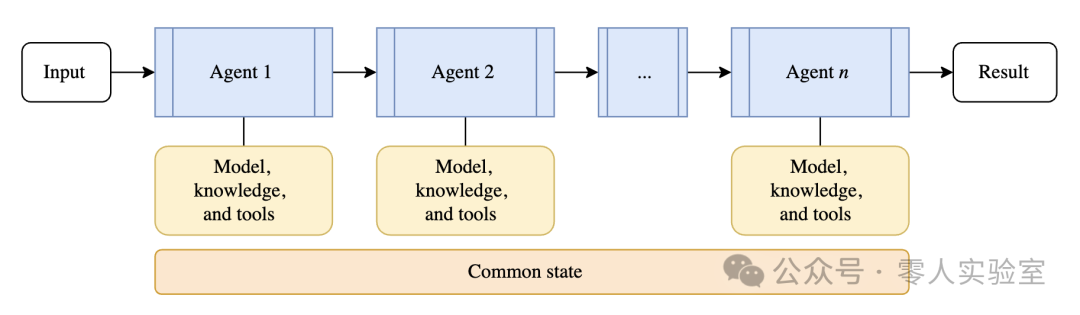
The diagram shows several sections with arrows and connecting lines. An arrow points from “Input” to “Agent 1”. A line connects “Agent 1” to a section labeled “Models, Knowledge, and Tools”. An arrow points from “Agent 1” to “Agent 2”. A line connects “Agent 2” to a section labeled “Models, Knowledge, and Tools”. An arrow points from “Agent 2” to a box with ellipses. An arrow points from this box to “Agent n”. A line connects “Agent n” to a section labeled “Models, Knowledge, and Tools”. An arrow points from “Agent n” to “Results”. A section labeled “Common State” spans from the “Agent 1” section to the “Agent n” section.
The sequential orchestration pattern addresses problems that require stepwise processing, where each stage builds on the previous one. It is suitable for workflows with clear dependencies and improves output quality through stepwise refinement. This pattern is similar to the pipeline and filter cloud design pattern, but it uses AI agents instead of custom-coded processing components. The choice of which agent to call next is deterministically defined in the workflow, rather than being determined by the selection of agents during the process.
When to Use Sequential Orchestration
Consider the sequential orchestration pattern in the following scenarios:
- Multi-stage processes with clear linear dependencies and predictable workflow progress.
- Data transformation pipelines where each stage adds specific values relied upon by the next stage.
- Workflow stages that cannot be parallelized.
- Progressive refinement requirements, such as drafting, reviewing, and polishing workflows.
- You understand the availability and performance characteristics of each AI agent in the pipeline, and the failure or delay of one AI agent’s processing is tolerable for completing the entire task.
When to Avoid Sequential Orchestration
Avoid using this pattern in the following scenarios:
- Stages are entirely parallel. You can parallelize them without affecting quality or causing shared state contention.
- The process contains only a few stages that a single AI agent can effectively complete.
- Early stages may fail or produce low-quality output, and there is no reasonable way to prevent subsequent steps from processing accumulated erroneous output.
- AI agents need to collaborate rather than hand off work.
- The workflow requires backtracking or iteration.
- You need dynamic routing based on intermediate results.
Sequential Orchestration Example
A law firm’s document management software uses sequential agents to generate contracts. This intelligent application processes requests through a pipeline consisting of four specialized agents. The sequential and predefined pipeline steps ensure that each agent uses the complete output from the previous stage.
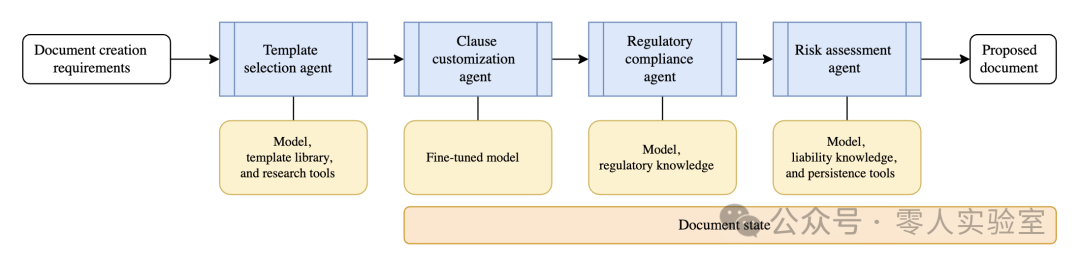
The diagram shows several sections with arrows and connecting lines. An arrow points from “Document Creation Request” to “Template Selection Agent”. A line connects “Template Selection Agent” to a section labeled “Models, Template Library, and Research Tools”. An arrow points from “Template Selection Agent” to “Terms Customization Agent”. A line connects “Terms Customization Agent” to a section labeled “Fine-tuned Model”. An arrow points from “Terms Customization Agent” to “Regulatory Compliance Agent”. A line connects “Regulatory Compliance Agent” to a section labeled “Models, Regulatory Knowledge”. An arrow points from “Regulatory Compliance Agent” to “Risk Assessment Agent”. A line connects “Risk Assessment Agent” to a section labeled “Models, Liability Knowledge, and Persistence Tools”. An arrow points from “Risk Assessment Agent” to a section labeled “Proposed Document”. A section labeled “Document Status” spans from the “Terms Customization Agent” to the “Proposed Document” section.
- Template Selection Agent receives client specifications, such as contract type, jurisdiction, and parties involved, and selects the appropriate base template from the firm’s library.
- Terms Customization Agent receives the selected template and modifies standard terms based on negotiated business terms (including payment schedules and liability limitations).
- Regulatory Compliance Agent reviews the customized contract against applicable laws and industry-specific regulations.
- Risk Assessment Agent conducts a comprehensive analysis of the complete contract. It assesses liability risks and dispute resolution mechanisms while providing risk ratings and protective language suggestions.
Concurrent Orchestration
The concurrent orchestration pattern runs multiple AI agents simultaneously on the same task. This approach allows each agent to provide independent analysis or processing from its unique perspective or area of expertise.
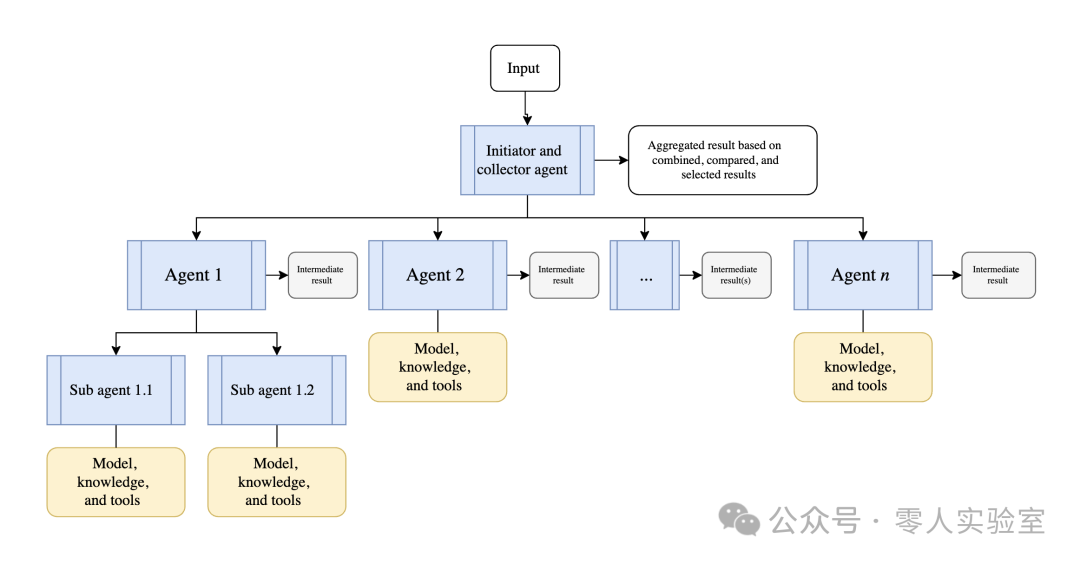
The image contains three main sections. In the top section, an arrow points from “Input” to “Launcher and Collector Agent”. An arrow points from “Launcher and Collector Agent” to a section labeled “Aggregated Results Based on Combination, Comparison, and Selection Results”. A line connects “Launcher and Collector Agent” to a line that connects to four sections. These sections are “Agent 1”, “Agent 2”, an unlabeled section with ellipses, and “Agent n”. An arrow points from “Agent 1” to “Intermediate Results”. A line from “Agent 1” splits into two streams. The first stream shows a section labeled “Sub-agent 1.1” and a section labeled “Models, Knowledge, and Tools”. The second stream shows “Sub-agent 1.2” and a section labeled “Models, Knowledge, and Tools”. An arrow points from “Agent 2” to “Intermediate Results”. A line connects “Agent 2” to a section labeled “Models, Knowledge, and Tools”. An arrow points from the unlabeled section with ellipses to “Intermediate Results”. An arrow points from “Agent n” to “Intermediate Results”. A line connects “Agent n” to a section labeled “Models, Knowledge, and Tools”.
This pattern addresses scenarios where you need diverse insights or approaches to the same problem. Unlike sequential processing, all agents work in parallel, reducing overall runtime and providing comprehensive coverage of the problem space. This orchestration pattern is similar to the fan-out/fan-in cloud design pattern. The results of each agent are typically aggregated to return a final result, but this is not required. Each agent can independently generate its own results within the workload, such as calling tools to complete tasks or updating different data stores in parallel.
Agents operate independently and do not pass results to each other. Agents can call additional AI agents as part of their independent processing using their orchestration methods. Available agents must know which agents are available for processing. This pattern supports deterministic calls to all registered agents and dynamically selects which agents to call based on task requirements.
When to Use Concurrent Orchestration
Consider the concurrent orchestration pattern in the following scenarios:
- Tasks that can run in parallel using a fixed set of agents or dynamically selected AI agents based on specific task requirements.
- Tasks that benefit from multiple independent perspectives or different expertise (e.g., technical, business, and creative approaches), all contributing to the same problem. This collaboration often occurs in the following multi-agent decision-making techniques:
- Brainstorming
- Collective reasoning
- Arbitration and voting-based decision-making
- Time-sensitive scenarios where parallel processing can reduce latency.
When to Avoid Concurrent Orchestration
Avoid using this orchestration pattern in the following scenarios:
- Agents need to build on each other’s work or require cumulative context in a specific sequence.
- Tasks require a specific order of operations or deterministic, reproducible results in a defined sequence.
- Resource constraints (e.g., model quotas) make parallel processing inefficient or impossible.
- Agents cannot reliably coordinate changes to shared state or external systems when running simultaneously.
- There is no clear conflict resolution strategy to handle contradictory or conflicting results from each agent.
- The result aggregation logic is too complex or degrades result quality.
Concurrent Orchestration Example
A financial services company built an intelligent application that uses parallel agents specializing in different types of analysis to simultaneously evaluate the same stock. Each agent contributes insights from its area of expertise, providing diverse, time-sensitive input for rapid investment decisions.
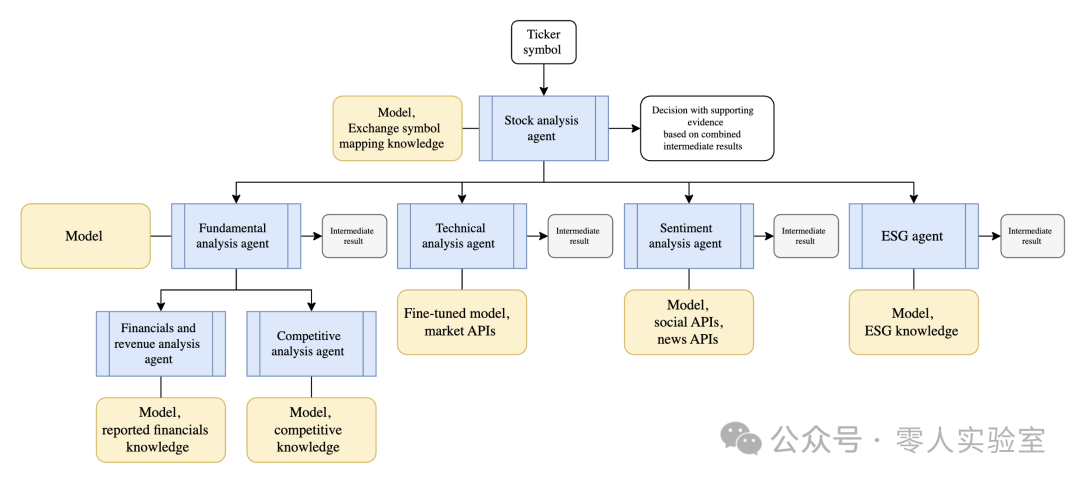
The image contains three main sections. In the top section, an arrow points from “Stock Code” to “Stock Analysis Agent”. A line connects “Models, Exchange Symbol Mapping Knowledge” to “Stock Analysis Agent”. An arrow points from “Stock Analysis Agent” to a section labeled “Decision Based on Intermediate Results and Supporting Evidence”. A line connects “Stock Analysis Agent” to a line that points to four independent sections. These sections are four independent processes: “Fundamental Analysis Agent”, “Technical Analysis Agent”, “Sentiment Analysis Agent”, and “ESG Agent”. A line connects “Models” to the “Fundamental Analysis Agent” process. An arrow points from the “Fundamental Analysis Agent” process to “Intermediate Results”. A line from the “Fundamental Analysis Agent” process splits into two processes: “Financial and Revenue Analysis Agent” and “Competitive Analysis Agent”. A line connects “Financial and Revenue Analysis Agent” to a section labeled “Models, Report Financial Knowledge”. A line connects “Competitive Analysis Agent” to a section labeled “Models, Competitive Knowledge”. An arrow points from “Technical Analysis Agent” to “Intermediate Results”. A line connects “Technical Analysis Agent” to a section labeled “Fine-tuned Model, Market API”. An arrow points from “Sentiment Analysis Agent” to “Intermediate Results”. A line connects “Sentiment Analysis Agent” to a section labeled “Models, Social API, News API”. An arrow points from “ESG Agent” to “Intermediate Results”. A line connects “ESG Agent” to a section labeled “Models, ESG Knowledge”.
The system processes stock analysis requests by assigning the same stock code to four parallel running specialized agents.
- Fundamental Analysis Agent evaluates financial statements, revenue trends, and competitive positioning to assess intrinsic value.
- Technical Analysis Agent examines price patterns, volume indicators, and momentum signals to identify trading opportunities.
- Sentiment Analysis Agent processes news articles, social media mentions, and analyst reports to gauge market sentiment and investor confidence.
- Environmental, Social, and Governance (ESG) Agent reviews environmental impact, social responsibility, and governance practice reports to assess sustainability risks and opportunities.
These independent results are then combined into a comprehensive investment recommendation, enabling portfolio managers to make informed decisions quickly.
Group Chat Orchestration
The group chat orchestration pattern enables multiple agents to solve problems, make decisions, or validate work by participating in a shared dialogue thread, where they collaborate through discussion. A chat manager coordinates the process by determining which agents can respond next and managing different interaction modes (from collaborative brainstorming to structured quality gates).
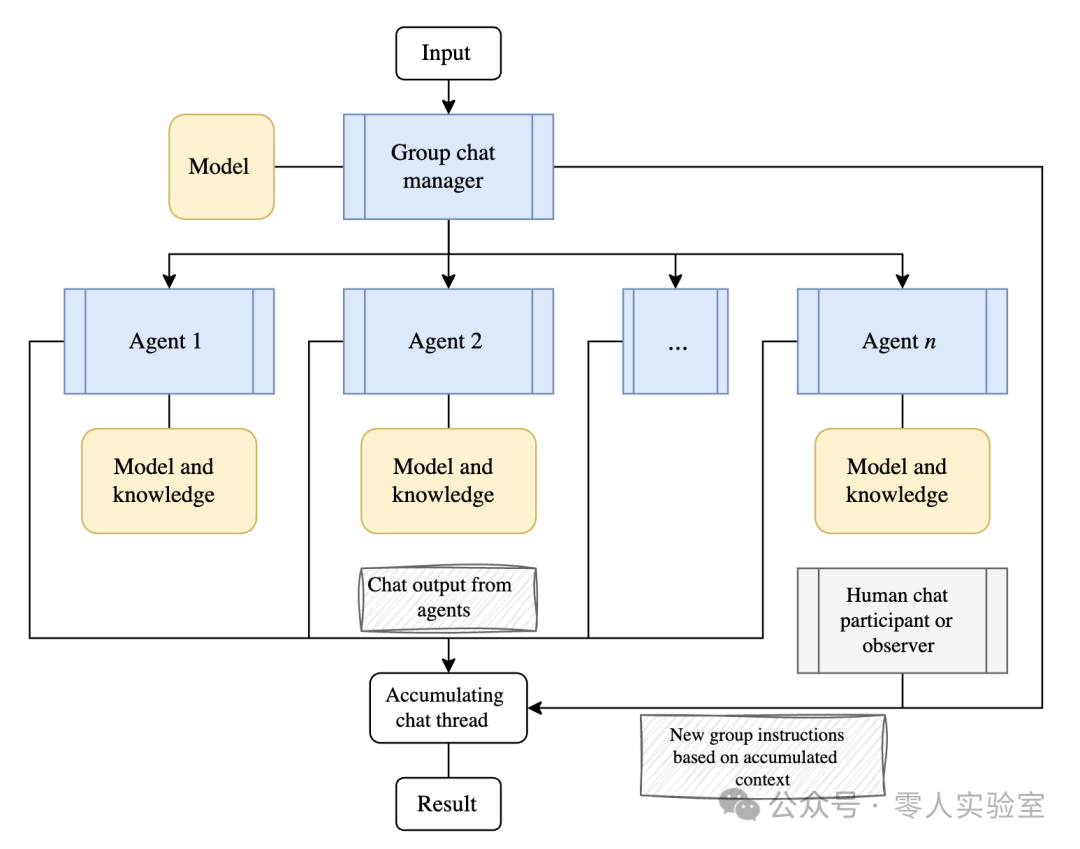
The diagram shows several sections with arrows and connecting lines. An arrow points from “Input” to “Group Chat Manager”. An arrow starts from “Models” and passes through “Group Chat Manager” to “Cumulative Chat Thread”. A section below this line reads “New Group Instructions Based on Cumulative Context”. A line connects to the “Human Chat Participants or Observers” section. An arrow points from “Group Chat Manager” to “Agent 2”. A bidirectional arrow connects “Agent 1”, an unlabeled box with ellipses, and “Agent n”. A line connects “Agent 1”, “Agent 2”, the unlabeled box, and “Agent n”. A line connects “Agent 1” to “Models and Knowledge”. A line connects “Agent 2” to “Models and Knowledge”. A line connects “Agent n” to “Models and Knowledge”. An arrow points from the “Chat Output from Agents” section to “Cumulative Chat Thread”. A line connects “Cumulative Chat Thread” to “Results”.
This pattern addresses scenarios best suited for decision-making through group discussion. These scenarios may include collaborative ideation, structured validation, or quality control processes. The pattern supports various interaction modes, from free-flowing brainstorming to formal review workflows with fixed roles and approval gates.
This pattern is particularly suitable for “Human-in-the-loop” scenarios, where humans can choose to take on the role of dynamic chat manager and guide the conversation toward productive outcomes. In this orchestration pattern, agents are typically in read-only mode. They do not use tools to make changes to the running system.
When to Use Group Chat Orchestration
Consider group chat orchestration when your scenario can be resolved through spontaneous or guided collaboration or iterative “maker-checker” loops. All these methods support real-time human oversight or participation. Because all agents and humans in the loop send outputs to a single cumulative thread, this pattern provides transparency and auditability.
Collaborative Scenarios
- Creative brainstorming sessions where agents complement each other with different perspectives and knowledge sources.
- Decision-making processes that benefit from debate and consensus-building.
- Decision scenarios that require iterative refinement through discussion.
- Multidisciplinary issues requiring cross-functional dialogue.
Validation and Quality Control Scenarios
- Quality assurance requirements involving structured review processes and iterations.
- Compliance and regulatory validation requiring multiple expert perspectives.
- Content creation workflows requiring editorial review, clearly distinguishing creation from validation.
When to Avoid Group Chat Orchestration
Avoid using this pattern in the following scenarios:
- Simple task delegation or linear pipeline processing is sufficient.
- Real-time processing requirements make discussion overhead unacceptable.
- Hierarchical decision-making or deterministic workflows that do not require discussion are more appropriate.
- The chat manager lacks an objective way to determine if a task is complete.
Managing the dialogue process and preventing infinite loops requires careful attention, especially as more agents are added, making control more challenging. To maintain effective control, consider limiting group chat orchestration to three or fewer agents.
Maker-Checker Loops
The “maker-checker” loop is a specific type of group chat orchestration where one agent (the maker) creates or proposes some content, while another agent (the checker) critically evaluates the output. This pattern is iterative, with the checker agent pushing the conversation back to the maker agent for updates and repeating the process. While the group chat pattern does not require agents to take turns chatting, the maker-checker loop necessitates a formally driven turn-taking sequence by the chat manager.
Group Chat Orchestration Example
A city parks and recreation department uses software that includes group chat orchestration to evaluate new park development proposals. The software reads proposal drafts, and multiple specialized agents debate different community impact perspectives and strive to reach a consensus on the proposal. This process occurs before the proposal opens for community review to help predict potential feedback.
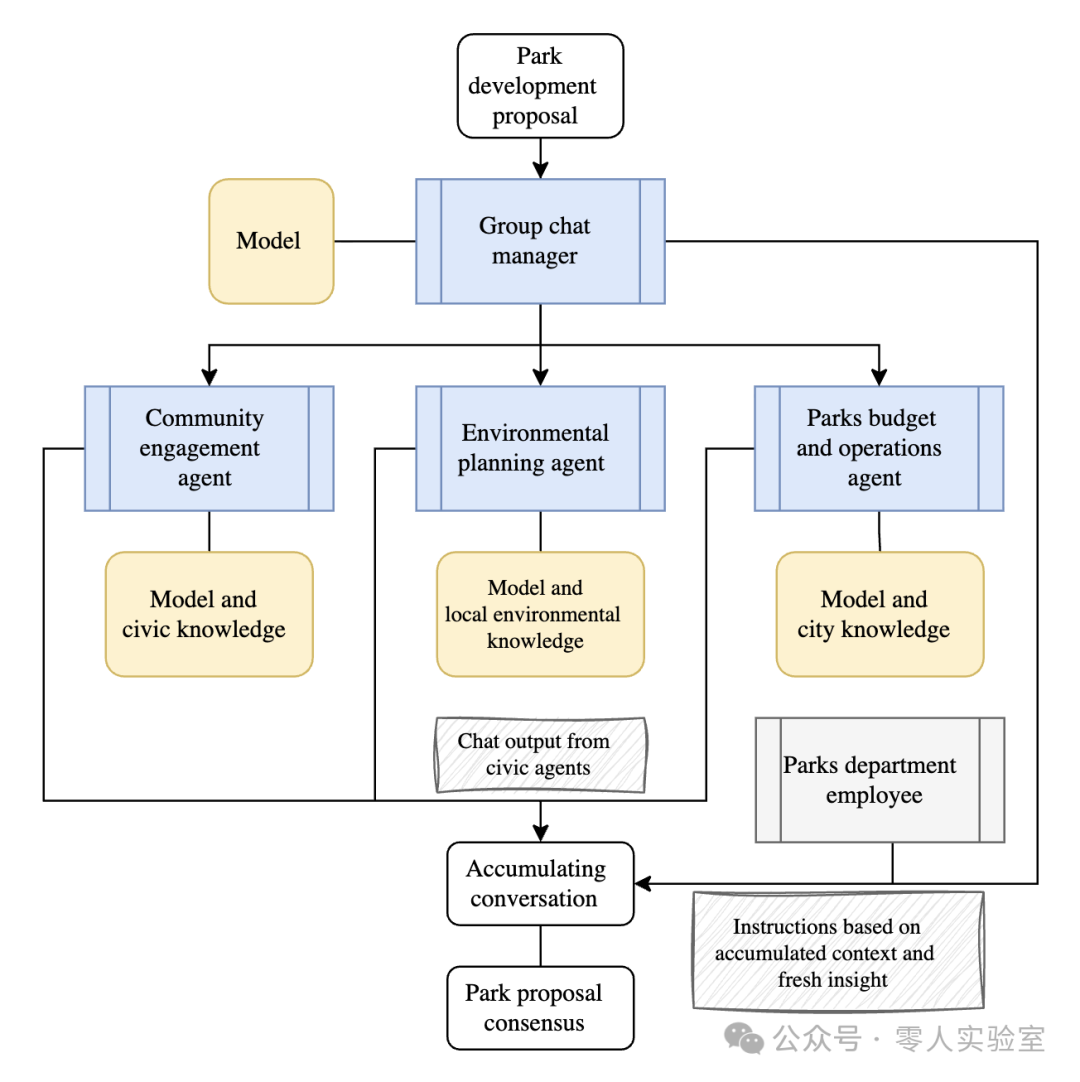
The diagram shows several sections with arrows and connecting lines. An arrow points from “Park Development Proposal” to “Group Chat Manager”. A line starts from “Models” and passes through “Group Chat Manager” to “Cumulative Dialogue”. A line connects “Parks Department Staff” to this line. Below this section, a part reads “Instructions Based on Cumulative Context and New Insights”. An arrow points from “Group Chat Manager” to “Environmental Planning Agent”. A bidirectional arrow connects “Community Engagement Agent” and “Parks Budget and Operations Agent”. A line connects “Community Engagement Agent” to both “Environmental Planning Agent” and “Parks Budget and Operations Agent”. A line connects “Community Engagement Agent” to a section labeled “Models and Citizen Knowledge”. A line connects “Environmental Planning Agent” to a section labeled “Models and Local Environmental Knowledge”. An arrow points from “Community Agent’s Chat Output” section to “Cumulative Dialogue”. A line connects “Cumulative Dialogue” to “Parks Proposal Consensus”. A line connects “Parks Budget and Operations Agent” to a section labeled “Models and City Knowledge”.
The system processes park development proposals by initiating group consultations with specialized municipal agents, who participate in the task from multiple citizen perspectives.
- Community Engagement Agent evaluates accessibility requirements, anticipated resident feedback, and usage patterns to ensure equitable community access.
- Environmental Planning Agent assesses ecological impacts, sustainability measures, local vegetation displacement, and compliance with environmental regulations.
- Budget and Operations Agent analyzes construction costs, ongoing maintenance expenses, staffing requirements, and long-term operational sustainability.
The chat manager facilitates structured debates, where agents challenge proposals and defend their reasoning. Parks department staff participate in the chat thread to provide real-time insights and respond to agents’ knowledge requests. This process allows staff to update the original proposal to address identified issues and better prepare for community feedback.
Handoff Orchestration
The handoff orchestration pattern allows dynamic delegation of tasks between specialized agents. Each agent can assess the task at hand and decide whether to handle it directly or transfer it to a more suitable agent based on context and requirements.
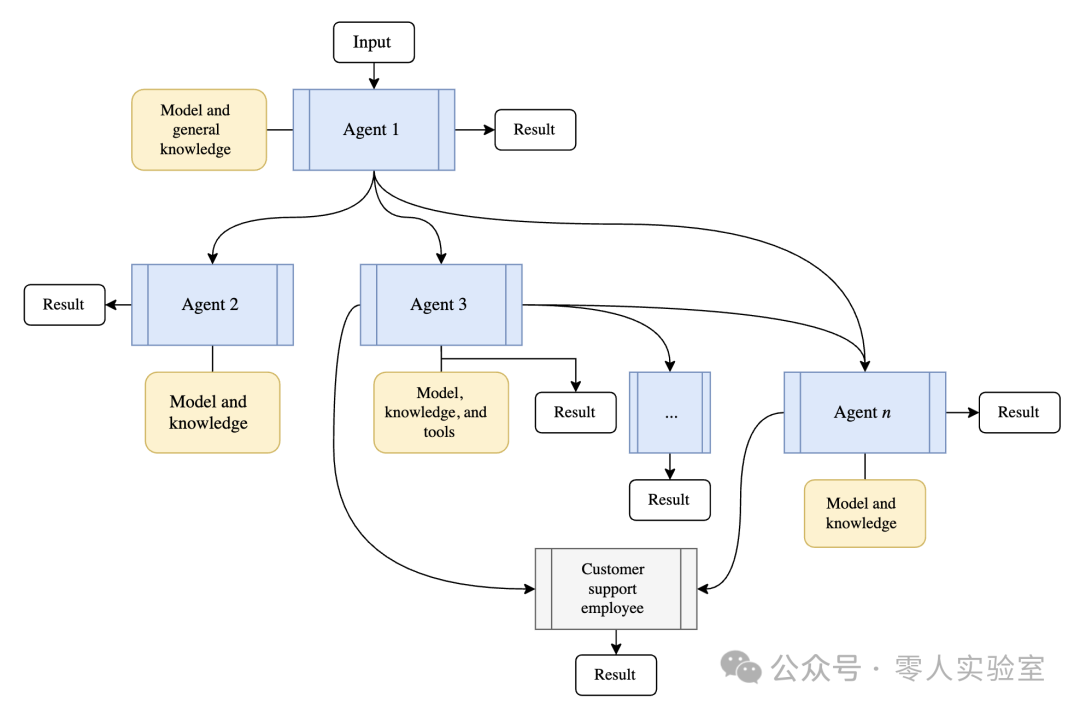
The image shows five key sections. The “Agent 1” section includes input, models, and general knowledge sections, as well as results. The “Agent 2” section includes results and models and knowledge sections. The “Agent 3” section includes models, knowledge and tools sections, results, and an unlabeled section connected to results. The “Agent n” section includes models and knowledge sections and results. The “Customer Support Staff” section includes results. Curved arrows flow from one agent to another and to customer support staff.
This pattern addresses scenarios where the best agent is unknown or task requirements become clear only during processing. It enables intelligent routing and ensures tasks reach the most capable agent. Agents in this pattern typically do not work in parallel. Control fully transfers from one agent to another.
When to Use Handoff Orchestration
Consider the agent handoff pattern in the following scenarios:
- Tasks requiring expertise or tools, but the number or order of required agents cannot be predetermined.
- Scenarios where expertise needs arise during processing, leading to dynamic task routing based on content analysis.
- Problems spanning multiple domains that require different experts to operate at once.
- Logical relationships and signals can be predetermined to indicate when an agent reaches its capability limits and which agent should handle the next task.
When to Avoid Handoff Orchestration
Avoid using this pattern in the following scenarios:
- When the appropriate agents and their order are always known in advance.
- Task routing is simple and based on deterministic rules rather than dynamic context windows or dynamic interpretations.
- Suboptimal routing decisions may lead to poor or frustrating user experiences.
- Multiple operations should run in parallel to handle the task.
- Avoiding infinite handoff loops or excessive jumping between agents is challenging.
Agent Handoff Pattern Example
A telecommunications customer relationship management (CRM) solution uses handoff agents in its customer support portal. The initial agent begins assisting the customer but discovers it needs expertise during the conversation. The initial agent hands off the task to the most suitable agent to resolve the customer’s concerns. Only one agent operates on the original input at a time, and the handoff chain produces a single result.
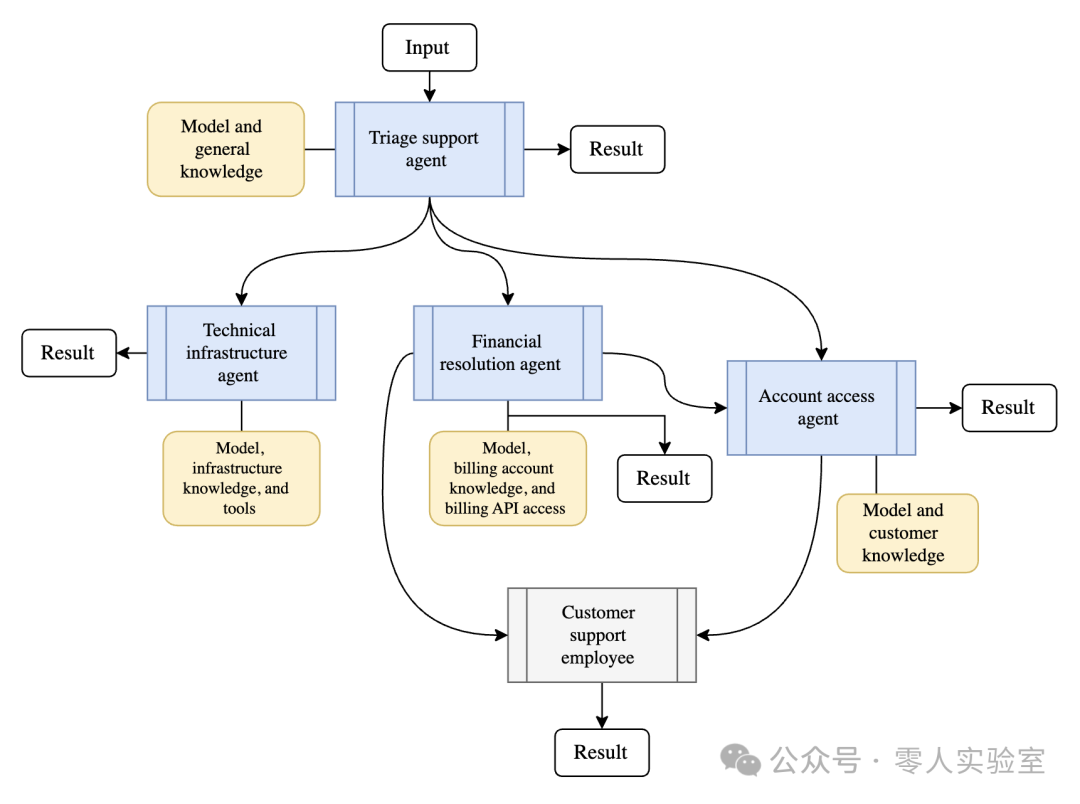
The image includes five key sections. The “Classification Support Agent” section includes models and general knowledge sections, input, and results. The “Technical Infrastructure Agent” section includes results and models, infrastructure knowledge, and tools sections. The “Billing Resolution Agent” section includes models, billing account knowledge, and billing API access sections, as well as results. The “Account Access Agent” section includes results and models and customer knowledge sections. The “Customer Support Staff” section includes results. Curved arrows flow from one agent to another and to “Customer Support Staff”.
In this system, the Classification Support Agent interprets requests and attempts to directly address common issues. When it reaches its limits, it hands off network issues to the Technical Infrastructure Agent, billing disputes to the Billing Resolution Agent, and so on. Further handoffs occur within these agents when the current agent identifies its capability limits and knows another agent can better support the scenario.
Each agent is capable of completing the conversation if it determines the customer has successfully resolved the issue or no other agent can further assist the customer. Some agents are also designed to hand off the user experience to a human support agent when the issue is significant but no AI agent currently has the capability to resolve it.
The diagram highlights a handoff instance. It starts with the classification agent, which hands off the task to the technical infrastructure agent. The technical infrastructure agent then decides to hand off the task to the billing resolution agent, ultimately redirecting the task to customer support.
Autonomous (Magentic) Orchestration
The autonomous (Magentic) orchestration pattern is designed for open-ended complex problems without a predetermined method plan. Agents in this pattern typically have tools that allow them to directly change external systems. The focus is on constructing and documenting methods for problem-solving and implementing those methods. The task list is dynamically built and refined through collaboration between specialized agents and autonomous manager agents within the workflow. As context evolves, the autonomous manager agent builds a task ledger to formulate a method plan containing goals and sub-goals, ultimately defining, executing, and tracking that plan to achieve the desired outcomes.
The image shows the “Manager Agent” section, which includes input and a model. An arrow labeled “Call Agent” points from the “Manager Agent” to “Agent 2”. An arrow labeled “Evaluate Goal Loop” points to the “Task Completion” section. An arrow labeled “Yes” points to the “Results” section, while an arrow labeled “No” points back to the “Manager Agent”. An arrow points from the “Manager Agent” to the “Task and Progress Ledger” section. A line connects the “Task and Progress Ledger” section to the “Human Participant” section. A line with three arrows points to “Agent 1”, “Agent 2”, an unlabeled section, and “Agent n”. A line connects “Agent 1” to the “Models and Knowledge” section. A line connects “Agent 2” to the “Models, Knowledge, and Tools” section. A line connects “Agent n” to the “Models and Tools”. An arrow points from the “Models, Knowledge, and Tools” section to “External Systems”, and from the “Models and Tools” section to “External Systems”.
The manager agent communicates directly with specialized agents to gather information while building and refining the task ledger. It iterates, backtracks, and delegates as needed to construct a complete plan that can be successfully executed. The manager agent frequently assesses whether the original request is fully met or stalled. It updates the ledger to adjust the plan.
In some ways, this orchestration pattern is an extension of the group chat pattern. The autonomous orchestration pattern focuses on agents constructing method plans, while other agents use tools to make changes to external systems rather than relying solely on their knowledge stores to achieve results.
When to Use Autonomous (Magentic) Orchestration
Consider the autonomous (Magentic) pattern in the following scenarios:
- Complex or open-ended use cases without a predetermined solution path.
- Effective solution paths require input and feedback from multiple specialized agents.
- AI systems are required to generate a complete method plan that can be reviewed by humans before or after implementation.
- Agents equipped with tools that interact with external systems, consume external resources, or can cause changes in running systems. A plan that records how these agents are ordered can be presented to users before allowing agents to execute tasks.
When to Avoid Autonomous (Magentic) Orchestration
Avoid using this pattern in the following scenarios:
- Solution paths are developed deterministically or should be handled deterministically.
- There is no requirement to produce a ledger.
- Task complexity is low, and simpler patterns can suffice.
- The work is time-sensitive, as this pattern focuses on constructing and debating feasible plans rather than optimizing final outcomes.
- You anticipate frequent stalls or infinite loops without a clear solution path.
Autonomous (Magentic) Orchestration Example
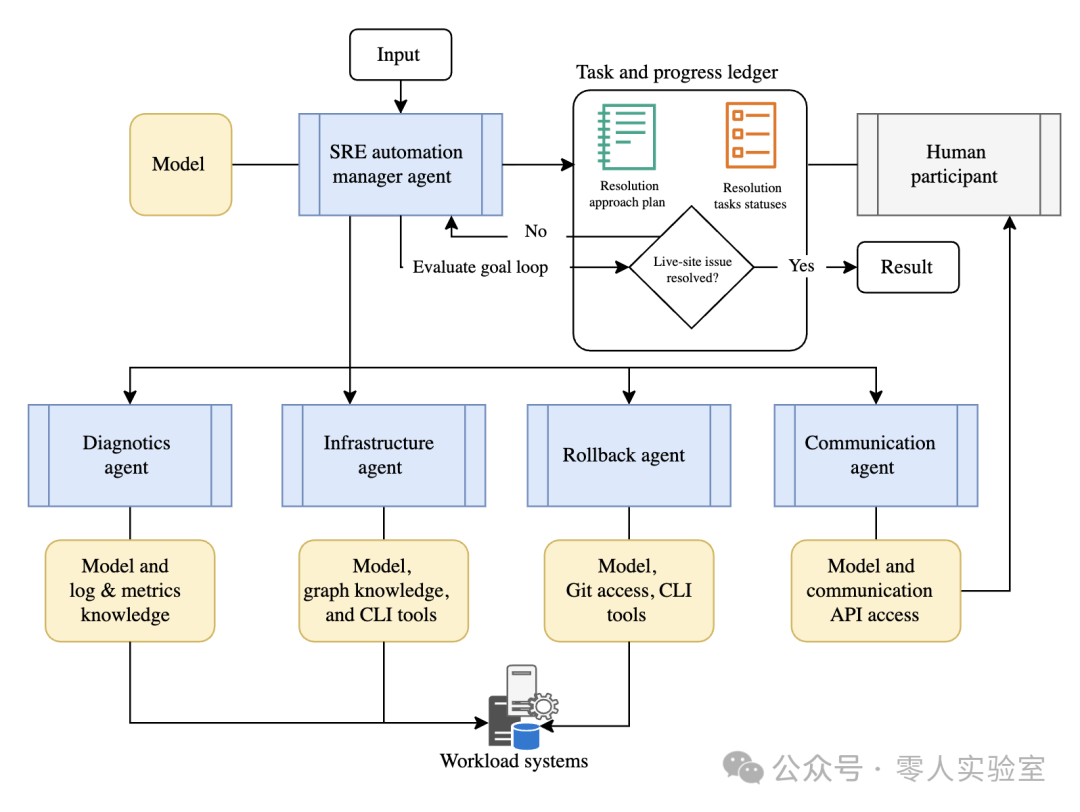
A Site Reliability Engineering (SRE) team built an automated system using autonomous (Magentic) orchestration to handle low-risk incident response scenarios. When a service disruption occurs within the automation scope, the system must dynamically create and implement a remediation plan without knowing the specific steps required in advance.
The image shows the SRE automation manager agent section, which includes input and a model. An arrow from the SRE automation manager agent points to the “Task and Progress Ledger” section. An arrow labeled “Call Knowledge and Action Agents” points to a line that connects to the “Infrastructure”, “Diagnosis”, “Rollback”, and “Communication” agents. An arrow labeled “Evaluate Goal Loop” points from the SRE automation manager agent to the “Real-time Site Issue Resolved” section. An arrow labeled “Yes” points from “Real-time Site Issue Resolved” to the “Results” section. The “Task and Progress Ledger” section includes “Solution Method Plan”, “Solution Task Status”, and “Real-time Site Issue Resolved” sections. An arrow labeled “No” points from “Real-time Site Issue Resolved” back to the SRE automation manager agent. A line from the “Diagnosis Agent” starts, passing through the “Models and Logs and Metrics Knowledge” section, pointing to the “Workload System”. A line from the “Infrastructure Agent” starts, passing through the “Models, Graph Knowledge, and CLI Tools” section, connecting to the “Workload System”. A line from the “Rollback Agent” starts, passing through the “Models, Git Access, CLI Tools” section, pointing to the “Workload System”. A line from the “Communication Agent” starts, passing through the “Models and Communication API Access” section, pointing to the “Human Participant” section.
When the automation system detects a qualifying event, the Autonomous (Magentic) Manager Agent first creates an initial task ledger containing high-level goals such as “Restore Service Availability” and “Identify Root Cause”. The manager agent then consults specialized agents to gather information and refine the remediation plan.
- Diagnosis Agent analyzes system logs, performance metrics, and error patterns to identify potential causes. It reports findings back to the manager agent.
- Based on the diagnosis results, the manager agent updates the task ledger with specific investigation steps and consults the Infrastructure Agent to understand the current system status and available recovery options.
- Communication Agent provides stakeholder notification capabilities, incorporating communication checkpoints and approval gates into the evolving plan based on the SRE team’s escalation procedures.
- As the scenario becomes clearer, if a rollback is needed, the manager agent may add the Rollback Agent to the plan; if the event exceeds the automation scope, it escalates to a human SRE engineer.
Throughout the process, the manager agent continuously refines the task ledger based on new information. It adds, removes, or reorders tasks as the event evolves. For example, if the diagnosis agent identifies a database connection issue, the manager agent may switch the entire plan from deploying rollback strategies to focusing on restoring database connections.
The manager agent monitors for excessive stalls during the service recovery process and prevents infinite remediation loops. It maintains a complete audit trail of the evolving plan and implementation steps, providing transparency for post-incident reviews. This transparency ensures the SRE team can improve workloads and automation systems based on lessons learned.
Implementation Considerations
When implementing any of these agent design patterns, several considerations must be addressed. Reviewing these considerations helps you avoid common pitfalls and ensures your agent orchestration is robust, secure, and maintainable.
Single Agent, Multiple Tools
You can address certain problems by providing a single agent with sufficient tools and knowledge sources. As the number of knowledge sources and tools increases, providing a predictable agent experience becomes challenging. If a single agent can reliably solve your scenario, consider adopting that approach. The overhead of decision-making and flow control often outweighs the benefits of breaking tasks into multiple agents. However, security boundaries, network visibility, and other factors may still render a single agent approach unfeasible.
Deterministic Routing
Some patterns require you to route flows deterministically between agents. Other patterns rely on agents to choose their own routing. If your agents are defined in a no-code or low-code environment, you may not have control over these behaviors. If you define agents in code using SDKs like Semantic Kernel, you will have more control.
Context Window
AI agents typically have limited context windows. This limitation affects their ability to handle complex tasks. When implementing these patterns, determine what context the next agent needs to operate effectively. In some scenarios, you may need the complete original context collected thus far. In other scenarios, a summary or truncated version may be more appropriate. If your agents can work without cumulative context and only need a new set of instructions, adopt that approach instead of providing context that does not aid in completing the agent’s task.
Reliability
These patterns require operational agents and reliable transitions between them. They often lead to classic distributed system issues such as node failures, network partitions, message loss, and cascading errors. Mitigation strategies should be in place to address these challenges. Agents and their coordinators should take the following steps:
- Implement timeout and retry mechanisms.
- Include graceful degradation implementations to handle failures of one or more agents in the pattern.
- Expose errors rather than hiding them, so downstream agents and coordinator logic can respond appropriately.
- Consider circuit breaker patterns for agent dependencies.
- Design agents to be as isolated from each other as possible, ensuring that a single point of failure is not shared across agents. For example:
- Ensure computational isolation between agents.
- Evaluate how using a single Model as a Service (MaaS) model or shared knowledge store can lead to rate limiting when agents run concurrently.
- Use checkpointing features available in SDKs to help recover from interrupted orchestrations, such as from failures or new code deployments.
Security
Implementing appropriate security mechanisms in these design patterns can minimize the risk of AI systems being attacked or data breaches. Protecting communication between agents and limiting each agent’s access to sensitive data are key security design strategies. Consider the following security measures:
- Implement authentication and use secure networks between agents.
- Consider the data privacy implications of agent communication.
- Design audit trails to meet compliance requirements.
- Design agents and their coordinators to follow the principle of least privilege.
- Consider how to handle user identities across agents. Agents must have broad access to knowledge stores to handle requests from all users, but they must not return data that users cannot access. Security trimming must be implemented in each agent in the pattern.
Observability and Testing
Distributing your AI system across multiple agents requires monitoring and testing each agent individually as well as the entire system to ensure proper operation. When designing observability and testing strategies, consider the following recommendations:
- Detect all agent operations and handoffs. Troubleshooting distributed systems is a challenge in computer science, and orchestrated AI agents are no exception.
- Track performance and resource usage metrics for each agent so you can establish baselines, identify bottlenecks, and optimize.
- Design testable interfaces for individual agents.
- Implement integration testing for multi-agent workflows.
Common Pitfalls and Anti-Patterns
Avoid the following common mistakes when implementing agent orchestration patterns:
- Creating unnecessary coordination complexity with complex patterns when simple sequential or concurrent orchestration suffices.
- Adding agents that do not provide meaningful specialization.
- Ignoring the latency impact of multi-hop communication.
- Sharing mutable state between concurrent agents, which can lead to transactionally inconsistent data due to assumptions of synchronized updates across agent boundaries.
- Using deterministic patterns for workflows that are inherently uncertain.
- Using uncertain patterns for workflows that are inherently deterministic.
- Ignoring resource constraints when selecting concurrent orchestration.
- Overconsuming model resources as context windows grow with agents accumulating more information and consulting their models for task progress.
Combining Orchestration Patterns
Applications sometimes require you to combine multiple orchestration patterns to meet their requirements. For example, you might use sequential orchestration for the initial data processing phase and then switch to concurrent orchestration for analyzable tasks. Do not try to make a single workflow fit a single pattern when different stages of the workload have different characteristics and can benefit from using different patterns.
Relationship to Cloud Design Patterns
AI agent orchestration patterns extend and complement traditional cloud design patterns by addressing the unique challenges of coordinating intelligent, autonomous components. Cloud design patterns focus on structural and behavioral issues in distributed systems, while AI agent orchestration patterns specifically address coordination challenges of components with reasoning capabilities, learning behaviors, and non-deterministic outputs.
– THE END –