In embedded system development, the GCC toolchain is an indispensable core tool. It is not just a set of compilers but also supports the entire process of building, debugging, and optimizing programs. This article will systematically introduce you to the various components of the GCC toolchain, its working mechanisms, debugging and optimization techniques, along with practical configurations and typical problem troubleshooting, making it suitable for beginners as well as experienced developers for reference and in-depth optimization.
1. Overview of the GCC Toolchain: More Than Just a Compiler
GCC (GNU Compiler Collection) is typically used in embedded development in the form of cross-compilation, such as <span>arm-none-eabi-gcc</span>, to build programs for ARM Cortex-M series chips.
1.1 Core Components of the Toolchain
| Component | Brief Description | Example Name |
|---|---|---|
| gcc / g++ | C/C++ compiler (including preprocessing and compilation) | arm-none-eabi-gcc |
| as | Assembler, converts assembly code to machine code | arm-none-eabi-as |
| ld | Linker, generates the final ELF executable file | arm-none-eabi-ld |
| objcopy | File format conversion (ELF ↔ HEX/BIN) | arm-none-eabi-objcopy |
| objdump | Disassembler for viewing instructions and section information | arm-none-eabi-objdump |
| nm | Symbol viewing tool | arm-none-eabi-nm |
| gdb | Debugger, supports hardware breakpoints and source debugging | arm-none-eabi-gdb |
| size | View section sizes | arm-none-eabi-size |
🧠 Tip: These tools are used in conjunction, and it is recommended to master basic command-line usage for quick troubleshooting of build or runtime issues.
1.2 What is Cross Compilation?
Cross compilation refers to building programs that can run on a target platform (such as ARM Cortex-M) on a host platform (such as x86).
Key concepts:
-
Triple:
<span>arch-vendor-os-abi</span>(e.g.,<span>arm-none-eabi</span>) -
Sysroot: Provides the root directory for target platform header files and libraries
-
Linker Script: Used for memory layout and section configuration
2. In-Depth Analysis of the Compilation Process and Command Practice
2.1 GCC Four-Stage Compilation Mechanism
GCC divides the code building process into four stages:
<span><span>A[Preprocessing] --> B[Compilation]</span></span><span><span>B --> C[Assembly]</span></span><span><span>C --> D[Linking]</span></span>
A[Preprocessing: .c → .i] –> B[Compilation: .i → .s]
B –> C[Assembly: .s → .o]
C –> D[Linking: .o → .elf (or .out/.exe)]
Each stage can be output separately for debugging:
| Stage | Command Example |
|---|---|
| Preprocessing | <span>gcc -E main.c -o main.i</span> |
| Compilation | <span>gcc -S main.i -o main.s</span> |
| Assembly | <span>gcc -c main.s -o main.o</span> |
| Linking | <span>gcc main.o -o main.elf</span> |
Preprocessing (.i file)

Let’s take a look at this preprocessing file
Using the command:
vim Demo.i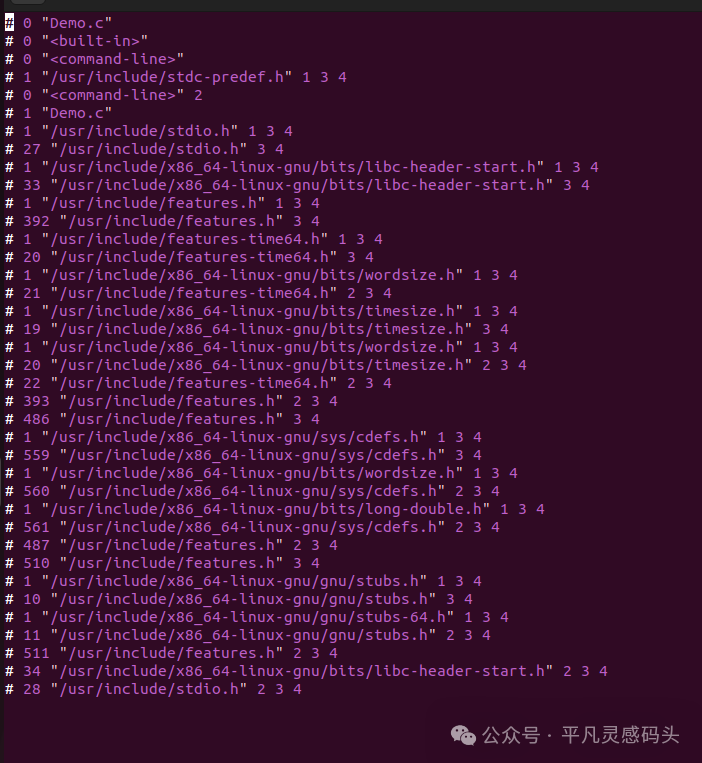
The above content is not fully displayed
Compilation (.s becomes assembly code)

Assembly (.o file becomes binary)

Linking (executable file)

2.2 Common Command Templates (Practical)
# Compile + Link to ELF file
arm-none-eabi-gcc -mcpu=cortex-m4 -mthumb -Og -g3 -Wall \
  -I./inc -L./lib -Tlink.ld main.c -o firmware.elf

# Generate bin file for flashing
arm-none-eabi-objcopy -O binary firmware.elf firmware.bin

# View section sizes
arm-none-eabi-size firmware.elf
3. Development and Debugging: The Most Practical Skills for Practitioners
3.1 Comparison of Compilation Optimization Levels
| Optimization Level | Code Size | Execution Speed | Debugging Friendly | Recommended Use |
|---|---|---|---|---|
<span>-O0</span> |
Maximum | Slow | ★★★★★ | Initial Debugging |
<span>-Og</span> |
Relatively Large | Medium | ★★★★☆ | Daily Development |
<span>-O2</span> |
Relatively Small | Fast | ★★☆☆☆ | Release Version |
<span>-Os</span> |
Minimum | Medium | ★★☆☆☆ | Resource-Constrained Devices |
<span>-O3</span> |
Uncertain | Fastest | ★☆☆☆☆ | Algorithm Intensive Modules |
3.2 Advanced GDB Debugging Usage
<span># gdb_script.gdb Example

target remote :3333

monitor reset halt

load

break main

continue</span>
<span>arm-none-eabi-gdb -x gdb_script.gdb firmware.elf</span>
4. Project Automation: Makefile and CMake Practices
4.1 Standardized Makefile Template
Supports modular compilation and optimization control
<span>CROSS_COMPILE = arm-none-eabi-

CC = $(CROSS_COMPILE)gcc

OBJCOPY = $(CROSS_COMPILE)objcopy

SIZE = $(CROSS_COMPILE)size

SRC_DIR = src

INC_DIR = inc

BUILD_DIR = build

CFLAGS = -mcpu=cortex-m4 -mthumb -Og -g3 -Wall -I$(INC_DIR)

LDFLAGS = -T$(SRC_DIR)/link.ld -Wl,--gc-sections

SRCS = $(wildcard $(SRC_DIR)/*.c)

OBJS = $(patsubst $(SRC_DIR)/%.c,$(BUILD_DIR)/%.o,$(SRCS))

all: $(BUILD_DIR)/firmware.elf

$(BUILD_DIR)/%.o: $(SRC_DIR)/%.c | $(BUILD_DIR)

	$(CC) $(CFLAGS) -c $< -o $@

$(BUILD_DIR)/firmware.elf: $(OBJS)

	$(CC) $(CFLAGS) $(LDFLAGS) $^ -o $@

	$(OBJCOPY) -O binary $@ $(BUILD_DIR)/firmware.bin

	$(SIZE) $@

$(BUILD_DIR):

	mkdir -p $@

clean:

	rm -rf $(BUILD_DIR)</span>
4.2 Using CMake for Cross Compilation Configuration
set(CMAKE_SYSTEM_NAME Generic)
set(CMAKE_SYSTEM_PROCESSOR ARM)
set(CMAKE_C_COMPILER arm-none-eabi-gcc)
set(CMAKE_C_FLAGS "-mcpu=cortex-m4 -mthumb -Og")
set(CMAKE_EXE_LINKER_FLAGS "-T${CMAKE_SOURCE_DIR}/link.ld")
5. Advanced Techniques: Scripts, Attributes, and Linking Details
-
Advanced Use of Linker Scripts: Section protection, function separation
-
GCC Attribute Magic:
__attribute__((section(".fast_code"), noinline))
void fast_func() {}

__attribute__((aligned(32)))
uint8_t aligned_buf[128];
6. Common Errors and Optimization Problem Troubleshooting
| Error Type | Troubleshooting Method | Solution |
|---|---|---|
| undefined reference | <span>nm</span> to check missing symbols |
Check for missing source/library |
| section overflow | <span>size</span> to check section sizes |
Reduce code or modify memory allocation |
| relocation truncated | <span>objdump</span> to check relocations |
Optimize struct/pointer sizes |
| multiple definition | <span>nm</span> to check for duplicate symbols |
Use <span>static</span> / limit included files |