In-Depth Technical Analysis of Linux Partition Tables
1. Basic Concepts and Historical Evolution of Partition Tables
1.1 The Essential Meaning of Storage Device Partitioning
In computer storage systems, the partition table acts as a “library catalog”—it does not directly store books (data) but records the location, size, and attributes of each book (partition). When we insert a hard drive into a Linux system, the kernel needs to understand the logical division of the disk space through the partition table.
// Simplified concept of disk structure
Physical Disk → Partition Table → Multiple Partitions → File System → Directory Structure → File Data
1.2 Evolution of Partition Table Technology
| Era | Technical Standard | Maximum Support | Features | Limitations |
|---|---|---|---|---|
| 1983 | MBR | 2TB | Good compatibility, simple structure | Limited number of partitions, poor security |
| 2010 | GPT | 8ZB | High security, flexible partitioning | Requires UEFI support, poor compatibility with old systems |
MBR (Master Boot Record) is like a traditional paper card catalog:
- • Limited catalog space (only 4 main partition “card slots”)
- • Prone to damage and cannot self-repair
- • Catalog information tightly coupled with book storage locations
GPT (GUID Partition Table) is like a modern electronic catalog system:
- • Almost unlimited number of catalog entries
- • Has backup and checksum mechanisms
- • Catalog physically separated from book storage
2. In-Depth Analysis of MBR Partition Table
2.1 Physical Structure and Data Layout of MBR
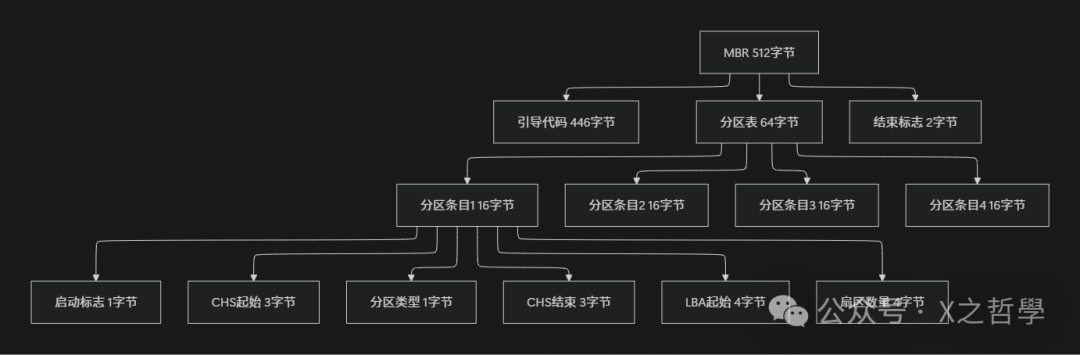
MBR is located in the first 512-byte sector of the disk, and its precise byte-level layout reflects the craftsmanship of early computer design:
// Representation of MBR data structure in Linux kernel
struct msdos_partition {
    u8 boot_ind;        /* 0x80 - Bootable flag */
    u8 head;           /* Starting head */
    u8 sector;         /* Starting sector (low 6 bits) + cylinder high 2 bits */
    u8 cyl;            /* Starting cylinder low 8 bits */
    u8 sys_ind;        /* Partition type identifier */
    u8 end_head;       /* Ending head */
    u8 end_sector;     /* Ending sector */
    u8 end_cyl;        /* Ending cylinder */
    __le32 start_sect; /* Starting sector LBA representation */
    __le32 nr_sects;   /* Total number of sectors */
} __attribute__((packed));

// Complete MBR structure
struct master_boot_record {
    u8 bootstrap[446];                 // Boot program
    struct msdos_partition partitions[4]; // 4 main partition entries
    u16 signature;                     // 0xAA55 end signature
};
Visualization of MBR Layout:
2.2 CHS and LBA Addressing Mechanisms
CHS (Cylinder-Head-Sector) Addressing is like the traditional library’s “floor-shelf-location” numbering:
- • Cylinder corresponds to the floor number
- • Head corresponds to the shelf number
- • Sector corresponds to the position of the book on the shelf
**LBA (Logical Block Addressing)** is like a modern unified numbering system, directly assigning a unique number to each storage unit.
// Conversion formula from CHS to LBA
lba = (cylinder * heads_per_cylinder + head) * sectors_per_track + sector - 1;

// Conversion implementation in Linux kernel
static inline sector_t cis_offset(struct msdos_partition *p)
{
    sector_t offset = get_start_sect(p);

    // Handle nested structures in extended partitions
    if (msdos_is_extended(p->sys_ind)) {
        struct partition *child;
        // Recursively process the extended partition linked list
        // ...
    }
    return offset;
}
2.3 Extended Partition Mechanism: Solving the 4 Partition Limit
The design of the extended partition reflects the “linked list concept” in computer science—when direct entries are insufficient, additional storage space is linked through pointers.
// Core logic for parsing extended partitions
int msdos_partition(struct parsed_partitions *state)
{
    struct msdos_partition *p;
    sector_t first_sector = 0;
    int slot = 1;  // Main partition slot

    // Read MBR
    if (!read_mbr(state, first_sector, &mbr))
        return -1;

    // Parse 4 main partitions
    for (i = 0; i < 4; i++, p++) {
        if (!p->sys_ind)
            continue;  // Empty partition entry

        if (msdos_is_extended(p->sys_ind)) {
            // Found extended partition, start linked list traversal
            parse_extended(state, first_sector, slot);
        } else {
            // Normal main partition
            put_partition(state, slot, first_sector + start, nr_sects);
        }
        slot++;
    }
    return 1;
}
Structure of Extended Partition Linked List:

3. Modern Architecture of GPT Partition Table
3.1 Overall Architecture Design of GPT
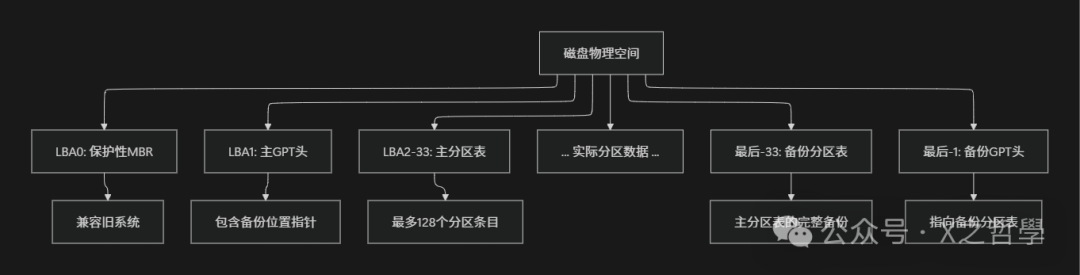
GPT adopts a robust design philosophy of “surrounding front and back, dual protection”:
// GPT partition table header structure
typedef struct gpt_header {
    __le64 signature;           /* "EFI PART" signature */
    __le32 revision;            /* Version number */
    __le32 header_size;         /* Header size (usually 92 bytes) */
    __le32 header_crc32;        /* Header CRC checksum */
    __le32 reserved;            /* Must be 0 */
    __le64 my_lba;              /* LBA where this header is located */
    __le64 alternate_lba;       /* Backup header location */
    __le64 first_usable_lba;    /* First usable LBA */
    __le64 last_usable_lba;     /* Last usable LBA */
    guid_t disk_guid;           /* Disk GUID */
    __le64 partition_entry_lba; /* Starting LBA of partition entry array */
    __le32 num_partition_entries; /* Number of partition entries */
    __le32 sizeof_partition_entry; /* Size of each partition entry */
    __le32 partition_entry_array_crc32; /* CRC of partition entry array */
    // Reserved bytes...
} __attribute__((packed)) gpt_header_t;

// GPT partition entry structure
typedef struct gpt_partition {
    guid_t partition_type_guid;   /* Partition type GUID */
    guid_t unique_partition_guid; /* Unique partition GUID */
    __le64 starting_lba;          /* Starting LBA */
    __le64 ending_lba;            /* Ending LBA */
    __le64 attributes;            /* Attribute flags */
    utf16_le_t partition_name[36]; /* Partition name UTF-16LE */
} __attribute__((packed)) gpt_partition_t;
Panoramic View of GPT Disk Layout:
3.2 GUID Naming System and Partition Attributes
GUID (Globally Unique Identifier) is like the “DNA sequence” of each partition, ensuring uniqueness worldwide:
// GUID handling in Linux
typedef struct {
    __le32 time_low;
    __le16 time_mid;
    __le16 time_hi_and_version;
    u8 clock_seq_hi_and_reserved;
    u8 clock_seq_low;
    u8 node[6];
} guid_t;

// Example of common partition type GUID
static guid_t linux_data_guid = {
    .time_low = cpu_to_le32(0x0fc63daf),
    .time_mid = cpu_to_le16(0x8483),
    .time_hi_and_version = cpu_to_le16(0x4772),
    .clock_seq_hi_and_reserved = 0x8e,
    .clock_seq_low = 0x79,
    .node = {0x3d, 0x69, 0xd8, 0x47, 0x4d, 0x0a}
};  // Linux filesystem data partition
GPT Partition Attribute Flags:
| Bit Position | Flag Name | Meaning |
|---|---|---|
| 0 | System Partition | Partition required by firmware |
| 1 | EFI Hidden | Invisible to EFI firmware |
| 2 | Traditionally Bootable by BIOS | Bootable by traditional BIOS |
| 60 | Read-Only | Partition is read-only |
| 63 | Do Not Auto-Mount | System does not auto-mount |
4. Linux Kernel Partition Handling Framework
4.1 Block Device and Partition Management Architecture
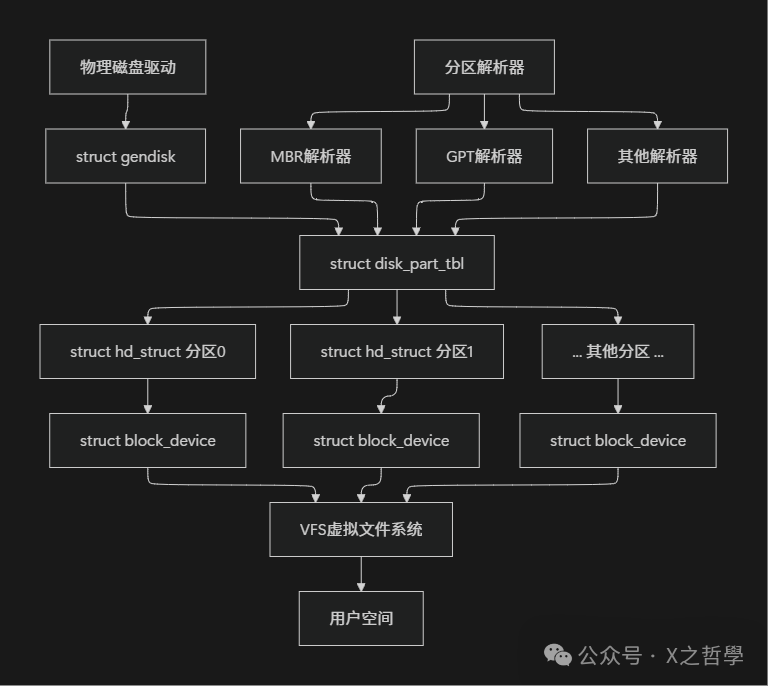
The Linux kernel adopts a layered block device architecture, with the partition management layer acting as the “address translator”:
// Core data structure relationships
struct gendisk → struct disk_part_tbl → struct hd_struct → struct block_device

// Partition descriptor structure
struct hd_struct {
    sector_t start_sect;    // Starting sector
    sector_t nr_sects;      // Number of sectors
    int partno;            // Partition number
    struct device __dev;   // Associated device
    struct block_device *bdev; // Associated block device
    // ...
};

// Disk device structure
struct gendisk {
    int major;                  // Major device number
    int first_minor;           // Starting minor device number
    int minors;               // Number of minor device numbers
    char disk_name[DISK_NAME_LEN]; // Disk name
    struct disk_part_tbl *part_tbl; // Partition table
    struct block_device_operations *fops; // Operation function set
    // ...
};
Linux Partition Management Architecture Diagram:
4.2 Partition Discovery and Registration Mechanism
The kernel uses a “parser plugin” architecture to support multiple partition table formats:
// Partition parser structure
struct parsed_partitions {
    struct gendisk *disk;      // Associated disk
    char name[BDEVNAME_SIZE];  // Device name
    // Partition discovery results...
};

// Partition parsing operation
typedef int (*partition_parser_fn)(struct parsed_partitions *state);

// Registered partition parser linked list
static LIST_HEAD(parsers);

// MBR parser implementation
static struct partition_parser msdos_parser = {
    .owner = THIS_MODULE,
    .name = "msdos",
    .parse_fn = msdos_partition,
};

// GPT parser implementation
static struct partition_parser gpt_parser = {
    .owner = THIS_MODULE,
    .name = "EFI GPT",
    .parse_fn = efi_partition,
};

// Main entry for partition discovery
int rescan_partitions(struct gendisk *disk, struct block_device *bdev)
{
    struct parsed_partitions state;
    int ret = -EINVAL;

    // Initialize state structure
    memset(&state, 0, sizeof(state));
    state.disk = disk;

    // Iterate through all registered parsers
    list_for_each_entry(p, &parsers, list) {
        if (!p->parse_fn)
            continue;

        // Attempt to parse the partition table
        ret = p->parse_fn(&state);
        if (ret > 0) {
            // Parsing successful, register partition
            ret = add_partitions(disk, &state);
            break;
        }
    }

    return ret;
}
5. Practical Example: Custom Partition Table Parser
5.1 Implementing a Simple Memory Partition Table Parser
Let’s create a teaching memory partition parser to demonstrate the complete process of kernel partition handling:
#include <linux/module.h>
#include <linux/genhd.h>
#include <linux/blkdev.h>
#include <linux/fs.h>
#include <linux/slab.h>

// Custom memory partition table structure
struct memory_partition {
    sector_t start;
    sector_t size;
    const char *name;
};

// Example partition definitions
static struct memory_partition demo_partitions[] = {
    { .start = 0,    .size = 100, .name = "mem-boot" },
    { .start = 100,  .size = 500, .name = "mem-root" },
    { .start = 600,  .size = 200, .name = "mem-data" },
    { .start = 800,  .size = 200, .name = "mem-swap" },
};

// Custom partition parsing function
static int memory_partition(struct parsed_partitions *state)
{
    int i;
    sector_t sector_size = get_capacity(state->disk);

    printk(KERN_INFO "Memory partition parser: scanning device %s\n",
           state->name);

    // Check if the device is suitable for our partition scheme
    if (sector_size < 1000) {
        printk(KERN_WARNING "Device too small for memory partitions\n");
        return -ENOSPC;
    }

    // Add each partition to the results
    for (i = 0; i < ARRAY_SIZE(demo_partitions); i++) {
        put_partition(state, i + 1,
                     demo_partitions[i].start,
                     demo_partitions[i].size);

        printk(KERN_INFO "Partition %d: %s [%llu-%llu]\n", i + 1,
               demo_partitions[i].name,
               (unsigned long long)demo_partitions[i].start,
               (unsigned long long)(demo_partitions[i].start +
                                   demo_partitions[i].size - 1));
    }

    return 1; // Successfully found partitions
}

// Partition parser registration structure
static struct partition_parser memory_parser = {
    .owner = THIS_MODULE,
    .name = "memory-demo",
    .parse_fn = memory_partition,
};

static int __init memory_parser_init(void)
{
    int ret;

    printk(KERN_INFO "Registering memory partition parser\n");

    ret = register_partition_parser(&memory_parser);
    if (ret)
        printk(KERN_ERR "Failed to register memory parser: %d\n", ret);
    else
        printk(KERN_INFO "Memory partition parser registered successfully\n");

    return ret;
}

static void __exit memory_parser_exit(void)
{
    unregister_partition_parser(&memory_parser);
    printk(KERN_INFO "Memory partition parser unregistered\n");
}

module_init(memory_parser_init);
module_exit(memory_parser_exit);
MODULE_LICENSE("GPL");
MODULE_DESCRIPTION("Demo Memory Partition Table Parser");
5.2 Principles of User-Space Partition Tool Implementation
Understanding the kernel mechanism allows us to implement user-space partition management tools:
// Core logic of a simplified partition reading tool
#include <stdio.h>
#include <fcntl.h>
#include <unistd.h>
#include <sys/ioctl.h>
#include <linux/fs.h>

int read_partition_table(const char *device) {
    int fd;
    unsigned char mbr[512];

    // Open block device
    fd = open(device, O_RDONLY);
    if (fd < 0) {
        perror("open device failed");
        return -1;
    }

    // Read MBR sector
    if (read(fd, mbr, sizeof(mbr)) != sizeof(mbr)) {
        perror("read MBR failed");
        close(fd);
        return -1;
    }

    // Check MBR signature
    if (mbr[510] != 0x55 || mbr[511] != 0xAA) {
        printf("Invalid MBR signature\n");
        close(fd);
        return -1;
    }

    // Parse partition entries
    for (int i = 0; i < 4; i++) {
        unsigned char *p = mbr + 446 + i * 16;

        if (p[4] == 0) continue; // Empty partition

        printf("Partition %d:\n", i + 1);
        printf("  Bootable: %s\n", (p[0] == 0x80) ? "Yes" : "No");
        printf("  Type: 0x%02x\n", p[4]);

        // Parse LBA starting address and size
        unsigned int start_lba = *(unsigned int*)(p + 8);
        unsigned int size_sectors = *(unsigned int*)(p + 12);

        printf("  Start LBA: %u\n", start_lba);
        printf("  Size: %u sectors (%llu MB)\n",
               size_sectors,
               (unsigned long long)size_sectors * 512 / 1024 / 1024);
    }

    close(fd);
    return 0;
}
6. Debugging and Diagnostic Techniques
6.1 Kernel Debugging Techniques
Dynamic Debug Output:
# Enable partition-related debug information
echo -n 'module block=debug module partitions=debug' > /sys/module/dynamic_debug/control

# View partition messages in the kernel ring buffer
dmesg | grep -i partition

# Real-time monitoring of partition events
udevadm monitor --property --subsystem-match=block
Proc File System Interface:
# View partition information
cat /proc/partitions

# View block device statistics
cat /proc/diskstats

# View mounted partitions
cat /proc/mounts
6.2 User-Space Diagnostic Tools
| Tool Command | Function Description | Usage Example |
|---|---|---|
<span>fdisk -l</span> |
List all partition tables | <span>fdisk -l /dev/sda</span> |
<span>parted -l</span> |
Display GPT and MBR partitions | <span>parted -l</span> |
<span>lsblk</span> |
Tree display of block devices | <span>lsblk -f</span> |
<span>blkid</span> |
Display partition UUID and type | <span>blkid /dev/sda1</span> |
<span>hdparm</span> |
Hard disk parameter tool | <span>hdparm -I /dev/sda</span> |
<span>sgdisk</span> |
GPT operation tool | <span>sgdisk -p /dev/sda</span> |
Advanced Diagnostic Script Example:
#!/bin/bash
# Comprehensive partition diagnostic script

DEVICE=${1:-/dev/sda}

echo "=== Partition Diagnostic Report: $DEVICE ==="
echo

echo "1. Basic partition information:"
fdisk -l $DEVICE 2>/dev/null || echo "fdisk does not support this device"

echo
echo "2. Detailed partition table:"
parted $DEVICE print 2>/dev/null || echo "parted does not support this device"

echo
echo "3. Block device topology:"
lsblk -o NAME,SIZE,TYPE,MOUNTPOINT,FSTYPE $DEVICE

echo
echo "4. File system information:"
blkid $DEVICE?* 2>/dev/null

echo
echo "5. Kernel partition messages:"
dmesg | grep -A5 -B5 $(basename $DEVICE) | tail -20
7. Performance Optimization and Best Practices
7.1 Partition Alignment Optimization
4K Sector Alignment Issues are like “parking space planning”:
- • Misaligned parking (not aligned) can lead to wasted space and performance degradation
- • Correct alignment allows each I/O operation to fully land within physical sectors
# Check partition alignment
parted /dev/sda align-check optimal 1

# Correct way to create aligned partitions
parted -s /dev/sda mklabel gpt
parted -s /dev/sda mkpart primary 1MiB 100%

# Alignment calculation principle
Starting sector = ceil(previous partition ending sector / alignment granularity) × alignment granularity
7.2 Partition Strategy Recommendations
| Usage Scenario | Recommended Partition Scheme | Reason |
|---|---|---|
| Desktop Systems | GPT + 3 Partitions | Simple and easy to manage, supports large disks |
| Servers | GPT + LVM | High flexibility, easy to expand |
| Embedded Devices | MBR + Read-Only Root Partition | Good compatibility, high security |
| Virtualization | Pass-through Physical Partitions | Optimal performance, fine control |
8. Conclusion
Layered Abstraction: Hardware sectors → Partition tables → Block devices → File systems
Plugin Architecture: The kernel supports multiple partition formats through a parser linked list
Data Consistency: CRC checks and backup mechanisms ensure partition table safety
Backward Compatibility: Protective MBR ensures coexistence of new and old systems