simd
SIMD stands for Single Instruction Multiple Data, which allows the copying of multiple operands, pronounced [洗目~底].
Taking the addition instruction as an example, a Single Instruction Single Data (SISD) CPU decodes the addition instruction, and the execution unit first accesses memory to retrieve the first operand; then it accesses memory again to retrieve the second operand; only then can it perform the summation operation. In contrast, in a SIMD CPU, after the instruction is decoded, several execution units simultaneously access memory to obtain all operands for computation at once. This feature makes SIMD particularly suitable for data-intensive computations such as multimedia applications.
simd in iOS
Starting from iOS 11, this operation was officially introduced to accelerate the processing of graphics and images.
While retaining the old property names and types in SceneKit, new types were added in iOS 11 with the simd_ prefix, such as in the SCNNode type’s properties:
// Old transformation matrix
open var transform: SCNMatrix4
// New simd type matrix
@available(iOS 11.0, *)
open var simdTransform: simd_float4x4
In SceneKit, if one of these two changes, the other will also change accordingly; the effect is the same, just in different formats.
ARKit was launched in iOS 11, directly using the new type without any prefix in the property of ARAnchor type:
/**
     The transformation matrix that defines the anchor’s rotation, translation and scale in world coordinates.
     */

open var transform: matrix_float4x4 { get }
Now, let’s take a closer look at the matrix_float4x4 structure, which is just an alias; the actual type is still simd_float4x4:
public typealias matrix_float4x4 = simd_float4x4/*! @abstract A matrix with 4 rows and 4 columns. */
public struct simd_float4x4 {
public var columns: (
simd_float4,
simd_float4,
simd_float4,
simd_float4
)
public init()
public init(
columns: (simd_float4, simd_float4, simd_float4, simd_float4)
)
}It consists of four simd_float4 vector types, and this is just an alias; the actual type is float4, which is also a structure:
/*! @abstract A vector of four 32-bit floating-point numbers.
 *  @description In C++ and Metal, this type is also available as
 *  simd::float4. The alignment of this type is greater than the alignment
 *  of float; if you need to operate on data buffers that may not be
 *  suitably aligned, you should access them using simd_packed_float4
 *  instead.
This vector consists of four 32-bit floating-point numbers. In C++ and Metal, this type is simd::float4. The alignment of this type is greater than that of float; if you need to directly manipulate data buffers that may have alignment issues, you should access them using simd_packed_float4 instead.
*/
public typealias simd_float4 = float4
/// A vector of four `Float`.  This corresponds to the C and
/// Obj-C type `vector_float4` and the C++ type `simd::float4`.
/// A vector composed of four `Float`. Its corresponding types in C and Obj-C are `vector_float4`, and in C++ it is `simd::float4`.
public struct float4 {
    public var x: Float

    public var y: Float

    public var z: Float

    public var w: Float

    /// Initialize to the zero vector.
    public init()
    /// Initialize a vector with the specified elements.
    public init(_ x: Float, _ y: Float, _ z: Float, _ w: Float)
    /// Initialize a vector with the specified elements.
    public init(x: Float, y: Float, z: Float, w: Float)
    /// Initialize to a vector with all elements equal to `scalar`.
    public init(_ scalar: Float)
    /// Initialize to a vector with elements taken from `array`.
    ///
    /// - Precondition: `array` must have exactly four elements.
    public init(_ array: [Float])
    /// Access individual elements of the vector via subscript.
    public subscript(index: Int) -> Float}
simd_floatN & floatN & simd_packed_floatN
Taking float4 as an example, there are several types related to it:
public typealias simd_float4 = float4
public typealias vector_float4 = simd_float4
public typealias simd_packed_float4 = float4
There is also a deprecated packed_float4:
public typealias packed_float4 = simd_packed_float4
Xcode documentation explains this:
These types are based on a clang feature called “extended vector types” or “OpenCL vector types” (available in C, Objective-C, and C++). There are also new features that make them more convenient to use than traditional SIMD types:
-
Overloaded basic operators allow vector-vector and vector-scalar operations.
-
You can access sub-elements using the “.” operator and names like “x”, “y”, “z”, “w”, similar to arrays.
-
There are also named sub-vectors: .lo and .hi represent the front and back halves of the vector, while .even and .odd represent the even and odd indexed vector elements.
-
Clang provides useful built-in operations to manipulate these vector types:
__builtin_shufflevectorand__builtin_convertvector. -
The header file <simd/simd.h> defines a large number of vector and matrix operations suitable for these types.
-
You can also reference <immintrin.h> and <arm_neon.h> to use SIMD types depending on the architecture.
The type definitions for SIMD vectors are:
 simd_charN   where N is 1, 2, 3, 4, 8, 16, 32, or 64.
simd_ucharN  where N is 1, 2, 3, 4, 8, 16, 32, or 64.
simd_shortN  where N is 1, 2, 3, 4, 8, 16, or 32.
simd_ushortN where N is 1, 2, 3, 4, 8, 16, or 32.
simd_intN    where N is 1, 2, 3, 4, 8, or 16.
simd_uintN   where N is 1, 2, 3, 4, 8, or 16.
simd_floatN  where N is 1, 2, 3, 4, 8, or 16.
simd_longN   where N is 1, 2, 3, 4, or 8.
simd_ulongN  where N is 1, 2, 3, 4, or 8.
simd_doubleN where N is 1, 2, 3, 4, or 8.
These types have greater alignment intervals compared to their underlying scalar types; they align to the lesser of the vector [1] size and the target platform’s maximum alignment in Clang [2].
[1] Note that the sizes of 3D and 4D vectors are the same because the 3D vector has a hidden channel.
[2] Generally speaking, the vector widths at the architecture level are 16, 32, or 64 bytes. If you need precise control over alignment, be careful, as this value may vary depending on compilation settings.
For simd_typeN types, except when N equals 1 or 3, there are corresponding simd_packed_typeN types, which only require alignment to match the underlying scalar types. If you need to handle pointers to scalars or arrays containing scalars, use simd_packed_typeN types:
// float *pointerToFourFloats is a pointer to a four-dimensional Float array

void myFunction(float *pointerToFourFloats) {
    // Doing this is a bug because `pointerToFourFloats` does not meet the alignment requirements of `simd_float4`; the cast may likely cause a crash at runtime.
    simd_float4 *vecptr = (simd_float4 *)pointerToFourFloats;
    // It should be cast to `simd_packed_float4` type:
    simd_packed_float4 *vecptr = (simd_packed_float4 *)pointerToFourFloats;
    // The alignment of `simd_packed_float4` is the same as `float`, so this cast is safe and allows us to successfully load a vector.
    // `simd_packed_float4` can be assigned directly to `simd_float4` without conversion; their types only differ when used as pointers or arrays.
    simd_float4 vector = vecptr[0];
}
All types starting with simd_ are in the simd:: namespace in C++; for example, simd_char4 can be used as simd::char4. Most of these types match the vector types in Metal shader language, except for those exceeding 4 dimensions, as Metal does not have vectors greater than 4.
Type Conversion
Conversion in Swift
In Swift, there is no pointer conversion issue, and the types simd_floatN & vector_floatN & simd_packed_floatN are essentially floatN types, so the conversion is quite simple; you can directly use init() to reconstruct:
let floats:[Float] = [1,2,3,4]
// Directly convert to simd_float4 type, essentially calling float4.init() method, which can accept various types, including [Float] type parameter
let testVect4:simd_float4 = simd_float4(floats)
// Convert to simd_packed_float4 type, then assign it to simd_float4 type, essentially also calling float4.init() method
let result2Vect4:simd_float4 = simd_packed_float4(floats)
// First convert to simd_packed_float4 type, the principle is also the init() method, without using as to convert again
let packedVect4:simd_packed_float4 = simd_packed_float4(floats)
let resultVect4:simd_float4 = packedVect4 as simd_float4
// Direct forced conversion is not allowed, such as the following method
let result1111Vect4:simd_float4 = (simd_float4)floats
let result2222Vect4:simd_float4 = floats as! simd_float4
Conversely, the conversion is the same principle, calling the init() method
let simdVect4 = simd_float4(1,2,3,4)
// Calling the array's Array.init() method
let array:[Float] = Array(simdVect4);
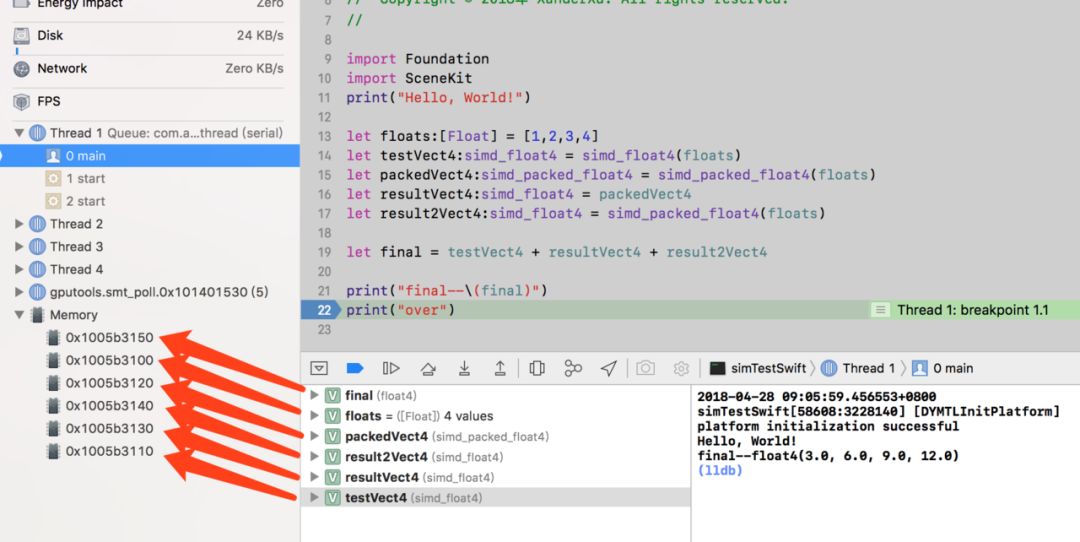
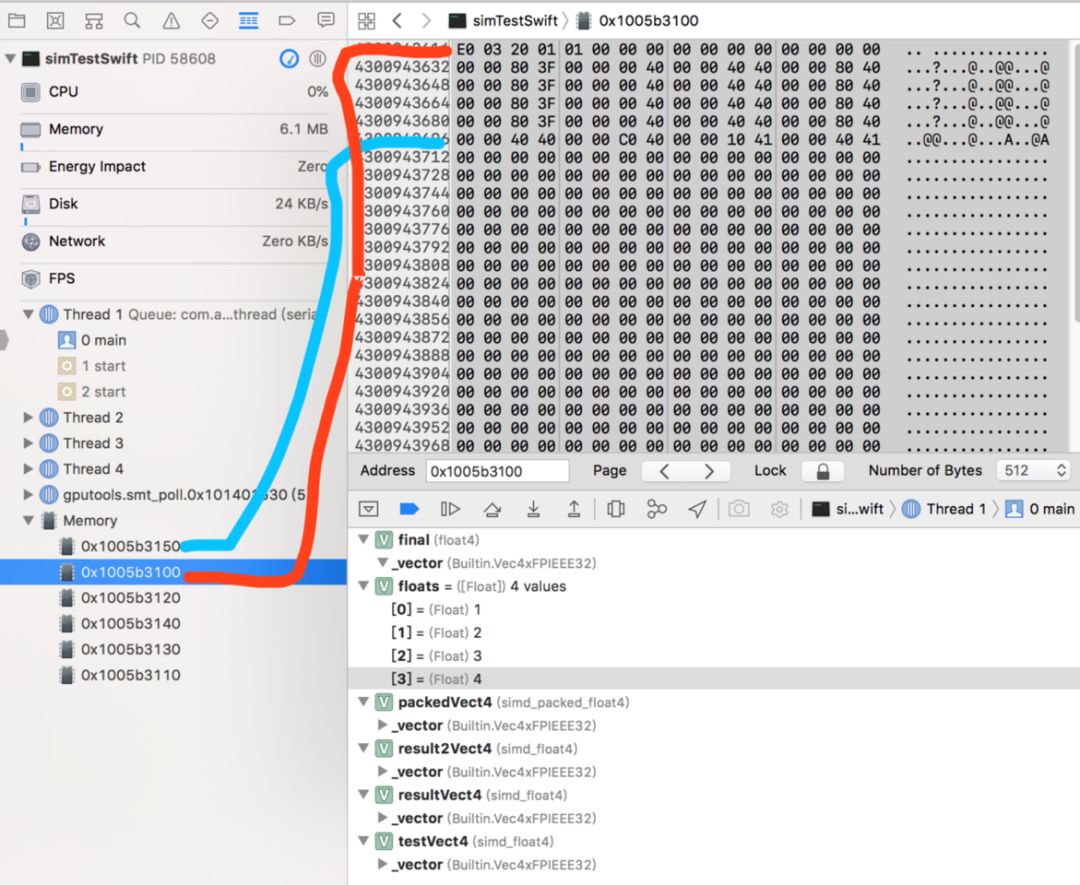
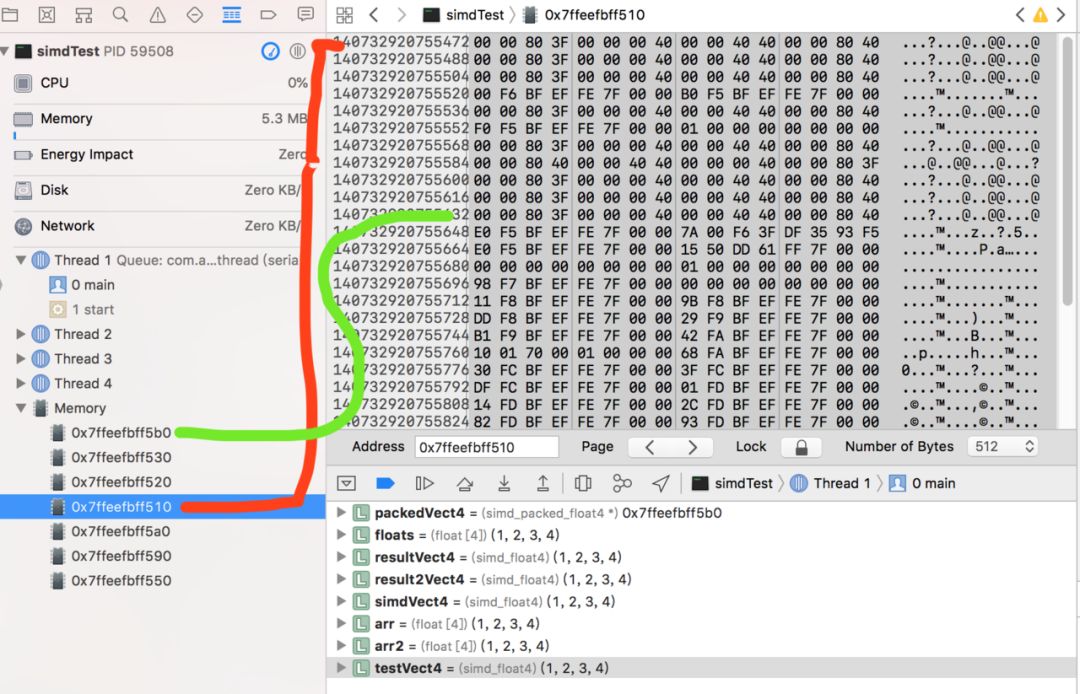
Testing has found that the [Float] type in Swift and the simd_float4 type, i.e., float4, have completely different storage structures in memory:
Conversion in Objective-C
In Objective-C, because of the concept of pointers, it is important to note the pointer types.
In OC and C, directly converting pointer types does not change the structure of the data, while the structure type will undergo a copy after a single assignment, completing the type conversion in the process:
float floats[4] = {1,2,3,4};
// At this point, packedVect4 pointer still points to the beginning of the array, just the pointer type is different
simd_packed_float4 *packedVect4 = (simd_packed_float4 *)floats;
// *packedVect4 means to take out the data pointed to by the packedVect4 pointer and assign it to resultVect4, in C language, constants and structure assignments are value transfers, which means copying a copy; during the copying and assignment, the type conversion is completed.
simd_float4 resultVect4 = *packedVect4;


// Because simd_packed_float4 type and simd_float4 are essentially float4 types, it doesn't matter which one you use; I didn't find any exceptions during my testing.
// However, Apple provided example code using simd_packed_float4 type as an intermediary, and specifically noted: their types only differ when used as pointers or arrays. So it is safer to use simd_packed_float4 in OC.
Conversely, because C language array initialization can only use {}, it limits type conversion, which is very inconvenient:
simd_float4 simdVect4 = simd_make_float4(1, 2, 3, 4);
// Can only take each value out and then initialize C array
float arr[4] = {simdVect4.x,simdVect4.y,simdVect4.z,simdVect4.w};
float arr2[4] = {simdVect4[0],simdVect4[1],simdVect4[2],simdVect4[3]};
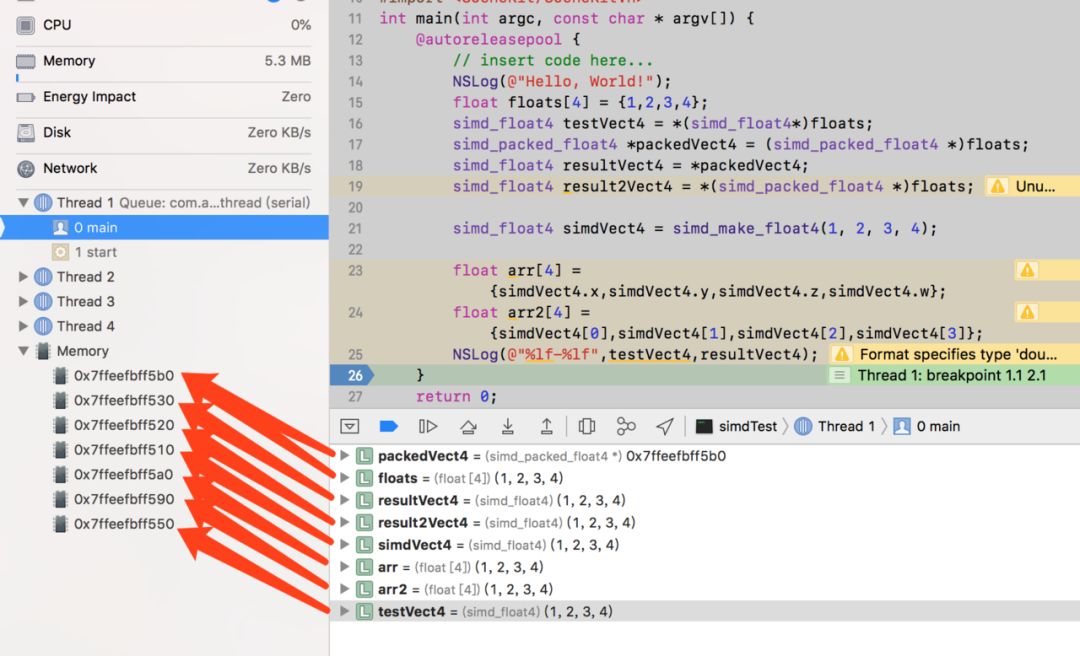
Testing has found that, disregarding memory alignment, the float [4] type array and simd_float4 type in OC have the same storage structure in memory:
Advantages in Use
At WWDC 2018, the applications of SIMD types were also discussed. The main points include:
-
Used in 2, 3, 4-dimensional matrices, and in 2, 3, 4, 8, 16, 32, or 64-dimensional vectors.
-
Vector with vector, vector with scalar can be operated using operators (+, -, *, /).
-
Common vector and geometric operations (dot, length, clamp).
-
Support transcendental functions (like sin, cos).
-
Quaternions.
For example, the previous method using regular arrays was slow, while SIMD is fast:
// Calculate the average of two vectors, previous method
var x:[Float] = [1,2,3,4]
var y:[Float] = [3,3,3,3]
var z = [Float](repeating:0, count:4)
for i in 0..<4 {
    z[i] = (x[i] + y[i]) / 2.0
}
// Now the method
let x = simd_float4(1,2,3,4)
let y = simd_float4(3,3,3,3)
let z = 0.5 * (x + y)
Let’s focus on the use of quaternions in rotation.
// The vector to be rotated (red point in the diagram)
 let original = simd_float3(0,0,1)
// Rotation axis and angle
 let quaternion = simd_quatf(angle: .pi / -3,
 axis: simd_float3(1,0,0))
// Apply rotation (yellow point in the diagram)
  let rotatedVector = simd_act(quaternion, original)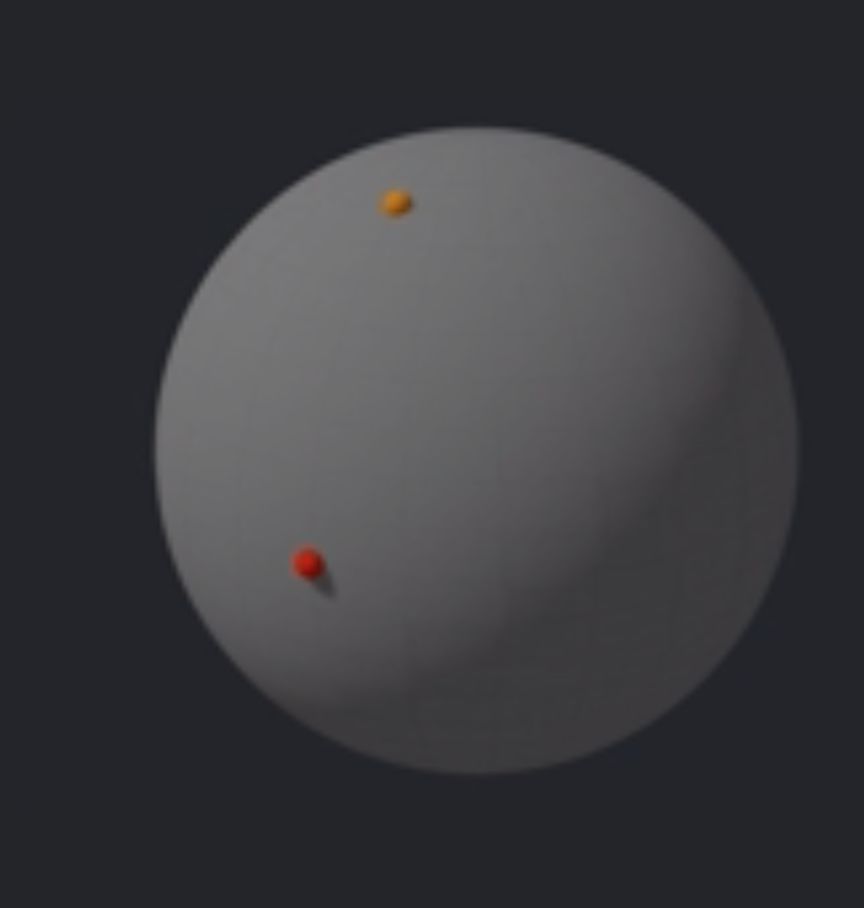
In development, we may not only rotate around one axis but possibly two or more complex axes.
// The vector to be rotated (red point)
let original = simd_float3(0,0,1)
// Rotation axis
let quaternion = simd_quatf(angle: .pi / -3,
                            axis: simd_float3(1,0,0))
let quaternion2 = simd_quatf(angle: .pi / 3,
                             axis: simd_float3(0,1,0))
// Combine two rotations
let quaternion3 = quaternion2 * quaternion
// Apply rotation (yellow point)
let rotatedVector = simd_act(quaternion3, original)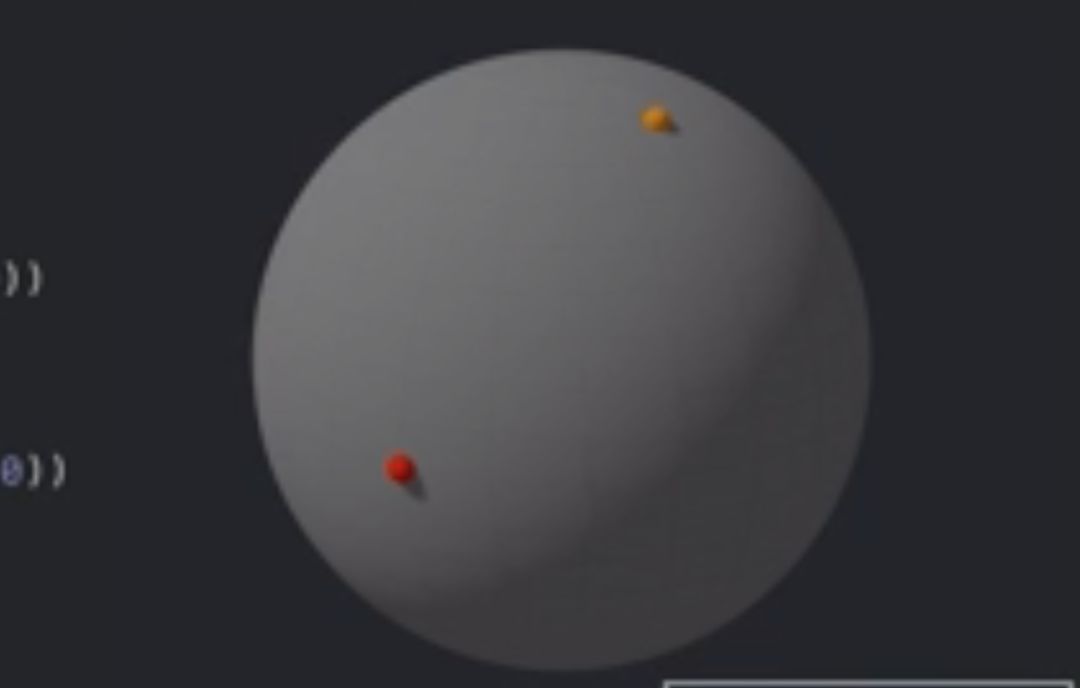
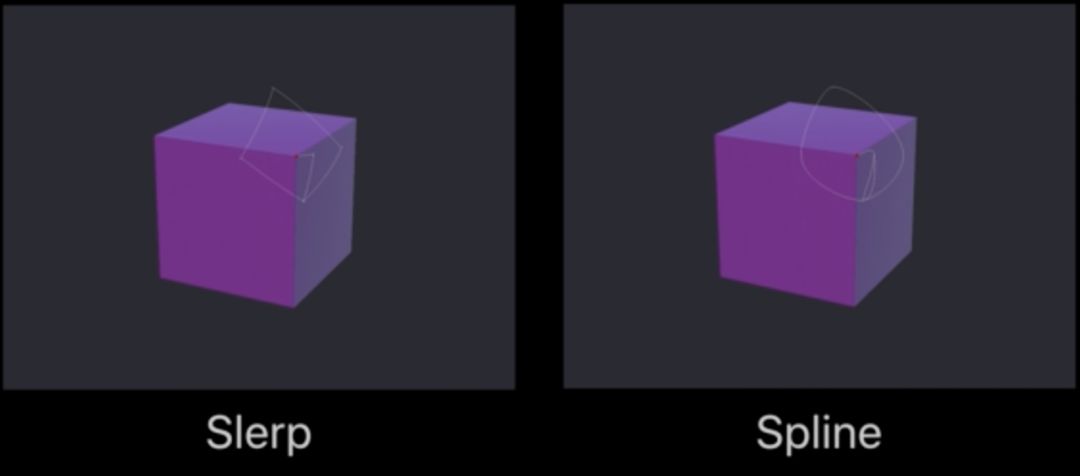
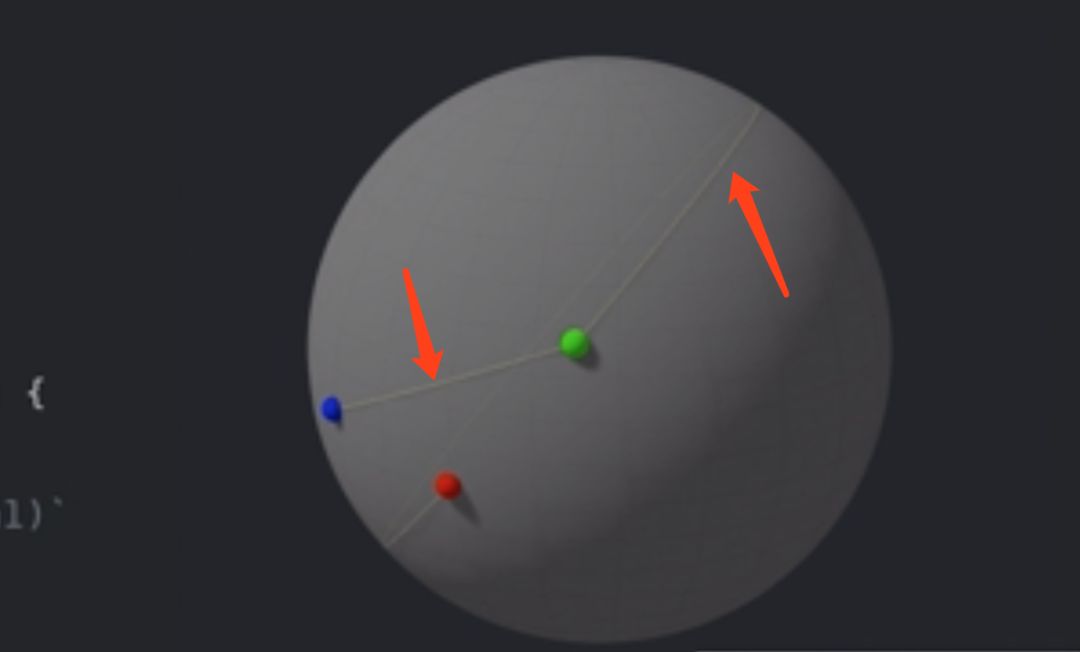
Additionally, SIMD also supports quaternion interpolation operations, Slerp Interpolation (spherical linear interpolation) and Spline Interpolation.
// Slerp Interpolation spherical linear interpolation
let blue = simd_quatf(...) // blue
let green = simd_quatf(...) // green
let red = simd_quatf(...) // red
for t: Float in stride(from: 0, to: 1, by: 0.001) {
    let q = simd_slerp(blue, green, t)
    // Interpolation curve from blue to green (shortest spherical distance)
    // Code to Add Line Segment at `q.act(original)`
}
for t: Float in stride(from: 0, to: 1, by: 0.001) {
        let q = simd_slerp_longest(green, red, t)
        // Interpolation curve from blue to green (longest spherical distance)
    // Code to Add Line Segment at `q.act(original)`
}
// Spline Interpolation spline interpolation
let original = simd_float3(0,0,1)
let rotations: [simd_quatf] = ...
for i in 1 ... rotations.count - 3 {
    for t: Float in stride(from: 0, to: 1, by: 0.001) {
            let q = simd_spline(rotations[i - 1],
                            rotations[i],
                            rotations[i + 1],
                            rotations[i + 2],
                            t)
    }
                // Code to Add Line Segment at `q.act(original)`
}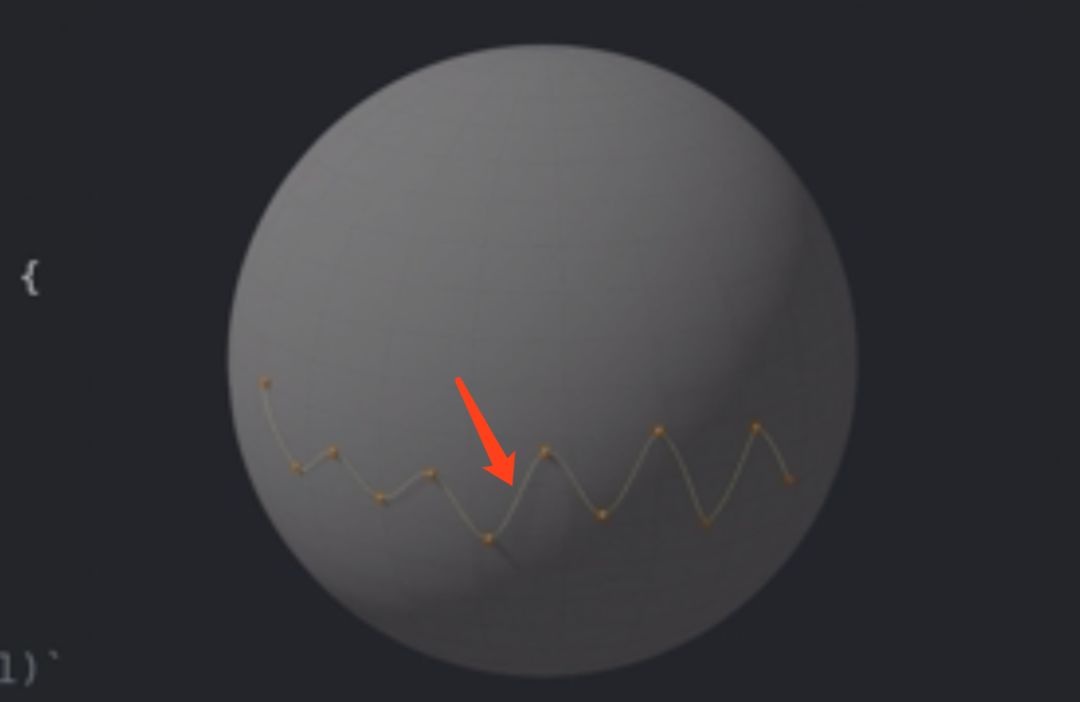
The differences in rotational motion between the two are still very obvious, as shown in the vertex trajectory below.