
The English name for GPU is Graphic Processing Unit, and the full Chinese name is 计算机图形处理器, proposed by NVIDIA in 1999.
1. Overview of GPU
The concept of GPU arises in relation to the CPU in computer systems. As people’s demand for graphics has increased, especially among home systems and gaming enthusiasts, the traditional CPU cannot meet the current situation, thus necessitating a dedicated core processor for graphics processing.
The GPU, as the “heart” of the graphics card, holds a status equivalent to that of the CPU in a computer system. At the same time, the GPU can also serve as an important criterion for distinguishing between 2D and 3D hardware graphics cards. 2D graphics cards mainly rely on the CPU to handle features and 3D images, referred to as software acceleration.
In contrast, 3D graphics cards concentrate the processing capabilities of features and 3D images within the hardware graphics card, known as hardware acceleration. Currently, most popular graphics cards on the market are produced by NVIDIA and ATI.
1.1 Why Is There a Need for a Dedicated GPU for Graphics Work? Why Not Use CPU?
The GPU operates on a parallel programming model, which is entirely different from the CPU’s serial programming model. This difference leads to many excellent algorithms on the CPU being unable to be directly mapped to the GPU. Moreover, the structure of the GPU resembles a shared memory multiprocessing structure, resulting in significant differences between parallel programs designed for the GPU and serial programs on the CPU. The GPU primarily employs key technologies such as cubic environmental texture mapping, hardware T&L, vertex blending, bump mapping, texture compression, and dual-texture four-pixel 256-bit rendering engines.
Due to the high parallelism of graphics rendering tasks, the GPU can effectively improve processing power and memory bandwidth simply by increasing parallel processing units and memory control units.
The design purpose of the GPU is fundamentally different from that of the CPU. The CPU is designed to handle general tasks, thus featuring a complex control unit, while the GPU is primarily used for computationally intensive tasks that are not logic-heavy. More processing units in the GPU can act as execution units. Therefore, compared to the CPU, the GPU has unparalleled advantages in application scenarios characterized by a large number of repetitive data set operations and frequent memory accesses.
1.2 How to Use GPU?
There are two ways to utilize the GPU: one is for developed applications to call the GPU device through general graphics library interfaces, and the other is for the GPU itself to provide API programming interfaces, allowing applications to directly call the GPU device via the provided API.
1.2.1 General Graphics Libraries
Using the GPU through general graphics libraries involves existing graphics function libraries such as OpenGL or Direct3D, where rendering languages (Shading Language) are used to control the internal renderer (Shader) of the GPU to achieve the required calculations.
The widely recognized graphics programming interfaces in the industry mainly include OpenGL and DirectX. OpenGL is the preferred environment for developing interactive and portable 2D and 3D graphics applications and is the most widely used standard for graphics applications today. OpenGL is a computer graphics processing system developed by SGI, serving as the software interface for graphics hardware, where GL stands for Graphics Library. OpenGL applications do not need to be concerned about the operating system and platform in which they run.
As long as they are in any environment that complies with the OpenGL standard, they will produce the same visual effects. Similar to OpenGL, DirectX (Directe Xtension) is also a graphics API created by Microsoft for multimedia programming interfaces, which has become the standard for Windows. To meet the demands of GPU applications, DirectX timely defines new versions based on the expansion and progress of GPU product features, with its functionalities almost synchronized with those provided by the GPU.
1.2.2 GPU Self-Programming Interfaces
The programming interfaces provided by the GPU itself are mainly offered by two companies: NVIDIA’s CUDA framework and AMD (ATI), which introduced the CTM (Close To Metal) framework in 2006 (Note: Initially, ATI produced GPU devices, which were later acquired by AMD). AMD’s CTM framework is no longer in use, as AMD (ATI) transitioned to the public OpenCL standard in 2008 after launching the ATI Stream SDK architecture in 2007, meaning AMD (ATI) currently does not have an independent, private computation framework.
In 2007, NVIDIA released the CUDA (Compute Unified Device Architecture) dedicated general computing framework. Programming using CUDA no longer requires the assistance of graphics APIs but instead uses a method very similar to the C language for development. In the CUDA programming model, there is a CPU referred to as the host and several GPUs referred to as devices or co-processors (Co-Processor).
In this model, the CPU and GPU work together, each performing their respective tasks. The CPU handles logically intensive transactions and serial computations, while the GPU focuses on executing threaded parallel processing tasks. The CPU and GPU each have their own independent memory address spaces: the host’s memory and the device’s video memory. Generally, applications that program using the CUDA framework are large applications in fields such as oil exploration, fluid dynamics simulation, molecular dynamics simulation, bio-computation, audio and video encoding/decoding, and astronomical computation.
Most enterprise-level applications, due to development costs and compatibility reasons, predominantly utilize general graphics libraries to develop and call GPU devices.
1.3 How Does the GPU Work?
The internal components of the GPU for general computing and graphics processing are mainly two parts: the vertex processor (Vertex Processor) and the fragment processor (Fragment Processor). These processors operate in a stream processing mode, meaning they do not have large-capacity caches/memory for read and write but directly use temporary registers on the chip for stream data operations.
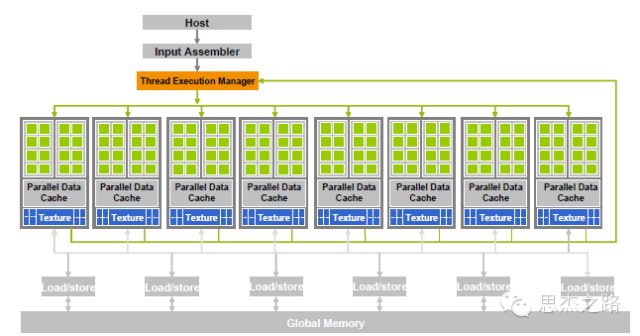
When the GPU is used for graphics processing, the internal vertex rendering, pixel rendering, and geometric rendering operations of the GPU can be completed through stream processors. As shown in the diagram, all stream processors within the GPU act like a multi-core processor, allowing data to be easily moved between the inputs and outputs of different stream processors, while the GPU dispatcher and control logic can dynamically assign stream processors to perform corresponding vertex, pixel, geometry, and other operations, as all stream processors are generic.
2. GPU Virtualization
Now we begin the main topic. Currently, there are three methods for graphics processing in virtual machine systems: one is to use virtual graphics cards, another is to directly use physical graphics cards, and the last is to use GPU virtualization.
2.1 Virtual Graphics Cards
The first method, using virtual graphics cards, is the choice of mainstream virtualization systems today because professional graphics card hardware is quite expensive. Technologies that currently use virtual graphics cards include:
-
Virtual Network Computing VNC (Virtual Network Computing)
-
Xen Virtual Frame Buffer
-
VMware Virtual Graphics Processing Unit GPU (Graphics Processing Unit)
-
Graphics acceleration system independent of the virtual machine manager VMGL (VMM-Independent Graphics Acceleration).
VNC (Virtual Network Computing) is essentially a display system, meaning it can transmit the complete window interface over the network to another computer’s screen. The Terminal Server included in Windows Server is designed based on this principle. VNC was developed by AT&T Labs and is authorized under the GPL (General Public License), allowing anyone to obtain the software for free. The VNC software consists of two parts: VNC server and VNC viewer. Users must first install the VNC server on the computer being remotely controlled before executing the VNC viewer on the controlling end for remote control.
XEN Virtual Frame Buffer refers to a virtual display device provided by XEN. This virtual display device uses a privileged domain’s VNC server, thus having a similar VNC interface. The client writes data into the XEN virtual frame buffer, which is then transmitted via the VNC protocol to update the front end with the modified image. The source code for this virtual frame buffer device comes from the open-source Qemu. When we see the desktop interface of the operating system in a virtual machine on XenServer, it is displayed using this technology.
Both VNC and XEN Virtual Frame Buffer modes currently do not provide any hardware graphics acceleration capabilities in virtual machines. As there is still no mechanism allowing virtual machines to access graphics hardware, these virtual display devices process graphic data using CPU and memory instead. They do not utilize the functions of physical display devices.
However, the VMGL mode has realized such a mechanism, commonly referred to as the front-end-back-end virtualization mechanism (Front-end virtualization). VMGL employs this mechanism to send the data requiring graphics processing to a virtual monitor with hardware graphics acceleration capabilities for corresponding graphics data processing. The two main graphics processing interfaces available for GPU application development currently are: OpenGL and Direct3D.
Among these two graphics processing interfaces, OpenGL is the only one capable of cross-platform operation on mainstream operating systems. In the virtual machine platform, VMGL is the first project to virtualize OpenGL API. The working principle of VMGL is that it deploys a fake library (Fake Library) in the client operating system to replace the standard OpenGL library. The fake library (Fake Library) has the same interface as the standard OpenGL library, and the fake library in the client operating system also implements remote calls to the host operating system on the remote server.
As a result, all local OPENGL calls will be interpreted as service requests to the remote server, where the host operating system possesses the actual OPENGL library, graphics card driver, and physical hardware GPU, responsible for fulfilling the OPENGL requests and displaying the execution results on the screen. Since VMGL operates transparently throughout the process, applications calling OPENGL do not need to modify their source code or undergo binary rewriting, nor do they need to make any changes for the virtual machine platform.
2.2 Direct GPU Passthrough
GPU passthrough, also known as graphics card passthrough (Pass-Through), refers to the method of bypassing the virtual machine management system to assign the GPU exclusively to a specific virtual machine, allowing only that virtual machine to use the GPU. This exclusive device allocation method preserves the integrity and independence of the GPU and approaches performance levels close to non-virtualized conditions, making it suitable for general computing. However, GPU passthrough requires utilizing specific details of the graphics card and has poor compatibility, only available for certain GPU devices.
Xen 4.0 has introduced VGA Passthrough technology, thus XenServer also possesses this technology. XenServer’s passthrough utilizes Intel’s virtualization technology (Intel VT-d) to expose the display device to a specific client virtual machine, preventing access from other client virtual machines and even the host virtual machine from using that GPU. It implements certain special details of the graphics card within the client virtual machine, such as VGA BIOS, text mode, IO ports, memory mapping, VESA modes, etc., to support direct access. The GPU execution efficiency using Xen Server’s VGA Pass-Through technology is high and fully functional, but it can only be used exclusively by a single system, losing the ability to reuse the device. VMware ESXi includes a VM Direct Path I/O framework, which also allows for direct passthrough of our graphics card device to a specific virtual machine for use.
XenServer and VMware use different technologies, but the effect achieved is the same, which is to directly passthrough the physical graphics card device to a specific virtual machine for achieving 3D display and rendering effects.
Since GPU passthrough is essentially the client operating system using native drivers and hardware, it lacks the necessary intermediate layer to track and maintain the GPU state. It does not support advanced virtual machine features such as real-time migration. For example, XenServer passthrough prohibits operations like Save/Restore/Migration. In VMware’s virtual machine, once the VMDirectPath I/O feature is enabled, the corresponding virtual machine will lose the ability to perform suspend/resume and real-time migration.
2.3 GPU Virtualization
GPU virtualization is the process of slicing the graphics card and allocating these slices of time to virtual machines. Since graphics cards that support virtualization can generally be divided into different specifications of time slices as needed, they can be allocated for use by multiple virtual machines. The underlying principle is to utilize application layer interface virtualization (API remoting), where API redirection refers to intercepting GPU-related application programming interfaces (APIs) at the application layer, completing corresponding functions through redirection (still using the GPU), and then returning the execution results to the application.
Currently, most of the 3D desktop virtualization solutions we use from Citrix utilize the graphics card virtualization technology provided by NVIDIA, namely vCUDA (virtual CUDA). As mentioned earlier, the CUDA framework will not be elaborated on again here. vCUDA employs a method of intercepting and redirecting CUDA APIs at the user layer, establishing a logical image of the physical GPU—a virtual GPU—in the virtual machine, achieving fine-grained division, reorganization, and reuse of GPU resources, and supporting advanced virtual machine features such as multi-machine concurrency and suspend/resume.
The implementation principle of vCUDA includes three modules: CUDA client, CUDA server, and CUDA manager. Taking XenServer as an example, a VMM runs on the physical hardware resources to provide hardware imaging upwards, and several virtual machines run on the VMM. One of the virtual machines is a privileged virtual machine (Host VM), which is Domain 0 in XenServer, and the operating system running in the virtual machine is referred to as the Host OS.
The Host OS can directly control the hardware, and the system has the native CUDA library and GPU driver installed, allowing the Host OS to directly access the GPU and use CUDA. Other virtual machines are non-privileged virtual machines (Guest VM), and the operating systems running on them (Guest OS) cannot directly manipulate the GPU. Here, we refer to the CUDA client as the client driver, the CUDA server as the host driver, and the CUDA manager as the GPU manager.
2.3.1 Client
The client driver is essentially the graphics card driver program we install on virtual machines, such as Windows 7. Its main functions include providing a library for CUDA API at the user layer and maintaining the virtual GPU (vGPU) related to CUDA’s hardware and software state. The client driver directly interacts with CUDA applications, serving the following purposes:
-
1) Intercepting CUDA API calls in the application;
-
2) Selecting communication strategies to provide higher-level semantic support for virtualization;
-
3) Encapsulating and encoding the called interfaces and parameters;
-
4) Decoding the data returned by the server and returning it to the application.
Additionally, before the first API call arrives, the client driver first requests GPU resources from the manager. Each independent calling process must apply for resources from the host manager driver to achieve real-time scheduling of GPU resources and tasks.
Moreover, the client driver also sets up the vGPU to maintain the hardware and software state related to the graphics card. The vGPU itself is essentially just a key-value pair data structure that stores the currently used address space, video memory objects, memory objects, etc., while also recording the order of API calls. When the computation results are returned, the client driver updates the vGPU based on the results.
2.3.2 Server
The server component is located in the privileged virtual machine (privileged domain in XenServer) at the application layer. The privileged virtual machine can directly interact with the hardware, allowing the server component to manipulate the physical GPU to complete general computing tasks.
The server faces the real GPU, serving the following purposes:
-
1) Receiving the data packets from the client and parsing the calls and parameters;
-
2) Auditing the calls and parameters;
-
3) Utilizing CUDA and the physical GPU to compute the audited calls;
-
4) Encoding the results and returning them to the client;
-
5) Managing the GPUs supporting CUDA in the computing system.
Additionally, the first task of the server is to register the information of the GPU devices supporting CUDA with the manager. When responding to requests from the client, the server allocates independent service threads for each application. The server centrally manages local GPU resources, providing GPU resources according to certain strategies and updating the relevant hardware and software states modified by API calls to the vGPU.
2.3.3 Manager
The manager component is located in the privileged domain, and based on the implementation of CUDA programming interface virtualization, it isolates, divides, and schedules the powerful computing capabilities and resources of the GPU at a higher logical level. The CUDA server uses computing threads and work threads to achieve a certain degree of load balancing among GPUs on the same physical machine, while the CUDA manager component enables load balancing at a higher logical level for GPUs in the same virtual GPU cluster.
The scheduling principle of the manager component is to ensure that GPU demands on the same physical machine are self-sufficient. If the physical machine has GPU resources that meet the conditions, in general, the GPU demands of virtual machines on that physical machine are redirected to the CUDA server of that physical machine.
The manager centrally manages GPU resources, adopting a centralized and flexible mechanism to achieve:
-
1) Dynamic scheduling: When the resources occupied by the user are idle for a certain threshold or the task ends, the manager recovers the resources. When the user issues a computing task again, GPU resources are reallocated for that task;
-
2) Load balancing: When local computing pressure is too high, adjust the computing load by choosing suitable GPU resources during dynamic scheduling to distribute the computing load;
-
3) Fault recovery: When a fault occurs, transfer tasks to new available GPU resources.
More technical content has been organized into an e-book, with promotional activities during Double Eleven as detailed below:
(If you meet the discount conditions, you can contact the assistant to modify the price after placing the order)
Warm Reminder:
Please search for “ICT_Architect” or “scan” the QR code to follow the public account, click the original link to get more e-book details.

Thirst for knowledge, humble as a fool