
//
In 2019, AMD abandoned the long-used GCN architecture in favor of RDNA. In this article, we will analyze RDNA 2, which builds upon RDNA 1, adding ray tracing support and other enhancements.
In this article, we can do some interesting things and look at some games from the perspective of RDNA 2.
Architecture
As the name suggests, RDNA 2 is built on top of the RDNA 1 architecture. AMD made several changes to improve efficiency and keep hardware features up to date, but the basic WGP architecture remains. Each WGP or Work Group Processor has four SIMD units. Each SIMD has a 32-wide execution unit for the most common operations. RDNA 2 gains some additional dot product operation instructions to help accelerate machine learning. For example, V_DOT2_F32_F16 multiplies and adds paired FP16 values, then adds to an FP32 accumulator. It is not like Nvidia’s tensor cores, where instructions like HMMA directly handle 8×8 matrices. But these instructions allow RDNA 2 to perform matrix multiplication with fewer instructions than using regular fused multiply-add instructions.
Each SIMD has 32 wide execution units for the most common operations, a 128 KB vector register file, and can track up to 16 wavefronts. Therefore, AMD reduced the number of wavefronts RDNA 2 can track from 20 in RDNA 1. GPUs do not perform out-of-order execution like high-performance CPUs. Instead, they keep a large number of threads running and switch between threads to keep execution units busy to hide latency. On RDNA 2, SIMD essentially has 16-way SMT, compared to 20-way on RDNA 1.
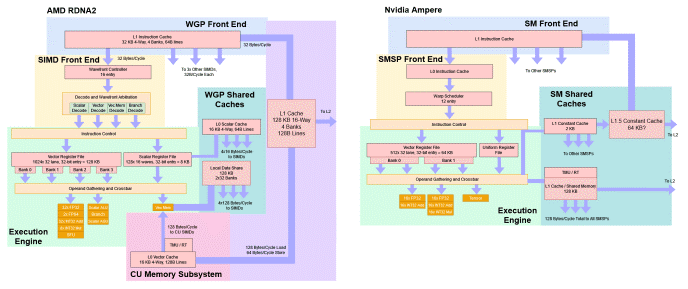
A basic sketch of WGP architecture in RDNA 2 and SM in Nvidia Ampere
This sounds like a regression, but tracking more wavefronts (similar to CPU threads) can be expensive. The thread or wavefront selection logic must solve problems very similar to those faced by a CPU scheduler. Each cycle, each entry must check if it is ready to execute. AMD may want to reduce the number of checks per cycle from 20 to 16 to achieve higher clock speeds at lower power. At the same processing node, RDNA 2’s clock speed is significantly higher than its predecessor, so AMD did well in this regard.
RDNA 2 also performs better than Ampere. Although both architectures use the same basic building blocks (SMs or WGPs), each cycle can execute 128 FP32 operations, but RDNA 2 WGP can maintain 64 wavefronts. Ampere SM can only maintain 48 warps in flight. RDNA 2 also has more vector register file capacity, meaning that the compiler can keep more data in registers without reducing occupancy.
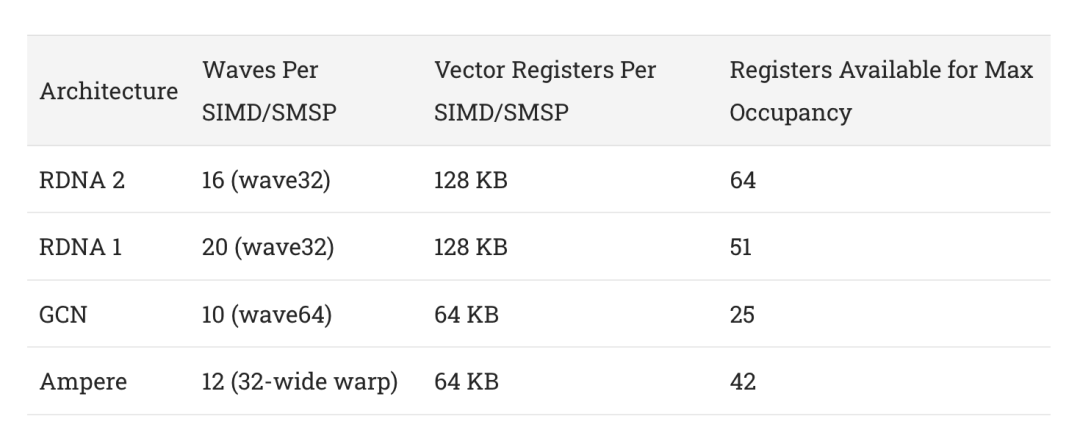
This gives RDNA 2 WGP a better chance to hide latency by keeping more work in flight. Combined with better caching, each RDNA 2 WGP should be able to be more powerful than Ampere SM.
The four SIMD units of a WGP are organized into two groups, which AMD calls Compute Units (CUs). A CU has its own memory pipeline and a 16 KB L0 vector cache. At the CU level, AMD enhanced the memory pipeline to add hardware ray tracing acceleration. Specifically, texture units can now perform ray intersection tests, conducting four box tests per cycle or one triangle test per cycle. Box tests occur at the upper levels of the BVH, while triangle tests occur at the last level. BVH, or Bounding Volume Hierarchy, uses a divide-and-conquer approach to accelerate ray tracing. Since checking every triangle in a scene is very costly, box tests narrow down the area the ray passes through, ideally allowing the GPU to check only a narrow set of triangles.
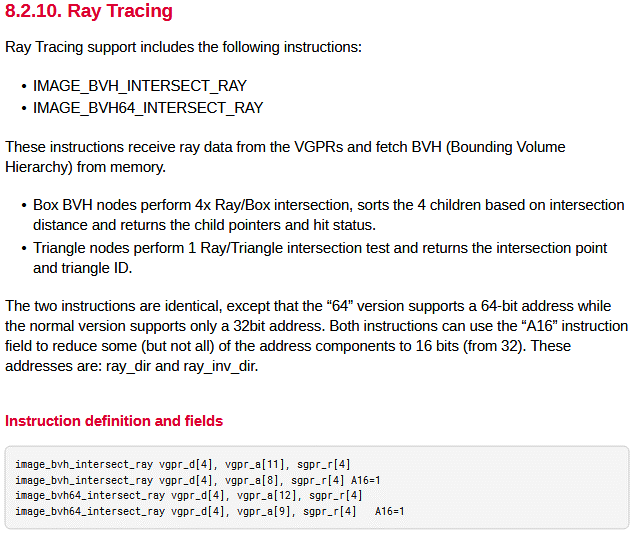
Ray tracing acceleration instructions introduced in RDNA 2
Ray tracing acceleration is accessed through some new texture instructions. Clearly, these instructions do not perform traditional texture work, but texture units are a convenient place to add this extra functionality. The new instructions themselves only perform intersection tests. Regular compute shader code handles traversing the BVH. It also has to calculate the inverse ray direction and provide it to the texture unit, even though the texture unit itself has enough information to compute it. AMD may want to minimize the hardware cost of supporting ray tracing and believes they have enough regular shaders to handle this.
Caching
In addition to being functionally on par with Nvidia, RDNA 2 also scales to performance. The highest-end RDNA 1 GPU RX 5700 XT has only 20 WGPs. It is also built on a small 251 mm² die, competing with Nvidia’s mid-range cards rather than challenging their high-end ones. RDNA 2’s RX 6900 XT doubles the number of WGPs and increases clock speeds, demonstrating AMD’s ambition to challenge Nvidia’s best performance. But just like increasing the core count in CPUs, scaling up GPUs also brings higher bandwidth demands. Nvidia went with a power-hungry 384-bit GDDR6X setup to power Ampere. AMD opted for a 256-bit GDDR6 configuration. To avoid memory bandwidth bottlenecks, RDNA 2 received an additional level of cache. AMD named it “Infinity Cache” and internally refers to it as MALL (Memory Access Last Level).
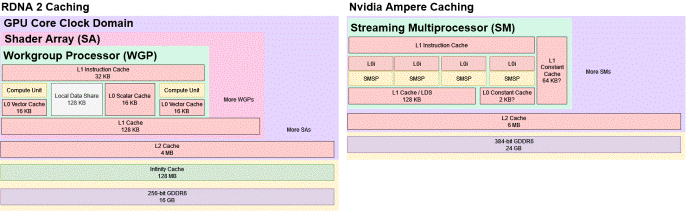
A simplified sketch of the cache hierarchy of RDNA 2 and Nvidia Ampere
The name MALL is meaningful because all VRAM accesses must go through it. RDNA 2’s L2 is also a cache shared by the entire GPU, but it can be bypassed if virtual memory pages are set to non-cacheable. Synchronization barriers can also flush L2 to ensure consistency. These accesses can be captured by the Infinity Cache on RDNA 2, while previous AMD GPUs would have serviced them from VRAM.
Because L2 should be large enough to capture a significant amount of memory accesses, the performance of Infinity Cache is not that critical; AMD runs Infinity Cache on a separate clock domain. This means it can be tuned lower to save power.
Latency
Through latency tests, we can see how AMD’s complex four-level cache system operates. We can also see Nvidia’s simpler two-level cache structure. Ampere’s SMs have larger L1 cache capacity, allowing SMs to service requests from their first-level cache when RDNA WGPs must fetch from the slower per-SA L1 cache. At larger test scales, RDNA 2 has a significant latency advantage, especially when the test scale overflows Nvidia’s L2.
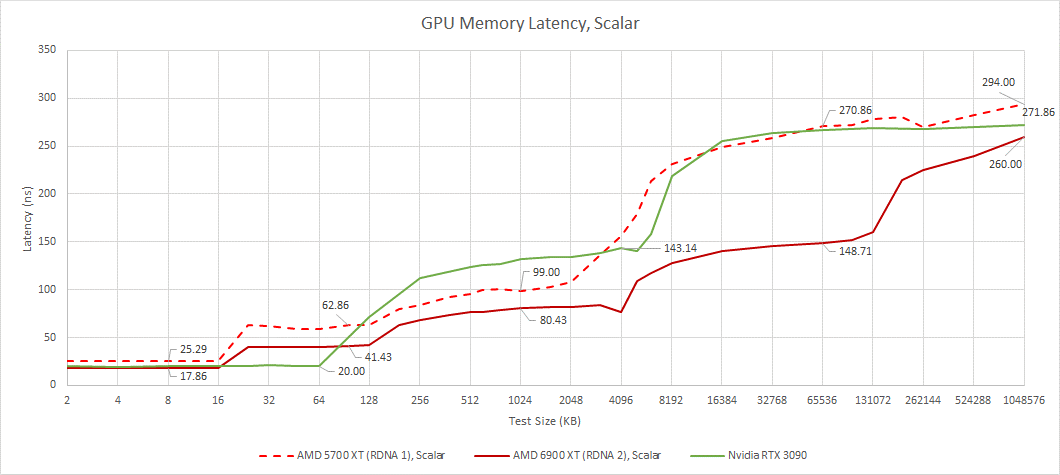
Compared to RDNA 1, the performance improvement of the first three cache levels is modest, primarily due to increased clock speeds. Then, Infinity Cache has a huge impact at larger test scales. For such a large cache, latency is very low. In contrast, the L2 of the RTX 3090 has a latency of 140 ns but only 6 MB of capacity.
The latency of Infinity Cache is also worth examining. AMD’s Adrenaline Edition software is very advanced, allowing users to set the maximum clock speed almost arbitrarily. We can use it to observe how caching behaves as the GPU core clock changes.
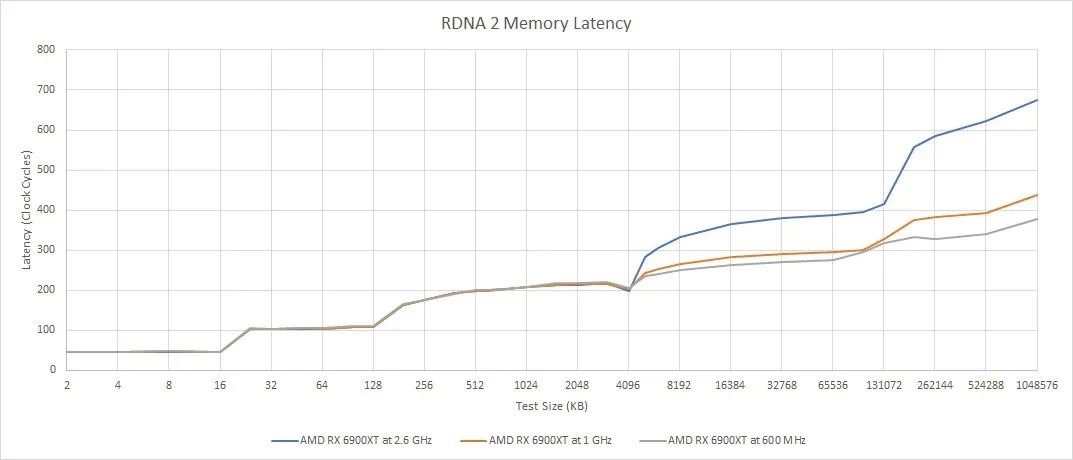
At lower clock speeds, RDNA 2’s WGP requires fewer cycles to obtain data from Infinity Cache. This could mean improved shader utilization at lower clock speeds.
From a vector perspective, we see a similar story. RDNA 2 is very similar to the faster RDNA 1, with an additional massive cache. Vector accesses have higher latency than scalar accesses. Nvidia does not have a separate scalar memory hierarchy. Their architecture does have constant caches, but those are read-only and serve a more limited purpose than AMD’s scalar data paths.
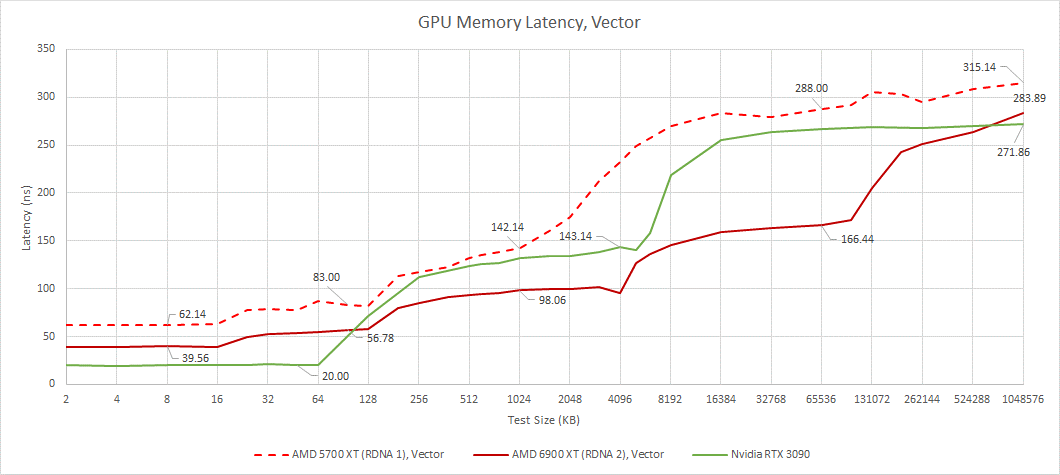
Nvidia benefits from lower latency at smaller test scales, while RDNA 2 maintains an advantage at larger test scales. AMD’s L2 and Infinity Cache latencies look very good, considering RDNA 2 must check more cache levels than Nvidia. Once we reach VRAM, the situation reverses.
Bandwidth
Bandwidth is also critical because GPUs are designed to process a large number of operations in parallel. Let’s start by looking at the bandwidth of a single workgroup. Running a single workgroup limits us to a single WGP on AMD or SM on Nvidia architecture. This is the closest we can get to single-core bandwidth on a CPU. Like single-core bandwidth on a CPU, such tests do not particularly represent any real-world workload. But it does give us insight into the memory hierarchy from the perspective of a single compute unit.
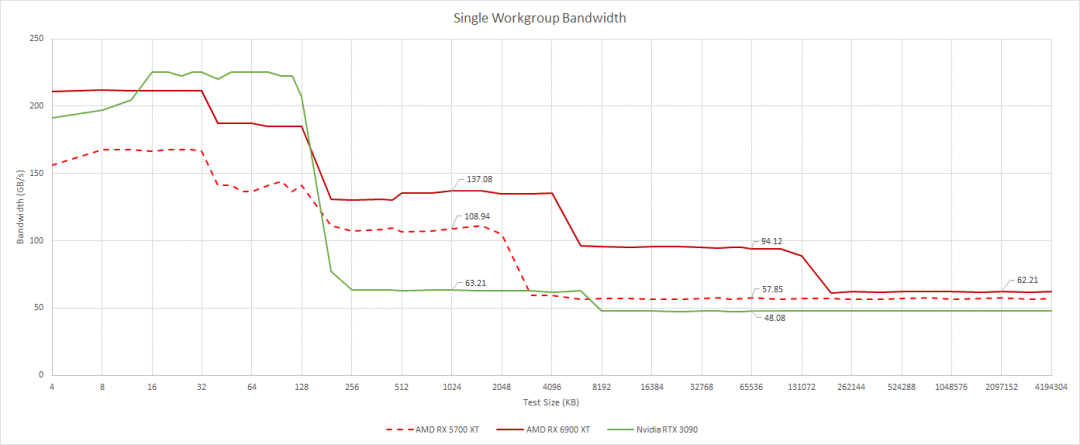
Not commenting on first-level cache bandwidth, as it is difficult to test due to address generation and boundary checking overhead
Through a single WGP, RDNA 2 achieves very high cache bandwidth through high clock speeds. This advantage is particularly pronounced at large test scales, where the 128 MB Infinity Cache comes into play. AMD’s cache architecture is far superior to Nvidia’s. At low occupancy, even Infinity Cache can provide more bandwidth than Ampere’s L2.
As we use more workgroups and load more WGPs or SMs, the bandwidth demand rises noticeably. This places greater demands on shared caches. AMD does well in this regard. L2 bandwidth starts very strong and scales very well as we load more WGPs. We have to load more SMs on Nvidia’s RTX 3090 before we start getting good bandwidth.
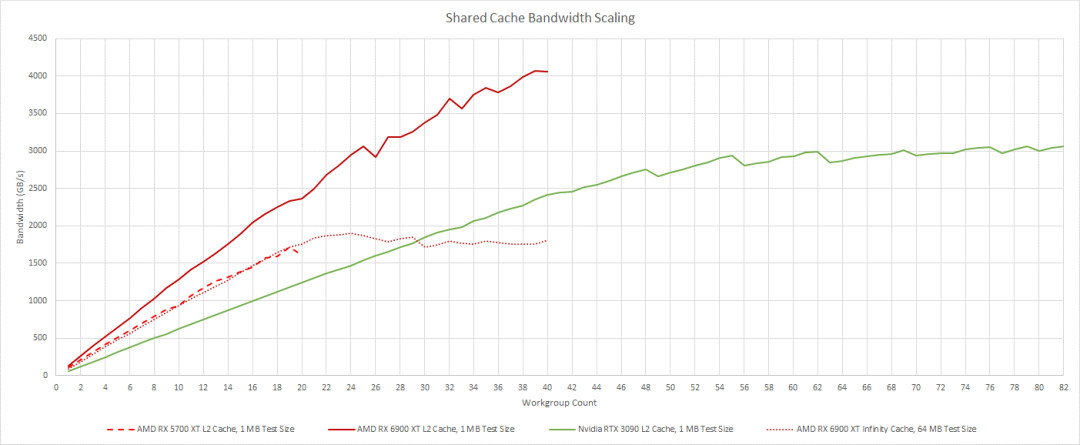
Infinity Cache bandwidth scaling is also very good, actually very close to the L2 bandwidth of RDNA 1. It cannot match the L2 bandwidth on Nvidia’s 3090, but it does not need to, as its 4 MB L2 in front should capture a large number of accesses. So far, AMD looks quite good in terms of cache bandwidth. However, VRAM is another story.
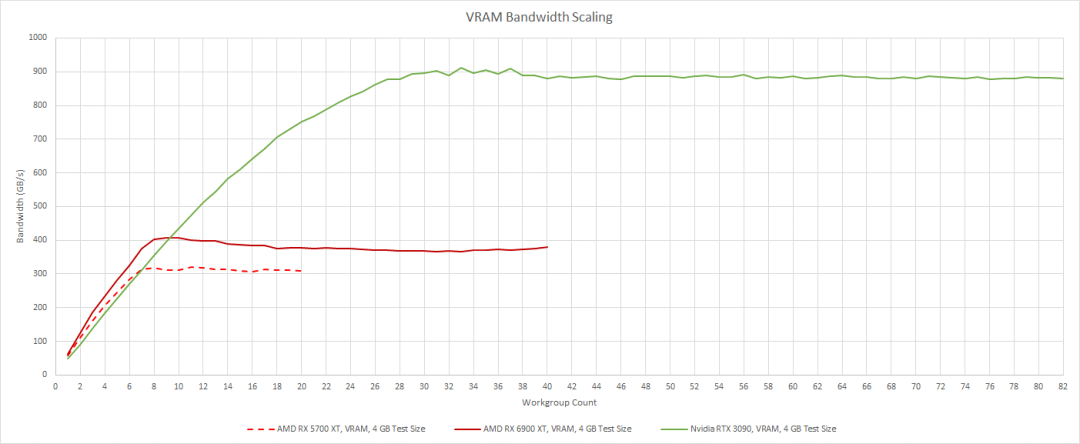
Nvidia has a significant VRAM bandwidth advantage. For large workloads that cannot fit into the cache, Ampere is much less likely to exhaust VRAM bandwidth. However, both generations of RDNA are better at utilizing the VRAM bandwidth they have. They do not need as much work to fully utilize their available bandwidth.
CU and WGP Modes
WGPs in AMD’s RDNA architecture can operate in WGP mode and CU mode. In WGP mode, the 128 KB LDS acts as a single unified memory block. All four SIMDs in the WGP can access the entire 128 KB. In CU mode, the LDS is divided into two 64 KB halves, each associated with a pair of SIMDs.
LDS latency remains the same in both modes, around 19.5 ns, even though CU mode should simplify request routing from the LDS. This is also true for RDNA 1, which has around 26.6 ns of LDS latency.
The differences in LDS organization allow us to hit a single CU (half of the WGP) by using a single workgroup for testing. Since each CU has its own memory pipeline and L0 cache, we see L0 bandwidth drop when we only use one CU in the WGP. Once we reach L2, the bandwidth does not drop.
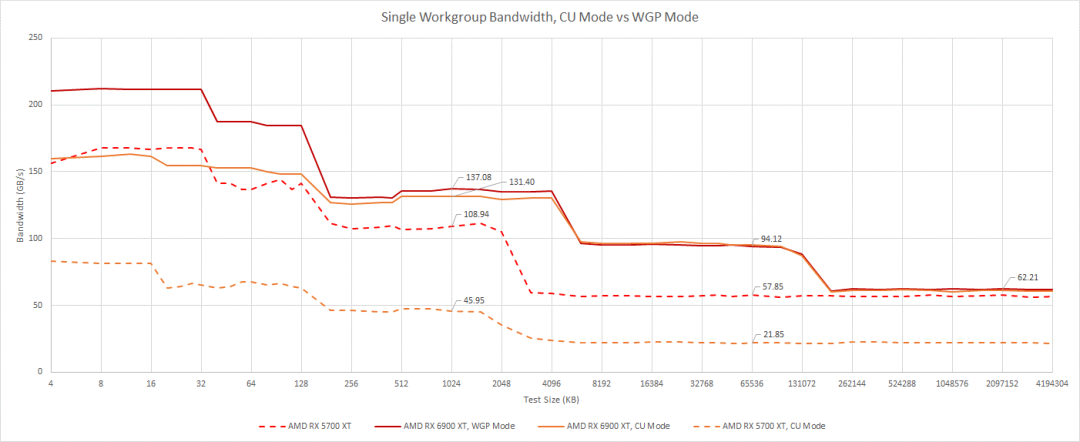
Compared to RDNA 1, this is a significant improvement as RDNA 1 saw a noticeable drop in bandwidth in its cache hierarchy. Bandwidth typically depends on the ability to hide latency in queues, so RDNA 2 may be more flexible in allocating queue entries. Perhaps some queues between L1 and L2 were allocated by CU in RDNA 1, but in RDNA 2 they are allocated by WGP. For GPU workloads, this means that if a wave in one half of the WGP finishes early, RDNA 2 performs better.
From a Gaming Perspective
RDNA 2 is a gaming-prioritized architecture, so let’s see what the RX 6900 XT has to deal with in these workloads. Studying games will also help us understand what gaming workloads look like.
Cyberpunk 2077, RT On
CD Projekt Red’s Cyberpunk 2077 is a showcase of modern GPU technology. It uses DirectX 12 with a lot of ray tracing to deliver rich graphical effects. Unfortunately, these effects can be very demanding. The impact of ray tracing on performance is particularly significant. Note that the numbers for this game were obtained with the GPU’s maximum clock set to 1800 MHz. The 3950X has boost disabled. Therefore, the numbers here should not be considered stock performance figures and should not be compared with other systems. We are only focusing on what the graphics card is doing. In this match, we will look down the Jig Jig Street.

Looking down on Jig-Jig Street in Cyberpunk 2077
RT-related work occupies about 21 milliseconds of frame time. More than 9 milliseconds of that is spent building the BVH, so optimizing BVH build time is almost as important as optimizing BVH traversal. To render ray tracing effects, the 6900 XT must perform 580 million box intersection tests and 109.5 million triangle intersection tests. At the achieved 25.9 FPS, that’s 15 billion box tests and 2.8 billion triangle tests per second.
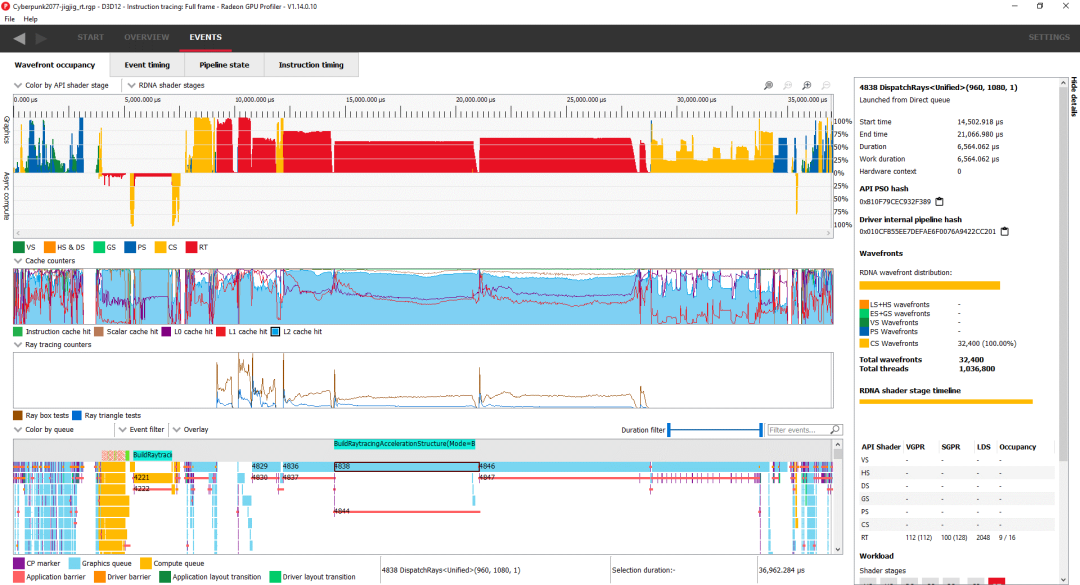
Checking frames with Radeon GPU Profiler. The top view shows occupancy while rendering frames.
Besides ray tracing, Cyberpunk also makes extensive use of compute. Traditional rasterization takes a backseat, perhaps showing the trend of cutting-edge games. Since most of the time is spent on ray tracing, let’s take a closer look at the longest-running DispatchRays call that takes 7.2 milliseconds:
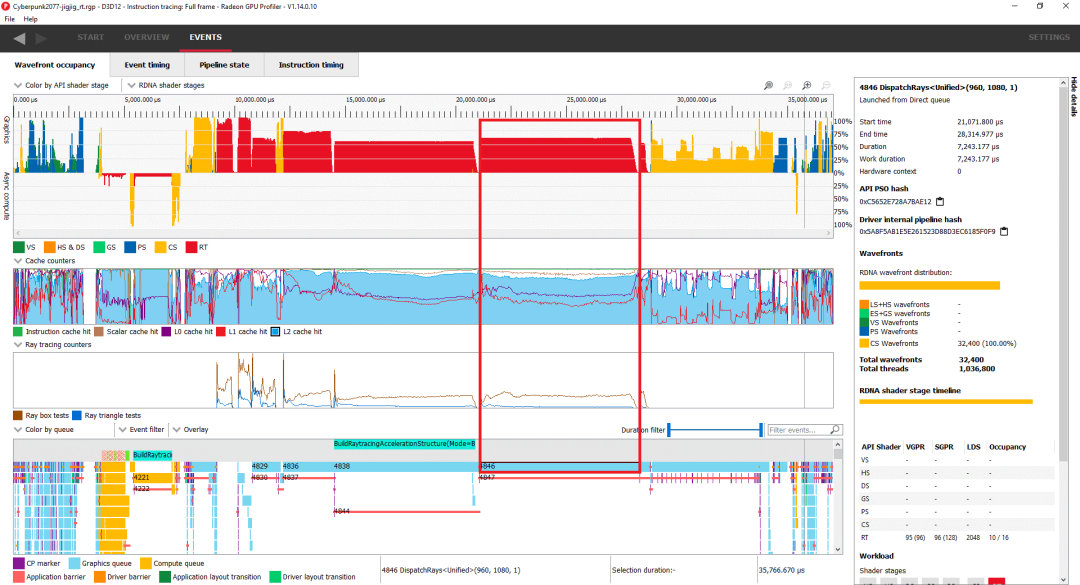
Boxing around the call we are looking at
Internally, RDNA 2 treats ray tracing kernels as compute shaders. This specific call launches 32,400 compute wavefronts. The 6900 XT’s 40 WGPs can keep a total of 2560 wavefronts in flight, so that is enough to fill the entire GPU. However, RDNA 2 cannot keep all 2560 wavefronts of this kernel in flight because it lacks sufficient vector register file capacity. Unlike CPUs, GPUs can flexibly allocate vector register file capacity. Providing more registers per thread (wavefront) helps prevent register spills but also reduces the number of threads it can keep running.
For this kernel, the compiler chose to use 96 vector registers, which means RDNA 2’s vector register file capacity is only sufficient to track 10 wavefronts per SIMD, or a total of 1600 across the entire GPU. On one hand, this means that each SIMD cannot keep execution units busy by switching between wavefronts during a stall. On the other hand, using more registers allows the compiler to expose more instruction-level parallelism. From the profiling, RDNA 2 spends a lot of time occupied due to limited vector register capacity, so reducing RDNA 1’s maximum occupancy seems reasonable.
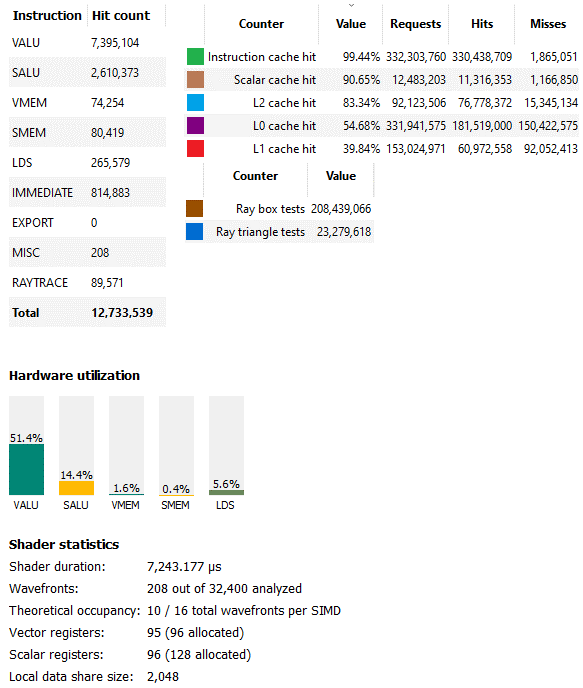
More details on that call
In this case, the operator may have made the right trade-offs, or at least not made a bad decision. 51% vector ALU utilization is in a good place. The shaders are not fully utilized. Meanwhile, the utilization does not exceed 70-80%, which means only compute shaders can be used. We also see a small amount of LDS usage. AMD uses LDS to store the BVH traversal stack, keeping writes and latency-sensitive reads away from the unoptimized global memory path. Other ray tracing calls show similar hardware usage patterns.
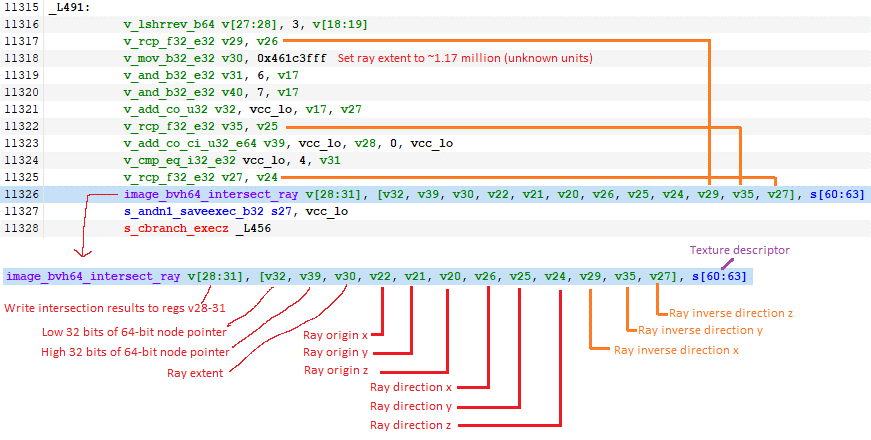
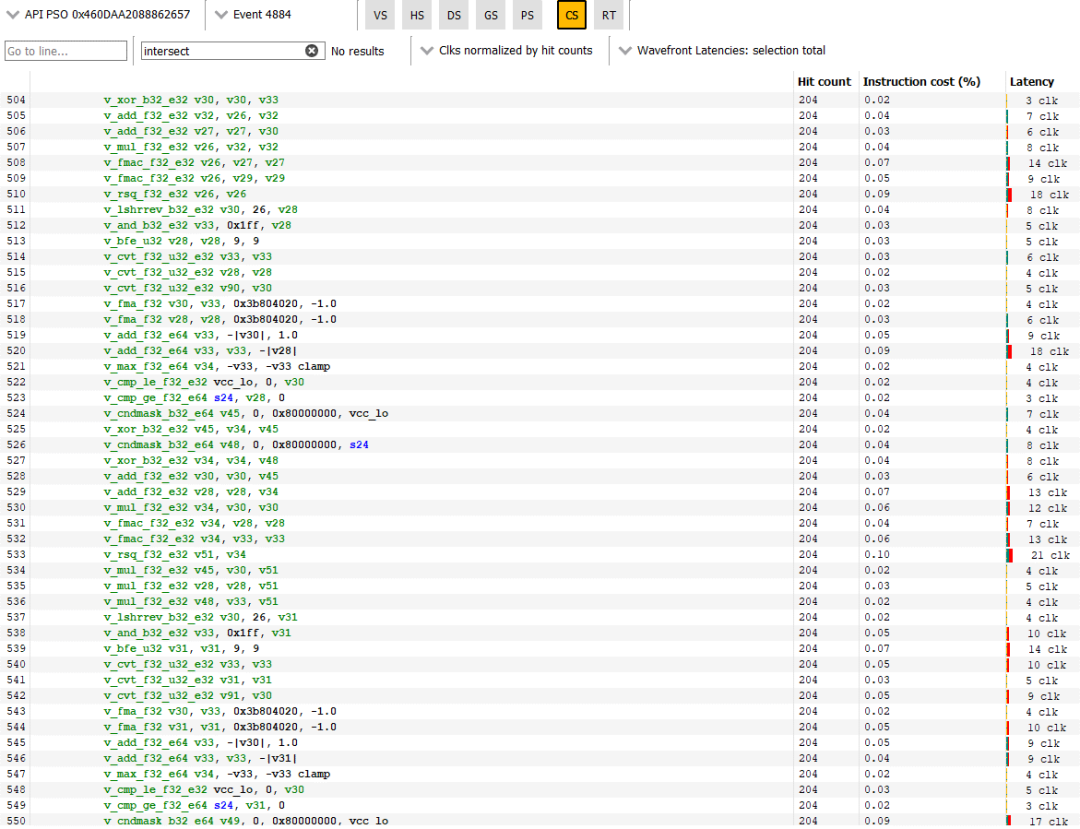
This is the basic block of the shader hitting the RT units. The shader must use three additional instructions to calculate the inverse ray direction and provide it along with the ray direction. Three additional instructions are not many, but these inter-instructions are quite expensive and can only be executed at a quarter of the rate compared to simpler FP32 operations. Most importantly, the compiler must use three additional registers to hold the inverse ray direction. I am not sure how much impact this will have, but there is room for improvement.
Unfortunately, AMD has not made Infinity Cache counters public through their analysis tools. However, we can still look at how the first three caches are performing. First, the L0 cache hit rate is poor, slightly below 55%. Even in subpar implementations like Bulldozer, CPUs typically see over 80% L1 cache hit rates. The 128 KB mid-level cache helps capture some of those misses, bringing the cumulative L0+L1 hit rate just below 73%. My impression here is that the L0 and L1 caches are too small. The 4 MB L2 is the hero here, raising the cumulative hit rate to 95.4% before reaching the higher latency Infinity Cache.
RDNA 2’s 16 KB scalar cache achieves a relatively good hit rate, just over 90%, and more importantly offloads some requests from the vector path. From an instruction perspective, the L1i hit rate exceeds 99%. The instruction footprint of GPU programs seems smaller than that of CPU programs, and 32 KB L1i seems sufficient.
BVH Construction
RGP annotates several sections as calls to BuildRaytracingAccelerationStructure for constructing the BVH. As mentioned, these sections take up a significant portion of ray tracing time, so let’s also look at one of them. The longest one is call number 4838, strangely enough it is a DispatchRays call and shows intersection testing activity. I am not sure what that means, so I will turn to the second longest one.
Call 4221 corresponds to CmdDispatchBuildBVH, running in the compute queue. Its occupancy is low, with only 160 wavefronts launched. This is far from filling the GPU, so this section may be limited by latency. Synchronization barriers prevent the GPU from using asynchronous work to keep execution units busy. Fortunately, this section only lasts 1.7 milliseconds.
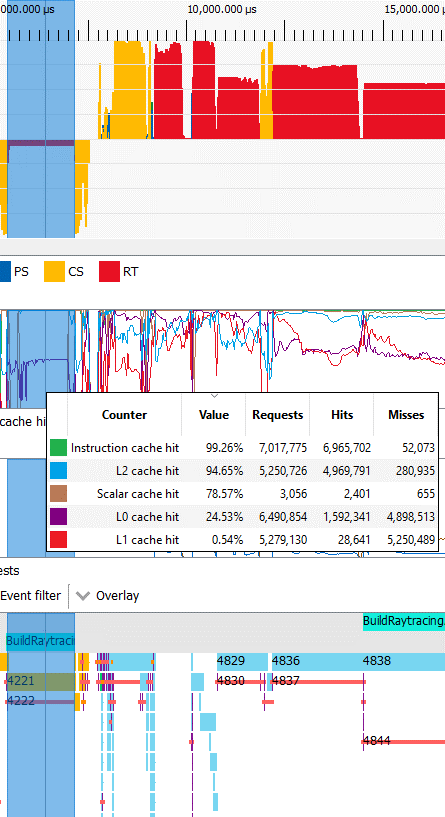
Unlike the ray traversal section introduced above, AMD’s drivers chose to use wave64 mode for this BVH build section. I suspect this is not the best choice. Wave32 mode should be preferred in low occupancy scenarios as it allows for more thread-level parallelism. But AMD may have had good reasons to use wave64, so I will not be an armchair quarterback and will turn to caching.
As before, the instruction cache hit rate is very high. The scalar cache does not have enough scalar memory accesses. In terms of vector, the performance of the 16 KB L0 is very poor, with a hit rate below 25%, while the 128 KB L1 may not even exist. RDNA’s L2 ultimately services most of the memory traffic, and in a more extreme manner than the ray traversal section. Due to low occupancy, L0/L1 cache hit rates are low, and L2 latency is likely to become a limiting factor when building the BVH.
Compute
Besides ray tracing (technically considered a form of compute on RDNA), Cyberpunk 2077 also makes extensive use of compute shaders. Non-ray tracing compute in the game often consists of many short-lived calls rather than a few very heavy calls. The longest compute call (number 4473) is compiled for wave32 mode and runs for less than 0.7 milliseconds. RDNA 2 handles this easily. The shaders do not use many vector registers or LDS space and launch 130,560 wavefronts. Thus, occupancy is very good.
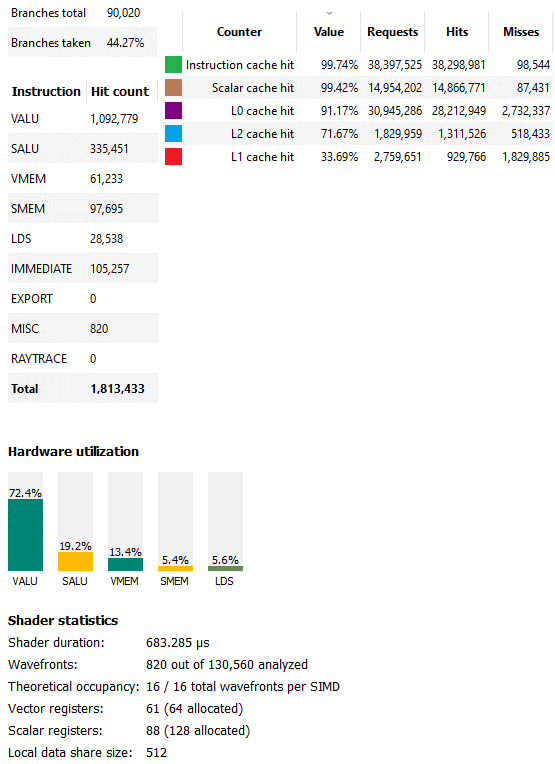
The utilization of vector ALUs is also very good. In fact, it is excellent. A little higher, and we would call this section limited compute. RDNA 2’s scalar data path plays a key role in offloading computations applied to wavefronts. Cache hit rates also contribute to good compute utilization. About 94% of vector accesses are serviced by L0 and L1 caches, most of which come from L0. L2 brings the cumulative hit rate above 98%. The hit rates for L1 instruction cache and scalar cache are so high that misses are basically noise. For this shader, good cache hit rates and high occupancy combine to make RDNA 2 shine.
The second longest compute shader (number 4884) runs for less than half a millisecond and shows different characteristics. It uses wave64 and its occupancy is limited to only four waves per SIMD due to vector register file capacity. Nevertheless, RGP still reports very good VALU utilization. This may be because this kernel consists mostly of vector ALU instructions. There are not many memory accesses, and a significant amount of memory access indeed occurs on the scalar path.
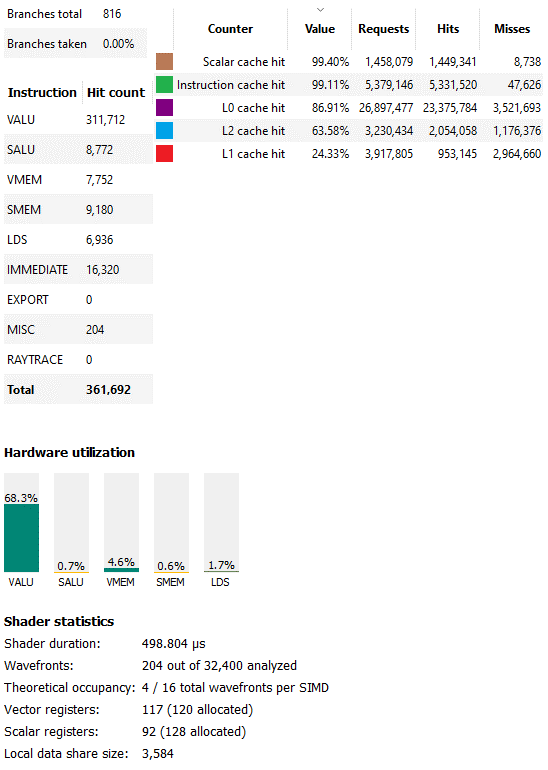
Moreover, this compute shader has very few branches, and RGP did not select any taken branches. Branching on GPUs is very expensive, as GPUs do not have branch prediction and must stall threads until the branch condition is resolved. Untaken branches also mean divergence is not much of an issue. Overall, this shader consists mainly of straightforward FP32 operations. GPUs love these things. RDNA 2 is no exception, and although occupancy is low, hardware utilization is very good.
Cyberpunk 2077, RT Off
Ray tracing effects are cool, but Cyberpunk 2077 still looks very good with RT turned off. If artists and developers know their stuff, traditional rasterization can still render impressive scenes, and the staff at CP2077 seems absolutely capable of this.
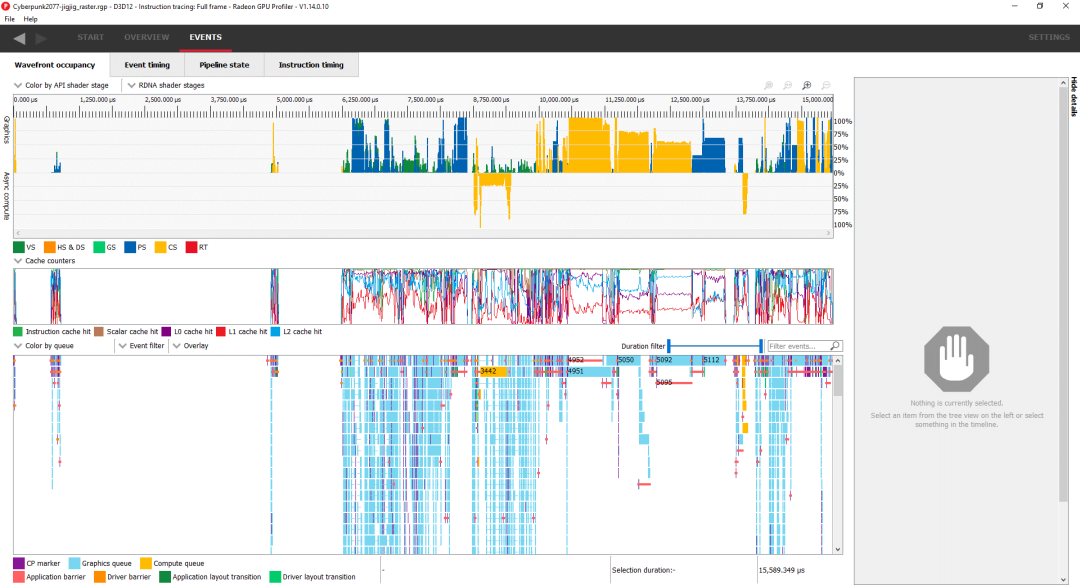
A large amount of blank space near the beginning indicates we are CPU-bound
Without ray tracing, traditional vertex and pixel shaders step in and take a larger role. However, the game still makes extensive use of compute shaders, and asynchronous compute also appears. The three longest-running calls are all compute, summarized as follows:
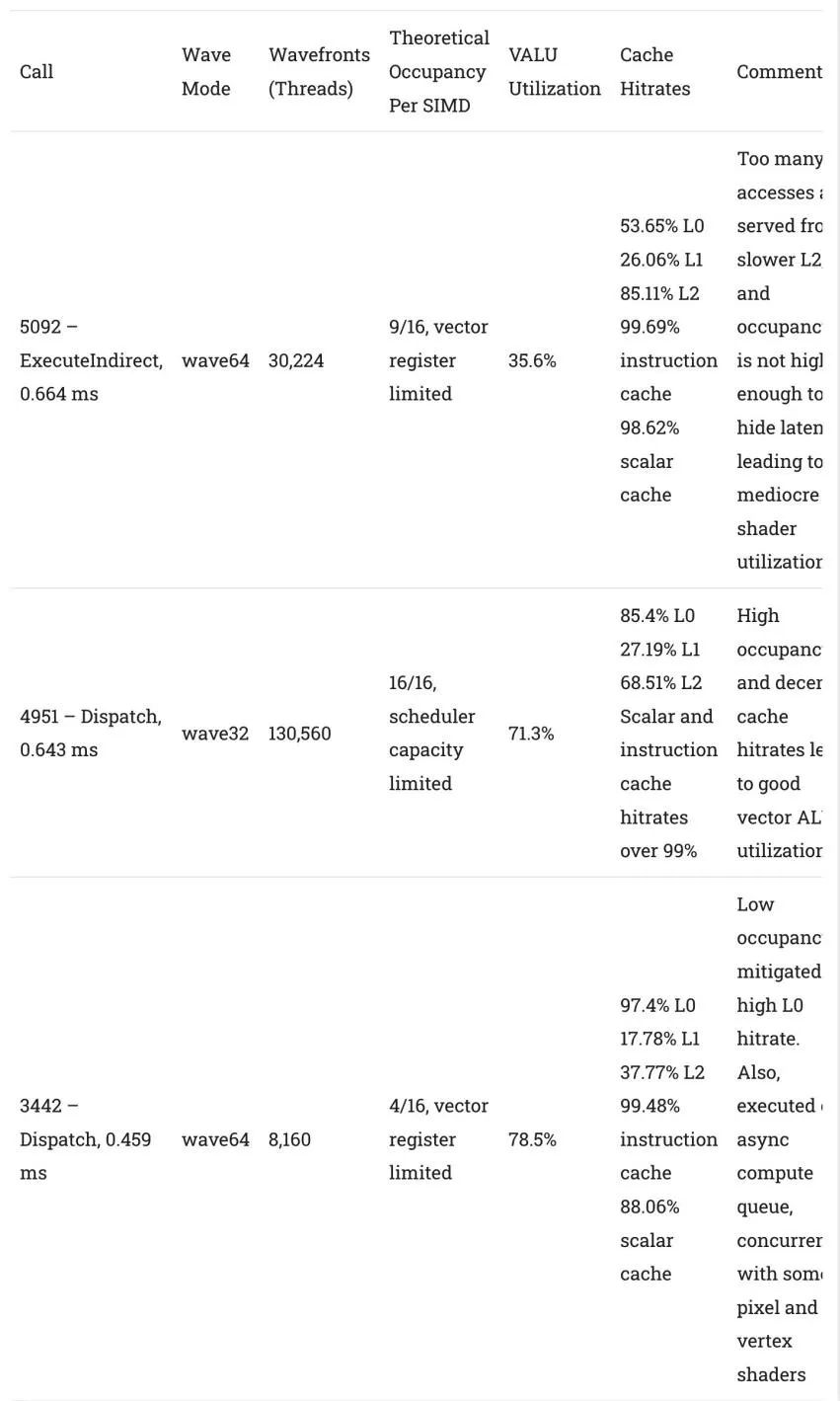
Comparing the three longest GPU calls, all of which are compute shaders
RDNA 2 performs very well in these compute kernels, even with the longest-running kernel having lower utilization. Vector register file capacity continues to limit the parallelism the architecture can take advantage of, but this issue is not unique to AMD. In terms of caching, the 128 KB L1 typically performs poorly. We see that a 256 KB mid-level cache is already quite common for CPUs. GPU caches are even harder to come by. Time and again, RDNA 2’s L1 misses more than it hits. I am glad AMD chose to increase L1 cache capacity in RDNA 3. On the positive side, scalar and instruction cache hit rates continue to perform well.
Rasterization
Unlike ray tracing, the traditional rasterization pipeline is very efficient. Rasterization can map 3D points to 2D screen space using simple computations instead of sending rays everywhere and observing what they hit. The GPU then uses fixed-function hardware to distribute work to pixel shaders, which decide what color those pixels should be. As before, let’s take a look at several of the longest rasterization calls in CP2077.
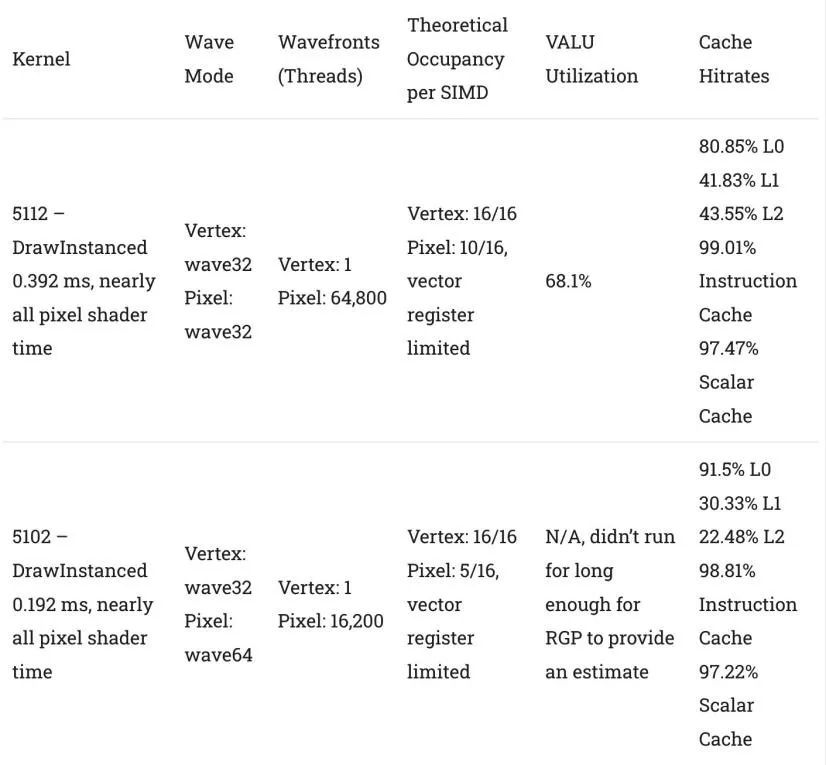
Through rasterization work, the L1 cache displays more credible results. The hit rate is still not great, but in some cases, it can catch enough L0 misses to ensure that the vast majority of requests do not need to be satisfied from L2 or higher. This can be a significant advantage, as L1’s latency and bandwidth characteristics are much better than L2.
A set of vertex shader work occurs close to the beginning of the frame. This is difficult to analyze due to the large number of small calls, but peeking at some displays, they typically launch fewer than 100 wavefronts each time. From our latency and bandwidth scaling tests, RDNA 2 performs exceptionally well in low occupancy scenarios, possibly even better than Nvidia’s Ampere in handling these calls.
Titanic Honor and Glory,
Megademo 401 (Rasterization, 4K)
Large studios with million-dollar budgets can create complex games with deep storylines and impressive visuals. But they do not monopolize the fun; independent creators can create immersive and visually stunning things with smaller budgets. One example is the ongoing Titanic Honor and Glory project, which focuses on recreating the Titanic using 3D technology. It uses Unreal Engine and runs on DirectX 12.
Like many indie games, developers spend less time and resources on optimization. But perhaps because it is not yet optimized, the level of detail in the presentation is astounding, even very heavy on modern GPUs.

Scene of the first-class lounge gets a profile. The detail here is incredible
Here, we look down on the first-class lounge, with the game running at 4K resolution, and GPU/CPU clock settings as before. Pixel shaders dominate this workload, but compute shaders also play a role. Asynchronous compute utilization is extremely low, with almost all calls happening on the graphics queue.
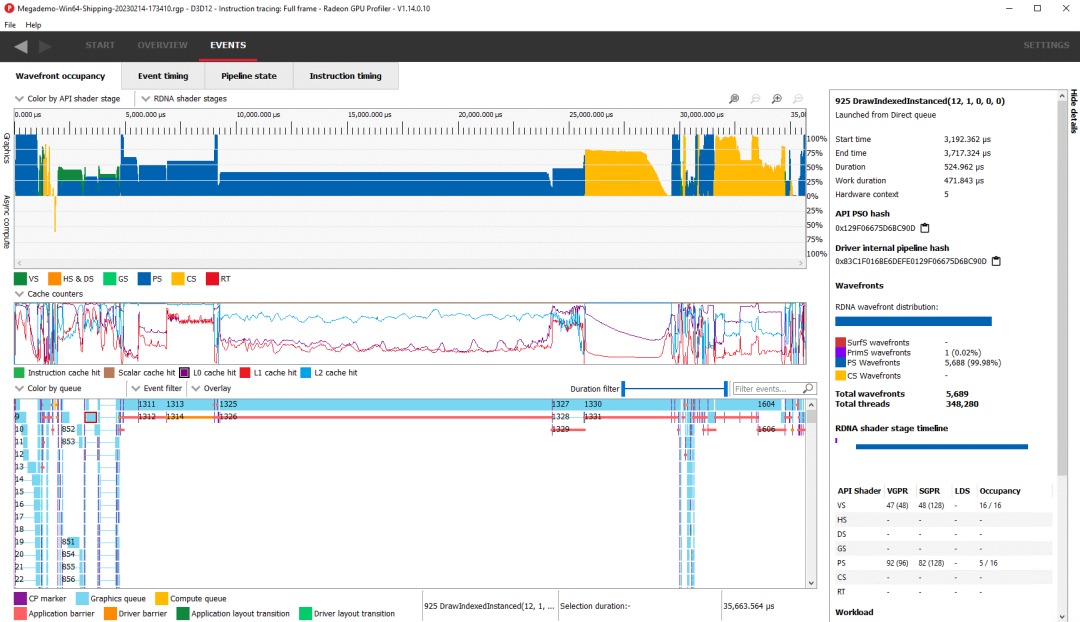
The longest call is event 1325, a pixel shader running in wave64 mode. It launches 129,652 wavefronts, or enough to cover every pixel at 4K resolution with a wave. Due to vector register file limitations, occupancy is low. Vector ALU utilization is also low, which may be due to low occupancy and mediocre cache hit rates.
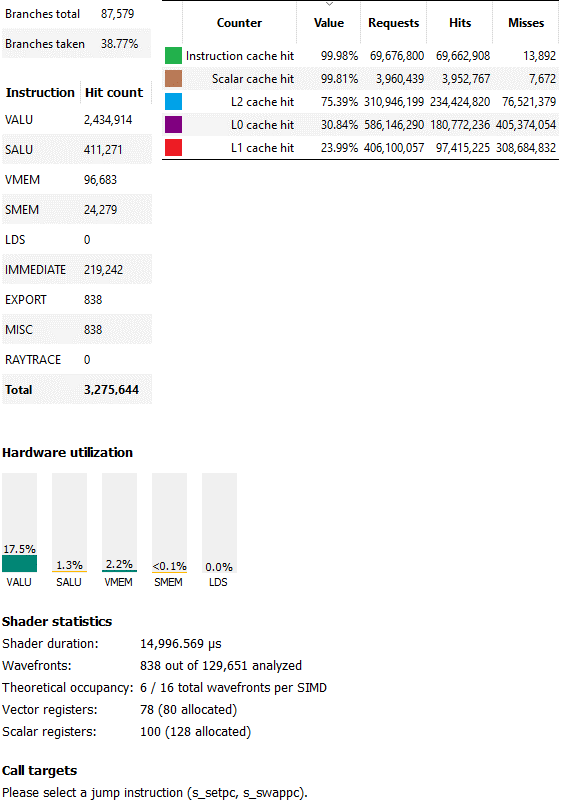
Analyzer statistics for long-running pixel shaders
Event 1330 is the second longest call, a compute shader that launches 16,320 wave32 wavefronts. Occupancy is again limited by vector register file capacity, but this time with better occupancy of 12 waves per SIMD. The shader achieves 27.7% vector ALU utilization, which is acceptable but still low. The L0 hit rate is not bad at 59.69%, while the L1 hit rate is embarrassingly low at only 13.11%. Fortunately, the second-level cache saves the day with a hit rate of 99.82%. Compute utilization should really be better, as 12 waves per SIMD is not a terrible occupancy. But a closer look reveals another issue. Work is unevenly distributed across threads, with some threads finishing before others.
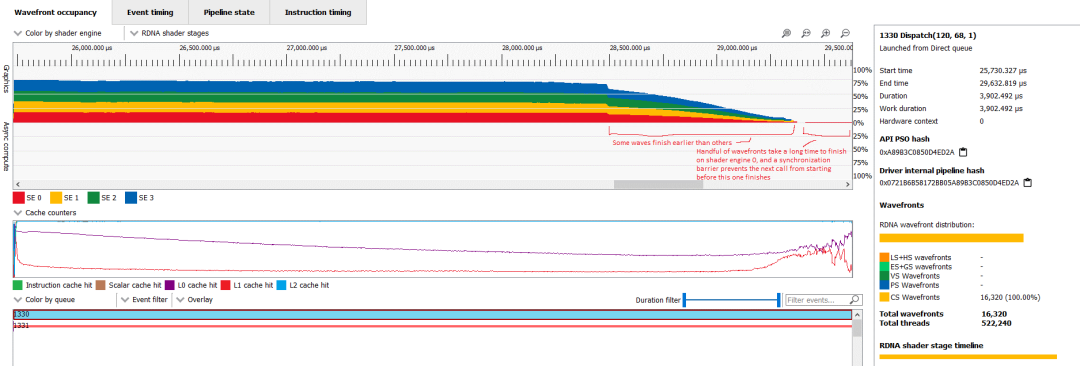
Zooming in on that compute shader, adding annotations and setting shading to shader engine
Clearly, the next call requires data written by the compute shader, so the synchronization barrier prevents it from executing until all threads in the compute shader finish executing. Ultimately, this means that many of the 6900 XT’s WGPs are idle or lack sufficient thread-level parallelism to effectively hide latency. This is not good for any GPU, but RDNA 2’s high clock speeds and better handling at low occupancy should allow it to fare better than Nvidia’s Ampere.
Through THG, we can see the role of DirectX 12 in rasterization. It does not perform ray tracing like Cyberpunk 2077, but the caching behavior of both workloads is surprisingly similar.
Gunner, HEAT, PC
Gunner, HEAT, PC (GHPC) is a tank simulation indie game. It aims to accurately depict the fire control systems and sensors on tanks from the late Cold War, while being more accessible than something like DCS. Unlike the THG demo, GHPC uses the Unity engine and runs on DirectX 11. Unfortunately, AMD’s analyzer does not support DirectX 11. I used PIX to analyze the game. But this has been annoying, as PIX has a nasty habit of crashing both itself and the game it tries to analyze.
GHPC predominantly uses traditional pixel and vertex shaders. I run the game at 4K, so it is no surprise that there is a lot of pixel shader work. Using compute shaders, but unlike the above DirectX 12 workloads, they play a very small role.
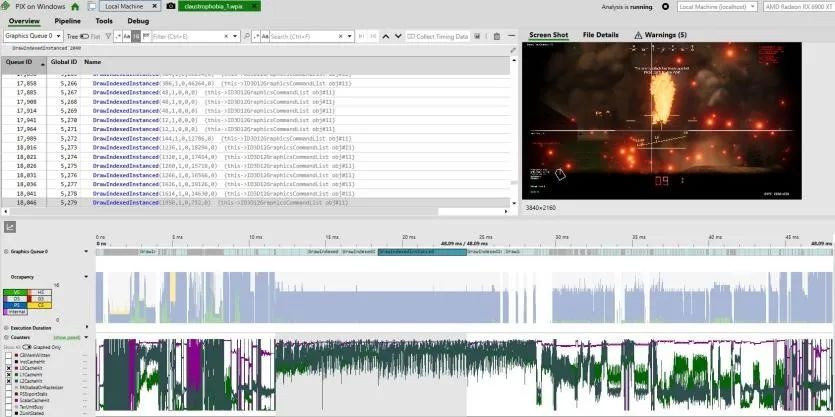
GHPC’s longest-running pixel shader is much more cache-friendly than THG’s. We see over 90% L0 hit rate. The L1 hit rate ultimately fluctuates between 70-80%, which is excellent, while L2 hit rates hover around 90% and approximately 60%. Scalar and instruction cache hit rates are essentially 100%. Unfortunately, PIX does not display metrics on execution unit utilization, but I hope it is very good. That is because the game tends to generate a lot of heat from the card, even when running below standard clock speeds. Fortunately, PIX does reveal a lot more counters than RGP, allowing us to explore other aspects of the rasterization pipeline.
Long-running pixel shaders are limited by compute and seem to be processing drawing effects for smoke. Early calls in the frame mainly deal with drawing objects like houses and roads. Since these calls are short and often overlap, we see some rasterization bottlenecks emerge. “PAStalledOnRasterizer” means the primitive assembler generates primitives faster than the rasterizer can process them. This may indicate a bottleneck in the rasterizer or anywhere afterward.
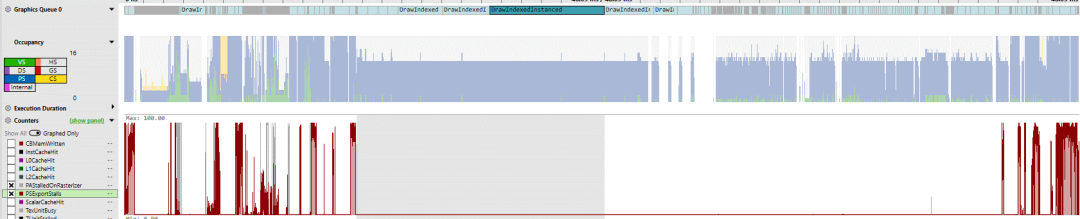
PAStalledOnRasterizer in gray,
PSExportStalls in red
Another metric is “PSExportStalls”, indicating when the pixel shader program has computed color information but the last stage of the rasterization pipeline is not yet ready to accept data. One culprit is the Z unit, which performs depth testing to ensure that only unoccluded pixels are displayed in the final frame. For example, if half of the tank is behind a house, the Z unit will ensure that the pixels of the house are displayed in the final frame. If a large number of pixels from many different objects must go through this depth test, the Z unit may struggle to keep up.
But looking back, the biggest performance culprit is definitely the smoke and haze effects. Drawing these effects occupies the GPU the most, and pixel shader operations are very heavy. During these shaders, texture units are almost always active, so there may also be a texture bottleneck.
Cache Comments
For a long time, GPU caches have lagged behind CPU caches. In the early 2000s, GPUs did not have a general-purpose cache hierarchy. They did have dedicated buffers, but in most cases, they relied on explicit parallelism and high-bandwidth memory setups. By the late 2000s, memory bandwidth limitations prompted GPUs to adopt caching. These have often been much smaller than CPU caches, with two-level cache setups being the norm. CPUs switched to three-level setups around that time to maintain performance through high core counts and large shared caches.
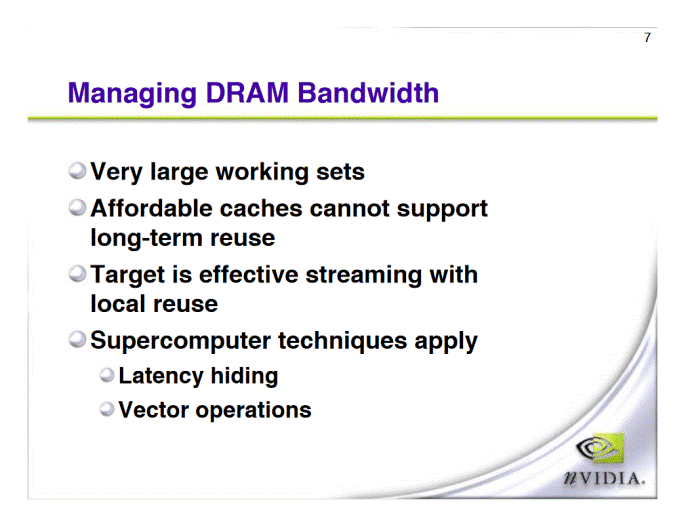
Once upon a time, during the Geforce 4 era, GPU caches were impractical. Oh, how times have changed…
RDNA 2 turns everything around by adopting a more complex and higher-capacity cache hierarchy than we see on most CPUs. It uses an incredible four-level cache, with the last-level cache having a capacity of 128 MB. In contrast, even AMD’s VCache CPUs have only 96 MB of last-level cache and use a three-level cache setup.
Like CPUs, DRAM technology is also struggling to keep up with the performance improvements of GPUs. But unlike CPUs, GPUs are less sensitive to latency, making such cache setups practical (latency seems to be the main reason L4 caches are not favored by CPUs). It is great to see GPUs evolve and use caches more frequently than CPUs.
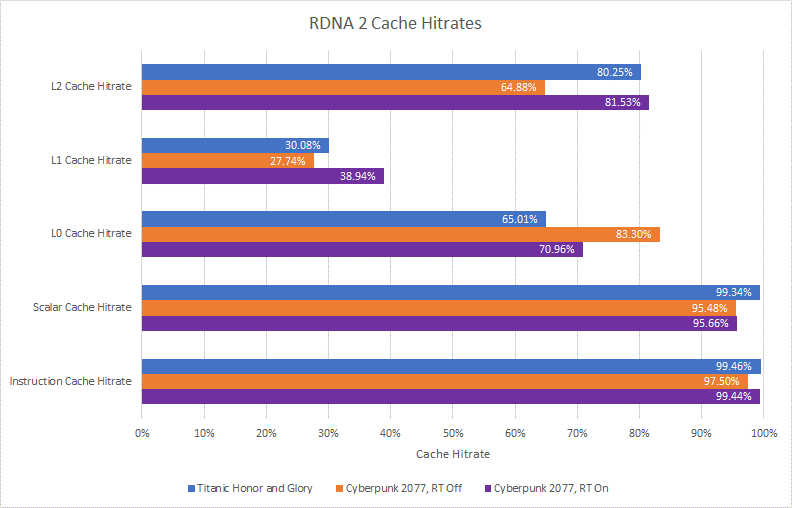
Overall hit rate, for all accesses across frames
However, more complex cache setups are not necessarily good. More levels of cache mean you may check more tags for hits. If the cache levels do not capture a large number of memory accesses, it can ultimately delay access to where the data comes from. Therefore, RDNA 2’s L1 cache is disappointing, with a lower hit rate compared to other cache levels. It either needs to become larger or should be sacrificed to support a larger L0 cache.
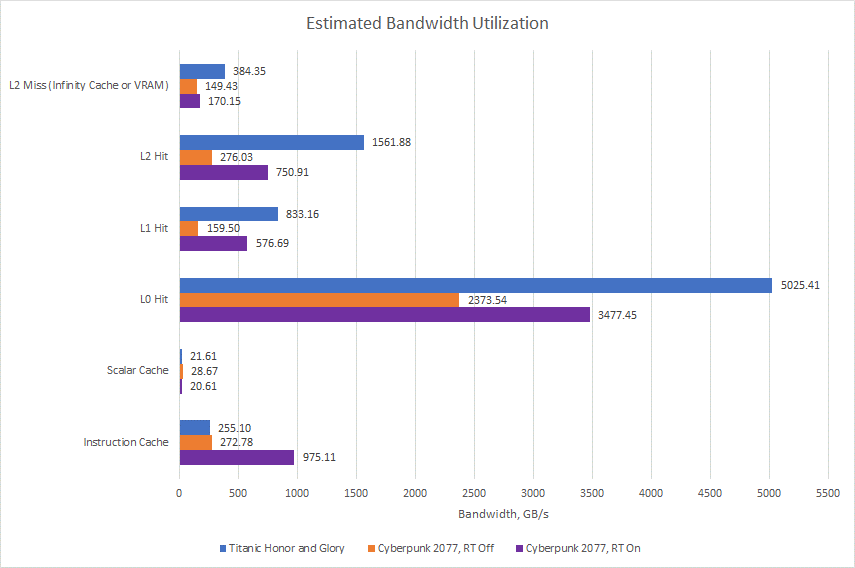
Assuming each scalar cache access retrieves a 64-bit value. Let’s pause for a moment to appreciate the massive data that GPU caches must handle.
Caches also help improve bandwidth, which is more important for GPUs. The L1 cache does reduce traffic going into L2, but I suspect L2 does not need this help. AMD’s RX 6900 XT already has plenty of L2 bandwidth, even compared to Nvidia’s larger RTX 3090. Therefore, L1 ultimately serves to consolidate requests from multiple WGPs, simplifying L2 routing.
Narrowing the scope, we can look at request counts, multiply by request sizes, and then multiply by achieved frame rates to estimate how much data the GPU pulls from its caches. The L0 cache delivers several TB of data per second, and if I were running my 6900 XT at standard clock instead of limiting it to 1800 MHz, that number would be higher. Even at L2, we see bandwidth demands exceeding 1.5 TB/s. Modern GPUs without several megabytes of cache would be severely bandwidth-limited, even if we provide them with a six-stacked HBM2E setup like on Nvidia A100.
Gaming Trends
From the small sample of games I’ve seen, compute seems to be playing a larger role. Compute shaders are particularly prominent in Cyberpunk 2077, a modern AAA game developed with a large budget. I consider ray tracing a form of compute. RDNA 2 treats ray tracing as compute. I am not sure what Nvidia did, but Pascal used compute shaders to handle ray tracing. Even without ray tracing, Cyberpunk still employs a lot of compute alongside traditional rasterization.
Smaller-budget indie games often emphasize the rasterization pipeline more, but still leverage compute. The extent to which they do this likely depends on the game engine, as indie developers often do not have the time to create their own engines from scratch. Titanic Honor and Glory uses Unreal Engine, which has a lot of compute power. GHPC uses Unity engine, with very little compute. While the traditional rasterization pipeline remains very important, we may see it increasingly supplemented by compute in new games.
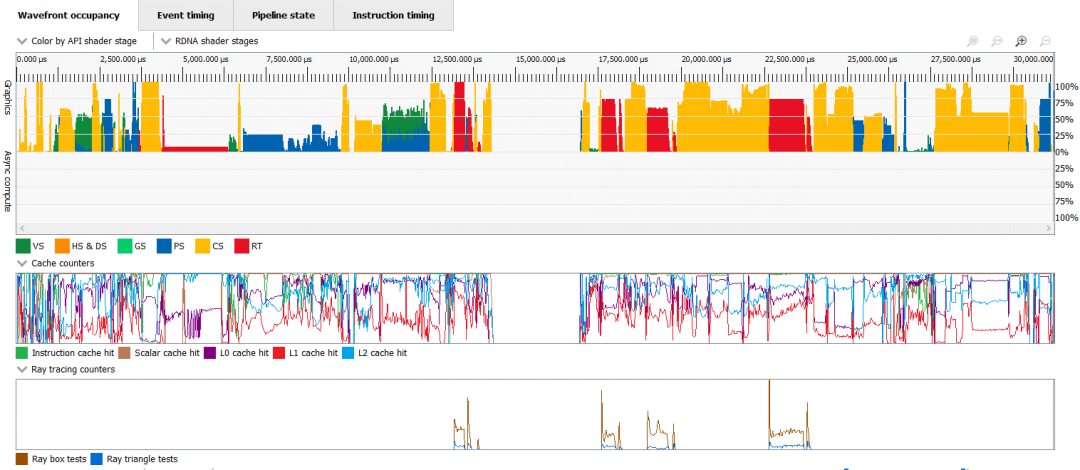
Analyzing frames in a city demo of Unreal Engine shows extensive use of compute and ray tracing
Thus, modern video cards need to have good compute capabilities, and RDNA 2 does not disappoint. It may not have the massive FP32 throughput of Nvidia’s Ampere architecture, but it is better positioned to utilize its existing execution units.
Conclusion
RDNA 2 is an important moment for AMD. For about the past decade, Nvidia has generally dominated the high-performance GPU market. AMD (and ATI) occasionally produced graphics cards that could go head-to-head with Nvidia’s best, but that situation never seemed to last long. The RX 6900 XT based on RDNA 2 is one of those, with significance akin to that of the HD 5800 based on Terascale 2. Terascale 2 offered much of the performance of Nvidia’s Fermi cards but at much lower power consumption. Similarly, RDNA 2 offers much of the performance of Ampere but with higher power efficiency. At least part of the reason is RDNA 2’s use of caching, rather than a large GDDR6X setup. Therefore, RDNA 2 represents a turning point in GPU caching strategy.
This cache setup also makes RDNA 2 significant in another way. It represents a turning point in GPU caching strategy towards prioritizing general compute performance. The days of just throwing more shaders and building a massive VRAM subsystem to feed them seem to be gone. The same goes for tile-based rendering, which attempts to optimize cache occupancy by optimizing rasterization order. As compute becomes increasingly important, rasterization-based tricks begin to have less impact. Like CPUs, the answer seems to be more cache. AMD’s next-generation GPU architecture, RDNA 3, adopts a similar four-level cache subsystem. Nvidia is similarly moving away from reliance on huge VRAM configurations. Ada Lovelace significantly increases L2 cache capacity, with the RTX 4090 receiving 72 MB of L2. Even larger GDDR6X setups or HBM may provide enough bandwidth to only use 4 MB or 6 MB of cache, but such solutions would be too power-hungry or too expensive.
RDNA 2 also brings hardware ray tracing acceleration to AMD’s GPU lineup. In contrast to Nvidia’s all-out approach, AMD seems to be trying to achieve acceptable performance at the lowest hardware cost. I see this as a wise move, as traditional compute and rasterization still dominate many workloads and absolutely do not require ray tracing to produce good visuals. Furthermore, even as GPU power and die area reach their limits, future ray tracing workloads are unlikely to be achievable with today’s technology. That is because we are far from using pure ray tracing to render AAA titles, and even limited ray tracing effects would incur such a performance hit that both Nvidia and AMD resort to using upscaling techniques.
But importantly, RDNA 2’s ray tracing implementation provides AMD with something to build upon. The cache setup is significant as well. In laying the groundwork for future success, RDNA 2 is nearly on par with RDNA 1.
Click “Read Original” for the English original.Source | Compiled from chipsandcheese by Semiconductor Industry Observer (ID: icbank)Recommended Reading——【Semiconductor】IMEC Releases Chip Miniaturization Roadmap: Entering 0.2nm Era by 2036【Semiconductor】Every Chip Is Losing Money! Memory Manufacturers Face Unprecedented Crisis【Semiconductor】Under U.S. Suppression, Japan and the Netherlands Follow Suit, Will Chinese Chips Struggle to Fight or Fold?【Semiconductor】EU Chip Law Draft Passed! “Chip Diplomacy” Rarely Includes Taiwan【Semiconductor】New Trends in Chip Design Industry【Semiconductor】New Advances in 1nm Transistor Technology

 ☞ Business Cooperation: ☏ Please call 010-82306118 / ✐ Or send an email to [email protected]
Click
Here “Read Original” to go directly to Electronic Technology Application Official Website