1. Base Conversion
Data in computers is typically stored in binary form, but during programming and debugging, we often need to deal with decimal, octal, and hexadecimal systems. Therefore, mastering base conversion is an important part of learning C language.
 Editor
1.1 Basic Concepts of Number Systems
- Binary: Base 2, using digits 0 and 1.
- Octal: Base 8, using digits 0 to 7.
- Decimal: Base 10, using digits 0 to 9.
- Hexadecimal: Base 16, using digits 0 to 9 and letters A to F.
1.2 Methods of Base Conversion
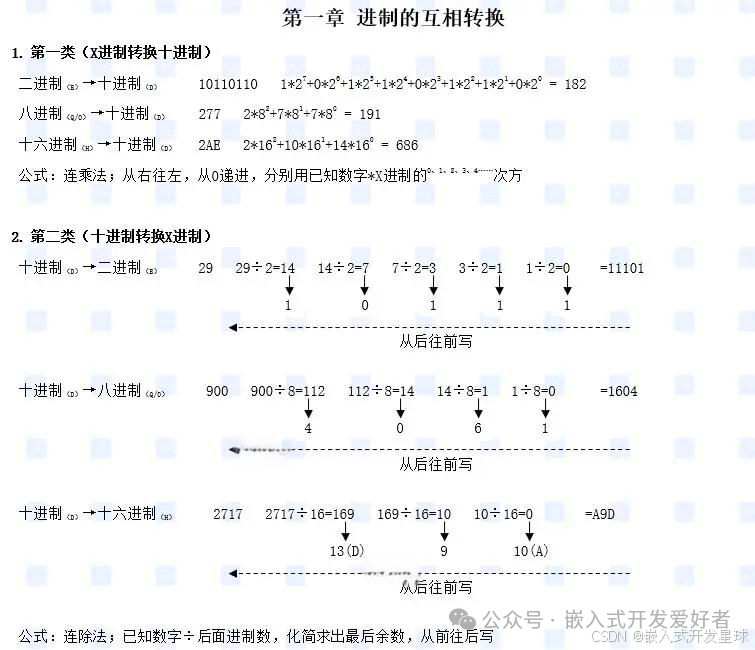
1.2.1 Binary to Decimal
Multiply each bit of the binary number by the power of 2, then sum them up.
Convert the binary number<span>1011</span> to decimal:
1*2^3+0*2^2+1*2^1+1*2^0
=8+0+2+1
=11
1.2.2 Decimal to Binary
Continuously divide by 2 and record the remainders until the quotient is 0, then reverse the order of the remainders.
Convert the decimal number<span>11</span> to binary:
11/2=5 remainder 1
5/2=2 remainder 1
2/2=1 remainder 0
1/2=0 remainder 1
Reverse the order of the remainders:<span>1011</span>.
1.2.3 Binary to Octal
Group the binary number from right to left in sets of three bits, padding with zeros if necessary, then convert each group to the corresponding octal number.
Convert the binary number<span>101110</span> to octal:
101110
56
The result is<span>56</span>.
1.2.4 Binary to Hexadecimal
Group the binary number from right to left in sets of four bits, padding with zeros if necessary, then convert each group to the corresponding hexadecimal number.
Convert the binary number<span>101110</span> to hexadecimal:
00101110
2E
The result is<span>2E</span>.
1.2.5 Decimal to Hexadecimal
Continuously divide by 16 and record the remainders until the quotient is 0, then reverse the order of the remainders.
Convert the decimal number<span>255</span> to hexadecimal:
255/16=15 remainder 15(F)
15/16=0 remainder 15(F)
Reverse the order of the remainders:<span>FF</span>.
2. Ones Complement, Twos Complement, and Sign-Magnitude
Computers can distinguish between positive and negative integers, but programs are ultimately converted into binary instructions. Binary can be positive or negative, with a 1-bit added at the front as a sign bit, where bit=0 indicates a positive number and bit=1 indicates a negative number.
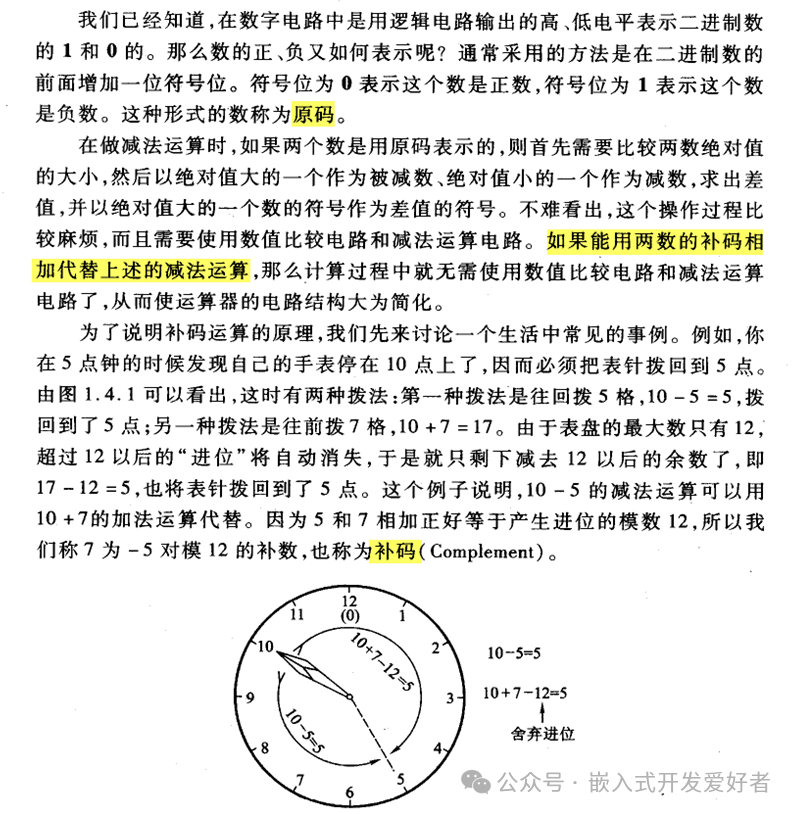
It can be seen that data is stored in the computer using the twos complement method, so it is necessary to convert the binary number from sign-magnitude to twos complement form.
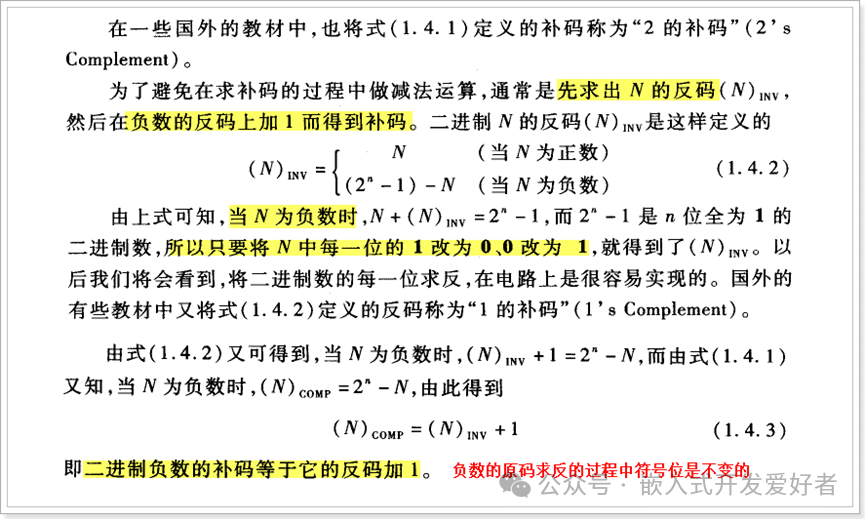
It can be seen that the sign-magnitude and twos complement representations are the same for positive numbers, so only negative numbers need to convert from sign-magnitude to twos complement for storage!
2.1 Sign-Magnitude
Sign-magnitude is the most basic representation of a binary number, where the highest bit is the sign bit (0 for positive, 1 for negative), and the remaining bits represent the value.
<span>+5</span>‘s sign-magnitude:<span>00000101</span><span>-5</span>‘s sign-magnitude:<span>10000101</span>
Sign-magnitude representation has the following issues:
- 0 has two representations:
<span>00000000</span>(+0) and<span>10000000</span>(-0). - Addition and subtraction operations are complex and require additional hardware support.
2.2 Ones Complement
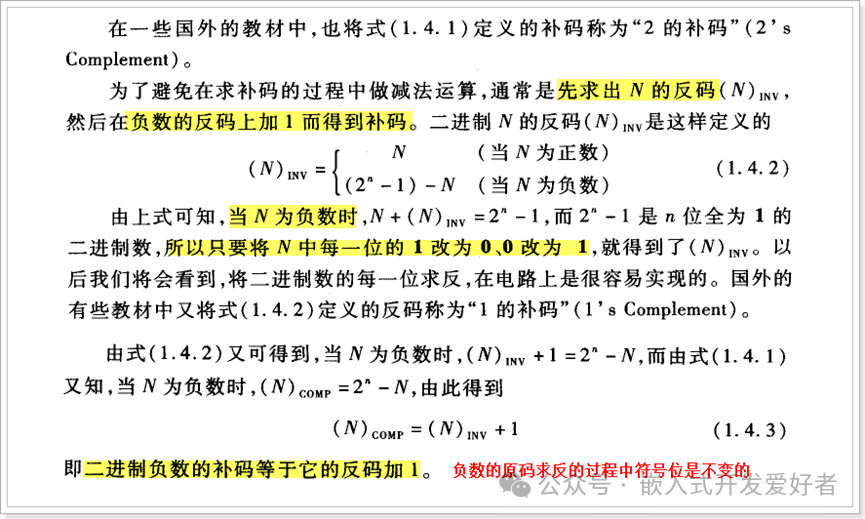
Ones complement is an improvement over sign-magnitude; the ones complement of a positive number is the same as its sign-magnitude, while the ones complement of a negative number is obtained by keeping the sign bit unchanged and inverting the remaining bits.
<span>+5</span>‘s ones complement:<span>00000101</span><span>-5</span>‘s ones complement:<span>11111010</span>
Ones complement representation still has the following issues:
- 0 has two representations:
<span>00000000</span>(+0) and<span>11111111</span>(-0). - Addition and subtraction operations remain complex.
2.3 Twos Complement
Twos complement is the standard way to represent signed integers in computers. The twos complement of a positive number is the same as its sign-magnitude, while the twos complement of a negative number is its ones complement plus one.
<span>+5</span>‘s twos complement:<span>00000101</span><span>-5</span>‘s twos complement:- Sign-magnitude:
<span>10000101</span> - Ones complement:
<span>11111010</span> - Twos complement:
<span>11111011</span> - 0 has only one representation:
<span>00000000</span>. - Addition and subtraction operations are unified and can be implemented directly using an adder.
Twos Complement Operations: An important property of twos complement is that the twos complement of a number is equal to its sign-magnitude. Therefore, twos complement can conveniently represent negative numbers and perform subtraction operations.
Calculate<span>5 - 3</span>:
<span>5</span>‘s twos complement:<span>00000101</span><span>-3</span>‘s twos complement:<span>11111101</span>- Add:
<span>00000101 + 11111101 = 00000010</span>(result is<span>2</span>).
Note: When designing programs, if the defined variable is signed, try to avoid writing values that exceed the variable’s range!!!!!!
Character type: char 1 byte — signed — value range -128 ~ 127 — unsigned — value range 0 ~ 255
Short type: short 2 bytes — signed — value range -32768 ~ 32767 unsigned — value range 0 ~ 65535
3. Base Representation and Bit Manipulation in C Language
3.1 Base Representation
- Binary: C language does not support direct representation of binary numbers, but can represent them using the prefix
<span>0b</span>or<span>0B</span>(somecompilers support this). - Octal: Starts with
<span>0</span>, for example,<span>012</span>represents decimal<span>10</span>. - Hexadecimal: Starts with
<span>0x</span>or<span>0X</span>, for example,<span>0x1A</span>represents decimal<span>26</span>.
#include <stdio.h>

int main(){
    int binary =0b1010;// Binary, value is 10
    int octal =012;// Octal, value is 10
    int hexadecimal =0x1A;// Hexadecimal, value is 26
printf("Binary: %d\n", binary);
printf("Octal: %d\n", octal);
printf("Hexadecimal: %d\n", hexadecimal);
return0;
}Output:
Binary:10
Octal:10
Hexadecimal:26
3.2 Bit Manipulation
The C language provides the following bit manipulation operators:
- Bitwise AND (
<span>&</span>): Result is 1 when both corresponding bits are 1, otherwise 0. - Bitwise OR (
<span>|</span>): Result is 1 when at least one corresponding bit is 1, otherwise 0. - Bitwise XOR (
<span>^</span>): Result is 1 when corresponding bits are different, otherwise 0. - Bitwise NOT (
<span>~</span>): Inverts all bits. - Left Shift (
<span><<</span>): Shifts the binary number left by a specified number of bits, filling low bits with 0. - Right Shift (
<span>>></span>): Shifts the binary number right by a specified number of bits, filling high bits with the sign bit (arithmetic right shift) or 0 (logical right shift).
#include <stdio.h>
int main(){
int a =5;// Binary: 00000101
int b =3;// Binary: 00000011
printf("a & b: %d\n", a & b);// 00000001 (1)
printf("a | b: %d\n", a | b);// 00000111 (7)
printf("a ^ b: %d\n", a ^ b);// 00000110 (6)
printf("~a: %d\n",~a);// 11111010 (-6, twos complement representation)
printf("a << 1: %d\n", a <<1);// 00001010 (10)
printf("a >> 1: %d\n", a >>1);// 00000010 (2)
return0;
}Output:
a & b:1
a | b:7
a ^ b:6
~a:-6
a <<1:10
a >>1:2