Hello everyone, welcome to <span>LiXin Embedded</span>.
In the development era, tasks like code compilation, linking, and cleaning can be quite tedious. Makefile acts like a project manager, helping you automate these cumbersome tasks. Many people may find Makefile a bit mysterious when they first encounter it, but it is not complicated. Today, we will take a simple text editor project as an example to discuss the basic usage of Makefile and some practical tips.
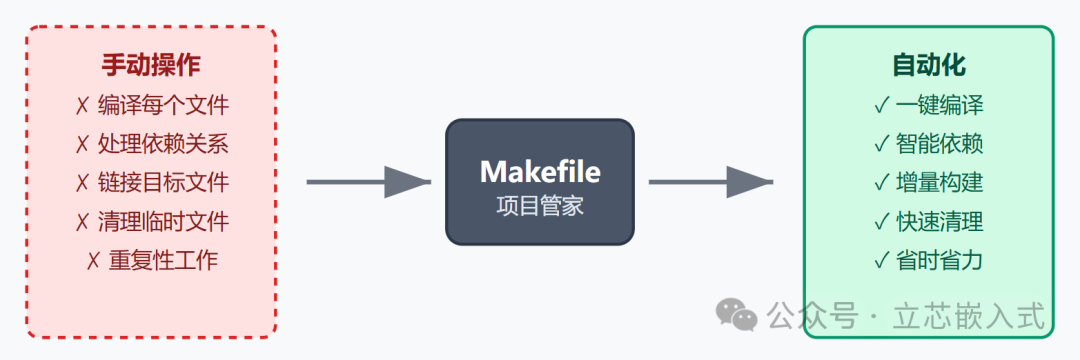
What is Makefile
Makefile is a configuration file for the make tool, used to tell make how to handle your project. In simple terms, it defines the dependencies and generation rules of files, such as which source files need to be compiled into object files and which object files need to be linked into executable files. In actual development, projects usually contain multiple C files, header files, and even assembly files. Manually compiling and linking is time-consuming and error-prone. Makefile acts like a script, helping you automate these steps, and with a single command <span>make</span>, everything can be done.
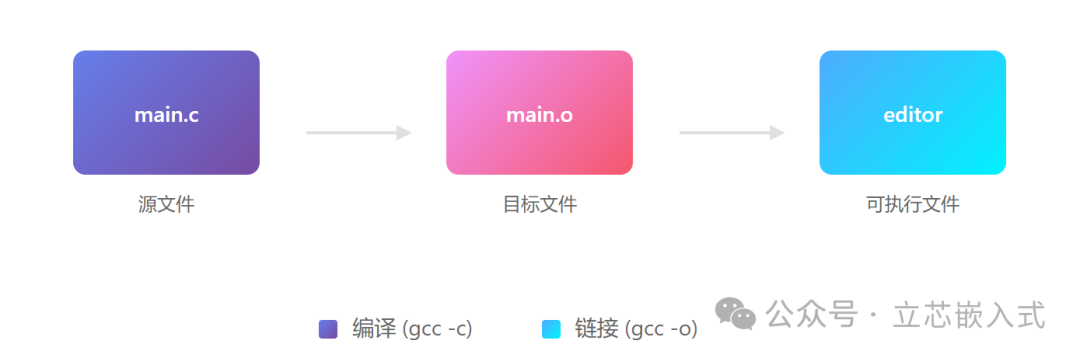
For example, suppose we want to develop a simple text editor that includes 8 C source files and 3 header files. Makefile can define how to compile these files, generate the executable file, and even handle cleaning operations, such as deleting intermediate files to keep the project directory tidy.
Makefile Rules
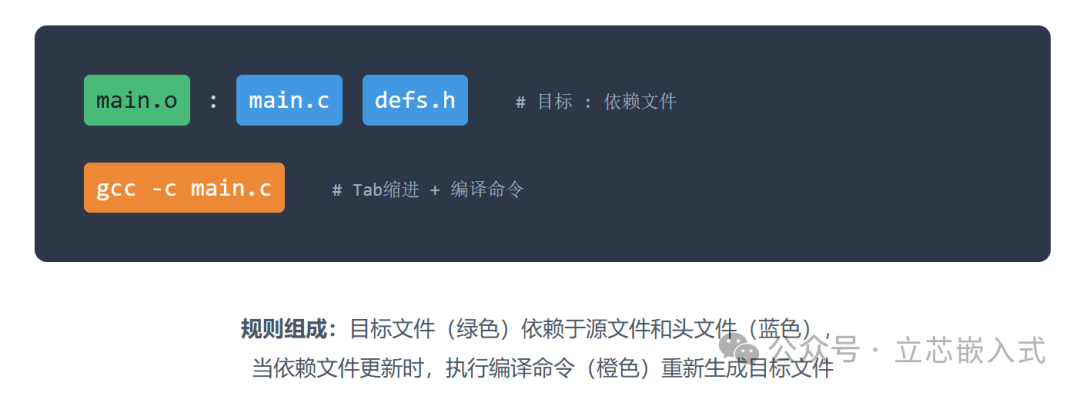
The core of Makefile is rules, which have a simple and clear structure:
target : dependencies
    command
- Target: Usually the file you want to generate, such as an executable file or an object file (.o file). Sometimes the target can also be an action, such as clean, used to clean the project.
- Dependencies: Input files needed to generate the target, such as C source files or header files.
- Command: The specific operation to generate the target, such as compiling with gcc.Note: Each command must be indented with a Tab character, which is a strict requirement of Makefile; spaces will not work, and missing a Tab will cause an error, which beginners often overlook.
For example, suppose we want to compile main.c to generate main.o:
main.o : main.c defs.h
    gcc -c main.c
This means: if main.c or defs.h changes, or if main.o does not exist, make will execute gcc -c main.c to generate main.o.
Rules are not limited to generating files; they can also define actions. For example, the clean rule is used to delete generated files:
clean :
    rm -f *.o editor
Here, clean is a phony target, not a real file, just used to trigger the cleaning action. Adding the .PHONY tag can prevent make from mistakenly thinking clean is a file, which will be discussed later.
Practical Case Study of Makefile
Suppose our text editor is called editor, containing 8 C source files (main.c, kbd.c, command.c, display.c, insert.c, search.c, files.c, utils.c) and 3 header files (defs.h, command.h, buffer.h). All C files include defs.h, and some files also depend on command.h or buffer.h. We need to compile these source files into object files and then link them into the executable file editor.
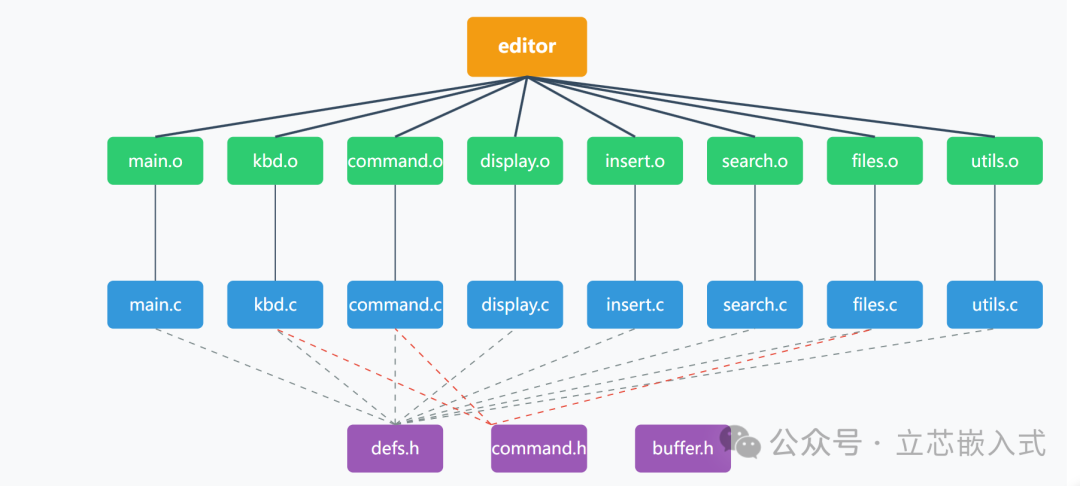
A straightforward Makefile can be written as follows:
editor : main.o kbd.o command.o display.o insert.o search.o files.o utils.o
    gcc -o editor main.o kbd.o command.o display.o insert.o search.o files.o utils.o

main.o : main.c defs.h
    gcc -c main.c
kbd.o : kbd.c defs.h command.h
    gcc -c kbd.c
command.o : command.c defs.h command.h
    gcc -c command.c
display.o : display.c defs.h buffer.h
    gcc -c display.c
insert.o : insert.c defs.h buffer.h
    gcc -c insert.c
search.o : search.c defs.h buffer.h
    gcc -c search.c
files.o : files.c defs.h buffer.h command.h
    gcc -c files.c
utils.o : utils.c defs.h
    gcc -c utils.c
clean :
    rm -f editor *.o
After running <span>make</span>, make will check the dependencies, compile the changed C files, generate the corresponding .o files, and finally link them into editor. If you want to clean the project, just run <span>make clean</span>.
This Makefile is functional but a bit verbose. Listing all .o files each time is cumbersome and prone to errors, such as forgetting to add a new file to the linking step. Don’t worry, below we will teach you how to optimize it.
Simplifying Makefile with Variables
Embedded projects often have dozens of files, and manually listing all target files and dependency files is a nightmare. Makefile supports variables, which can greatly simplify writing. A commonly used variable name is objects (or OBJS), used to store the list of all target files. For example:
objects = main.o kbd.o command.o display.o insert.o search.o files.o utils.o
Then, in the rules, you can reference this list using $(objects), and the optimized Makefile becomes:
objects = main.o kbd.o command.o display.o insert.o search.o files.o utils.o

editor : $(objects)
    gcc -o editor $(objects)

main.o : main.c defs.h
    gcc -c main.c
kbd.o : kbd.c defs.h command.h
    gcc -c kbd.c
command.o : command.c defs.h command.h
    gcc -c command.c
display.o : display.c defs.h buffer.h
    gcc -c display.c
insert.o : insert.c defs.h buffer.h
    gcc -c insert.c
search.o : search.c defs.h buffer.h
    gcc -c search.c
files.o : files.c defs.h buffer.h command.h
    gcc -c files.c
utils.o : utils.c defs.h
    gcc -c utils.c
clean :
    rm -f editor $(objects)
Now, you only need to add or remove file names in the objects variable, and the linking and cleaning rules will automatically update, making maintenance much easier.
Let make Automatically Infer Compilation Commands
When writing Makefile, the compilation command gcc -c xxx.c is repeated eight times, which is quite annoying. In fact, make has built-in implicit rules, which can automatically recognize the compilation method from .c files to .o files, such as using gcc -c main.c -o main.o directly. Moreover, make will automatically add .c files to the dependency list.
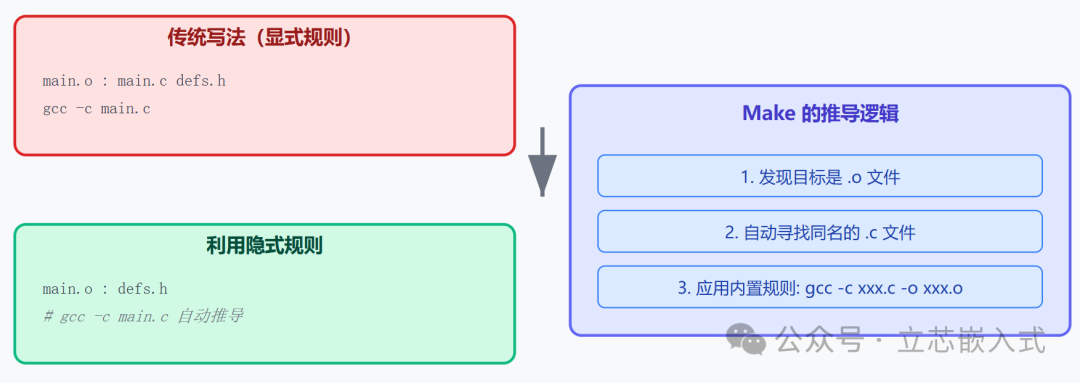
By utilizing implicit rules, we can omit the compilation commands and .c file dependencies, only writing header file dependencies, further simplifying the Makefile:
objects = main.o kbd.o command.o display.o insert.o search.o files.o utils.o

editor : $(objects)
    gcc -o editor $(objects)

main.o : defs.h
kbd.o : defs.h command.h
command.o : defs.h command.h
display.o : defs.h buffer.h
insert.o : defs.h buffer.h
search.o : defs.h buffer.h
files.o : defs.h buffer.h command.h
utils.o : defs.h

.PHONY : clean
clean :
    rm -f editor $(objects)
Isn’t it much simpler? Make will automatically infer commands like gcc -c main.c -o main.o, saving a lot of code. Additionally, the .PHONY tag ensures that clean will not be mistakenly recognized as a file, even if there is a file named clean in the directory.
Another Style: Grouping by Dependencies
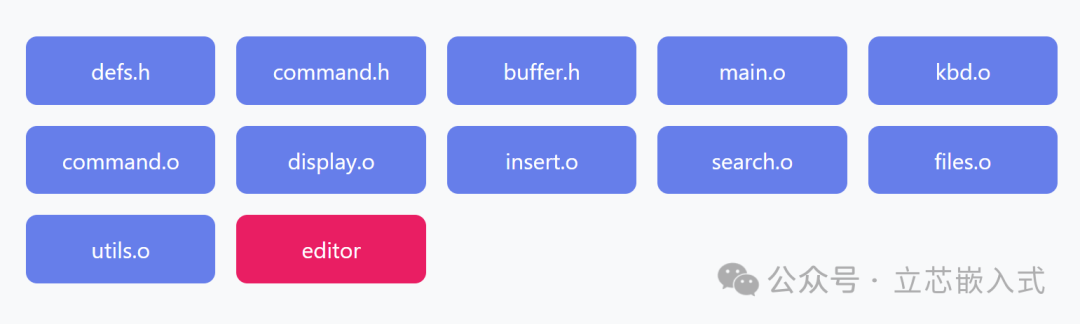
Some engineers prefer to write Makefile more compactly, grouping target files with the same dependencies together. For example, writing all target files that depend on defs.h in one line. This style is more concise but may be harder to read, depending on personal preference:
objects = main.o kbd.o command.o display.o insert.o search.o files.o utils.o

editor : $(objects)
    gcc -o editor $(objects)

$(objects) : defs.h
kbd.o command.o files.o : command.h
display.o insert.o search.o files.o : buffer.h

.PHONY : clean
clean :
    rm -f editor $(objects)
This writing style lists all .o files that depend on defs.h together, and similarly for command.h and buffer.h. The advantage is less code, but the disadvantage is that the dependency relationships of target files are dispersed, which may not be intuitive. In embedded development, for complex projects, it is recommended to list target files one by one for clearer maintenance.
How to Clean the Directory
Cleaning the directory is a common function of Makefile, used to delete generated files and keep the project tidy. We have already seen this in the previous clean rule:
.PHONY : clean
clean :
    rm -f editor $(objects)
Here, the -f parameter is added to prevent rm from throwing an error if it cannot find the file. In embedded development, the cleaning rule is especially important because target files and executable files can take up valuable storage space, especially on resource-constrained development boards.
Additionally, the clean rule should not be placed at the beginning of the Makefile, as make executes the first rule by default. If clean is at the top, running <span>make</span> will directly clean the project instead of compiling! Therefore, the compilation rules (such as editor) should be placed first.
How make Processes Makefile
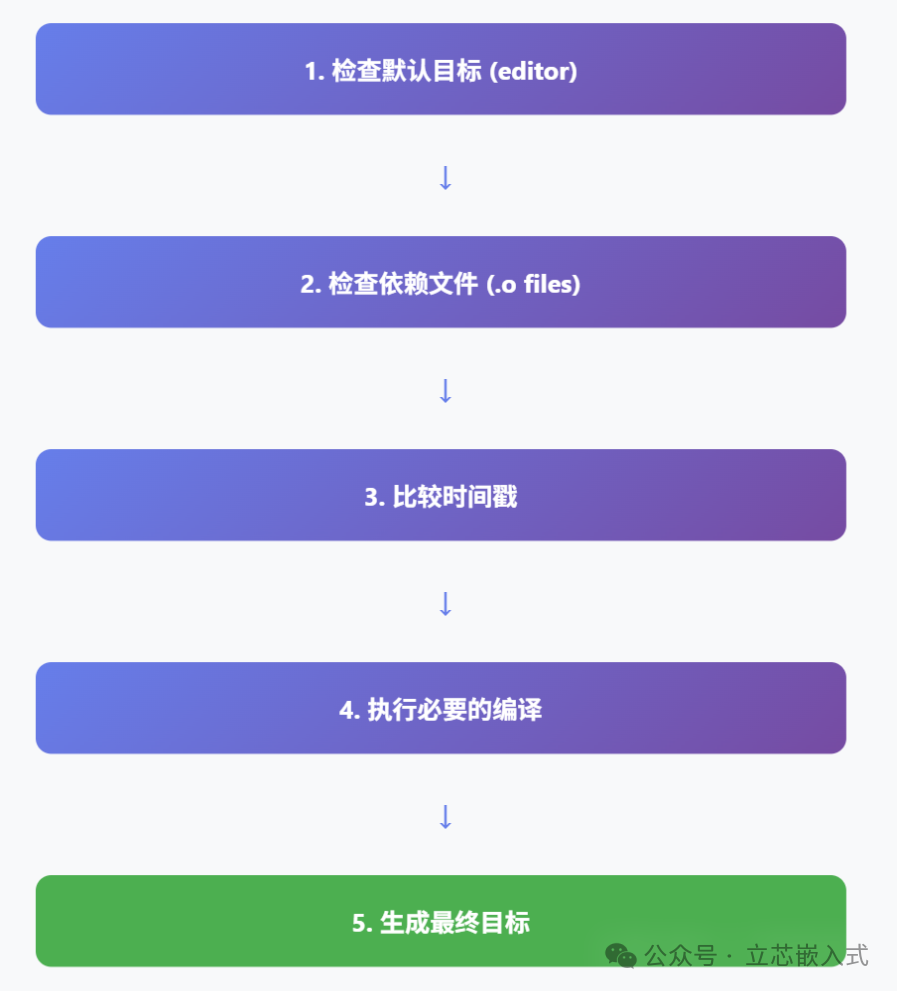
The working principle of make is actually quite simple: it starts from the first non-dot-prefixed rule (the default target) and checks whether the target needs to be updated. If the target file does not exist, or if the dependency files are newer than the target file, make will execute the corresponding command.
Taking our editor project as an example, when running <span>make</span>:
- make finds that the default target is editor and checks its dependencies (the .o files in the objects list).
- For each .o file, it checks its dependencies (the .c files and header files).
- If the .c files or header files are newer than the .o files, or if the .o files do not exist, make will recompile to generate the .o files.
- If any .o files are updated, make will relink to generate editor.
For example, if insert.c is modified and then <span>make</span> is run, make will recompile insert.o and then relink editor. If command.h is modified, make will recompile all .o files that depend on command.h (kbd.o, command.o, files.o) and then relink editor.

This process is very intelligent, compiling only the necessary files, saving time. In actual development, compilation time can be a bottleneck, and the incremental compilation feature of Makefile can greatly improve efficiency.
Summary
In embedded development, the differences between the debugging environment and the target environment are often a big issue. Makefile can work with scripts to generate different build configurations, such as debug and release versions, reducing the hassle of manual operations.
Finally, remember that Makefile is just a tool; the core is still understanding the dependencies of the project. Spend some time clarifying which files depend on which header files and which modules need to be compiled first, and writing Makefile will become much easier.
