Dev-C++The download link is provided at the end of the article for those who need it.
Hello everyone! Click the blue text in the upper left corner to follow our public account for more free resources. To avoid missing out on exciting content from our public account, please take a moment to mark it as a favorite⭐,” thank you very much~~
 In enhancing workplace skills or expanding side jobs, mastering a programming language is undoubtedly a plus. C/C++, as the foundation for many system tools, embedded development, and performance-intensive applications, remains highly valuable for learning. Today, I recommend a lightweight, free, and easy-to-use integrated development environment—Dev-C++ 6.5, particularly suitable for professionals who want to self-learn programming in their spare time.1. Why choose Dev-C++?
- 1.Lightweight and resource-efficientThe installation package is only about 70MB, starts quickly, and runs smoothly on low-spec computers, making it ideal for “fishing” and recharging on old company computers or personal laptops.
- 2.One-click integrated compilation environmentIt comes with the MinGW GCC compiler built-in, eliminating the need to configure environment variables separately. After writing, you can directly click to compile and run, which is extremely friendly for beginners.
- 3.Simple and user-friendly interfaceIt supports syntax highlighting and automatic code indentation. Although it lacks the smart suggestions of modern IDEs, it is sufficient to help beginners understand code structure.
- 4.Free and open-sourceNo need to worry about copyright issues; whether for practice, writing small tools, or taking on small projects, you can use it with confidence.
2. Detailed installation steps (with screenshots)Note before installation: Please temporarily disable antivirus software such as 360 Security Guard and Computer Manager to avoid mistakenly deleting cracked files that could lead to installation failure.
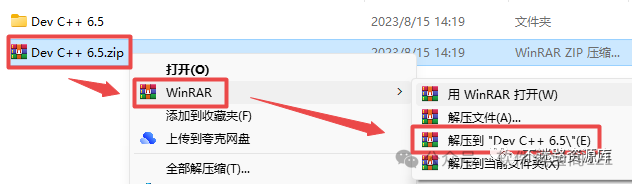
- 1.Extract the installation packageAfter downloading the compressed package, right-click and select “Extract to Dev-C++ 6.5”
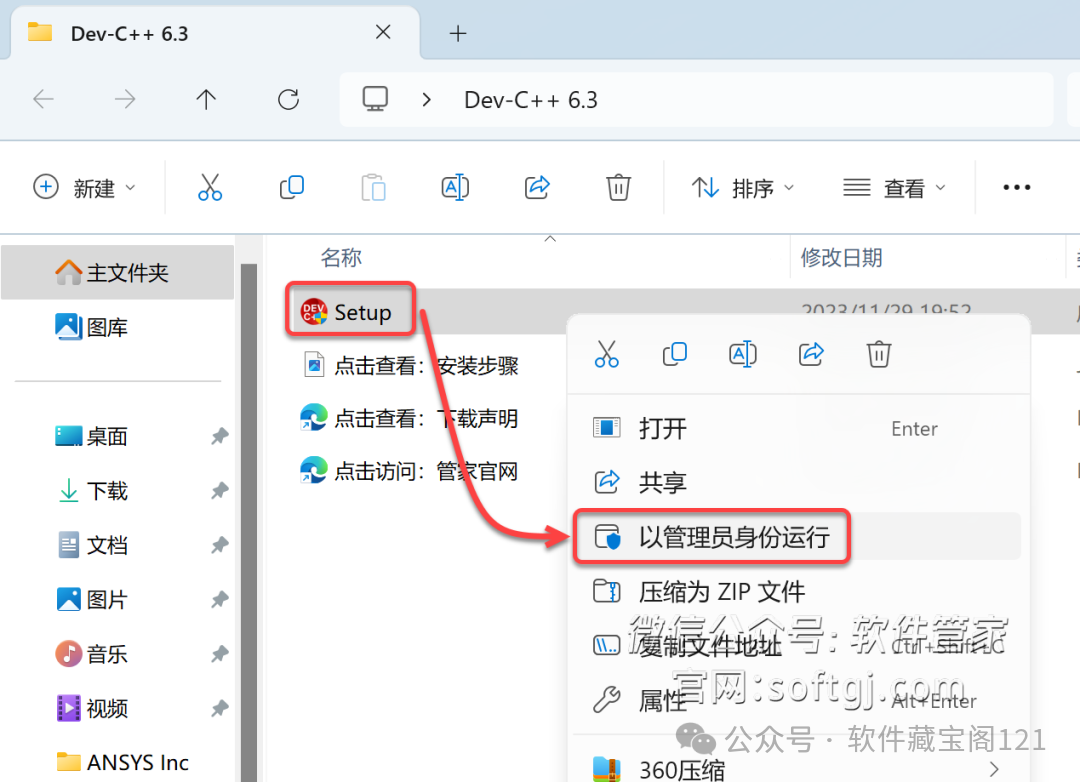
- 2.Run the installer as an administratorGo to the extracted folder, right-click on “DevCpp65.exe”, and select “Run as administrator”
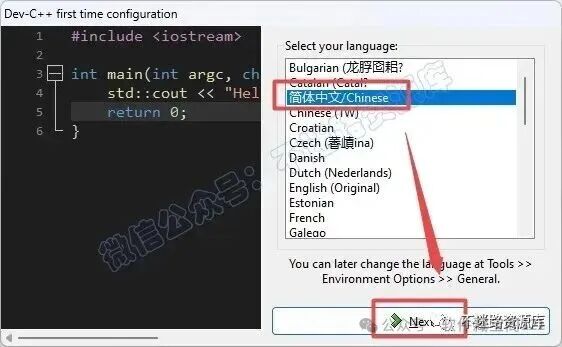
- 3.Follow the installation steps
- •Click OK → I agree → Next
- •Modify the installation path (it is recommended to install on the D drive, and the path should not contain Chinese characters)
- •Click “Install” and wait for completion
3. Applicable scenarios
- •Professionals self-learning the basics of C/C++ syntax
- •Writing automation scripts or small tools to improve work efficiency
- •Taking on simple console applications or algorithm development as a side job
- •Building a foundation for transitioning to technical positions
Resource Access
Dev-C++ packageDownload link:
Shared file: Dev C++
Link: https://pan.xunlei.com/s/VOdhx58j_gITGdvjbMBg2FkBA1#
Extraction code: 6a4m
Disclaimer: The above resources are sourced from the internet, shared here for free testing, and are intended for user communication, learning, and research purposes only. Copyright belongs to the original copyright holder. If there is any infringement, please contact us for removal.
Wallpaper sharing