 Ansible is an automation tool written in Python that can achieve cluster automation management and perform common operational tasks.Many companies today use cluster deployment services, ranging from a few virtual machines to hundreds or thousands. Sometimes, it is necessary to perform operational tasks on a single cluster or multiple clusters, and at this point, Ansible can facilitate batch operations.My main responsibility at the company is related to automated deployment and operations of services. The company itself belongs to cloud services and has a wide variety of deployments, so I have encountered several versions of automation platforms, including:
-
An automation deployment and upgrade platform primarily based on Ansible scripts
-
An automation build and deployment platform built similarly to Jenkins pipelines
-
An operations platform based on SDK packages, primarily executing Python scripts
-
Docker containers + orchestration
This article shares my experience using Ansible to automate the installation of Docker and Docker Compose.
1. Installing Ansible
The management machine for Ansible must have Python 2 installed, but an important point is that Windows cannot be used as the management machine. The host operating systems can be various versions of Red Hat, Debian, CentOS, OS X, or BSD.
Installation using pip
Since Ansible is a Python package, it can be installed as a regular third-party library by simply running the command:
sudo pip install ansible
Installation using yum or apt-get
Ansible can also be installed directly using the system’s package management tools, such as the yum command for CentOS:
sudo yum install ansible
For Ubuntu systems, the apt-get command is:
sudo apt-get install software-properties-common
sudo apt-add-repository ppa:ansible/ansible
sudo apt-get update
sudo apt-get install ansible
2. Basic Usage of Ansible
Using ansible-playbook
ansible-playbook, also known as a playbook, is a module that combines a series of automated operations in a specific execution order and logic, making it easier to manage Ansible tasks.The ansible-playbook command can be used to start an Ansible task. For specific usage, you can check the help; the following is a general startup command:
ansible-playbook docker.yml -i hosts -u alex -k -K
This command specifies an operating user, and you will need to enter the user’s password and the sudo command afterward.Since Ansible has many useful modules and commands, no one can remember every module command. However, Ansible has a very useful command to query documentation, allowing you to view the usage of a specific module and examples directly:
# List all modules
ansible-doc -l
# List usage of the yum module
ansible-doc yum
Directory Structure of ansible-playbook
Below is the basic directory structure of an ansible-playbook project, with the specific roles of directories and files commented:
├── group_vars           <- Location for storing public variables for all hosts
│   └── all
├── hosts                <- List of hosts to be managed
├── roles                <- Roles store modules, currently with etcd, initial, and loop modules
│   ├── etcd
│   │   ├── files                    <- Files to be directly copied to clients
│   │   │   └── etcd-proxy.service            <-- Configuration is the same for each host
│   │   ├── handlers                     <- Control files for service management
│   │   │   └── main.yml
│   │   ├── tasks                        <- Ansible task files
│   │   │   ├── config.yml
│   │   │   ├── main.yml
│   │   │   ├── package.yml
│   │   │   └── service.yml
│   │   └── templates                <- Template files to be copied to clients, configured with variables
│   │       └── etcd-proxy.conf       <-- Configuration may differ for each host
│   ├── initial
│   │   ├── files
│   │   │   ├── hosts
│   │   │   ├── resolv.conf
│   │   │   └── updatedb.conf
│   │   ├── handlers
│   │   ├── tasks
│   │   │   ├── main.yml
│   │   │   ├── mlocate.yml
│   │   │   ├── package.yml
│   │   │   ├── sysctl.yml
│   │   │   └── yumrepo.yml
│   │   └── templates
│   │       ├── centos7.repo
│   │       └── docker.repo
│   └── loop
│       ├── files
│       ├── handlers
│       ├── tasks
│       │   ├── main.yml
│       │   └── t1.yml
│       └── templates
└── site.yml                           <- Main control entry file
Installing Docker with Ansible
I wrote a playbook to automate the installation of Docker using Ansible, the project address is: https://github.com/Hopetree/ansible-demos/tree/master/install_dockerThis is suitable for executing Docker installation on CentOS systems. The playbook performs tasks including checking if Docker is usable, installing Docker, adding users to the Docker group, installing pip, and Docker Compose, etc. The directory structure of the playbook is as follows:
Prefer Using Built-in Modules
The term “prefer using built-in modules” means that when you can use the shell module to execute commands, you should prefer to use built-in modules instead. For example, the following shows the difference between using command line to install a package and using the yum module directly:
# Install using shell command
- name: install yum-utils
  shell: yum install yum-utils
# Install using yum module
- name: install yum-utils
  yum:
    name: yum-utils
    state: present
And the following directly uses the pip module:
- name: install docker-compose
  pip:
    name: docker-compose
    extra_args: "-i {{ pip.index_url }} --trusted-host {{ pip.trusted_host }}"
Using register + when
The register can be used to assign the execution result of a step to a variable, while when can be used to judge the result of a variable. Therefore, these two modules are often used together. For example, in the following segment, the first step uses<span><span>docker -v</span></span> to check the Docker version, and the second step checks if Docker is unavailable, then executes the Docker installation.
- name: check docker
  shell: docker -v
  register: result
  ignore_errors: True
- name: include tasks yaml if not docker
  include_tasks: install.yml
  when: result is failed
Execution Results
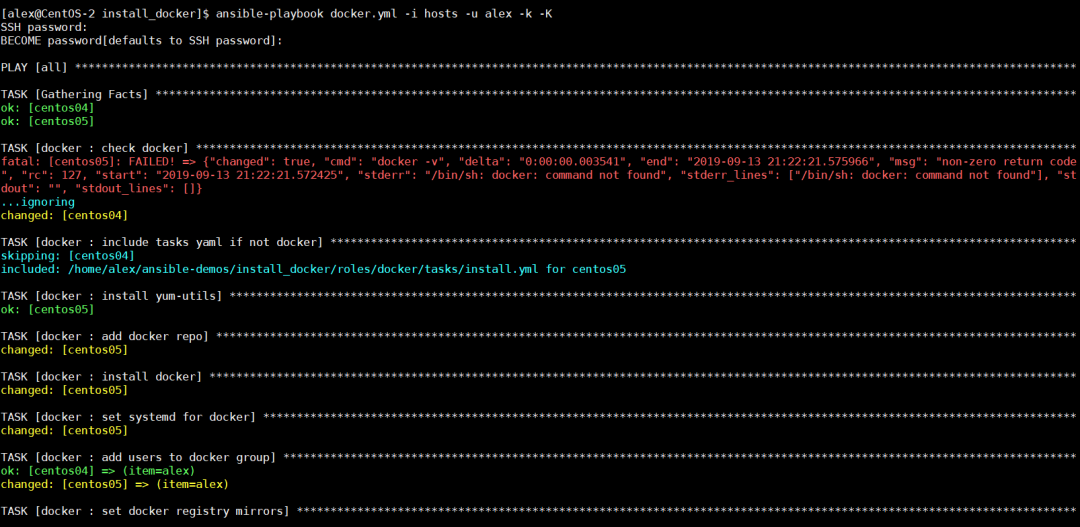
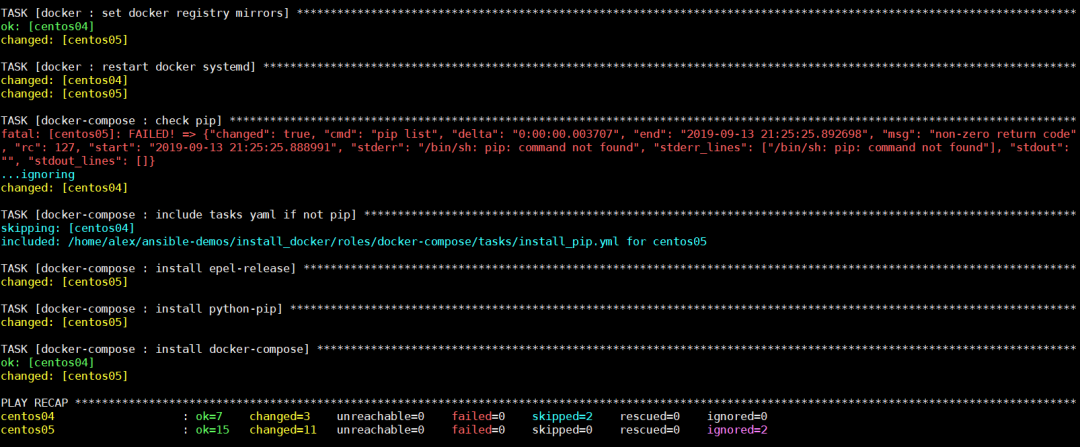 Source: https://cloud.tencent.com/developer/article/2123531To help everyone better use the automation operation tool Ansible, I am sharing a completeAnsible System Tutorial that introduces related knowledge of operational automation, includinginstallation of operational tools, common commands, testing node configuration, executing commands, and using playbooks etc. Students of the video course will also receive the best code structure examples in the country as a gift!Ansible System Tutorial
Recommended Reading

One-click deployment, easy to get started! DeepSeek-R1 local deployment guide, start your AI exploration journey!
Practical | PXE + kickstart unattended batch installation (principles and architecture)
Practical | PXE + kickstart unattended batch installation (practical deployment)
ifconfig has been deprecated, ip is on stage Linux cloud computing learning path (recommended to bookmark)
If the Linux background task is gone, try this command
Linux network status tool ss command detailed explanation Finally understood VLAN technology Finally someone explained Agile, DevOps, CI, CD clearly
Quick start: iperf network performance testing tool (essential for operations)
A comprehensive guide to understanding ceph, no longer unfamiliar with ceph
Shell analysis log file command comprehensive summary (super detailed)
8 ways to protect SSH server connections on Linux
Sharing a free and easy-to-use cross-platform SSH client
HTTP/3 officially released, deeply understanding the HTTP/3 protocol
Kafka principles are surprisingly simple, easy to understand!
Blood and tears advice for computer and cloud computing majors
My boss asked me to choose monitoring, should I choose Zabbix or Prometheus?
Is the maximum number of TCP connections in Linux limited to 65535? How does the server handle millions of concurrent connections?
High-performance GPU server architecture analysis (Part 1) High-performance GPU server architecture analysis (Part 2)