❝
Are you still struggling with complex command-line operations? Are you still worried about managing servers in bulk? Today, I would like to introduce a super useful Ansible Web management panel that makes operations and maintenance as easy as ordering takeout!
❞
What is the Ansible Web Management Panel?
The Ansible Web Management Panel is a “lightweight and easy-to-use” web interface tool that transforms complex Ansible command-line operations into an intuitive graphical interface. In simple terms, it allows operations and maintenance personnel who cannot write code to easily manage multiple servers!
🎯 Target Audience
- New operations and maintenance personnel
- System administrators
- Development teams
- Enterprises that need to manage servers in bulk
Why Choose This Tool?
🎨 User-Friendly Interface
- “Zero Learning Cost”: No need to memorize complex commands
- “Visual Operations”: A WYSIWYG management interface
- “Responsive Design”: Supports access from mobile, tablet, and computer
🔧 Powerful Features
- “Batch Operations”: Manage hundreds of servers at once
- “Real-Time Monitoring”: Real-time feedback on command execution results
- “File Management”: Drag and drop uploads, simple and convenient
🛡️ Safe and Reliable
- “Multiple Encryption”: Data security is guaranteed
- “Permission Control”: Fine-grained permission management
- “Operation Audit”: Complete operation log records
Core Features Revealed
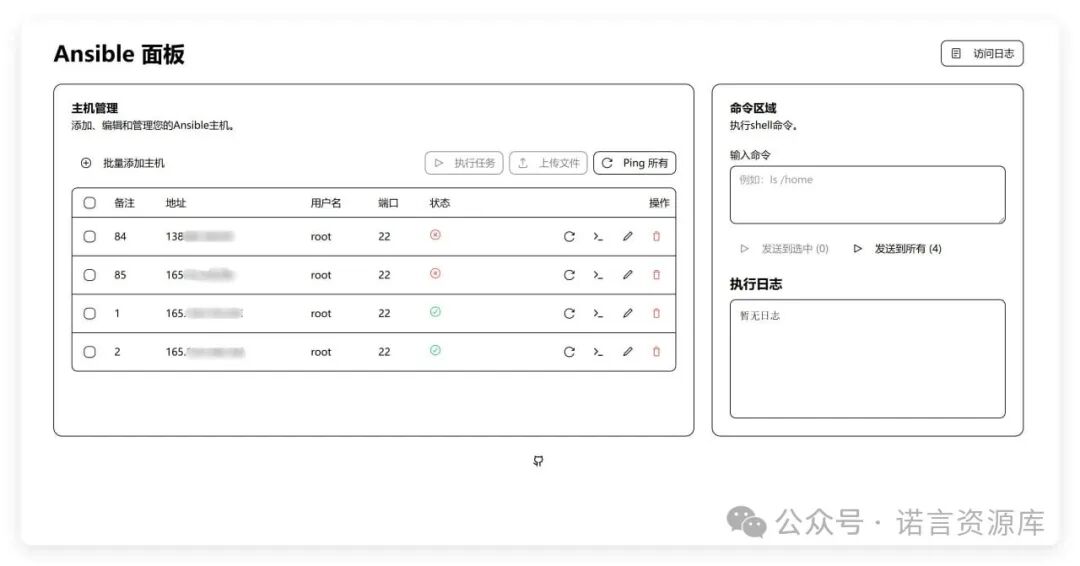
1. 🖥️ Host Management
✨ Batch add hosts✨ Supports password and key authentication✨ Host password encrypted storage✨ Group management, tag classification2. ⚡ Command Execution
✨ Send commands to selected hosts✨ View execution results in real-time✨ Supports batch command execution✨ Command template saving and reuse3. 📁 File Transfer
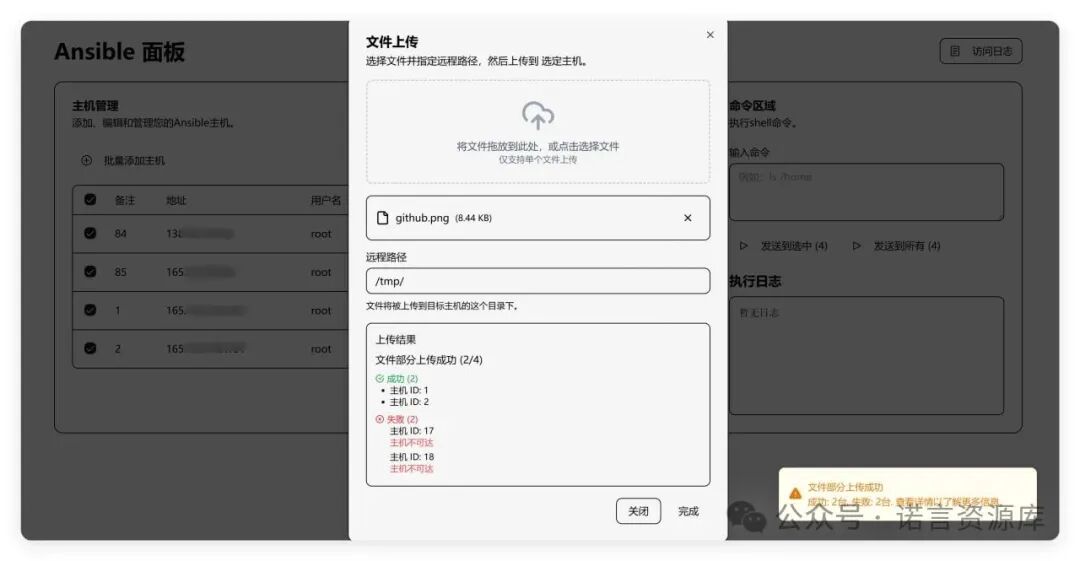
✨ Upload files to selected hosts✨ Supports multiple files transfer simultaneously✨ Real-time display of transfer progress✨ Automatic file permission settings4. 📜 Playbook Execution
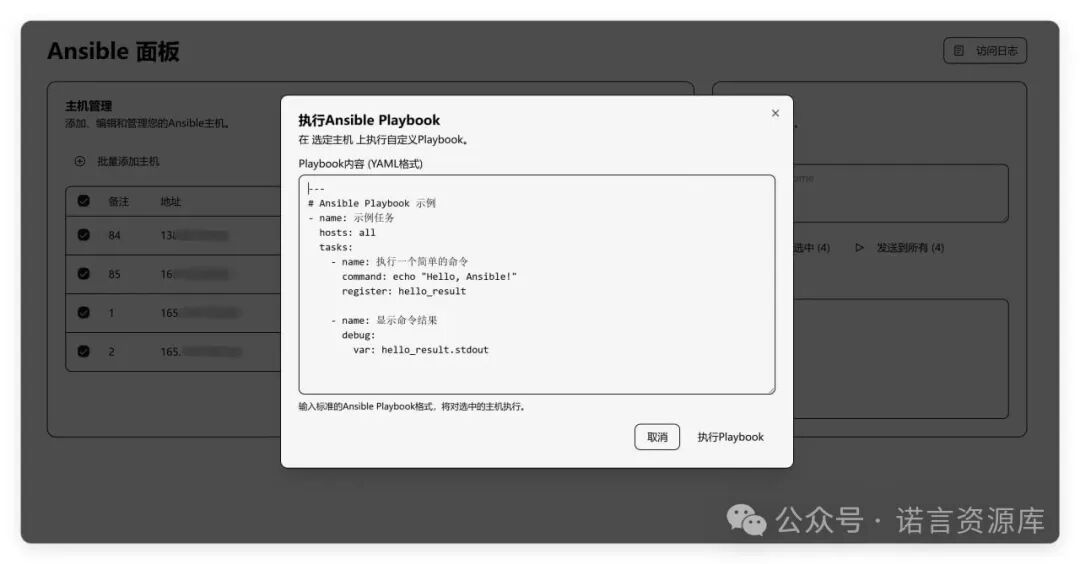
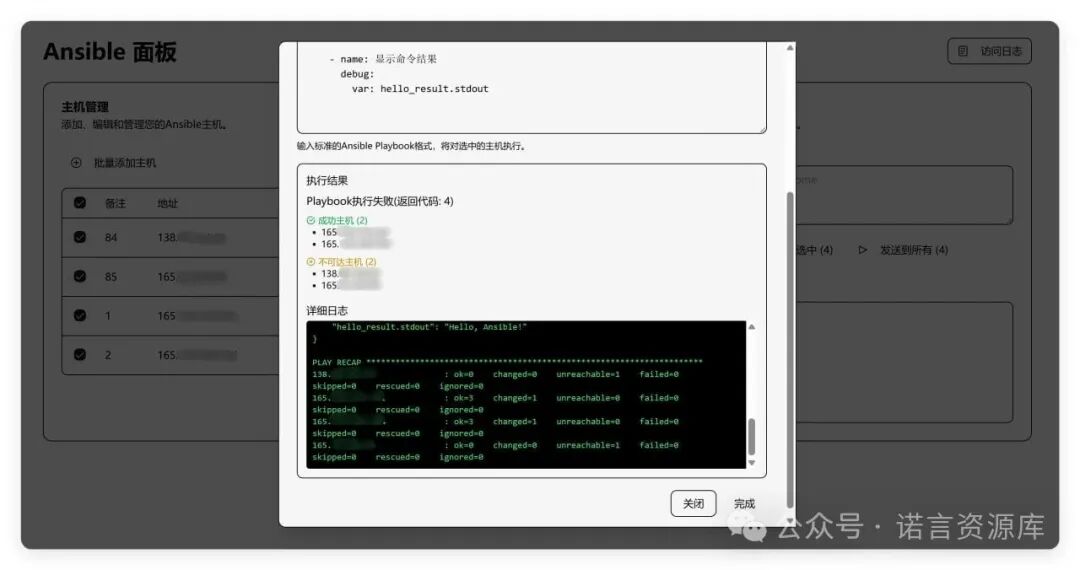
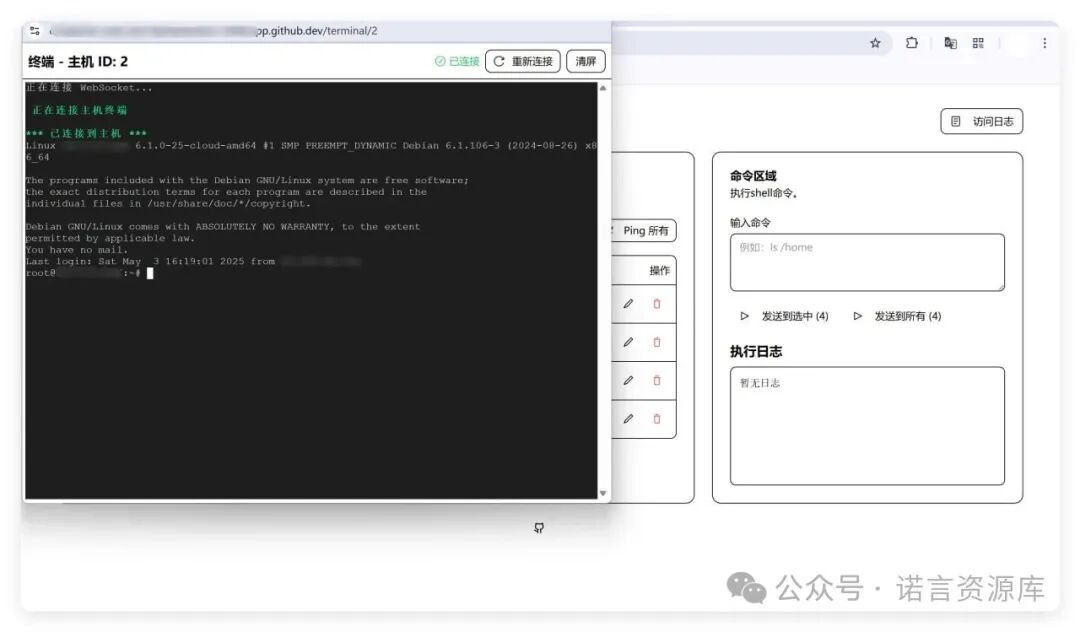
✨ Custom Playbook writing✨ Visual task orchestration✨ Execution history records✨ Error diagnosis and repair5. 💻 Web Terminal
✨ Direct browser connection to remote hosts✨ Supports multi-tab operations✨ Terminal session persistence✨ Shortcut key support6. 📊 Access Logs
✨ System access records✨ Operation behavior analysis✨ Security event alerts✨ Log export functionalitySecurity Features Analysis
🛡️ Credential Derivation Encryption
The system uses the administrator’s username and password to derive the encryption key, providing an additional layer of security. This means that even if someone obtains the database file, they cannot decrypt the data without the correct administrator credentials.
🔒 Session Isolation
The encryption key only exists during the user login session and cannot be accessed when not logged in. This ensures that even if the system is compromised, unauthorized users cannot access sensitive information.
💾 Zero Local Storage
The encryption key is never stored in the file system, only derived and used in memory. This greatly reduces the risk of key leakage.
🚫 No Default Credentials
The system enforces the setting of administrator environment variables and does not use any default values or fallback options. This avoids the security risks associated with using default passwords.
One-Click Deployment Tutorial
📦 Quick Deployment with Docker
docker run -d \ --name ansible-ui \ -p 5000:5000 \ -e ANSIBLE_HOST_KEY_CHECKING=False \ -e ADMIN_USERNAME=admin123 \ -e ADMIN_PASSWORD=admin123 \ -v ./ansible:/app/db \ -v /root/.ssh:/root/.ssh:ro \ ghcr.io/sky22333/ansible-ui⚠️ Important Reminders
- “Be sure to change the default password”: Please change
<span>ADMIN_USERNAME</span>and<span>ADMIN_PASSWORD</span>to strong passwords - “HTTPS is recommended”: Please configure a reverse proxy and enable HTTPS in production environments
- “Regularly back up data”: Important data should be backed up regularly
Key Authentication Configuration
Generate SSH Key Pair
ssh-keygen -t ed25519Just press Enter to use the default, which will be generated at <span>/root/.ssh/id_ed25519</span> and <span>id_ed25519.pub</span>
Configure Target Host
ssh-copy-id -i /root/.ssh/id_ed25519.pub [email protected]“Note”: If the target host’s SSH port is not the default 22, you need to specify the port parameter:
ssh-copy-id -i /root/.ssh/id_ed25519.pub -o Port=2222 [email protected]Batch Configuration Script
#!/bin/bashfor host in 192.168.1.{1..10}; do ssh-copy-id -i /root/.ssh/id_ed25519.pub root@$hostdonePractical Tips Sharing
🎯 Best Practices
- “Password Management”: Use a password manager to generate strong passwords
- “Network Isolation”: Deploy the management panel in an internal network environment
- “Regular Updates”: Update the system and dependencies in a timely manner
- “Monitoring Alerts”: Configure system monitoring and anomaly alerts
🔧 Performance Optimization
- “Resource Limitation”: Reasonably set Docker container resource limits
- “Caching Strategy”: Enable Redis caching to improve performance
- “Load Balancing”: Multi-instance deployment for high availability
📈 Extended Features
- “API Integration”: Integrate with other system APIs
- “Custom Plugins”: Develop exclusive functional plugins
- “Report Statistics”: Generate operation and maintenance reports and analysis
Frequently Asked Questions
Q1: What should I do if I forget the administrator password?
A: If you forget the password, you need to redeploy the container and set a new administrator credential. Note: After changing the password, previously encrypted data will be unrecoverable.
Q2: How to back up important data?
A: Regularly back up the data files in the <span>./ansible</span> directory, and it is recommended to use an automated script for scheduled backups.
Q3: Which operating systems are supported?
A: Supports all Ansible-compatible operating systems, including Linux, Unix, Windows, etc.
Q4: How many servers can be managed simultaneously?
A: There is theoretically no limit, but it is recommended to reasonably control the number of concurrent connections based on server performance.
Effect Preview
💬 Interactive Discussion
🤔 What problems have you encountered while using Ansible?
Feel free to share your:
- 🚀 “Usage Experience”: Share your Ansible usage experience
- 🔧 “Technical Issues”: Technical problems encountered and solutions
- 💡 “Improvement Suggestions”: Suggestions for improving this tool
- 📚 “Learning Resources”: Recommended learning materials and tutorials
❝
💡 “Friendly Reminder”: The content of this article is for reference only, please configure according to the actual environment. If you have any questions, feel free to leave a comment for discussion!
❞
“Tags”: #Ansible #OperationAndMaintenanceTools #WebManagementPanel #Docker #SSH #ServerManagement #TechnicalSharing
“Reading Time”: Approximately 8 minutes“Difficulty Level”: ⭐⭐⭐☆☆“Target Audience”: Operations and maintenance engineers, system administrators, technical enthusiasts