Hello!
This is your 166th encounter with the “University Student Research Competition”.
Recommended reading: Essential tools for mathematical modeling? Just how powerful is MATLAB?
It’s time for the Mathematical Contest in Modeling (MCM) column again. Today, I am excited to present examples of real test applications of MATLAB in mathematical modeling competitions, which will give everyone a more intuitive understanding of how to use MATLAB to solve MCM problems.
The examples of real test applications are divided into calculations and plotting. Before introducing the real test applications, I have also compiled some important foundational knowledge to help everyone quickly get started with MATLAB, to give a little inspiration~
1
MATLAB‘s Calculation Applications in MCM
01
Important foundational knowledge for MATLAB calculations
(1) General format of the command line
In the application of MATLAB, the most basic and simplest application is to directly input commands in the command window to achieve calculation or plotting functions.
The general format of a MATLAB command line is:
variable = expression For example: A = 1 + 2
expression For example: 1 + 2
(2) Command line operation editing
1.Using (>>)
After starting MATLAB, you can work with MATLAB. Since MATLAB is an interactive language, you can input commands at any time, and it will provide immediate calculation results.
To perform basic mathematical operations in MATLAB, simply enter the operation directly after the prompt (>>) and press Enter. For example:
>> (5 * 2 + 1.3 – 0.8) * 10 / 25
ans = 4.2000
Note!
① ans is a reserved MATLAB string that represents the return result of the previous expression, used as the default variable name for the result.
② “>>” is the MATLAB prompt symbol, but in PC Chinese Windows systems, due to different encoding methods, this prompt symbol often disappears, but this does not affect the calculation results in MATLAB.
③ Common operators in MATLAB include: addition (+), subtraction (-), multiplication (*), division (/), and exponentiation (^).
2.Using variable assignment
We can also assign the result of the above operation to another variable x:
x = (5 * 2 + 1.3 – 0.8) * 10^2 / 25
x = 42
At this point, MATLAB will directly display the value of x.
If you don’t want MATLAB to display the calculation result every time, just add a semicolon (;) at the end of the operation, as shown below:
y = sin(10) * exp(-0.3 * 4^2);
If you want to display the value of variable y, simply enter y:
>> y
Y = -0.0045.
02
MATLAB’s Calculation Applications in MCM Real Problems
Taking the 2017 MCM Problem B as an example, the problem is translated as shown in the figure below:
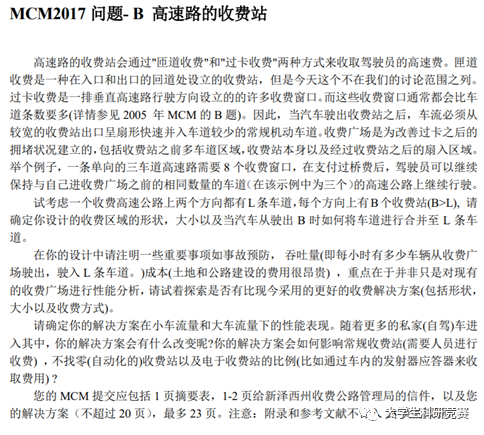
Figure 1 2017 MCM Problem B Title
The essence of the problem is to propose an optimized construction plan for highway toll stations based on certain constraints, including the shape and size of the toll area and the merging lane scheme. One of the popular approaches to solving the problem that year was to use cellular automata algorithms for simulation.
Cellular automata are essentially defined on a cellular space composed of discrete, finite states, evolving over discrete time dimensions according to certain local rules. They have been applied in fields such as physical simulation and biological simulation.
In Problem B, if you want to use cellular automata for simulation, you will inevitably need to solve complicated calculation problems. Such large-scale calculations are impossible to achieve ideal results through manual computation during the competition period, and using basic software like EXCEL is also very time-consuming.
However, in MATLAB, a cell can be understood as a square block composed of one or more points in a matrix, generally represented by one point in the matrix. Therefore, we can use MATLAB programming to make the complex calculations of cellular automata feasible and swift. The following image shows a participant’s code.
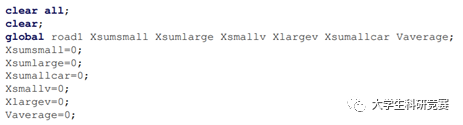
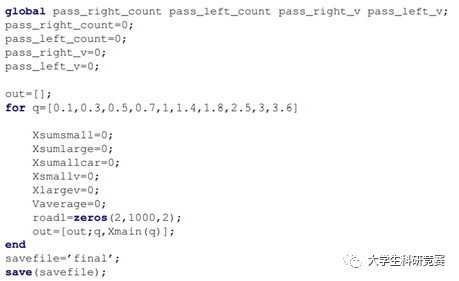
Figure 2 Part of the MATLAB Cellular Automata Code
2
MATLAB‘s Plotting Applications in MCM
01
Important foundational knowledge for MATLAB plotting
(1) Drawing 2D graphs
Since MATLAB graphics are implemented by plotting points and connecting lines, when drawing simple plane shapes, it is necessary to provide a series of x and y coordinates of points on the shape, and then link these points together. The specific plotting command is: plot(X,Y,’S’)
Where X and Y are vectors consisting of all points’ x and y coordinates, and S is a string used to determine the line color, point shape, and the way points are connected.
By entering the help plot command in the command window, you can view the specific way to write S. Y can sometimes be a matrix, in which case multiple curves will be plotted for the same independent variable.
Example 1. Plot a sine curve and a cosine curve.
Solution:
>> x = 0:pi/10:2*pi; % Construct vector
>> y1 = sin(x); % Construct corresponding y1 coordinates
>> y2 = cos(x); % Construct corresponding y2 coordinates
>> plot(x,y1,x,y2) % Plot a graph with x as the x-coordinate and y1, y2 as the y-coordinates
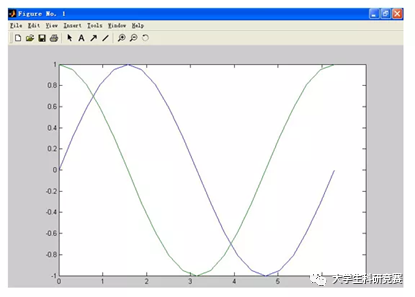
Figure 3 Example 1 Plot Result
Example 2. In an exam, 8% of students scored excellent, 20% scored good, 36% scored average, 24% passed, and 12% failed. Represent these using a pie chart and a bar chart.
Solution:
>> x = [8 20 36 24 12];
>> subplot(221); pie(x,[1 0 0 0 1]);
>> title(‘Pie Chart’);
>> subplot(222); bar(x,’group’);
>> title(‘Vertical Bar Chart’);
>> subplot(223); bar(x,’stack’);
>> title(‘Vertical Bar Chart with Cumulative Values as Y-axis’);
>> subplot(224); barh(x,’group’);
>> title(‘Horizontal Bar Chart’);
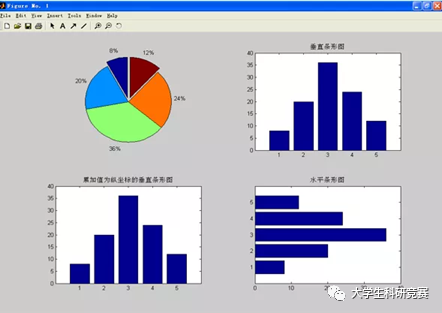
Figure 4 Example 2 Plot Result
(2) Curve control commands
When using commands like plot to draw curves, you can specify the color, line style, and data point markers of the curve. The basic calling format is:
plot(x,y,’color line-style marker’).
Table 1 MATLAB Plotting Color Calling Commands
|
Character |
Color |
Character |
Color |
|
b |
Blue |
m |
Magenta |
|
c |
Cyan |
r |
Red |
|
g |
Green |
w |
White |
|
k |
Black |
y |
Yellow |
Table 2 MATLAB Data Point Styles
|
Marker Symbol |
Data Point Style |
Marker Symbol |
Data Point Style |
|
. |
Solid Circle |
> |
Greater Than |
|
o (letter) |
Hollow Circle |
< |
Less Than |
|
x |
Cross |
s |
Square |
|
+ |
Plus |
d |
Diamond |
|
* |
Star |
h |
Hexagram |
|
v |
Downward Triangle |
p |
Pentagram |
|
^ |
Upward Triangle |
Example 3. Use red color, dotted line, and cross markers to draw the sine curve. Solution: >>x=0:0.2:8;>>y=sin(x);>>plot(x,y,’r:x’)
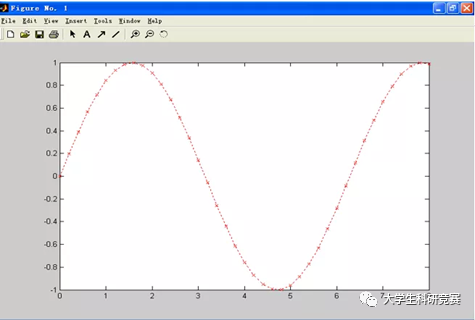
Figure 5 Example 3 Plot Result
02
MATLAB’s Plotting Applications in MCM Real Problems
Taking the 2017 MCM Problem F as an example, the essence of the problem is: under a series of constraints, please establish a scientific Mars colonization plan model and conduct a multi-faceted benefit analysis.
In this problem, many participants visualized the trajectory of Mars in a pictorial way. A common method was to search for images from literature and directly transfer them into the paper. If this method can be well handled in terms of the unity and integration of the entire image and text, it is also acceptable.
However, a more outstanding method is to simulate and output the graphics by oneself, which can be easily achieved by writing plotting code in MATLAB.
For example: t = -pi:pi/500:pi;
Y = tan(sin(t)) – sin(tan(t)); comet(t,y)
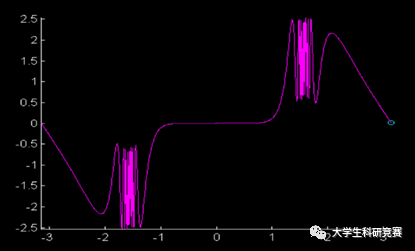
Figure 6 Mars Trajectory Plot Result
The above is an introduction to the main applications of MATLAB in real MCM problems, namely calculations and plotting. This is also one of the reasons why it is often said that mastering MATLAB is basically enough to solve MCM problems. The former is the pillar of the paper, while the latter is the flesh and blood of the paper, both complementing each other and playing a very important role in the competition results.
I recommend everyone, when learning MATLAB, firstly to master essential knowledge points, which can be self-taught through reference books and online resources; secondly, to apply what you have learned by researching the requirements of MATLAB in past real problems, focusing on the learning content, so that you can achieve twice the result with half the effort.
This issue’s benefits

Resource Acquisition MethodAdd Sister Zhi and send:MATLAB installation package to receive resources (long press to add) Sister ZhiFor more questions about paper publication, research, and competitionsPlease scan to add 【Sister Zhi】1-on-1 precise consulting and Q&AEnding with something seriousDue to the WeChat platform algorithm update, public account content will no longer be displayed in chronological order. If you want to see more of Xiao Jing’s pushes first,it is strongly recommended to star us and give us more clicks on 【See】~The specific steps to star are:(1) Click on the top of the page “University Student Research Competition” to enter the public account homepage(2) Click on the little dots in the upper right corner, and in the pop-up page click “Set as Star“, and you are done.Thank you for your support and companionship. Xiao Jing will work harder to output high-quality articles, helping everyone to excel in research competitions!
 Recommended Reading[Welfare Materials]Origin | Visio | LaTeX | NoteExpress | Stata | SCI Writing Templates | R Language | SPSS | MATLAB | College English Test Band 4 & 6 | English Competition | Computer Level 2 Exam Questions | Python | Mathematics Competition | Mathematical Modeling | Endnote | Posters | Entrepreneurship Competition | SCI Experimental Technology Resources | PDF Editor | Excel | Big Data | Teacher Qualification Certificate | office | Civil Servant | Classic Algorithms for Mathematical Modeling, Excellent Papers | PPT Tutorials | Student Work PPT | PS | RP | Adobe Collection | Mind Map PPT | “Salt System” PPT | E-books | Map Chart PPT Templates | Reference Management Software | Core Vocabulary for British and American Mathematical Modeling | Graduation Thesis Package | Exam Papers for Teacher Qualification | Comprehensive Research Materials for Business Management | PPT Template for Red Special | SCI Literature Tools | Lingo 17.0 Installation Tutorial | Literature Download | Paper Polishing Tools | Mechanical Innovation Design Competition | Procreate | Literature Review Materials | SCI Journal Abbreviations | Computer Eye Protection Software | Origin Tips[Paper Tips]7 Paper Reduction Techniques | How to Get Started with Research for Science and Engineering Beginners | The Significance of Undergraduates Doing Research | How to Choose Topics for Papers | Classification and Quality Analysis of Academic Journals | How Beginners Can Start Their Path in Mathematical Modeling | Academic Paper Writing Secrets from Peking University Seniors | How Undergraduates Can Publish Papers | How to Read Literature | Tips for Writing Papers | Comprehensive Interpretation of Academic Journals Classification | Websites, Plugins, and Software for English Literature Retrieval | How to Respond to Reviewers’ Comments When Submitting to Journals? | Comprehensive SCI Journal Reviews | Good Paper Titles Are Like This | Free Full-Text Database for Journals | How to Write Submission Emails for Journal Papers | How Beginners Can Build a Paper Framework | Attention Items for Using Charts in Paper Writing | Common Databases for Business Management | 19 Ways to Find Literature at Home and Abroad | 9 Practical Research Methods for Papers【Competition Notices】Mathematical Contest in Modeling (MCM/ICM) | “Discovery Cup” National College Student Internet Software Design Grand Prix | National College English Challenge Activity English Vocabulary Competition | National College Student E-commerce “Innovation, Creativity, and Entrepreneurship” Challenge | Industry-Education Integration Innovation and Entrepreneurship Competition | National College Student Creative Writing Short Story Competition Call for Papers | National College Student E-commerce “Innovation, Creativity, and Entrepreneurship” Challenge | International Photography Art Exhibition Call for Papers | 2020 “Artistic China” Photography Exhibition | Cultural Creative Works Collection for the Mascot of Ecological Environment Protection in China | Hangzhou College Student Entrepreneurship Competition | Public Safety Innovation and Entrepreneurship Competition | National College Student Industrialized Building and Smart Construction Competition | “Assisting Learning • Building Dreams • Shaping People” Thematic Activity | National College Student Robotics Competition | 【Knowledge Competition】Online Rewalking of the Long March” and Promoting the Study of the “Four Histories” Education | Short Video Competition for College Students in the Yangtze River Delta | National College Bookbinding Art Exhibition Call for Papers | “Poetry China” Call for Papers | China College Student Creative Festival | China College Student Service Outsourcing Innovation and Entrepreneurship Competition | Lanqiao Cup National Software and Information Technology Professional Talent Competition | “Red Tourism into Campus” Case Works Collection | China Game Innovation Competition | China Smart City Data Open Innovation Application Competition | “Spotlight Cup” National Environmental Micro Video and Photography Competition | National Animation Art Works Exhibition Call for Papers | National College Physical Education Major Students’ Basic Skills Competition | National Art Peak Forum Call for Papers | Procter & Gamble CEO Challenge Officially Launched! | National Art Works Exhibition Call for Papers | National Farmers Photography Exhibition | Volunteer Conference Main Promotion Language and Visual Background Design Collection | National College Student Algorithm Design and Programming Challenge | National College Student Digital Art Design Competition | National College Student Robotics Competition | International College Student Fashion Design Competition | Preventing Pyramid Schemes from Entering Campus Thematic Creative Works Collection | China Holiday Creative Competition | WeChat Photography Moments National Short Video Works Collection | Future Cabin Innovation Design Competition | China College Student Medical Technology Skills Competition | China Painting Youth Support Plan Biennial Exhibition Call for Papers | National and College Students’ 10th Ocean Culture Creative Design Competition Collection of Works | Yingchuang Cup Script Competition | “Eight Great Masters of the Tang and Song Dynasties” Thematic Cultural and Creative Design Competition Notice | National Higher Education Institutions Student “Svirl Cup” BIM-CIM Innovation Competition | Ocean Culture Creative Design Competition | National Zhou Peiyuan College Student Mechanics Competition | “Beidou Cup” National Youth Science and Technology Innovation Competition | “Spotlight Cup” National Environmental Micro Video and Photography Competition | MathorCup University Mathematics Modeling Challenge | National College Student English Debate Competition Opening Notice | Shanghai College Student Computer Application Ability Competition | Sino-European Industrial Design Innovation Competition | College Student Summer Sports Songs Collection | The Power of Role Models – 2021 Lei Feng Spirit International Public Welfare Poster Design Exhibition | Guanghua School of Management Case Competition | National Sudoku Competition | Oil and Gas Storage and Transportation Engineering Design Competition | Uniform Design Competition | Occupational Health Communication Work Collection