Click the blue words to follow usBinary interruption of code
Use binary interruption instead of stacking the code in a single column, do not do it like this:
if(a==1) {
} else if(a==2) {
} else if(a==3) {
} else if(a==4) {
} else if(a==5) {
} else if(a==6) {
} else if(a==7) {
} else if(a==8)
{
}
Instead, use the binary method below:
if(a <= 4) {
    if(a==1)     {
    }  else if(a==2)  {
    }  else if(a==3)  {
    }  else if(a==4)   {

    }
}
else
{
    if(a==5)  {
    } else if(a==6)   {
    } else if(a==7)  {
    } else if(a==8)  {
    }
}
Or like this:
if(a <= 4)
{
    if(a <= 2)
    {
        if(a==1)
        {
            /* a is 1 */
        }
        else
        {
            /* a must be 2 */
        }
    }
    else
    {
        if(a==3)
        {
            /* a is 3 */
        }
        else
        {
            /* a must be 4 */
        }
    }
}
else
{
    if(a <= 6)
    {
        if(a==5)
        {
            /* a is 5 */
        }
        else
        {
            /* a must be 6 */
        }
    }
    else
    {
        if(a==7)
        {
            /* a is 7 */
        }
        else
        {
            /* a must be 8 */
        }
    }
}
Compare the two case statements below:
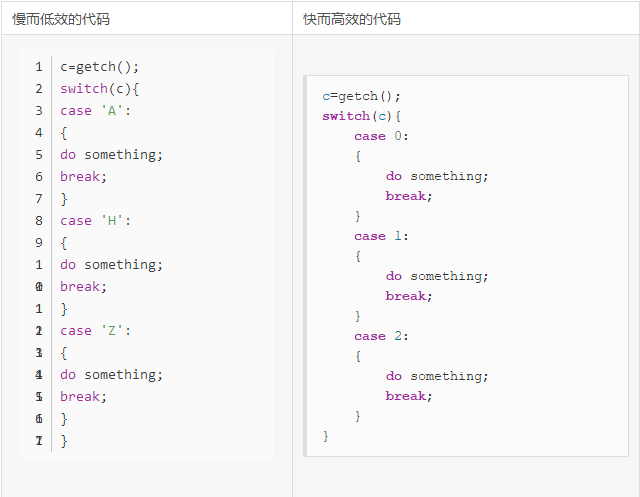
Switch Statement vs Lookup Table
The application scenarios of Switch are as follows:
- Call one or more functions
- Set variable values or return a value
- Execute one or more code snippets
If there are many case labels, using a lookup table can complete the first two scenarios of switch more efficiently. For example, the two methods of converting strings below:
char * Condition_String1(int condition) {
  switch(condition) {
     case 0: return "EQ";
     case 1: return "NE";
     case 2: return "CS";
     case 3: return "CC";
     case 4: return "MI";
     case 5: return "PL";
     case 6: return "VS";
     case 7: return "VC";
     case 8: return "HI";
     case 9: return "LS";
     case 10: return "GE";
     case 11: return "LT";
     case 12: return "GT";
     case 13: return "LE";
     case 14: return "";
     default: return 0;
  }
}

char * Condition_String2(int condition) {
   if ((unsigned) condition >= 15) return 0;
      return
      "EQ\0NE\0CS\0CC\0MI\0PL\0VS\0VC\0HI\0LS\0GE\0LT\0GT\0LE\0\0" +
       3 * condition;
}
The first program needs 240 bytes, while the second only needs 72 bytes.
Loops
Loops are a common structure in most programs; most of the time the program executes occurs within loops, so it is worth putting effort into optimizing loop execution time.
Loop Termination
If not careful, writing the loop termination condition can lead to additional burdens. We should use loops that count down to zero and simple loop termination conditions. Simple termination conditions consume less time. Look at the two programs that calculate n!. The first implementation uses an incremental loop, while the second uses a decremental loop.
int fact1_func (int n)
{
    int i, fact = 1;
    for (i = 1; i <= n; i++)
      fact *= i;
    return (fact);
}

int fact2_func(int n)
{
    int i, fact = 1;
    for (i = n; i != 0; i--)
       fact *= i;
    return (fact);
}
The efficiency of the second program’s fact2_func is higher than the first.
Faster for() Loop
This is a simple yet efficient concept. Typically, we write for loop code like this:
for( i=0; i<10; i++){ ... }
i loops from 0 to 9. If we don’t mind the order of loop counting, we can write it like this:
for( i=10; i--; ) { ... }
This is faster because it can handle the value of i more quickly—the test condition is: is i non-zero? If so, decrement the value of i. For the above code, the processor needs to calculate “is i minus 10 non-negative? If non-negative, increment i and continue”. Simple loops have a significant difference. Thus, i decrements from 9 to 0, making such loops execute faster.
The syntax here is a bit strange, but it is indeed legal. The third statement in the loop is optional (an infinite loop can be written as for(;;)). The following code has the same effect:
for(i=10; i; i--){ }
Or even further:
for(i=10; i!=0; i--){ }
Here we need to remember that the loop must terminate at 0 (therefore, if looping from 50 to 80, this won’t work), and the loop counter is decrementing. Code using an incrementing loop counter does not enjoy this optimization.
Merge Loops
If one loop can solve the problem, don’t use two. But if you need to do a lot of work in the loop, this can be unsuitable for the processor’s instruction cache. In this case, two separate loops may execute faster than a single loop. Below is an example:
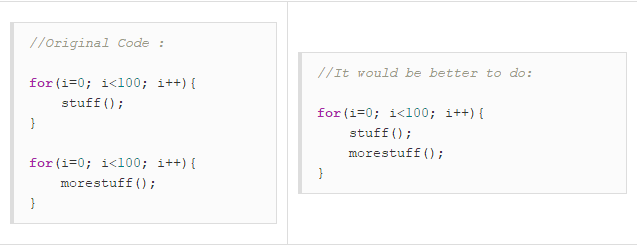
Function Loops
There is always a certain performance overhead when calling functions. Not only does the program pointer need to change, but the variables used need to be pushed onto the stack and new variables allocated. To improve program performance, there is much that can be optimized at the function level while maintaining code readability and keeping the code size manageable.
If a function is frequently called within a loop, then incorporate the loop into the function to reduce the duplicate function calls. The code is as follows:
for(i=0 ; i<100 ; i++)
{
    func(t,i);
}
-
-
-
void func(int w,d)
{
    lots of stuff.
}
Should be changed to:
func(t);
-
-
-
void func(w)
{
    for(i=0 ; i<100 ; i++)
    {
        //lots of stuff.
    }
}
Loop Unrolling
Simple loops can be unrolled for better performance, but at the cost of increased code size. After unrolling the loop, the loop count should decrease to execute fewer code branches. If the number of loop iterations is only a few, the loop can be fully unrolled to eliminate the burden of looping.
This can make a significant difference. Loop unrolling can provide considerable performance savings because the code does not need to check and increment the value of i every loop. For example:
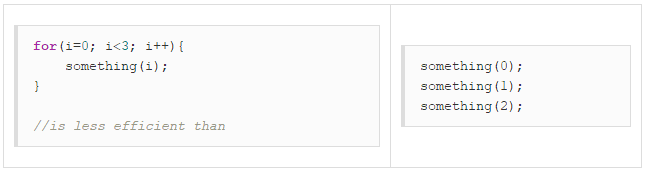
Compilers typically unroll simple, fixed-iteration loops like the one above. However, the following code:
for(i=0;i< limit;i++) { ... }
Below code (Example 1) is clearly longer than the loop-based version, but is more efficient. The block-size value is set to 8 merely for testing purposes; as long as we repeat the same number of times for “loop-contents”, it will yield good results.
In this example, the loop condition is checked every 8 iterations instead of every time. Since the number of iterations is not known, it generally will not be unrolled. Therefore, unrolling loops as much as possible can provide better execution speed.
//Example 1

#include<STDIO.H>

#define BLOCKSIZE (8)

void main(void)
{
int i = 0;
int limit = 33;  /* could be anything */
int blocklimit;

/* The limit may not be divisible by BLOCKSIZE,
 * go as near as we can first, then tidy up.
 */
blocklimit = (limit / BLOCKSIZE) * BLOCKSIZE;

/* unroll the loop in blocks of 8 */
while( i < blocklimit )
{
    printf("process(%d)\n", i);
    printf("process(%d)\n", i+1);
    printf("process(%d)\n", i+2);
    printf("process(%d)\n", i+3);
    printf("process(%d)\n", i+4);
    printf("process(%d)\n", i+5);
    printf("process(%d)\n", i+6);
    printf("process(%d)\n", i+7);

    /* update the counter */
    i += 8;

}

/*
 * There may be some left to do.
 * This could be done as a simple for() loop,
 * but a switch is faster (and more interesting)
 */

if( i < limit )
{
    /* Jump into the case at the place that will allow
     * us to finish off the appropriate number of items.
     */

    switch( limit - i )
    {
        case 7 : printf("process(%d)\n", i); i++;
        case 6 : printf("process(%d)\n", i); i++;
        case 5 : printf("process(%d)\n", i); i++;
        case 4 : printf("process(%d)\n", i); i++;
        case 3 : printf("process(%d)\n", i); i++;
        case 2 : printf("process(%d)\n", i); i++;
        case 1 : printf("process(%d)\n", i);
    }
}

}
Count Non-Zero Bits
By continuously left-shifting, extracting and counting the lowest bit, Example Program 1 efficiently checks how many non-zero bits are in an array. Example Program 2 is loop-unrolled four times and then optimized by merging the four shifts into one. Frequent loop unrolling can provide many optimization opportunities.
//Example - 1

int countbit1(uint n)
{
  int bits = 0;
  while (n != 0)
  {
    if (n & 1) bits++;
    n >>= 1;
   }
  return bits;
}

//Example - 2

int countbit2(uint n)
{
   int bits = 0;
   while (n != 0)
   {
      if (n & 1) bits++;
      if (n & 2) bits++;
      if (n & 4) bits++;
      if (n & 8) bits++;
      n >>= 4;
   }
   return bits;
}
Break Loops Early
Often, loops do not need to execute entirely. For example, if we are searching for a specific value in an array, once found, we should break the loop as early as possible. For example: the following loop searches for -99 among 10,000 integers.
found = FALSE;
for(i=0;i<10000;i++)
{
    if( list[i] == -99 )
    {
        found = TRUE;
    }
}

if( found )
    printf("Yes, there is a -99. Hooray!\n");
The above code works correctly but requires the entire loop to execute regardless of whether we have already found the number. A better approach is to terminate the search as soon as we find the number we are looking for.
found = FALSE;
for(i=0; i<10000; i++)
{
    if( list[i] == -99 )
    {
        found = TRUE;
        break;
    }
}
if( found )
    printf("Yes, there is a -99. Hooray!\n");
If the data to be searched is at the 23rd position, the program will execute 23 times, saving 9977 iterations.
Function Design
Designing small and simple functions is a good practice. This allows the registers to perform optimizations such as register variable allocation, making it very efficient.
Performance Overhead of Function Calls
The performance overhead of function calls on the processor is minimal, only accounting for a small portion of the performance overhead during function execution. The parameters passed into function variable registers have certain limitations. These parameters must be integer-compatible (char, shorts, ints, and floats occupy one word) or smaller than four words in size (including doubles and long longs occupying two words).
If the limit on the number of parameters is four, then the fifth and subsequent words will be stored on the stack. This increases the storage and retrieval overhead when calling the function.
See the code below:
int f1(int a, int b, int c, int d) {
   return a + b + c + d;
}

int g1(void) {
   return f1(1, 2, 3, 4);
}

int f2(int a, int b, int c, int d, int e, int f) {
  return a + b + c + d + e + f;
}

ing g2(void) {
 return f2(1, 2, 3, 4, 5, 6);
}
The fifth and sixth parameters in function g2 are stored on the stack and are loaded in function f2, incurring the overhead of storing two parameters.
Reduce Function Parameter Passing Overhead
Methods to reduce function parameter passing overhead include:
- Try to ensure that functions use fewer than four parameters. This way, stack storage for parameter values will not be used.
- If a function requires more than four parameters, ensure that the value of the latter parameters outweighs the cost of storing them on the stack.
- Pass references of parameters via pointers instead of passing the parameter structure itself.
- Place parameters in a structure and pass it to functions via pointers, reducing the number of parameters and improving readability.
- Avoid using long type parameters that occupy two words as much as possible. For programs requiring floating-point types, doubles should also be minimized due to occupying two words.
- Avoid parameter splitting, where function parameters exist both in registers and on the stack. Current compilers are not efficient in handling this situation: all register variables will also be placed on the stack.
- Avoid variable-length arguments. Variable-length functions place all parameters on the stack.
Leaf Functions
A function that does not call any other functions is called a leaf function. In the following applications, nearly half of the function calls involve calling leaf functions. Since there is no need to perform the storage and retrieval of register variables, leaf functions are efficient on any platform.
The performance overhead of reading register variables is much smaller compared to the work done by leaf functions that use four or five register variables. Therefore, try to write frequently called functions as leaf functions. The number of function calls can be checked using some tools.
Here are some methods to compile a function as a leaf function:
- Avoid calling other functions, including those that call C library functions (such as division or floating-point operation functions).
- Use the __inline modifier for short functions.
Inline Functions
Inline functions disable all compilation options. Using the __inline modifier for a function causes the function to be directly replaced with its body at the call site. This makes function calls faster but increases code size, especially when the function itself is large and called frequently.
__inline int square(int x) {
   return x * x;
}

#include <MATH.H>

double length(int x, int y){
    return sqrt(square(x) + square(y));
}
The benefits of using inline functions are as follows:
- No function call overhead. The function call site is directly replaced with the function body, so there is no performance overhead such as reading register variables.
- Smaller parameter passing overhead. Since there is no need to copy variables, the cost of passing parameters is lower. If parameters are constants, the compiler can provide better optimization.
The downside of inline functions is that if they are called many times, the code size will become large. This primarily depends on the size of the function itself and the number of calls made.
It is wise to use inline only for important functions. When used properly, inline functions can even reduce the code size: function calls generate some computer instructions, but using the optimized inline version may produce fewer computer instructions.
Using Lookup Tables
Functions can often be designed as lookup tables, which can significantly improve performance. The accuracy of lookup tables is lower than typical calculations, but it does not matter much for general programs.
Many signal processing programs (for example, modem demodulation software) use many computationally intensive sin and cos functions. For real-time systems, precision is not particularly important, and sin and cos lookup tables may be more suitable. When using lookup tables, try to place similar operations in the lookup table, as this is faster and saves storage space compared to using multiple lookup tables.
Floating Point Operations
Although floating-point operations are time-consuming for all processors, we still need to use them when implementing signal processing software. When writing floating-point operation programs, keep the following points in mind:
- Floating-point division is slow. Floating-point division is twice as slow as addition or multiplication. Convert division into multiplication by using constants (for example, x=x/3.0 can be replaced by x=x*(1.0/3.0)). Constant division is computed at compile time.
- Use float instead of double. Float type variables consume better memory and registers and are more efficient due to lower precision. Use float whenever precision is sufficient.
- Avoid using transcendental functions. Transcendental functions, such as sin, exp, and log, are implemented through a series of multiplications and additions (using precision extension). These operations are at least ten times slower than typical multiplications.
- Simplify floating-point operation expressions. Compilers cannot apply optimizations used for integer operations to floating-point operations. For example, 3*(x/3) can be optimized to x, while floating-point operations will lose precision. Therefore, it is necessary to perform manual floating-point optimization when the result is known to be correct.
However, the performance of floating-point operations may not meet the performance needs of specific software. In this case, the best approach may be to use fixed-point arithmetic. When the range of values is small enough, fixed-point arithmetic operations are more precise and faster than floating-point operations.
Other Tips
In general, space can be traded for time. If you can cache frequently used data instead of recalculating it, this allows for faster access. For example, sine and cosine lookup tables, or pseudo-random numbers.
- Avoid using ++ and — in loops whenever possible. For example: while(n–) {}, this can sometimes be difficult to optimize.
- Reduce the use of global variables.
- Use static-modified variables for file-level access unless declared as global variables.
- Use one-word-sized variables (int, long, etc.) whenever possible; using them (instead of char, short, double, bit fields, etc.) may run faster on the machine.
- Avoid recursion. Recursion may be elegant and simple, but it requires too many function calls.
- Avoid using the sqrt function in loops; calculating square roots is very performance-intensive.
- One-dimensional arrays are faster than multi-dimensional arrays.
- Compilers can optimize within a single file—avoid splitting related functions into different files; if they are kept together, the compiler can handle them better (e.g., it can use inline).
- Single-precision functions are faster than double-precision ones.
- Floating-point multiplication is faster than floating-point division—use val*0.5 instead of val/2.0.
- Addition operations are faster than multiplication—use val+val+val instead of val*3.
- put() function is faster than printf() but less flexible.
- Use #define macros to replace common small functions.
- Binary/unformatted file access is faster than formatted file access because the program does not need to convert between human-readable ASCII and machine-readable binary. If you do not need to read the contents of the file, save it as binary.
- If your library supports the mallopt() function (which controls malloc), try to use it. The MAXFAST setting provides a significant performance boost for functions that call malloc many times. If a structure needs to be created and destroyed multiple times within a second, try setting the mallopt options.
Lastly, but most importantly—turn on the compiler optimization options! It seems obvious, but it is often forgotten when products are released. The compiler can optimize the code at a lower level and perform specific optimizations for the target processor.
*Disclaimer: This article is compiled from the internet, and the copyright belongs to the original author. If there is any error in the source information or infringement of rights, please contact us to delete or authorize matters.

 Click to read the original text for more information.