Previous Answer:
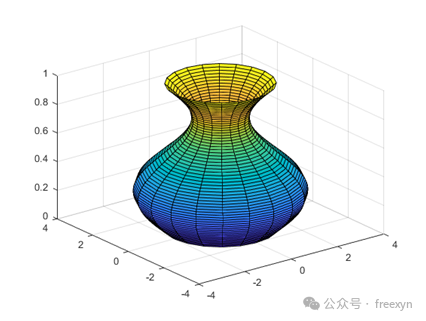
4.5.1 Image Rotated Around the Z Axis
MATLAB Quick Exercise 4.5.1: How to Plot an Image Rotated Around the Z Axis
[Reference Video31.18]
Program:
cylinder(sin(0:0.1:2*pi)+2)Running Result
——————— Non-ornate Divider —————————
4.6 Image Annotation
4.6.1 Annotating Zero Coordinates on Images
Plot the image:y=(x+4)(x-6), and annotate the zero coordinates on the graph(-4,0).
(The answer will be announced in the next issue)
Recommended Popular Content from Previous IssuesAlgorithm Code Quick Start 15: Stunning RBF Radial Basis Interpolation Method: Surface Reconstruction with Point Cloud Data with Holes | MATLAB Programming Application ExampleAlgorithm Code Quick Start 14: Super Simple Fitting Prediction Method Done in One Line of Code: Extrapolation PredictionMATLAB Programming Basics 76: Four Major Functions of Symbolic Computation to Solve Polynomial Expansion/Decomposition/Simplification Problems | Reject Manual DerivationMATLAB Basic Short Article 75 (Solving + Plotting) The Graph and Zero Points of Functions, Using Quadratic Functions as an Example, Completed with Super Simple CodeEssential MATLAB Exercise 4.4.1: Drawing 3D Parametric Function Curves | Don’t Panic When Not PracticingMATLAB Weekly Practice 4.3.2: Drawing Surface Graphs Based on Function ExpressionsMATLAB Literacy Must-Read 2: Function Syntax Definition, Function Files, Local Functions, Anonymous Functions, Multivariable Functions Programming ExamplesAlgorithm Code Quick Start 12: Lagrange Interpolation Method, and MATLAB Program Example (Directly Usable)The Concept, Forms, Core Algorithms, and Application Scenarios of Big DataBeginner’s Quick Understanding: The Concept, Forms, Core Algorithms, and Application Scenarios of Cloud ComputingConcise Algorithm Programming Example 6: Theoretical Principles of Least Squares Method, Typical Cases, and MATLAB ImplementationMATLAB Beginner Short Article 67: Introducing a Programming Example for Solving Nonlinear Equation Systems fsolveSeries 25: Detailed Explanation of Naive Bayes Algorithm and Its MATLAB Programming Code ExampleEnd