In the last section, we used the example of how to write a calculator program to extend into why data types, variables, and constants exist, and introduced the difference between assignment and equality. From this section, we will analyze these three concepts in detail, starting with the basic data type of integer, without further ado, let’s get to the main course.
BOOL Type
Do you still remember the image from the last section? Forget it, I will put another one here.
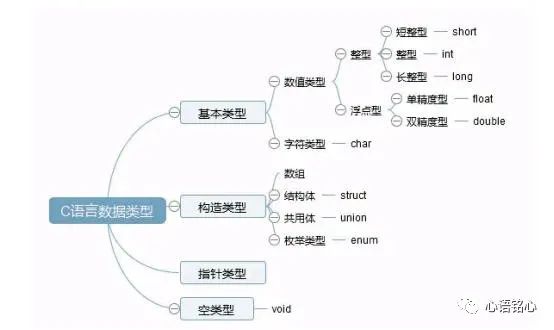
Before discussing basic types, let’s talk about a special existence—the logical type. We use bool to represent it; when the bool value is 1, it means true; when the bool value is 0, it means false.
Remember, the bool type only has two values: 1 and 0. If you want to use bool type data in your program, remember to include #include <stdbool.h> in your header file. As we mentioned in the first section, when using someone else’s stuff, you should greet them. The usage is bool a;
Generally speaking, when using the bool type, we do not assign specific values of 0 and 1, but use false and true instead, the values are the same, mainly for ceremonial purposes.
Another point to emphasize is why does the value represent true?
Remember, in C language, any non-zero value is true (true: correct), for example, 5, 20 are true, and -10 is also true, only 0 represents false (false: incorrect).
Let me demonstrate:
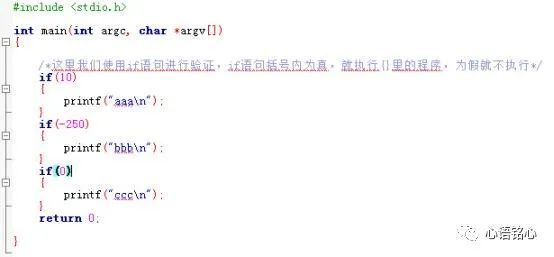
Here we use the if statement for verification. Do you still remember the role of the main function {} we discussed earlier? It indicates that the program within the brackets belongs to the main() function, and the content within the {} here belongs to the if() statement. This program states that if 10 is true, print “aaa”; if -250 is true, print “bbb”; if 0 is true, print “ccc”. Let’s look at the execution result:
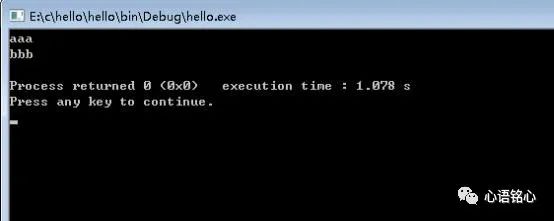
From the results, we can see that both 10 and -250 are true, while 0 is false, which verifies that in C language, any non-zero value is true.
Integer Type
Integer types are divided into char, short, int, and long, with the main characteristic being that the memory space allocated differs across different platforms or compilers. Here we will uniformly process it as a 32-bit system.
1. char
char is actually a character type, but it can also define integer types, with a storage size of 1 byte in a 32-bit operating system.
A new concept emerges here—byte (Byte, abbreviated as B). A byte is a unit of measurement for the storage capacity of computer information, just like we use meters as a unit of length measurement, except this is a unit used by computers.
Everyone knows that computers only recognize binary number strings, which are “0” and “1”. One “0” or “1” is one bit, represented by bit, so 101010 is 6 digits, which means 6 bits, and a 32-bit system can process 32 bits of data at once.
And one byte is 8 bits, which means it has 8 binary numbers. The character type char has a size of one byte.
Each basic data type has two forms: signed and unsigned.
If it is unsigned, the minimum is 0000 0000, which is 0, and the maximum is 1111 1111, which is 2^8-1, or 256.
If it is signed, the highest bit is the sign bit, where 0 indicates positive and 1 indicates negative.
0 000 0000~0 111 1111, the range is 0~127; 1 000 0000~1111 1111, the range is -1~128; thus, the range of unsigned char is 0~255, and the range of signed char is -128~127.
Note:
①. If signed or unsigned is not specified, it defaults to signed.
②. All data is stored in the computer in the form of complement.
What is complement?
You see, C language is interesting in this way, one ring after another. There are three coding systems in computers: original code, inverse code, and complement code, abbreviated as original, inverse, complement.
Positive numbers: original, inverse, and complement are the same, all are the original code itself.
(char) For example:
Why use char type numbers as examples? Because they have a small byte size, that’s the only reason.
Positive number: 10
Original code: 0 000 1010 (binary, octal, decimal, hexadecimal conversions should be calculable, you should have learned this in high school)
Inverse code: 0 000 1010
Complement code: 0 000 1010
Now let’s look at negative numbers: -10
Original code: 1 000 1010
Inverse code: 1 111 0101 (the inverse code is obtained by keeping the sign bit unchanged and inverting the other bits)
Complement code: 1 111 0110 (complement = inverse + 1)
This is also the final storage form of the value -10 in the computer.
Because the char type data has a small value, it can lead to data overflow, and overflow does not throw an error.
Suppose you assign the value 129 to a signed char type variable (the range of signed char is -128~127), what value will we ultimately see?
First, let’s look at the result:
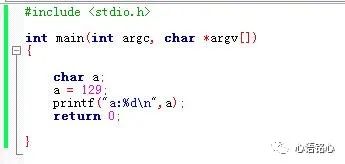
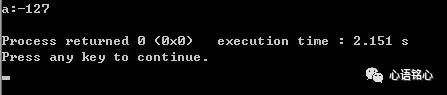
The answer is -127. What? Is your computer broken? Well… although my computer has been used for five years and is indeed lagging, it’s really not broken. So why is it -127?
Let’s reason it out:
First, 129 is a positive number, so the original, inverse, and complement are the same, that is:
Original code: 1000 0001
Inverse code: 1000 0001
Complement code: 1000 0001
At this point, the computer sees that the highest bit is 1, and since it is a signed number, it will treat this as a negative number and process it as such. The computer stores the complement, but displays the original code, so we need to reverse-engineer the original code:
Complement code: 1000 0001
Inverse code: 1000 0001 (complement = inverse + 1, so inverse = complement – 1)
Original code: 1111 1110 (the sign bit remains unchanged, and the other bits are inverted)
The result is -127, isn’t that amazing.
The introduction to char integer type ends here; we will discuss char character type later.
2. short
Short integer occupies two bytes, which is 16 bits. The definition method is short a; if there is an unsigned prefix, it is an unsigned integer, with a data value range of -32768~32767; if there is no prefix, it defaults to signed, with a data value range of 0~65535.
3. int
Integer (finally filling the pit left by hello world, I am so good), occupies 4 bytes, which is 32 bits, and the definition method is int a; If there is an unsigned prefix, it is an unsigned integer, with a data value range of… it’s too troublesome to calculate, just remember it doesn’t exceed 10 digits.
Speaking of int, I recall a painful history. Those who have read the previous articles should know that I actually did not directly contact C language, but started with microcontrollers.
The 51 microcontroller is an 8-bit system, where int occupies 2 bytes, and I always thought int was 2 bytes until I learned C language and saw that the book said int is 4 bytes. I laughed and raised my hand to correct the C language teacher, “Teacher, int is two bytes, the book is wrong.” I will never forget the teacher’s look of disbelief.
Isn’t it nice to play with your phone in class? Isn’t it nice to sleep? Isn’t it nice to chat with your crush in class? Bam! Choosing faults in textbooks in college is simply toxic. From then on, I learned a lesson: say less, do more!
Although I was severely slapped in the face, we can see that the number of bytes occupied by data types varies across different systems. In an 8-bit microcontroller, int is indeed 2 bytes, just like short in a 32-bit system, which is why I emphasized that the analysis is under a 32-bit system.
Remember, if you encounter questions about bytes in the future and the operating system is not specified, default to 32 bits.
3. long
Long integer also occupies 4 bytes (in a 32-bit operating system, x86), but in a 64-bit operating system, long occupies 8 bytes (x64).
The above is the basic types of integer data types. However, sometimes you may see long long or long int, which is not surprising. In a 32-bit system, long long occupies 8 bytes, and long int occupies 4 bytes. You don’t need to be too concerned because these are not common and not very useful.
But you know, I am a good person. With so much content above, how can I bear to see everyone memorize it?
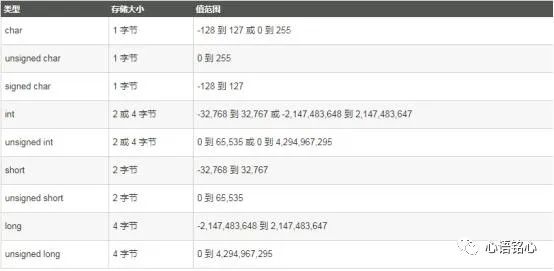
Here I have listed a table for everyone, no need to say more, just like, follow, and share, you understand what I mean.
Summary
This section provided a detailed introduction to the four basic integer data types: char, short, int, and long. Before the introduction, a special data type called bool was also discussed, along with its usage.
Additionally, the original, inverse, and complement codes were interspersed, as well as an analysis of data overflow (note, the compiler does not throw an error for data overflow! No error! No error!) and the byte sizes and value ranges of various integer data types.
Since there are integer types, are there non-integer types, like decimals? Of course, there are, stay tuned for the next section!
Last Section Homework Explanation
Which of the following assignment methods conforms to the C language standard (assuming all variables have been defined)?
A = b; 4.5 = xs; c = 5 + 8; sd = c + 7; d = 79.3 + d; a + b = 89; a == 23; i++; ++i;
Based on the knowledge learned in the last section, the left side of the assignment must be a variable, and the right side has no restrictions. The ones that conform to the above conditions are A = b; c = 5 + 8; sd = c + 7; d = 79.3 + d; a == 23; i++; ++i;
Why do the last two also conform?
Both represent i = i + 1; also called incrementing by 1. So what is the difference between ++i and i++?
Hehe…
This Section Homework
Define a signed char variable a, a = 128; what will a’s value be? Please analyze specifically and print the verification. Welcome everyone to share your homework in the comment area!
Friendly Reminder: There is a very strange link in the first section, remember to save it!