Teaching C++ to children can be quite dull, but using EasyX to guide them can enhance their enthusiasm for learning. This article introduces EasyX.
01
Software Overview
The EasyX Graphics Library is a free drawing library for Visual C++, supporting VC6.0 to VC2022. It is easy to use, has a low learning curve, and is widely applicable. Many universities have already incorporated EasyX into their teaching.
EasyX website:https://easyx.cn/
Documentation:https://docs.easyx.cn/zh-cn/intro
Software: Portable version of DevC++ 5.11 with EasyX included: https://pan.baidu.com/s/1Ccez6M-YcnHOeU1fuCiLQA (Extraction code: 8frc).
02
Usage Method
Open the portable version:
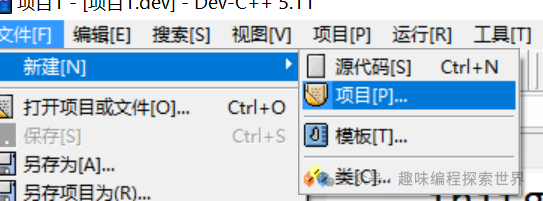
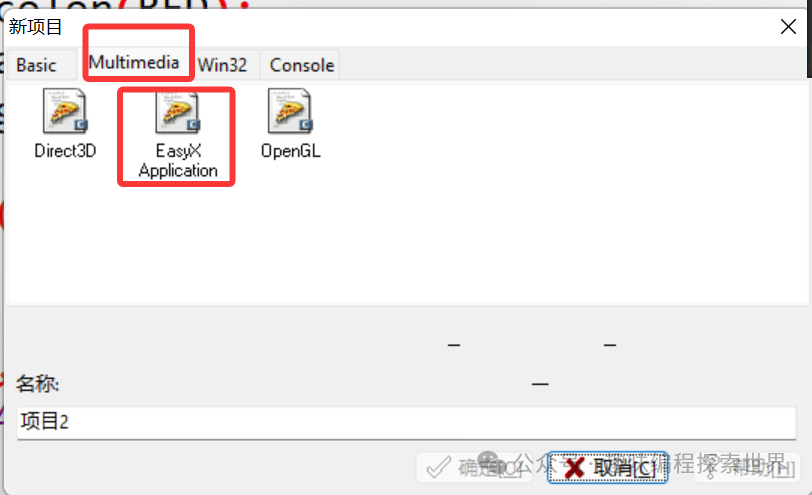
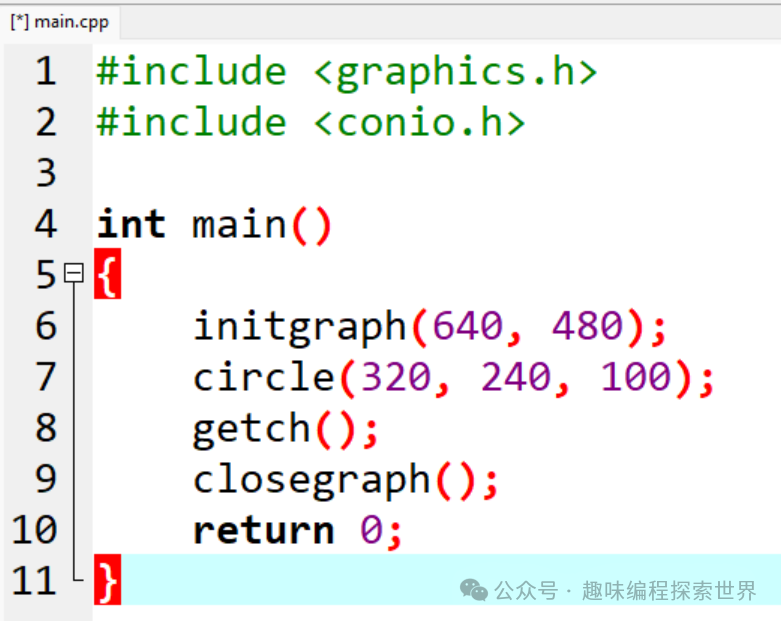
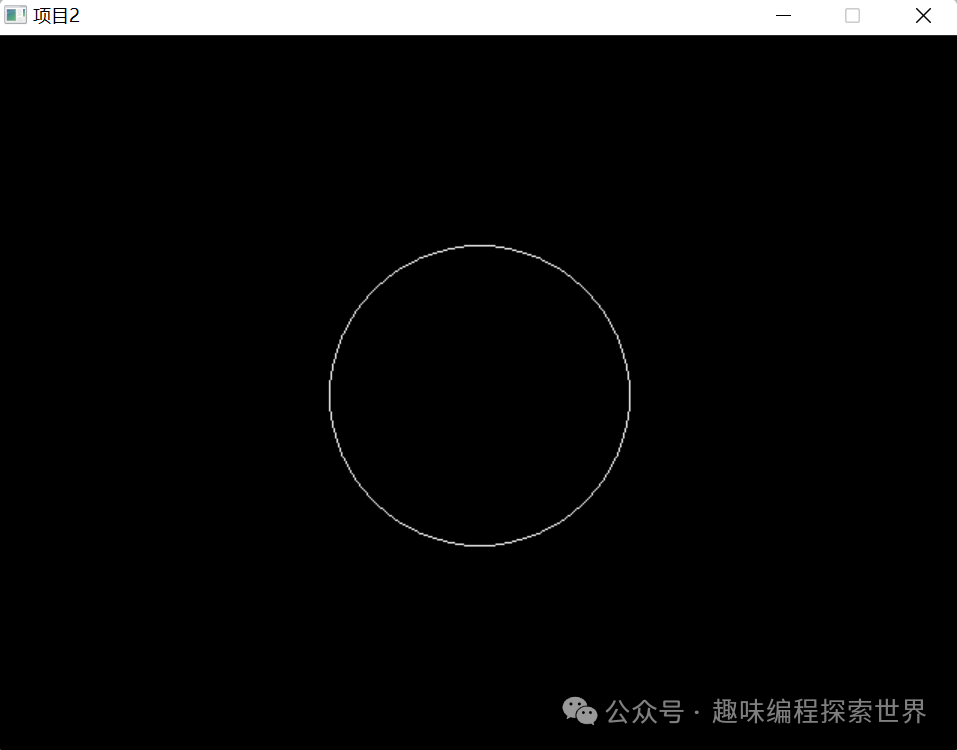
Compile and run:
03
Basic Commands
Common commands for EasyX are summarized in the table below:
|
Function Category |
Command Syntax |
Description |
|
Initialization and Window Control |
||
|
initgraph(width, height) |
Initialize the graphics window with width width and height height |
|
|
initgraph(width, height, SHOWCONSOLE) |
Initialize the window and show the console |
|
|
closegraph() |
Close the graphics window and release resources |
|
|
cleardevice() |
Clear the window and fill the background color |
|
|
setbkcolor(color) |
Set the background color, parameter is a color constant (e.g., WHITE, RGB (r,g,b)) |
|
|
Basic Drawing |
||
|
Color Settings |
setlinecolor(color) |
Set the line color |
|
setfillcolor(color) |
Set the fill color |
|
|
settextcolor(color) |
Set the text color |
|
|
Line Drawing |
line(x1, y1, x2, y2) |
Draw a line from (x1,y1) to (x2,y2). |
|
rectangle(x1, y1, x2, y2) |
Draw a rectangle border |
|
|
ellipse(x1, y1, x2, y2) |
Draw an ellipse (bounding rectangle is (x1,y1)-(x2,y2)). |
|
|
circle(x, y, r) |
Draw a circle (center at (x,y), radius r). |
|
|
Fill Shapes |
solidrectangle(x1, y1, x2, y2) |
Draw a solid rectangle |
|
fillellipse(x1, y1, x2, y2) |
Draw a solid ellipse |
|
|
fillcircle(x, y, r) |
Draw a solid circle |
|
|
Text Drawing |
||
|
outtextxy(x, y, “Text“) |
Draw text at (x,y) (default font) |
|
|
drawtext(“Text“, &rect, format) |
Draw text according to specified area and format (e.g., DT_CENTER for centering) |
|
|
setfont(size, weight, “font name“) |
Set font style (e.g., setfont(24, 0, “Microsoft YaHei”)). |
|
|
Images and Pixels |
||
|
putpixel(x, y, color) |
Draw a single pixel at (x,y). |
|
|
loadimage(&img, “image path“) |
Load an image into an IMAGE object |
|
|
putimage(x, y, &img) |
Display an image at (x,y) (top-left aligned) |
|
|
Interactive Operations |
||
|
Mouse Messages |
peekmessage(&msg) |
Check and retrieve messages (non-blocking) |
|
msg.message == WM_LBUTTONDOWN |
Left mouse button click event, coordinates are msg.x and msg.y |
|
|
Keyboard Messages |
_kbhit() |
Check if a key is pressed (non-blocking) |
|
_getch() |
Get the key value (blocking) |
|
|
msg.vkcode == VK_ESCAPE |
Capture special keys like ESC (requires ExMessage) |
|
|
Other Common Functions |
||
|
Sleep(ms) |
Pause for ms milliseconds (requires <windows.h>). |
|
|
getwidth() / getheight() |
Get window width / height |
|
|
setlinestyle(style, width) |
Set line style (e.g., setlinestyle(PS_SOLID, 3) for a 3-pixel solid line). |
04
Practice
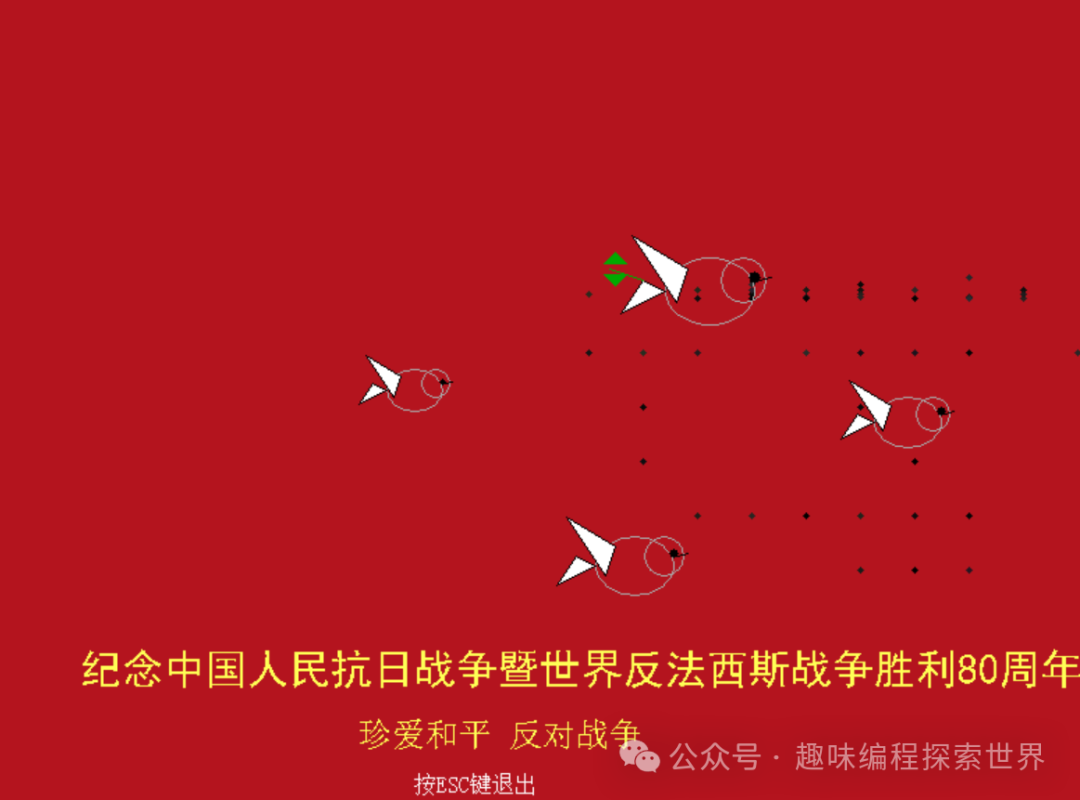
We will use EasyX to create a program themed around the “Commemoration of the 80th Anniversary of the Victory of the Chinese People’s Anti-Japanese War and the World Anti-Fascist War.” The program features a red background, four doves of peace (one holding an olive branch), fireworks randomly bursting every second above, and text at the bottom commemorating the 80th anniversary of the victory in the anti-Japanese war. Press ESC to exit.
|
#include <graphics.h> #include <tchar.h> #include <conio.h> #include <time.h> #include <vector> #include <cmath> // Include this header to use math functions like sin and cos #define PI 3.1416 // Firework particle structure struct FireworkParticle { int x, y; // Position int vx, vy; // Velocity COLORREF color; // Color int life; // Life span int maxLife; // Maximum life span }; // Peace dove drawing function void drawPeaceDove(int x, int y, int size, bool holdingOlive = false) { setfillcolor(WHITE); setlinecolor(LIGHTGRAY); // Body ellipse(x, y, x + size*0.8, y + size*0.6); // Head circle(x + size*0.7, y + size*0.2, size*0.2); // Beak setlinecolor(BLACK); line(x + size*0.85, y + size*0.2, x + size*0.95, y + size*0.18); // Wings POINT wingPoints[3] = { {x + size*0.2, y + size*0.1}, {x – size*0.3, y – size*0.2}, {x + size*0.1, y + size*0.4} }; fillpolygon(wingPoints, 3); // Tail POINT tailPoints[3] = { {x, y + size*0.3}, {x – size*0.4, y + size*0.5}, {x – size*0.2, y + size*0.2} }; fillpolygon(tailPoints, 3); // Eyes setfillcolor(BLACK); solidcircle(x + size*0.8, y + size*0.18, size*0.05); // Olive branch if (holdingOlive) { setlinecolor(GREEN); setfillcolor(GREEN); // Branch line(x – size*0.2, y + size*0.2, x – size*0.5, y + size*0.1); // Leaves POINT leaf1[3] = { {x – size*0.35, y + size*0.05}, {x – size*0.45, y – size*0.05}, {x – size*0.55, y + size*0.05} }; fillpolygon(leaf1, 3); POINT leaf2[3] = { {x – size*0.35, y + size*0.15}, {x – size*0.45, y + size*0.25}, {x – size*0.55, y + size*0.15} }; fillpolygon(leaf2, 3); } } // Initialize firework particles void initFirework(std::vector<FireworkParticle>& particles, int x, int y) { int count = rand() % 50 + 80; // Number of particles for (int i = 0; i < count; i++) { FireworkParticle p; p.x = x; p.y = y; // Random speed and angle double angle = 2 * PI * rand() / RAND_MAX; int speed = rand() % 5 + 2; p.vx = (int)(speed * cos(angle)); p.vy = (int)(speed * sin(angle)); // Random color (bright color) int r = 180 + rand() % 75; int g = 150 + rand() % 105; int b = 150 + rand() % 105; p.color = RGB(r, g, b); p.life = 0; p.maxLife = rand() % 20 + 30; // Life span particles.push_back(p); } } // Update and draw fireworks void updateAndDrawFireworks(std::vector<FireworkParticle>& particles) { for (size_t i = 0; i < particles.size(); ) { FireworkParticle& p = particles[i]; // Update position p.x += p.vx; p.y += p.vy; // Affected by gravity p.vy += 0.1; // Update life span p.life++; // Calculate opacity (changes with life span) int alpha = 255 * (1 – (float)p.life / p.maxLife); if (alpha < 0) alpha = 0; // Set color (with opacity) COLORREF color = p.color; int r = GetRValue(color); int g = GetGValue(color); int b = GetBValue(color); setfillcolor(RGB(r * alpha / 255, g * alpha / 255, b * alpha / 255)); // Draw particle solidcircle(p.x, p.y, 2); // Remove particles whose life span has ended if (p.life >= p.maxLife) { particles.erase(particles.begin() + i); } else { i++; } } } int main() { srand((unsigned int)time(NULL)); initgraph(800, 600); SetWindowText(GetHWnd(), “Commemoration of the 80th Anniversary of the Victory of the Anti-Japanese War – Doves of Peace and Fireworks”); std::vector<FireworkParticle> fireworks; int fireworkTimer = 0; while (true) { // Red background setbkcolor(RGB(180, 20, 30)); cleardevice(); // Timed firework launch fireworkTimer++; if (fireworkTimer >= 60) // Launch approximately once per second { int x = rand() % 600 + 100; int y = rand() % 200 + 50; initFirework(fireworks, x, y); fireworkTimer = 0; } // Update and draw fireworks updateAndDrawFireworks(fireworks); // Draw doves of peace drawPeaceDove(500, 200, 80, true); // Holding olive branch drawPeaceDove(650, 300, 60); drawPeaceDove(450, 400, 70); drawPeaceDove(300, 280, 50); // Commemorative text settextcolor(YELLOW); settextstyle(30, 0, _T(“SimHei”)); outtextxy(80, 480, _T(“Commemoration of the 80th Anniversary of the Victory of the Anti-Japanese War and the World Anti-Fascist War”)); settextstyle(24, 0, _T(“SimSun”)); outtextxy(280, 530, _T(“Cherish Peace, Oppose War”)); // Exit prompt settextcolor(WHITE); settextstyle(16, 0, _T(“SimSun”)); outtextxy(320, 570, _T(“Press ESC to exit”)); // Delay refresh Sleep(30); // Check for exit if (_kbhit() && _getch() == 27) // ESC key break; } closegraph(); return 0; } |
Code link: https://pan.baidu.com/s/1Cn9EkuebckdwWefuFPnKuQ?pwd=24ec Extraction code: 24ec