来源:
https://blog.csdn.net/qq_40276626/article/details/120477263
Memory Management in Linux
The main task of memory management is to organize physical memory, followed by the allocation and reclamation of physical memory. However, Linux introduces the concept of virtual addresses.
The Role of Virtual AddressesIf user processes directly manipulate physical addresses, the following issues may arise:1. User processes can directly manipulate the memory corresponding to the kernel, potentially disrupting kernel operation.2. User processes may also disrupt the operation of other processes.The registers in the CPU store logical addresses, which need to be mapped to corresponding physical addresses to access the appropriate memory.By introducing logical addresses, each process has its own separate logical address range.When a process requests memory, it is allocated both a logical address and a physical address, and a mapping is established between the two.Thus, Linux memory management involves the following three components:
1. Physical Memory
Organization of Physical Memory
In Linux, memory is divided into three levels, from bottom to top:1. Page: A page size is 4k, and a page is the most basic unit of memory.2. Zone: A zone provides multiple queues to manage pages.Zones are divided into three types: 2.1. ZONE_DMA: Used to store data read from IO devices by DMA, kernel-specific. 2.2. ZONE_NORMAL: Used to store kernel-related data, kernel-specific. 2.3. ZONE_HIGHMEM: High memory, used to store user process data.3. Node: A node corresponds to a CPU, and a node includes a ZONE_DMA, ZONE_NORMAL, and ZONE_HIGHMEM.When the memory corresponding to a CPU is exhausted, it can request memory from other CPUs.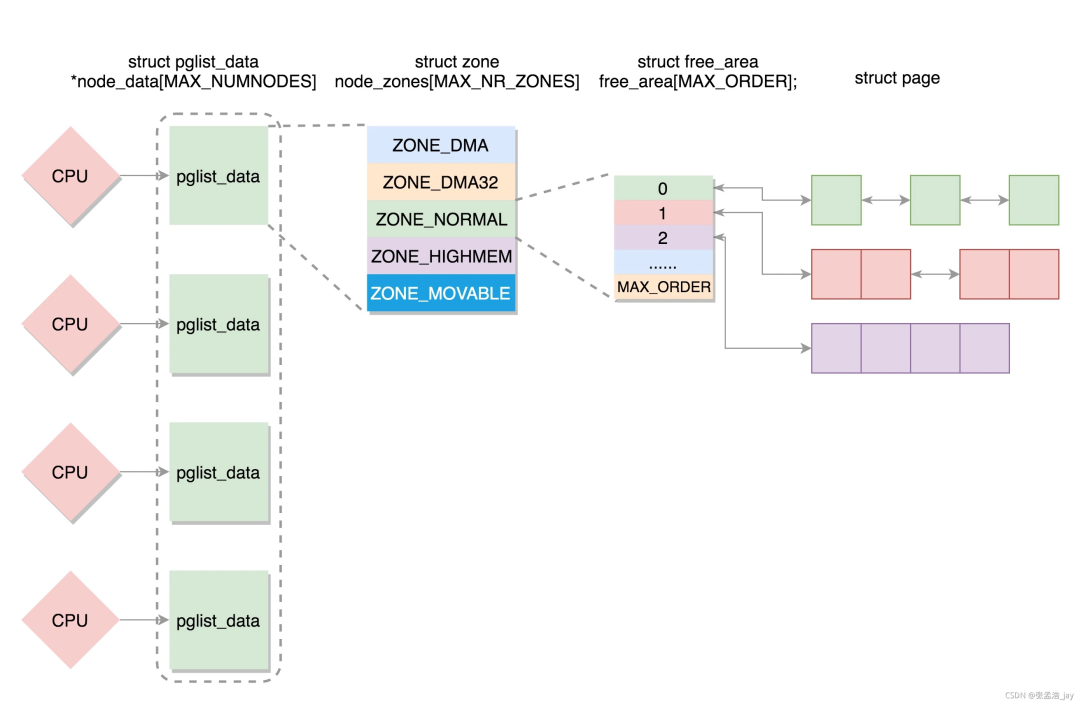
Allocation of Physical Memory
Linux divides memory allocation into two types:1. Large MemoryLarge memory is allocated using the buddy system.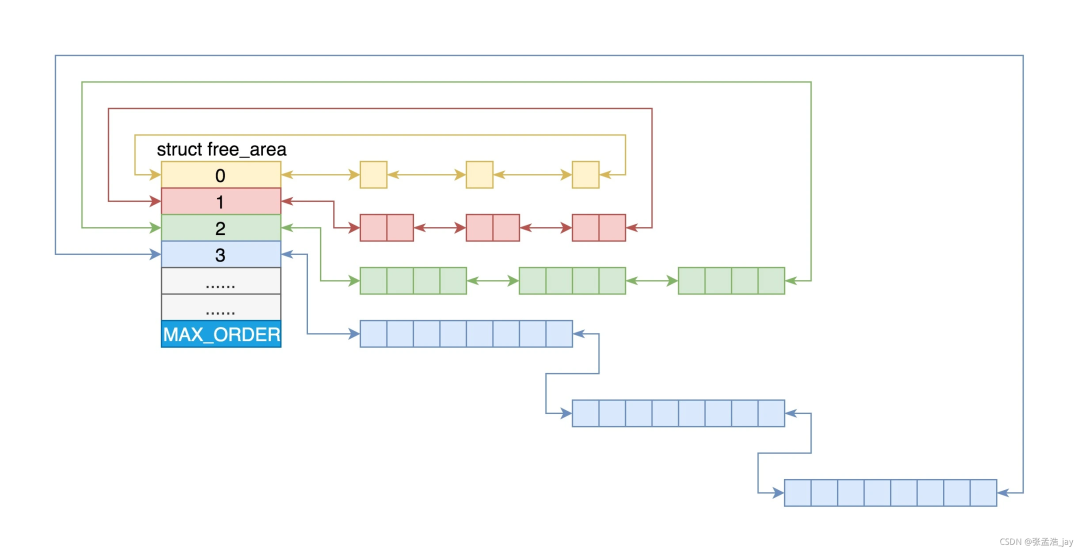 The buddy system groups pages in a zone and assembles them into multiple linked lists. The linked list contains collections of blocks of pages, which correspond to different sizes, ranging from 1, 2, 4, 8 … up to 1024 pages.When requesting a page size of (2i-1, 2i], it directly requests 2i pages. If the corresponding linked list has the required block, it is allocated directly. If not, it looks for 2i+1; if 2i+1 exists, it splits it into two 2i blocks, adds one 2i block to the corresponding linked list, and allocates the other.For example, when requesting a block of 128 pages, it first checks if there are free blocks in the 128-page linked list. If not, it checks the 256-page linked list; if there are free blocks, it splits the 256-page block into two, using one and inserting the other into the 128-page linked list. If still not found, it checks the 512-page linked list; if found, it splits into 128, 128, and 256 page blocks, using one 128 and inserting the other two into the corresponding page block list.2. Small Memory AllocationSmall memory allocation uses slub allocation, such as for objects and other data. Slub takes several pages and uses them as a cache, maintaining a linked list inside. Each time, it directly retrieves the corresponding memory from the linked list, and after use, it does not need to clear it but simply hangs it back onto the list, waiting for the next use.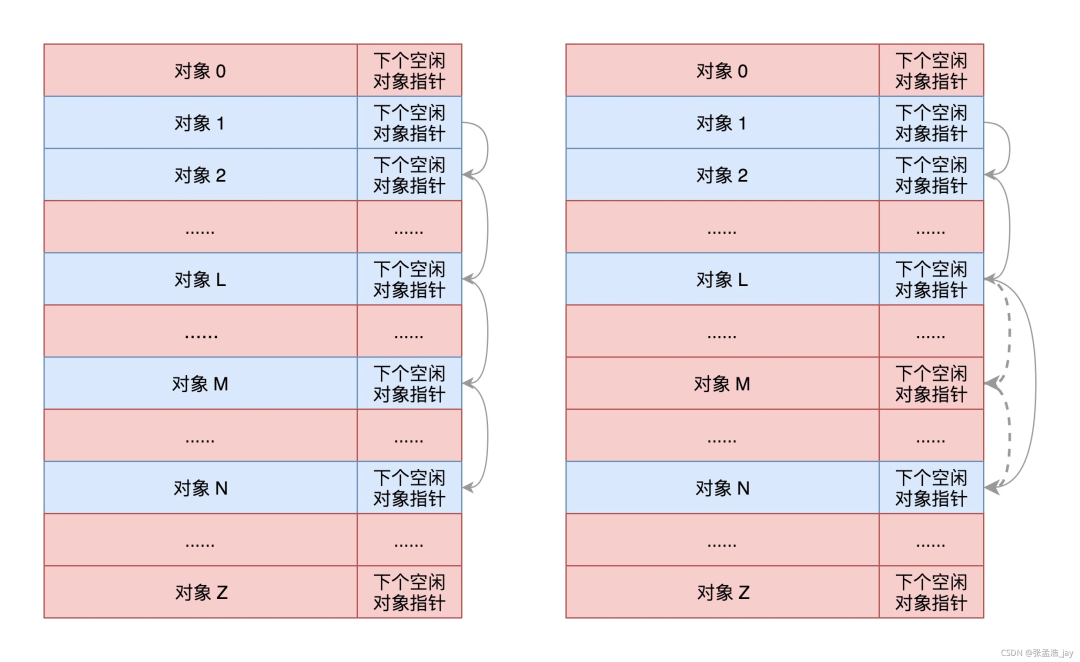
2. How to Organize Virtual Addresses
Virtual addresses correspond to virtual space, which is merely a collection of virtual addresses used to map physical memory.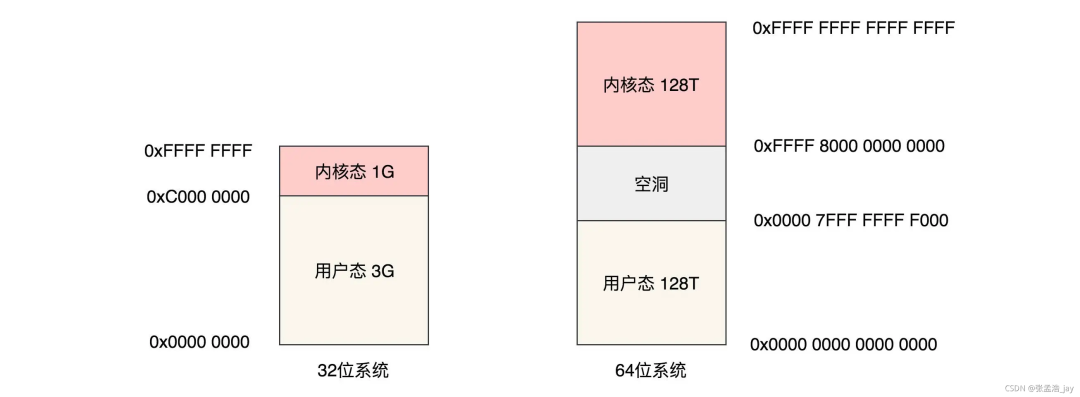 Virtual space is divided into user space and kernel space.In a 32-bit system, the virtual space is allocated in a 1:3 ratio to kernel space and user space.In a 64-bit system, both kernel space and user space are allocated 128T.User Space Structure
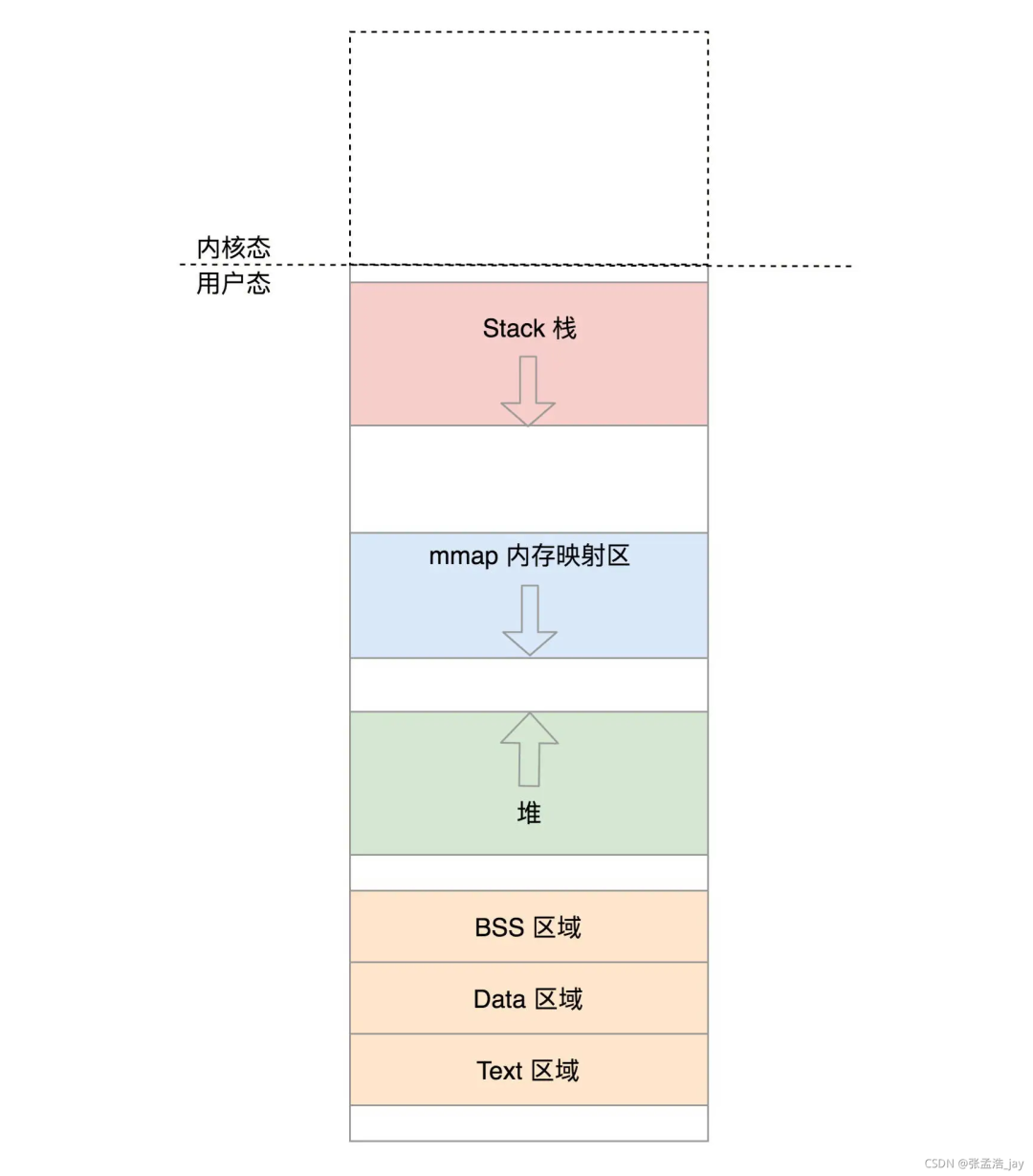 Each process corresponds to a user space virtual area, which contains the memory virtual address ranges for Text (code), Data (data), BSS (global variables), heap, stack, and mmap memory mapping area.Among them, mmap is used for mapping when requesting dynamic memory, while heap and stack are dynamically changing.The virtual address information for various aspects of a process in user space is stored in memory through a struct, and memory is allocated for it when the process is created.Kernel Space Structure
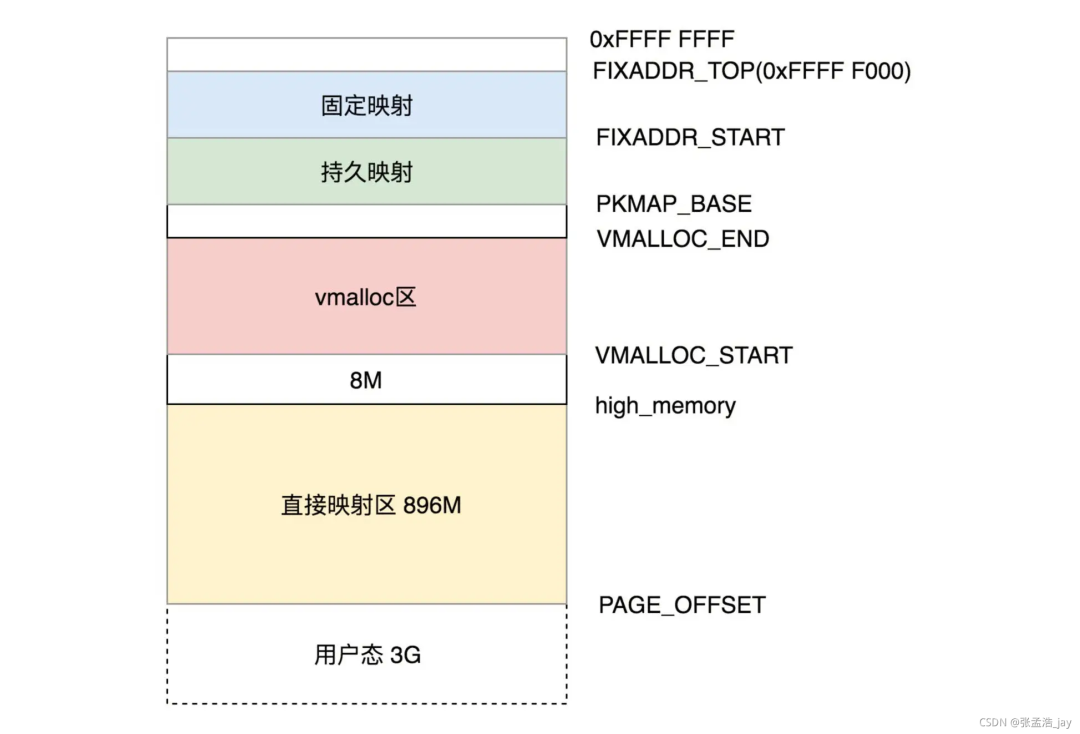 The Linux kernel programs share a kernel space virtual area, which is divided into the following parts:1. Direct Mapping Area896M, the kernel space is directly mapped to the corresponding ZONE_DMA and ZONE_NORMAL. Why is it called direct mapping? Because the logical address directly subtracts the corresponding offset to obtain the corresponding physical address. It is fixed.2. Dynamic MappingWhy introduce dynamic mapping? Because all physical memory allocation requires kernel program requests, and user processes do not have this permission. Therefore, the kernel space must be able to map to all physical memory addresses.If direct mapping were used, a 1G logical address kernel space could only map to 1G of physical memory.Thus, dynamic mapping is introduced, allowing the logical addresses in kernel space to map to any address in the physical memory’s ZONE_HIGHMEM (high memory), and after the corresponding physical memory is used up, it can map to other physical memory addresses.Dynamic mapping is divided into three types:1. Dynamic Memory Mapping: After using the corresponding physical memory, it can map to other physical memory.2. Permanent Memory Mapping: A virtual address can only map to one physical address. If another physical address needs to be mapped, it must be unbound.3. Fixed Memory Mapping: Can only be referenced by certain specific functions to call physical addresses.Difference Between Dynamic Memory Mapping and Direct MappingThe difference between dynamic mapping and direct mapping lies in the conversion rules from logical addresses to physical addresses.Direct MappingThe rule for direct mapping is fixed; a logical address corresponds to a fixed physical address. By adding or subtracting a number from the logical address, the corresponding physical address can be obtained.Dynamic MappingDynamic mapping is dynamically bound; each logical address corresponds to a dynamic physical address, queried through the page table.User Space Mapping:User space uses dynamic mapping, where each virtual address can be mapped to a physical address, mapping to ZONE_HIGHMEM.Why does user space not use direct mapping? Because physical memory is shared among multiple processes, each process has its own user space. If direct mapping were used, the corresponding physical addresses would conflict. The logical address size of user space is 3G, so there are cases where logical addresses are the same but corresponding physical addresses differ. This requires conversion through the page table, with each process corresponding to a page table.
3. How to Map Virtual Addresses to Physical Memory
Virtual addresses are converted to physical addresses through the page table, with each process corresponding to a page table, while the kernel has only one page table.Both virtual space and physical memory are paged at 4k, with pages in virtual space corresponding one-to-one with pages in physical memory.
Page Table Mapping
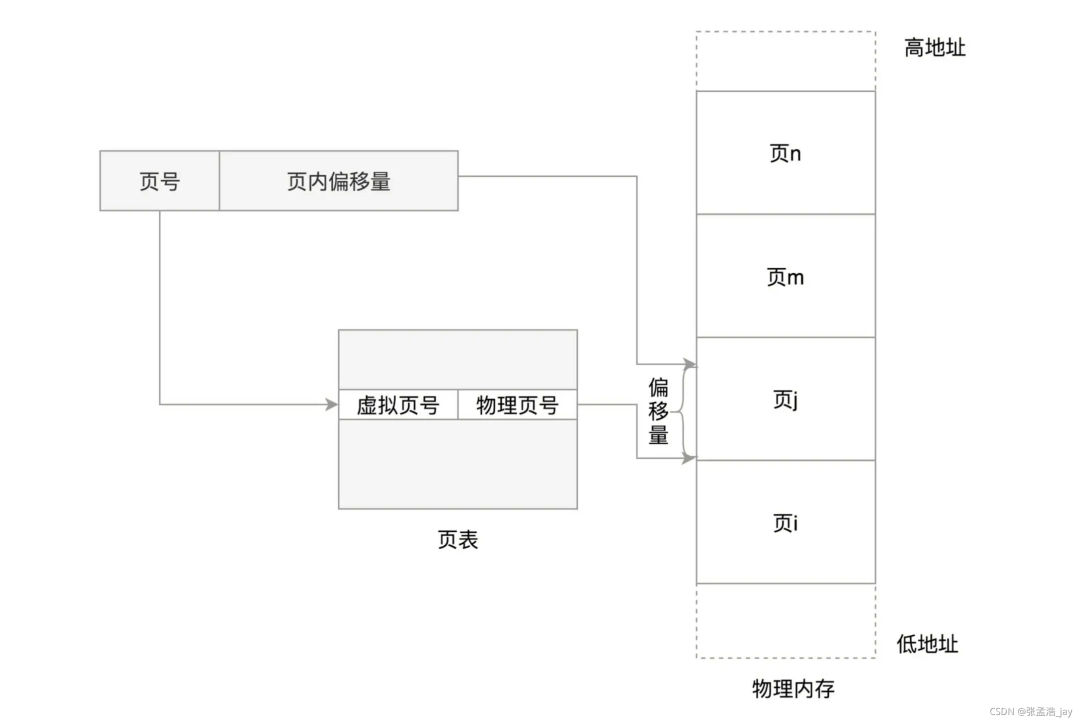 As shown in the figure, the page number in the virtual address is converted to the corresponding physical page number through the page table, and then the page offset can be used to obtain the corresponding physical address.
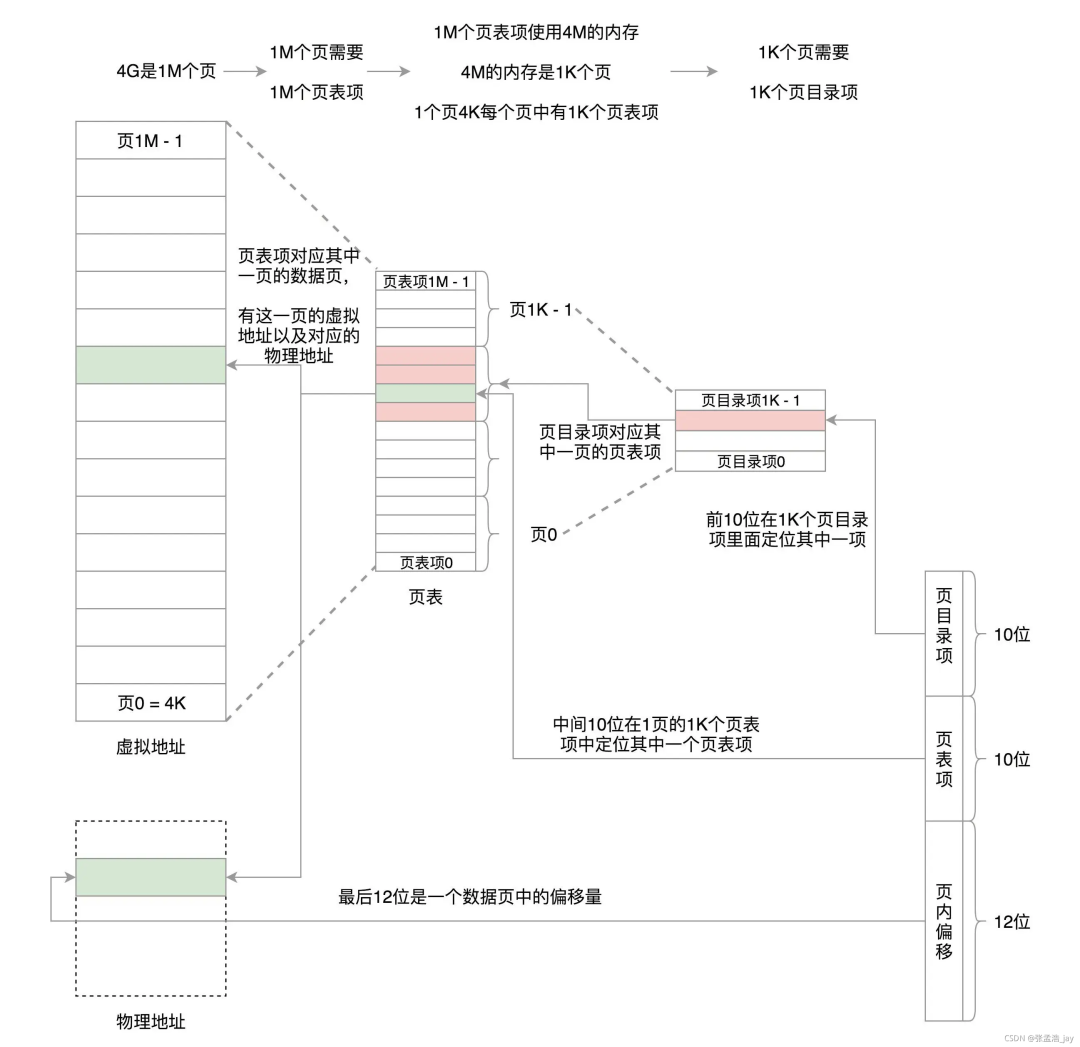 However, one process requires a page table, and for a 4G memory stick, 1M page table records are needed to describe it. If one page table record requires 4 bytes, then 4MB is needed. Moreover, page table records are indexed, corresponding to the virtual page number multiplied by the size of the page table entry to calculate the corresponding address.Therefore, Linux divides 4M into 1K of 4K, with one 4K corresponding to one page, used to store the actual page table records. By separating 1K pages, it does not require continuous 4M.If 4M is divided into 1K discrete pages, how do we find the page table number corresponding to the virtual address?Using pointers, we store 1K addresses, each pointing to these 1K pages, with the address size being 4 bytes, or 32 bits, which can fully represent the entire memory address range.1K * 4 bytes is exactly one page of 4k, so we use one page to store the corresponding page table record index.Thus, our virtual address lookup process is as follows:1> Find the corresponding page table record index position; since there are 1K indices, 10 bits can represent it.2> Through the index, we can find the actual page table address, which has 1K page table records, so 10 bits can represent it.3> One page has 4K, so 12 bits can represent its page offset.Thus, the virtual address is divided into three parts:1> 10 bits represent the index offset.2> 10 bits represent the page table record offset.3> 12 bits represent the page offset.Although this method increases the index items and further increases memory usage, it reduces the use of contiguous memory, allowing the page table to be stored in discrete memory.This is for a 32-bit system, while a 64-bit system uses a 5-level page table.
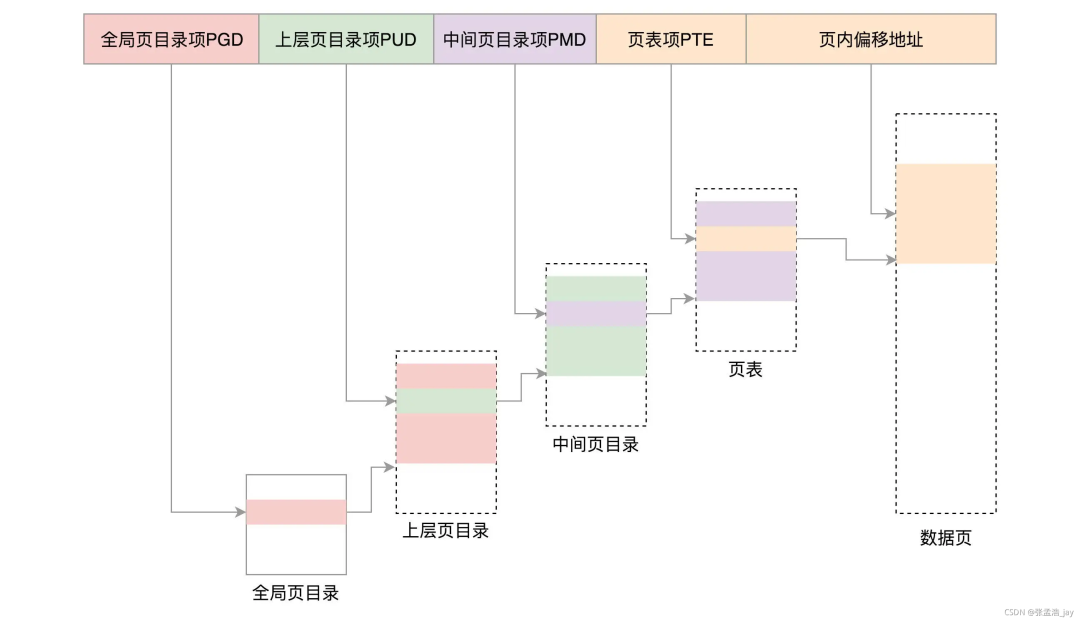 Mapping Flowchart
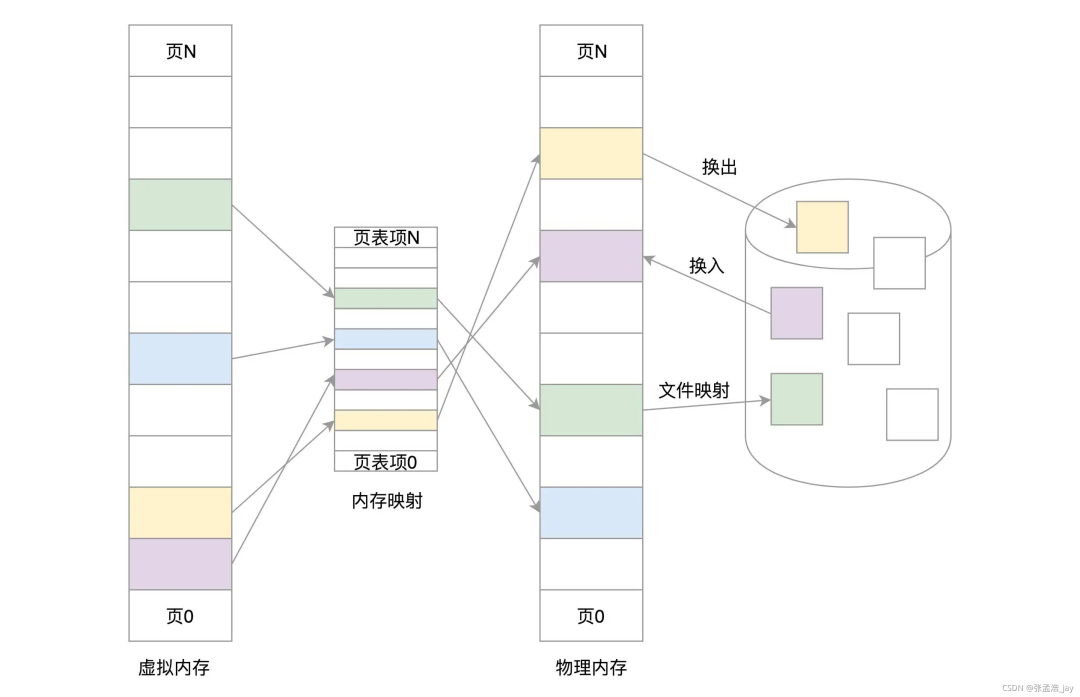 When user space requests memory, it only requests the corresponding virtual address and does not directly allocate physical memory. Instead, when it actually accesses memory, a page fault occurs, and the kernel allocates it and establishes the mapping, which is to create the corresponding page table entry.
TLB
TLB is a cache located in the CPU. It is used to cache the mapping between virtual addresses and corresponding physical addresses. When querying the corresponding physical address, it first checks the TLB; if the record exists, it returns directly. If not, it queries the page table.
Virtual Memory
Virtual memory refers to allocating a portion of the hard disk as a swap partition to act as virtual memory, used to store memory pages that are temporarily not needed. When needed, the corresponding memory pages are swapped back into memory from the swap partition. The hard disk acts as a virtual memory.Logically, it allows programs to run with larger memory because not all data needs to be loaded into memory at once; only the currently necessary programs and data need to be loaded into memory. When other data and programs are needed, they can be swapped in.Compared to actual memory loading, virtual memory requires constant switching of data between memory and disk, which is a time-consuming operation, so its speed cannot match that of actual memory loading.
Conclusion
Virtual space and physical memory are divided into kernel space and user space.Virtual addresses need to be converted to physical addresses through the page table before access.User virtual space can only map to user memory in physical memory and cannot map to kernel memory in physical memory, meaning user processes can only operate on user memory.Kernel space can only be used by the kernel, and user processes can only operate on physical memory and virtual space in user space.When a user process calls a system call, its corresponding code and data run in kernel space.