What is a Floating-Point Number?
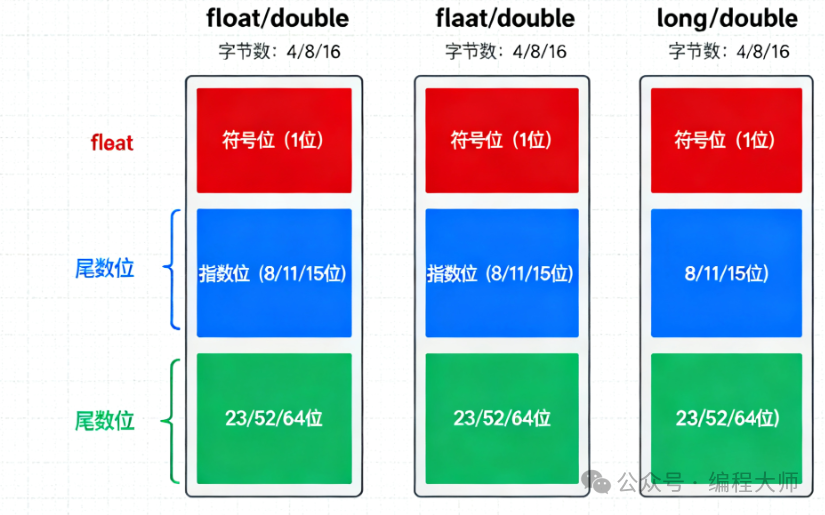
A floating-point number is a data type in C++ used to represent numbers with decimal parts and very large or very small values. Unlike integer types, floating-point numbers can represent values such as 2.5 and 3.14159, as well as extremely large or small numbers commonly found in scientific calculations.
How Floating-Point Numbers Work
Basic Concepts
Floating-point numbers use the principle of scientific notation, storing a number in two parts:
- Significand (Mantissa): Represents the significant digits of the number
- Exponent: Represents the scaling factor (power of 10)
For example:
- 34.1245 = 0.341245 × 10²
- 0.00341245 = 0.341245 × 10⁻²
In computers, floating-point numbers use binary scientific notation, where the scaling factor is a power of 2 instead of 10.
Floating-Point Types in C++
C++ provides three floating-point types:
| Type | Size | Precision | Range |
|---|---|---|---|
<span>float</span> |
4 bytes | Approximately 7 significant digits | ±3.4×10³⁸ |
<span>double</span> |
8 bytes | Approximately 15 significant digits | ±1.7×10³⁰⁸ |
<span>long double</span> |
Typically 16 bytes | Approximately 19 significant digits | Greater range |
Code Examples
Basic Declaration and Initialization
#include <iostream>
#include <iomanip>  // For controlling output format
using namespace std;

int main() {
    // Different initialization methods
    float price = 19.99f;           // 'f' suffix indicates float type
    double distance = 384400.5;     // Average distance from Earth to Moon (km)
    long double pi = 3.141592653589793238L;  // 'L' suffix indicates long double

    // Scientific notation representation
    double avogadro = 6.022e23;     // Avogadro's number
    double electronMass = 9.109e-31; // Electron mass (kg)

    cout << "Product Price: " << price << " Yuan" << endl;
    cout << "Distance to Moon: " << distance << " km" << endl;
    cout << "Pi: " << pi << endl;
    cout << "Avogadro's Number: " << avogadro << endl;
    cout << "Electron Mass: " << electronMass << " kg" << endl;

    return 0;
}
Precision Demonstration
#include <iostream>
#include <iomanip>
using namespace std;

int main() {
    float f = 1.23456789f;
    double d = 1.234567890123456;
    long double ld = 1.234567890123456789L;

    // Set output precision
    cout << fixed << setprecision(15);

    cout << "float precision: " << f << endl;
    cout << "double precision: " << d << endl;
    cout << "long double precision: " << ld << endl;

    // Restore default precision
    cout << defaultfloat;
    cout << "\nDefault format:" << endl;
    cout << "float: " << f << endl;
    cout << "double: " << d << endl;

    return 0;
}
Floating-Point Arithmetic
#include <iostream>
#include <cmath>    // Math functions
using namespace std;

int main() {
    // Basic arithmetic operations
    double a = 10.5, b = 3.2;

    cout << "a = " << a << ", b = " << b << endl;
    cout << "Addition: " << a + b << endl;
    cout << "Subtraction: " << a - b << endl;
    cout << "Multiplication: " << a * b << endl;
    cout << "Division: " << a / b << endl;

    // Math functions
    cout << "\nMath function examples:" << endl;
    cout << "Square root: sqrt(" << a << ") = " << sqrt(a) << endl;
    cout << "Power: pow(" << a << ", 2) = " << pow(a, 2) << endl;
    cout << "Sine: sin(30°) = " << sin(30 * M_PI / 180) << endl;
    cout << "Cosine: cos(60°) = " << cos(60 * M_PI / 180) << endl;
    cout << "Natural log: log(" << a << ") = " << log(a) << endl;

    return 0;
}
Considerations for Floating-Point Comparisons
#include <iostream>
#include <cmath>
#include <iomanip>
using namespace std;

int main() {
    // Example of floating-point precision issues
    double x = 0.1 + 0.2;
    double y = 0.3;

    cout << fixed << setprecision(20);
    cout << "0.1 + 0.2 = " << x << endl;
    cout << "0.3 = " << y << endl;
    cout << "Direct comparison: " << (x == y ? "Equal" : "Not equal") << endl;

    // Correct method for floating-point comparison
    double tolerance = 1e-10;  // Set a very small tolerance value
    cout << "\nUsing tolerance for comparison:" << endl;
    cout << "Absolute error: " << fabs(x - y) << endl;
    cout << "Relative error comparison: " << (fabs(x - y) < tolerance ? "Equal" : "Not equal") << endl;

    return 0;
}
Practical Application Examples
#include <iostream>
#include <cmath>
using namespace std;

int main() {
    // Calculate the area and circumference of a circle
    const double PI = 3.141592653589793;
    double radius;

    cout << "Please enter the radius of the circle: ";
    cin >> radius;

    double area = PI * pow(radius, 2);
    double circumference = 2 * PI * radius;

    cout << "Circle with radius " << radius << ":" << endl;
    cout << "Area: " << area << endl;
    cout << "Circumference: " << circumference << endl;

    // Physics calculation: free fall
    cout << "\nFree fall calculation:" << endl;
    double height;
    cout << "Please enter the height of the fall (meters): ";
    cin >> height;

    const double g = 9.8;  // Acceleration due to gravity
    double time = sqrt(2 * height / g);
    double velocity = g * time;

    cout << "Fall time: " << time << " seconds" << endl;
    cout << "Landing velocity: " << velocity << " meters/second" << endl;

    return 0;
}
Special Floating-Point Values
#include <iostream>
#include <cmath>
using namespace std;

int main() {
    // Special floating-point values
    double positive_infinity = INFINITY;
    double negative_infinity = -INFINITY;
    double not_a_number = NAN;

    cout << "Positive Infinity: " << positive_infinity << endl;
    cout << "Negative Infinity: " << negative_infinity << endl;
    cout << "Not a Number: " << not_a_number << endl;

    // Check special values
    cout << "\nChecking special values:" << endl;
    cout << "isinf(Positive Infinity): " << isinf(positive_infinity) << endl;
    cout << "isnan(Not a Number): " << isnan(not_a_number) << endl;
    cout << "isnan(1.0): " << isnan(1.0) << endl;

    // Operations that produce special values
    double div_by_zero = 1.0 / 0.0;
    double sqrt_negative = sqrt(-1.0);

    cout << "\nResults of special operations:" << endl;
    cout << "1.0 / 0.0 = " << div_by_zero << endl;
    cout << "sqrt(-1.0) = " << sqrt_negative << endl;

    return 0;
}
Important Considerations
1. Precision Issues
// Floating-point numbers cannot precisely represent all decimal fractions in binary
float f1 = 0.1f;  // Actually stores an approximate value
2. Type Suffixes
<span>f</span>or<span>F</span>:<span>float</span>type- No suffix:
<span>double</span>type <span>l</span>or<span>L</span>:<span>long double</span>type
3. Comparing Floating-Point Numbers
Never compare floating-point numbers directly using <span>==</span>; instead, use tolerance comparisons:
bool areEqual(double a, double b, double tolerance = 1e-9) {
    return fabs(a - b) < tolerance;
}
Conclusion
- Floating-point numbers are used to represent numbers with decimal parts and very large or small values
- C++ provides
<span>float</span>,<span>double</span>, and<span>long double</span>as three floating-point types - Do not directly compare floating-point numbers for equality; use tolerance comparisons instead
- Be aware of the precision limitations and rounding errors
- Scientific notation representation:
<span>1.23e4</span>represents 1.23 × 10⁴
Floating-point numbers are an essential data type in fields such as scientific computing, graphics processing, and physical simulations. Understanding their characteristics and limitations is crucial for writing accurate numerical computation programs.