This is the third article in this series. Previously, we explored the Linux kernel and applications, discussing how applications invoke kernel capabilities through CPU privilege exceptions and interrupts. However, these implementations are quite low-level and not directly relevant to most business application development. In this chapter, we will discuss how the file system, which interacts with all business applications, achieves a unified interface while adapting to various media.
In this article, we will understand VFS through several steps: “What is VFS? -> The relationship between mount/unmount and VFS super_block -> Characteristics of major file system types and their requirements for storage media -> Differences between block devices and MTD devices.”
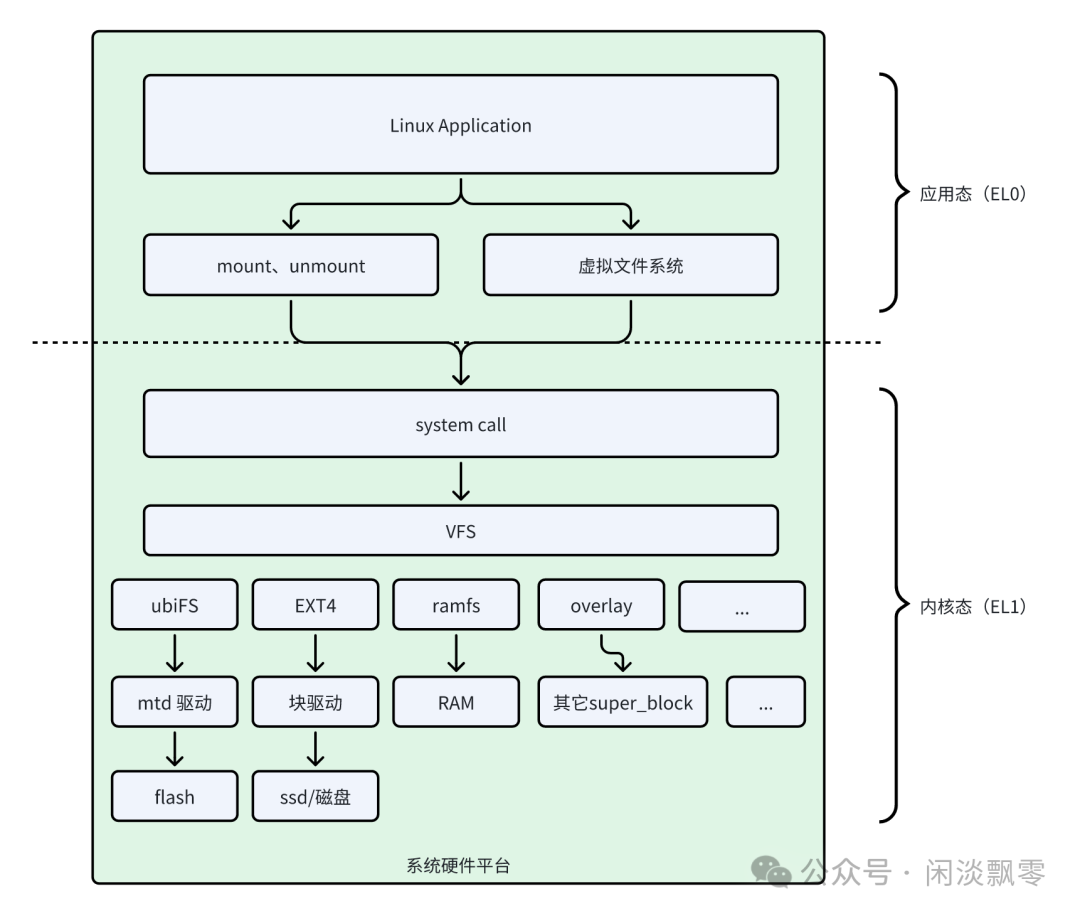
1. What is VFS?
VFS is a software abstraction layer in the Linux kernel. It is not a real file system but a layer above all specific file systems (such as ext4, XFS, NTFS, proc, sysfs, etc.).
Its core objectives are twofold:
- 1. Provide a unified interface to the application layer: Regardless of whether the underlying file system is ext4 on a hard disk, tmpfs in memory, or NFS on the other end of the network, applications can use the same system calls (such as
open,read,write,close) to access files. Applications do not need to care about where or how files are stored. - 2. Provide a unified file system model to the kernel layer: Different file systems (such as ext4, FAT) have significant differences in implementation details, but they can all “connect” to the VFS framework. File system developers only need to implement their functionality according to the “protocol” defined by VFS (i.e., a set of operation function collections) to seamlessly integrate into the Linux kernel.
1. Core Design of VFS: The Dual Pillars of “Abstraction + Interface”
VFS constructs a unified abstract model through four core data structures and three sets of operation interfaces, ensuring that the upper-level interaction logic remains consistent regardless of changes in the underlying file system or media:
(1) Four Core Data Structures (The “Minimum Unit” of Abstract File Systems)
| Data Structure | Core Function | Common Understanding |
super_block |
Stores global metadata of a single mounted file system (such as file system type, total capacity, mount flags) | The “ID card + Global Configuration” of the file system |
inode |
Stores metadata of a single file/directory (such as permissions, size, storage address, associated device) | The “Attribute Specification” of the file |
dentry |
Stores directory entry information (file name, parent directory pointer, corresponding inode) | The “Directory Navigation Map” of the file system |
file |
Stores the kernel object corresponding to the file descriptor (current read/write position, open mode, associated inode) | The “Temporary Interaction Session” between the application and the file |
The relationship among these four structures: one super_block corresponds to one mounted file system, containing multiple inode (files), inode forms a directory tree through dentry, and file is the “temporary handle” after the application opens the file.
(2) Three Sets of Core Operation Interfaces (The “Access Standards” of File Systems)
VFS defines three sets of interface structures. Any file system that implements these interfaces can be managed by VFS:
super_operations: Super block operations (such as reading file system metadata, creating inodes, unloading and cleaning);inode_operations: Inode operations (such as creating files, deleting files, finding directory entries);file_operations: File operations (such as read/write/open/close, which are the interfaces most commonly encountered by applications).
For example: ext4 implements ext4_super_operations, ext4_inode_operations, while ubifs implements ubifs_file_operations. VFS calls the specific file system logic through these interfaces, and applications do not need to perceive the differences.
2. Mount/Unmount and VFS super_block: The “Onboarding and Offboarding” of File Systems
As described in the previous chapter, super_block is the core metadata structure in Linux VFS that represents an instance of a mounted file system — the essence of the mount operation is to create and initialize a super_block and associate it with the VFS directory tree; unmount is to disassociate, clean up resources, and destroy the super_block.
Each mounted file system (whether ext4/ubifs/overlayfs/ramfs) corresponds to a unique super_block instance, which is the core to understanding the relationship between the two.
1. super_block: The “Core ID Card” of a Mounted File System
super_block stores the global metadata of a mounted file system and is the core hub for VFS to interact with specific file systems (such as ext4, ubifs). Its key fields are directly related to the mount/unmount logic:
| Core Field | Function (Strongly Related to mount/unmount) |
s_type |
Points to the file system type (such as ext4_fs_type), matched during mount through this field to the specific file system implementation |
s_bdev/s_mtd |
Associates with the underlying storage device: – s_bdev: Block devices (such as hard disks/SD cards, used by ext4/xfs); – s_mtd: MTD devices (such as Flash, used by ubifs/jffs2); bound during mount, disassociated during unmount |
s_root |
Points to the root directory dentry of the file system, associated with the mount point in the VFS directory tree |
s_operations |
Points to the super block operation set of the file system (such as read_inode/write_super/put_super, core interfaces for mount initialization and unmount cleanup) |
s_flags |
Mount flags (such as MS_RDONLY for read-only, MS_NOATIME for not updating access time), parsed and set during mount |
s_count |
Reference count: +1 during mount, checked during unmount (only allowed to destroy when 0), preventing the unmounting of file systems in use |
s_vfs_rename_mutex |
Mutex for mounting/unmounting, ensuring atomicity of operations |
The core conclusion is: super_block is the abstraction of the “mounted file system”; mount is the process of constructing this abstraction and integrating it into the VFS directory tree; unmount is the process of dismantling this abstraction and cleaning up resources.
2. The Relationship Between mount/unmount and VFS super_block
mount:
- • When you execute
mount /dev/sda1 /mnt, the kernel first confirms the file system type of/dev/sda1(for example, ext4). - • The kernel allocates and initializes a
super_blockstructure for that file system. - • Then, the kernel calls the
ext4_fill_super()function provided by the ext4 file system driver. This function reads the super block information from the disk, fills it into the VFSsuper_blockstructure, and establishes the necessarysuper_operations,inode_operations, andfile_operationsfor the ext4 file system. - • Finally, the kernel associates this newly created
super_blockwith the mount point (/mnt). From then on, access to files under the/mntdirectory will be handled by thissuper_blockand its associated ext4 operation methods.
unmount:
- • When executing
umount /mnt, the kernel checks if there are any processes using files under/mnt. - • If not, the kernel releases the
super_blockassociated with that mount point and calls the file system’s own cleanup method (such asext4_put_super), synchronizing all data and ultimately disconnecting the association.
In simple terms: mount is the process of creating and initializing a super_block and “grafting” it onto the directory tree; unmount is the process of “cutting it off” and destroying it.
3. Mainstream File System Types: Characteristics and Adaptation to Storage Media
The flexible adaptability of VFS allows Linux to support dozens of file systems, each with different design goals and significant differences in their requirements for storage media. In the context of automotive/embedded scenarios, we focus on the following core types:
| Type | Design Assumption | Core Adaptation Media | Representative File Systems and Characteristics |
| Block Device File System | Storage media can be randomly read and written in fixed-size “blocks” (512B/4KB) without manual handling of erasure or bad blocks | Hard disks, SSDs, SD cards, eMMC (with built-in controllers, supporting random overwrite) | – ext4: General stability, supports large files/partitions, journal recovery |
| MTD Specific File System | Storage media must be erased (in blocks) before being written (in pages), with limitations on erase cycles and bad blocks | NOR Flash, NAND Flash (without built-in controllers, requiring management of erasure, bad blocks, and wear leveling) | – ubifs: Supports large capacity Flash, dynamic bad block management, strong wear leveling – yaffs2: Optimized for NAND Flash, supports hard links |
| Memory File System | Provides high-speed temporary storage without physical I/O | RAM (memory), data lost on power failure | – ramfs: No size limit, pure memory storage, no swap |
| Pseudo File System | Does not store actual data; read/write operations are essentially queries/configurations of kernel state | N/A | – procfs: Exposes process information, kernel parameters, hardware information – sysfs: Organizes hardware and driver information by device tree |
| Union File System | Merges multiple directories (read-only layer + writable layer) into a unified view, with write operations only affecting the writable layer | N/A | – overlayfs: Lightweight, copy-on-write (CoW), supports layer isolation |
4. Differences Between Block Devices and MTD Devices: The “Essential Differences” of Underlying Media
Why can’t block device file systems (such as ext4) be directly used on raw Flash? The core issue lies in the physical characteristic differences between block devices and MTD devices — this is also the fundamental contradiction that VFS needs to adapt to.
1. Core Differences Comparison
| Comparison Dimension | Block Devices (Hard Disk/SSD/eMMC) | MTD Devices (Raw NOR/NAND Flash) |
| Core Feature | With built-in controllers (such as SSD’s FTL, eMMC’s controller) | No controller, exposing raw physical characteristics |
| Minimum Operation Unit | Sectors (512B/4KB), supporting random overwrite | Pages (2KB/4KB, write) + Blocks (128KB/512KB, erase), must erase before writing |
| Erase Limitations | Almost unlimited (controller automatically manages wear) | Limited (NAND about 100,000 times, NOR about 1,000,000 times) |
| Bad Block Handling | Controller automatically remaps bad blocks, upper layer unaware | Requires software (MTD driver + file system) to manage bad block table |
| Wear Leveling | Implemented by built-in FTL in the controller (such as wear leveling in SSD) | Must be implemented by the file system (such as wear leveling in ubifs) |
| Compatible File Systems | General block device file systems such as ext4, xfs, FAT32 | MTD specific file systems such as ubifs, jffs2, yaffs2 |
(1) The Essential Difference of “Overwrite”
- • Block Devices: The controller (such as SSD’s FTL) makes the upper layer mistakenly believe it can directly overwrite through “address mapping + write redirection + background garbage collection” (in reality, it writes new physical blocks and updates the mapping table);
- • MTD Devices: Without a controller, it must erase the entire block (which takes a long time) before writing pages, and cannot directly overwrite — this is the core reason why block device file systems like ext4 perform poorly on raw Flash (frequently triggering the “read – erase – write” cycle).
(2) Different Responsibilities for Managing Bad Blocks and Wear
- • Block Devices: The controller automatically detects bad blocks and adds them to the bad block table, data is automatically redirected to good blocks, and the upper layer file system does not need to care;
- • MTD Devices: Bad blocks need to be detected by the MTD driver (such as scanning for bad block markers in Flash), and the file system (such as ubifs) must maintain a bad block table to avoid writing data to bad blocks; it must also use wear leveling algorithms to evenly distribute erase operations across all blocks to extend Flash lifespan.
(3) Selection Logic in Automotive Scenarios
- • If using SSD, eMMC (with controllers) → Prefer ext4/xfs (general stability, no need to care about underlying characteristics);
- • If using raw Flash (such as NOR Flash in automotive ECUs) → Must use ubifs/jffs2 (to adapt to erasure characteristics, manage bad blocks and wear);
- • If temporary high-speed storage is needed → Use tmpfs (memory file system, no physical I/O loss).
Conclusion: The Core Logic of VFS — “Abstract Unity, Adapt to Diversity”
The reason why the Linux file system can achieve “unified interfaces while adapting to myriad media” is that VFS constructs a “layered abstraction” architecture:
- 1. Upper Layer: Faces applications with standard POSIX interfaces, shielding all underlying differences;
- 2. Middle Layer: Centers around
super_block/inode/dentry/fileas core abstractions, defining the access standards for file systems; - 3. Lower Layer: Various file systems implement interfaces according to access standards, adapting to the physical characteristics of different storage media.
For business application development, there is no need to care whether the underlying media is a hard disk, Flash, or memory; just call the unified interface; for kernel/driver development, it is only necessary to implement the corresponding file system interface for new media to integrate into the VFS ecosystem — this is the beauty of VFS design.