DALI to MQTT – ADFWEB Gateway Converter–Guangzhou Xinyu IoT
Author:www.adfweb.com.cn Zou Wuyi Mobile185-020-77899 Email: [email protected]
1 Features:
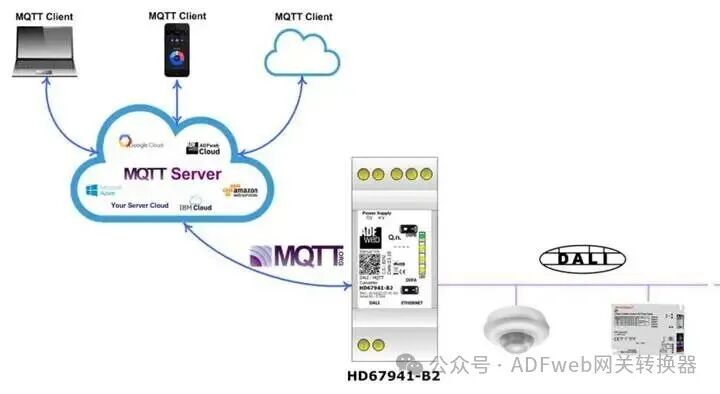
HD67941-B2 is a DALI/MQTT converter with the following features:
– Electrical isolation between Ethernet and DALI ;
– Can be mounted on a 35mm standard rail;
– Wide power input range:18…35V DC and 8…24V AC;
– Wide operating temperature range:-40°C to 85°C.
Configuration:
You need to install the Compositor SW67941 software on your computer to perform the following operations:
– Define MQTT parameters;
– Define DALI line parameters;
– Specify the MQTT topics to publish to and subscribe in the MQTT server;
– List connected DALI nodes;
– Update device configuration.
2 New Configuration / Open Configuration:
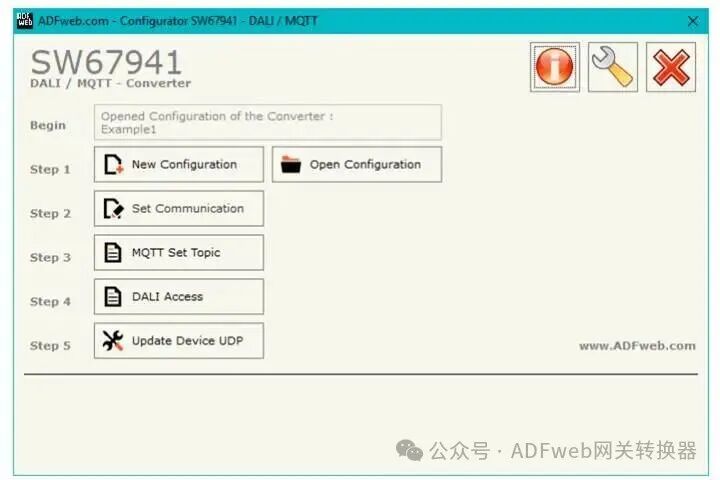
The “New Configuration” button is used to create a folder containing the entire device configuration.
The device configuration can also be imported or exported:
– To clone the configuration of the programmable “DALI/MQTT converter” for configuring another device in the same way, the folder and all its contents must be retained;
– To clone a project for different versions, simply rename the project folder to another name and use the “Open Configuration” button to open the new folder.
3 Set Communication:
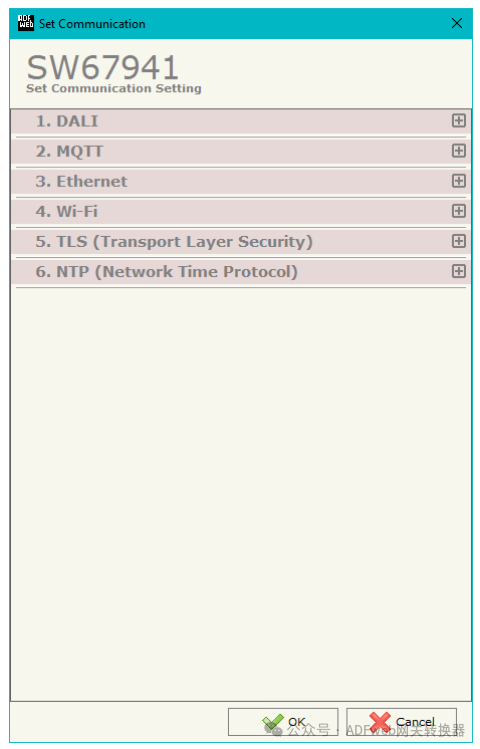
By clicking the “Set Communication” button in the SW67941 main window (Figure 2), the “Set Communication” window (Figure 3) will appear.
This window is divided into several sections to define different parameters of the converter:
DALI
MQTT
Ethernet
Wi-Fi
TLS (Transport Layer Security)
NTP (Network Time Protocol)
4 MQTT Set Topic:
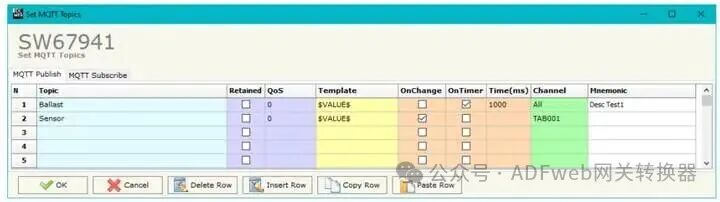
By clicking the “MQTT Set Topic” button in the SW67941 main window (Figure 2), the “Set MQTT Topic” window (Figure 4) will appear.
This section is used to define the MQTT topics that the converter will publish data read from DALI and the subscription topics used by the converter to write data to DALI .
MQTT Publish
The meanings of each field are as follows:
– The “Topic” field is used to define the MQTT topic;
– If the “Retain” field is defined, the retain flag is enabled. The MQTT server will retain the last published topic;
– The “Quality of Service (QoS)” field is used to define the quality of service level;
– The “Template” field is used to define the structure of the MQTT message. Double-clicking this field opens the editing window;
– If “Publish on Data Change” is checked, the converter will publish the topic when the MQTT data changes;
– If “Publish on New Response” is checked, the converter will publish the topic when a new MQTT response is received;
– If “Periodic Publish” is checked, the converter will publish the topic periodically with the delay specified in the “Time (ms)” field;
– The “Channel” field is used to associate DALI lights/ sensors/ groups with the MQTT topic. If “All” is selected, all lights will be associated with the same topic. To associate sensors, you can enter “TABXXX” to select the corresponding row in the “Set Access” table;
– The “Mnemonic” field is used to define the description of the topic.
5 DALI Access:
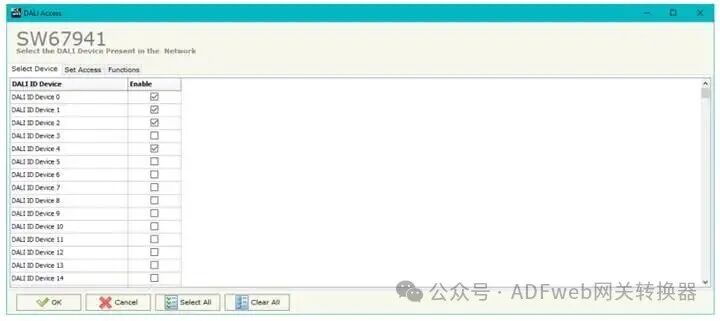
By clicking the “DALI Access” button in the SW67941 main window (Figure 2), the “Select Existing DALI Devices on the Network” window (Figure 5) will appear.
This section contains three tables to define the list of DALI devices to be controlled, the DALI sensors to be read, and the functions of the DALI router.