Click ↑ dark colorPocket IoT, selectFollow the public account to get more content and not get lost
Complete Method to Add systemd in Buildroot
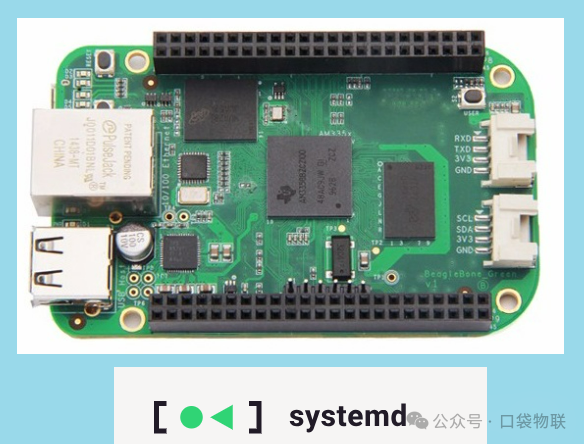
Buildroot is a commonly used root filesystem build tool for embedded Linux, which defaults to using <span>busybox init</span> as the initialization system. The following is the process of adapting systemd for the BeagleBone Green (hereinafter referred to as BBG, which is part of my xboard project) development board.
- • Open-source hardware board BBG
- • U-Boot 2020.10
- • Kernel 5.15.173
- • Buildroot 2021.02
- • systemd 247.3
The main purpose of xboard is to give old boards a new look, that is, to update outdated ARM boards with the ARMv7 instruction architecture to run with a new kernel (5.15), while also studying the startup of popular development boards with ARMv8 instruction SoCs like RK3568/AM62x/iMX8M (mainly focusing on kernel 6.1). Currently, the ARMv7 part of this project is basically complete and will be released later.
1. Preliminary Preparation
- • Buildroot compilation environment installed (refer to the official Buildroot documentation: https://buildroot.org/downloads/manual/manual.html#requirement)
- • Configuration file for BBG compiled successfully (
<span>configs/xboard_bbg_defconfig</span>)
2. Step 1: Enable systemd through Buildroot Menu Configuration
1. Enter the Buildroot configuration interface
Execute the following command in the Buildroot root directory to open the graphical configuration menu (requires installation of <span>ncurses-dev</span> dependency:<span>sudo apt install libncurses5-dev</span>):
make O=bbg xboard_bbg_defconfig
make O=bbg menuconfig
O is a separate compilation directory for easier management
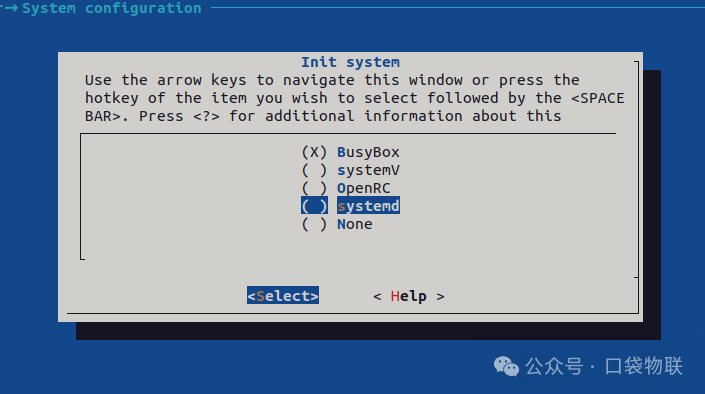
2. Select systemd as the initialization system
2.1 Switch the initialization system to systemd
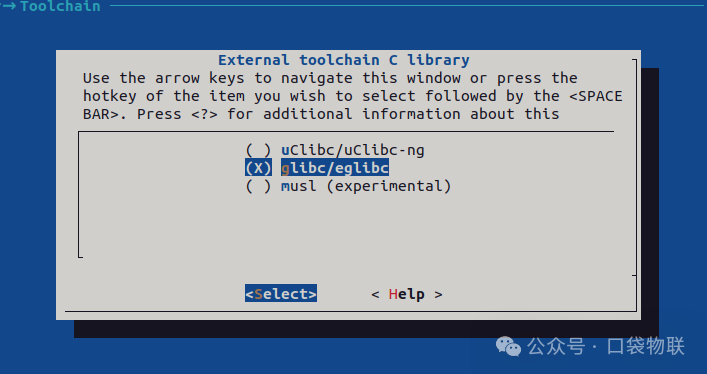
2.2 Configure the toolchain (systemd usually requires glibc)
2.3 Enable optional features for systemd
Enter the systemd submenu to enable additional features, navigate to Target packages → System tools, enter systemd, find and enable the following configurations:
- • Key Note:
<span>systemd</span>selected, Buildroot will automatically depend on components such as<span>dbus</span>and<span>libudev</span>, no need to enable them manually. 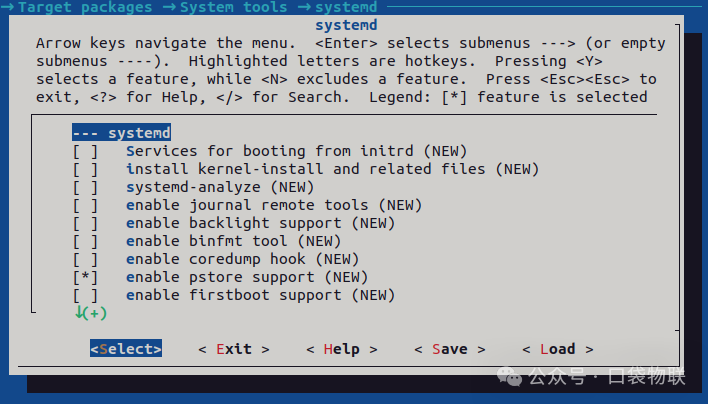
- • Specific Features: systemd includes a wide range of features, specific definitions, usage scenarios, and recommendations are shown in the table below
| Option Name | Main Function | Usage Scenario | Recommendation |
| Services for booting from initrd | Provides system services for initrd boot | Systems booting from initial RAM disk | Enable only when initrd boot is needed |
| install kernel-install and related files | Installs kernel installation tools and files | Systems requiring dynamic kernel installation and updates | Recommended to enable for easier kernel management |
| systemd-analyze | System boot performance analysis tool | Debugging boot time, service dependencies | Enable during development debugging, optional in production |
| enable journal remote tools | Remote log receiving and sending tools | Centralized log management, remote debugging | Enable when remote logging is needed |
| enable backlight support | Backlight control support | Laptops, embedded devices with displays | Enable for devices with backlight control |
| enable binfmt tool | Binary format registration support | Running executables of non-native architectures | Enable when running cross-architecture binaries |
| enable coredump hook | Core dump handling hook | Application crash debugging and analysis | Enable during development debugging |
| enable pstore support | Persistent storage support | Saving kernel crash logs and other diagnostic information | Recommended to enable for easier problem diagnosis |
| enable firstboot support | First boot initialization configuration | Factory settings for productized devices | Strongly recommended for productized devices |
| enable hibernation support | System hibernation support | Scenarios requiring saving system state to disk | Enable for devices with hibernation needs |
| enable hostname daemon | Hostname daemon | Dynamic hostname management | Recommended to enable |
| enable hwdb installation | Hardware database installation | Device identification and configuration | Recommended to enable |
| enable import daemon | System image import daemon | Container and virtual machine image management | Enable when containers/VMs are needed |
| enable locale daemon | Localization daemon | Multi-language support, keyboard layout management | Enable for internationalized devices |
| enable login daemon | Login daemon | User session and power management | Recommended to enable |
| enable machine daemon | Machine daemon | Container and virtual machine instance management | Enable when container functionality is needed |
| enable myhostname NSS plugin | Local hostname resolution plugin | Local hostname resolution service | Recommended to enable |
| enable network manager | Network manager | Network connection management and configuration | Enable when dynamic network management is needed |
| polkit support | Permission policy framework | Interaction between unprivileged and privileged processes | Enable when fine-grained permission control is needed |
| enable portable services | Portable services support | Containerized application deployment | Enable when portable services are needed |
| enable quotacheck tools | Disk quota check tools | Disk space management for multi-user systems | Enable for multi-user systems |
| enable random-seed support | Random seed support | Improving random number quality at boot | Recommended to enable for enhanced security |
| enable repart support | Partition adjustment support | Dynamic disk partition adjustment | Enable when automatic partition expansion is needed |
| enable resolve daemon | DNS resolution daemon | DNS resolution and caching service | Recommended to enable |
| enable rfkill tools | Wireless RF switch tools | Management of wireless devices like WiFi and Bluetooth | Enable for devices with wireless functionality |
| enable SMACK support | Simplified Mandatory Access Control | Enhancing system security | Enable for systems with high security requirements |
| enable sysusers support | System user management support | Dynamic creation of system users and groups | Recommended to enable for simplified user management |
| enable timedate daemon | Date and time daemon | System time and timezone management | Recommended to enable |
| enable timesync daemon | Time synchronization daemon | System time synchronization service | Recommended to enable |
| enable tmpfiles support | Temporary file management support | Creation and cleanup of temporary files and directories | Recommended to enable |
| enable userdb daemon | User database daemon | Dynamic user information query service | Enable when dynamic user management is needed |
| enable vconsole tool | Virtual console tool | Management of virtual terminal settings | Recommended to enable |
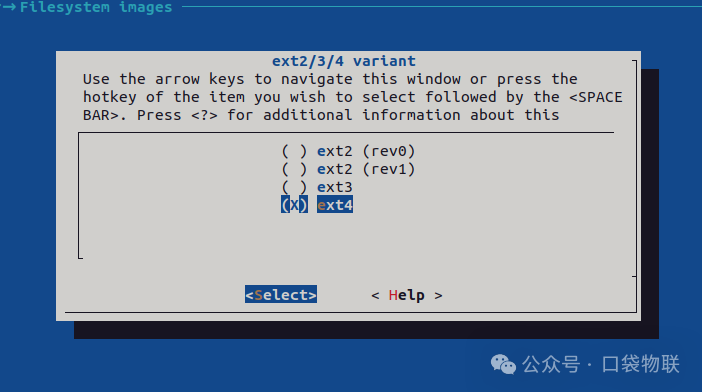
2.4 Configure the filesystem image format
The format of the device filesystem, supporting the latest ext4 format
Step 3: Configure the Linux Kernel
Systemd has specific requirements for the kernel. We need to ensure that the kernel includes the necessary options. Use Buildroot’s kernel menu (recommended)
make O=bbg linux-menuconfigIn the pop-up Linux kernel configuration window, use the search function (press <span>/</span> key) to ensure the following options are enabled (<span>=y</span> or <span>=m</span>):
- 1. Search for
<span>CONFIG_CGROUPS</span>
- • Ensure
<span>General setup -> Control Group support</span>is enabled. - • In its submenu, typically need to enable
<span>... -> Memory controller</span>and<span>... -> CPU controller</span>, etc.
<span>CONFIG_AUTOFS4_FS</span>- • Ensure
<span>File systems -> Network File Systems -> Kernel automounter version 4 support (also supports v3)</span>is enabled.
<span>CONFIG_TMPFS_POSIX_ACL</span>- • Ensure
<span>File systems -> Pseudo filesystems -> Tmpfs POSIX Access Control Lists</span>is enabled.
<span>CONFIG_TMPFS_XATTR</span>- • Ensure
<span>File systems -> Pseudo filesystems -> Tmpfs extended attributes</span>is enabled.
Other potentially required options:
- •
<span>CONFIG_DEVTMPFS</span>and<span>CONFIG_DEVTMPFS_MOUNT</span>(usually enabled by default, crucial for managing<span>/dev</span>) - •
<span>CONFIG_FANOTIFY</span>(for file monitoring) - •
<span>CONFIG_SECCOMP</span>(system call filtering)
Step 4: Clean and Compile
Since core system components (C library and Init) have been changed, it is recommended to perform a clean rebuild.
# Full clean (safest but time-consuming)
make clean

# Alternatively, if you do not want to fully clean, you can try to force rebuild systemd and related packages
# make systemd-dirclean
# make busybox-dirclean # because we want to replace it

# Start compilation
make
The compilation process will take a long time (from tens of minutes to several hours, depending on your network and computer performance).
Step 5: Prepare the SD Card and Test
After compilation is complete, the output files are in the <span>bbg/output/images/</span> directory.
- 1. Insert the SD card into the computer, find the SD card device (usually
<span>/dev/sdb</span>, be careful not to select the wrong disk!) - 2. Use the
<span>dd</span>command to write the image (if<span>sdcard.img</span>is generated)sudo dd if=output/images/sdcard.img of=/dev/sdb bs=1M status=progress - 3. Or, prepare manually (if
<span>zImage</span>,<span>*.dtb</span>, and<span>rootfs.tar</span>are generated):
- • Partition the SD card into two partitions: FAT32 (for boot) and EXT4 (for rootfs).
- • Copy the
<span>zImage</span>and<span>*.dtb</span>files to the FAT32 partition. - • Extract the
<span>rootfs.tar</span>to the EXT4 partition. - • Ensure
<span>boot/cmdline.txt</span>or U-Boot environment variables correctly point to the new rootfs.
Step 6: Verify systemd
After the system boots, log in via the serial port and execute the following commands to verify:
# 1. Check the current running init system
ps
# 2. Check if systemctl is working
systemctl --version
Check logs via journalctl, there are many control items
# 3. Check logs (now managed by journald)
journalctl
Bonus
During the compilation process, due to the cross-compiler being too old and the kernel being too new, an error regarding ARPHRD_MCTP was reported.
To avoid changing the current cross-compiler and kernel versions, remove references to ARPHRD_MCTP from the systemd source code to compile successfully.
uildroot$ grep -rn "ARPHRD_MCTP" ./bbg/
./bbg/build/host-systemd-247.3/build/src/basic/arphrd-from-name.h:195:      {"MCTP", ARPHRD_MCTP},
./bbg/build/host-systemd-247.3/build/src/basic/arphrd-to-name.h:57:        case ARPHRD_MCTP: return "MCTP";
./bbg/build/host-systemd-247.3/build/src/basic/arphrd-from-name.gperf:64:MCTP, ARPHRD_MCTP
Thank you for reading, and thank you for your support
If you find the content useful, please give a thumbs up in the lower right corner to support;
If you want more valuable content, remember to follow to unlock;
Share the beauty, recommend quality assistance, and interact in the comments!