Click the blue text above to follow us



Introduction to Linux
Linux is a free and open-source operating system, with many different versions available, all of which use the Linux kernel. Linux can be installed on various computer hardware devices, such as smartphones, tablets, routers, and desktop computers.
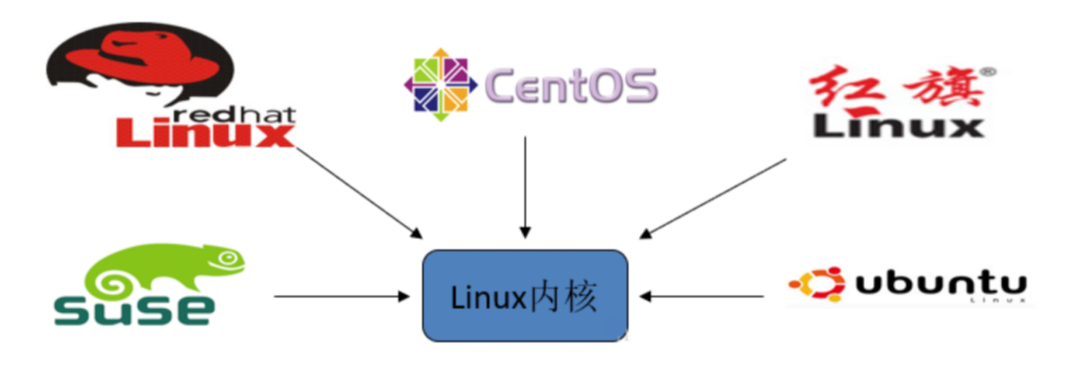
Introduction to Linux
Linux was created in 1991 by Linus Torvalds, a student at the University of Helsinki in Finland, along with many enthusiasts who later joined the development.
Features of Linux
-
Multi-user
-
Multi-tasking
-
Rich networking capabilities
-
Reliable system security
-
Good portability
-
Standard compliance
-
Good user interface
-
Excellent speed performance
-
Open-source
CentOS
Mainstream: The current Linux operating systems are mainly used in production environments, with mainstream enterprise-level Linux systems still being RedHat or CentOS.
Free: RedHat and CentOS are not much different; CentOS is an enterprise-level Linux distribution based on the freely available source code provided by Red Hat Linux.
Easy updates: The unique yum command in CentOS supports online upgrades, allowing for immediate system updates, unlike RedHat, which requires purchasing support services!
Linux Directory Structure

-
bin (binaries) stores binary executable files.
-
sbin (super user binaries) stores binary executable files, only accessible by root.
-
etc (etcetera) stores system configuration files.
-
usr (unix shared resources) used to store shared system resources.
-
home stores user files’ root directory.
-
root superuser directory.
-
dev (devices) used to store device files.
-
lib (library) stores shared libraries and kernel modules required for program execution in the file system.
-
mnt (mount) the mount point for temporary file systems installed by the system administrator.
-
boot stores various files used during system boot.
-
tmp (temporary) used to store various temporary files.
-
var (variable) used to store files that need to change during runtime.
Common Linux Commands
Command format: command -option argument
For example: ls  -la  /usr
ls: displays the list of files and directories (list)
Common options:
-l (long)-a (all) Note hidden files, special directories . and .. -t (time)Classification of Linux Commands
Internal commands: part of the Shell parser
cd change directory (change directory)
pwd display current working directory (print working directory)
help help
External commands: file programs independent of the Shell parser
ls displays the list of files and directories (list)
mkdir create directory (make directory)
cp copy files or directories (copy)
View help documents:
Internal command: help + command (help cd)
External command: man + command (man ls)
Common commands for operating files or directories:
pwd display current working directory (print working directory)
touch create empty file
mkdir create directory (make directory) -p create parent directory if it does not exist (parents)
cp copy files or directories (copy) -r recursively copy files and subdirectories under the specified directory (recursive)
mv move files or directories, rename files or directories (move)

rm delete files (remove) -r delete all files under the directory (recursive) -f force delete files or directories (force)
rmdir delete empty directories (remove directory)
cat display text file contents (catenate)
more, less paginate text file contents
head, tail view the beginning or end of text in a file
head -n  5  a.log view the first 5 lines of a.log
tail  -F b.log follow (loop read)
Common commands:
wc count lines, words, characters in text (word count)
-m count characters in text
-w count words in text
-l count lines in text
find search for specified files in the file system
find /etc/ -name "aaa"
grep search for specified strings in specified text files
ln create link files (link) -s create symbolic links to source files instead of hard links (symbolic)

top display the processes consuming the most resources in the current system
ps display instantaneous process status -e /-A display all processes, environment variables -f full format -a display all users' processes (including other users) -u display processes in order of username and start time -x display processes without a control terminal
kill kill a process
kill -9 pid
df display file system disk space usage

du display total disk space used by specified files (directories) -h display file size in K, M, G (human-readable) -s only display the total size of each file (summarize)
free display current memory and swap space usage
netstat display network status information -a display all connections and listening ports -t (tcp) display only tcp-related options -u (udp) display only udp-related options -n refuse to display aliases, convert everything that can be displayed as numbers into numbers. -p display the program name that established the relevant link
ifconfig detailed network card configuration
ping test network connectivity
Backup compression commands:
gzip compress (decompress) files or directories, compressed file suffix is gz
bzip2 compress (decompress) files or directories, compressed file suffix is bz2
tar package (unpackage) files, directories
gzip command:
Command format: gzip [options] file name to compress (decompress) -d decompress the compressed file (decompress) -l display the size of the compressed file, the size of the uncompressed file, compression ratio (list) -v display file name and compression ratio (verbose) -num use specified number num to adjust compression speed, -1 or --fast indicates the fastest compression method (low compression ratio), -9 or --best indicates the slowest compression method (high compression ratio). The system default is 6bzip2 command:
Command format: bzip2 [-cdz] document name -c output the data generated during the compression process to the screen -d decompress parameter (decompress) -z compression parameter (compress) -num use specified number num to adjust compression speed, -1 or --fast indicates the fastest compression method (low compression ratio), -9 or --best indicates the slowest compression method (high compression ratio). The system default is 6tar command:
-c create a compressed file parameter instruction (create)
-x extract a compressed file parameter instruction (extract)
-z whether to use gzip compression
-j whether to use bzip2 compression
-v display files during compression (verbose)
-f use file name, the file name must immediately follow f (file)
Shutdown/reboot commands:
shutdown system shutdown -r reboot immediately after shutdown -h shutdown without restarting
halt power off after shutdown
shutdown -h reboot restart
shutdown -r
Good habits for learning Linux:
-
Be good at checking man page (manual) and other help documents
-
Make good use of the Tab key
-
Master some shortcut keys
ctrl + c (stop current process)
ctrl + r (view command history)
ctrl + l (clear screen, same effect as the clear command)
Receive Benefits


Source: Internet, please delete if infringing