
Yesterday, a student asked me to explain the concept of mounting in Linux and its specific usage. So let’s first look at what mounting is.
To access files outside the root directory in Linux, you need to “associate” them with a directory under the root directory. This operation is called “mounting,” and the directory is referred to as the “mount point.” The process of removing this association is called “unmounting.”
The directory for the “mount point” has three requirements: (1) It can be created with the mkdir command (the directory must exist beforehand). (2) The mount point directory cannot be used by other processes. (3) Existing files under the mount point are hidden. Mounting and Unmounting
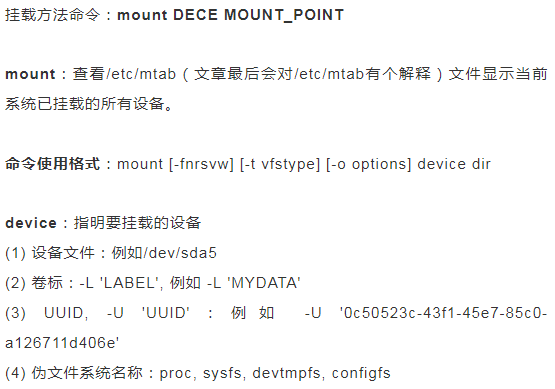
dir: The mount point is recommended to be an empty directory; devices that are currently in use cannot be unmounted; common command options: -t vsftype: Specify the filesystem type on the device to be mounted; -r: readonly, mount as read-only; -w: read and write, mount as read-write; -n: Do not update /etc/mtab; -a: Automatically mount all devices that support automatic mounting; (defined in the /etc/fstab file, and the mount options include “automatic mount” feature) -L ‘LABEL’: Specify the mount device by label; -U ‘UUID’: Specify the device to be mounted by UUID; -B, –bind: Bind a directory to another directory;Note: To view all currently mounted devices tracked by the kernel: cat /proc/mounts
Note: The above options can be used simultaneously, separated by commas;Unmount command: umountCommand usage format:# umount DEVICE# umount MOUNT_POINTfuser: View processes accessing the specified filesystem:Command usage format:# fuser -v MOUNT_POINTTerminate all processes accessing the specified filesystem: use with caution# fuser -km MOUNT_POINT Command summary: mount, umount, free, df, du, swapon, swapoff, fuserAutomatic Mounting on BootIf you want to achieve automatic mounting of a device at boot, just modify the /etc/fstab file.File mount configuration file: /etc/fstab/etc/fstab and /etc/mtab differences
 Exclusive for fans
We have organized resources worth over 2000+
100G resources
The content includes:
Planning the software testing learning path from 0-1
Commonly used testing templates and strategies in the workplace
Software testing improvement eBook
Classic interview questions
Recordings of SongQin’s courses
Limited time free~~~
 Long press the image below
Add Teacher Tang from SongQin to get 100G resources for free

Currently, over 100,000 people have followed us


Long press the QR code
Follow the 【SongQin Online Course】 video account