
Eigenvalues and eigenvectors are very important concepts in linear algebra and have wide applications in solving practical problems in industrial and agricultural production.
To find the eigenvalues and eigenvectors of a matrix
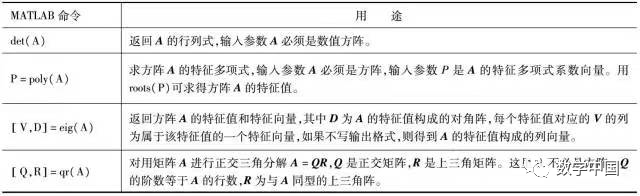
The eigenvalue λ and eigenvector x satisfy the relationship Ax=λx, while for matrices A and B, the generalized eigenvalue λ and generalized eigenvector x satisfy Ax=λBx, where A and B are square matrices of the same order. In MATLAB, the table function can be used to find the eigenvalues and eigenvectors of a matrix.
MATLAB command to find the matrix
All eigenvalues and eigenvectors of the matrix.
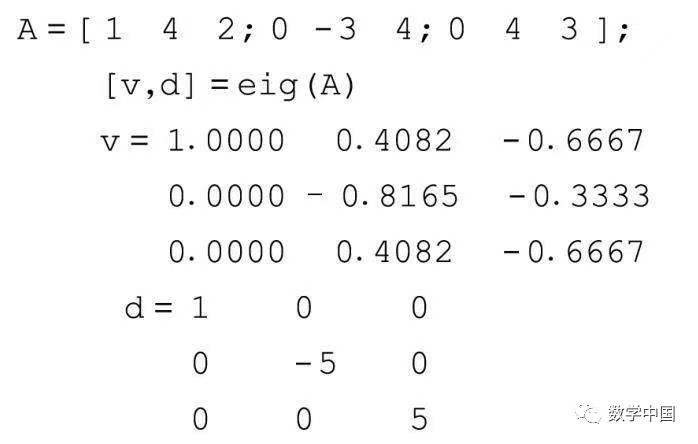
Solution: In the command window, input the following command:

The result returns the eigenvector matrix v and the eigenvalue matrix d, where d is a diagonal matrix.
Find the eigenvectors and eigenvalues of matrix A.
If you replace eig(A) with eig(A,B), it returns the generalized eigenvalues and eigenvectors, satisfying Av=Bvd, and the norm of each eigenvector is 1. If B is invertible, the generalized eigenvalue problem is equivalent to finding the ordinary eigenvalue problem of inv(B)A.
Diagonalization of a matrix
The following function is used to determine if a matrix is diagonalizable. If it is diagonalizable, it returns 1; otherwise, it returns 0.
Example: Matrix diagonalization.
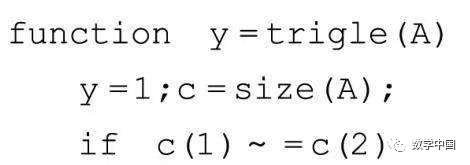
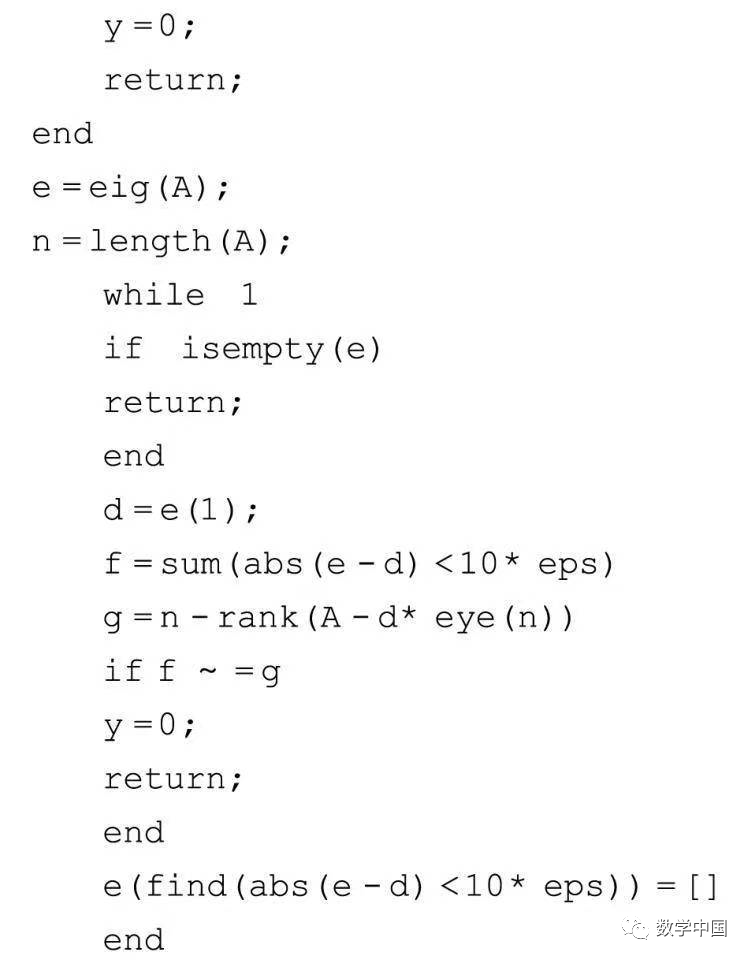
When a matrix is diagonalizable, the matrix’s eigenvector P can be used to obtain the diagonalized matrix, which is the eigenvalue matrix. Here, P is invertible, and inv(P)AP is the characteristic matrix.
All real symmetric matrices are diagonalizable, and there exists an orthogonal matrix Q such that inv(Q)AQ is a diagonal matrix. Here, Q can be obtained from the orthogonal normalization of the eigenvector matrix. In fact, for a real symmetric matrix A, the eigenvectors returned by eig(A) are exactly the orthogonal matrix. For example:
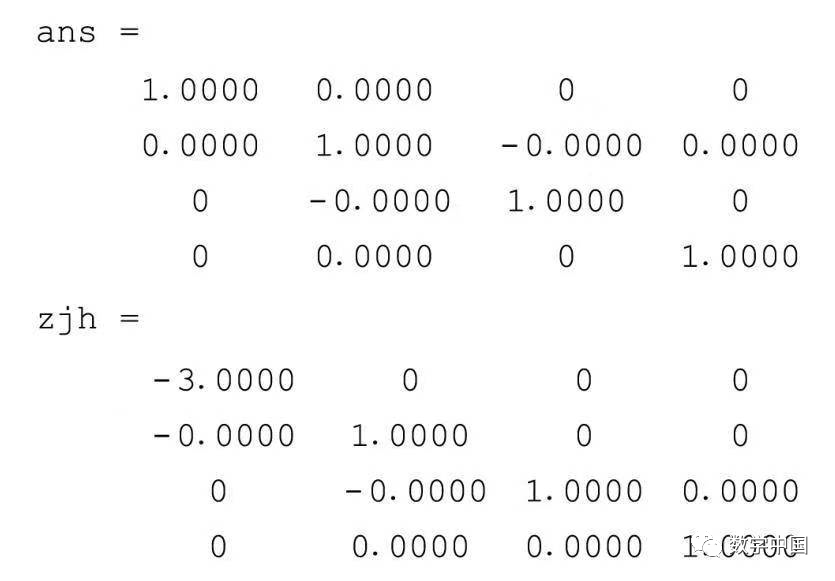
Example: Diagonalization of a real symmetric matrix, input D=[0 1 1-1; 1 0-1 1; 1-1 0 1; -11 1 0] and then run the following li5_3_4.m function program.
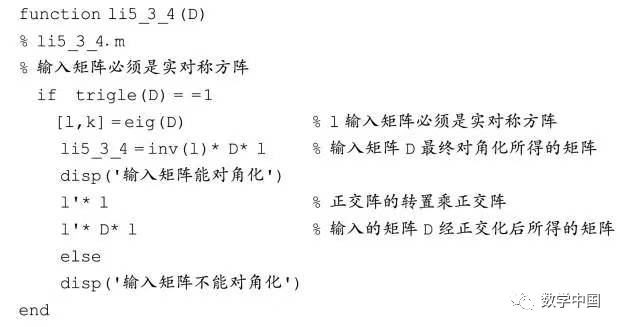
The result shows:
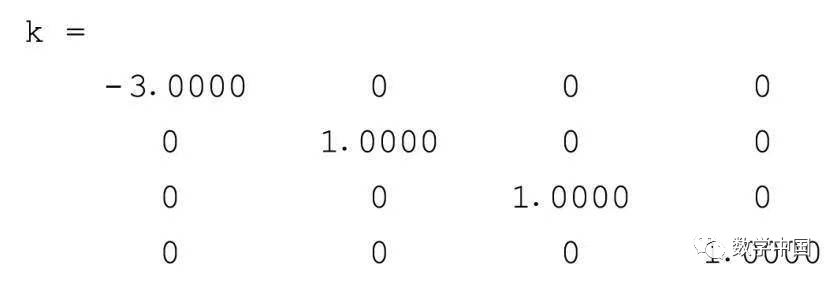
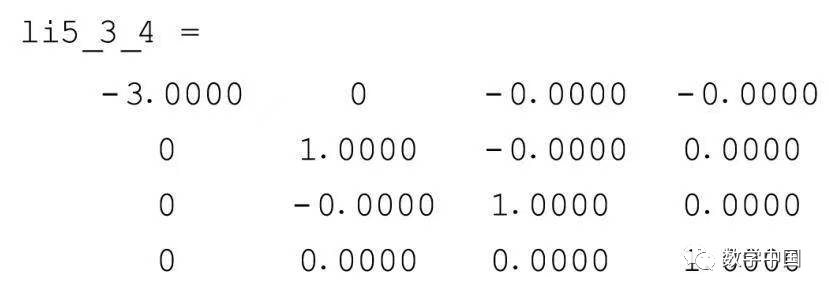
The input matrix can be diagonalized.

Model solving of the asteroid orbit equation problem
Using MATLAB software to solve, that is, using the command A\b to solve, where the coefficient matrix and constant vector are respectively
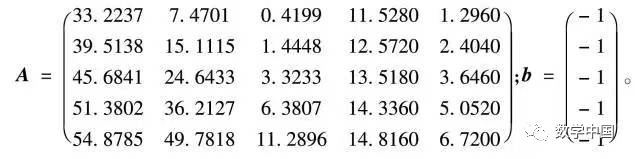
The calculation result is: x=[0.0507 -0.0351 0.0381 -0.2265 0.1321]
Therefore, the equation of the asteroid’s trajectory is
0.0507×2-0.0351xy+0.0381y2-0.2265x+0.1321y+1=0
Plotting the asteroid orbit curve
1) Write the equation of the ellipse in matrix form:

Then use variable substitution (translation transformation and rotation transformation) to convert it into the standard equation of the ellipse.
First, use translation transformation to eliminate the linear terms. Let
x=x0+ξ, y=y0+η
where x0, y0 are to be determined. Substitute it into the equation and rearrange

where F=a1x0+2a2x0y0+a3y0+2a4x0+2a5y0+1. To simplify and eliminate the linear terms, simply choose x0 and y0 such that the above equation contains no terms in ξ and η, so let x0 and y0 satisfy the system of equations
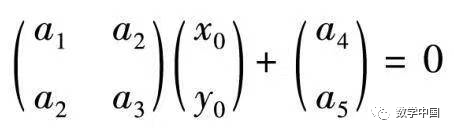
Solving gives x0=2.7213, y0=2.4234
Substituting it into equation (5-3-2), the equation after translation transformation is

where F=3.2488.
Next, use a rotation (orthogonal) transformation to convert the ellipse into standard form, letting
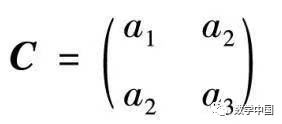
Using the MATLAB command eig, we can find its eigenvalues
λ1=-0.1694, λ2=-0.5502
and eigenvectors

Clearly, the eigenvectors ξ1 and ξ2 are two mutually orthogonal
unit vectors, thus constructing the orthogonal transformation

Substituting equation (5-3-4) into equation (5-3-3), the quadratic form can be transformed into the standard form, thus obtaining the standard equation of the ellipse

where a=4.3799, b=2.4299 are the semi-major and semi-minor axes of the ellipse, respectively. From this, we obtain the parametric equation

2) Plotting the ellipse:
Using the parametric equation (5-3-5) to calculate the discrete data of variables u and v, then through rotation transformation and translation transformation
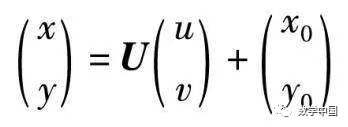
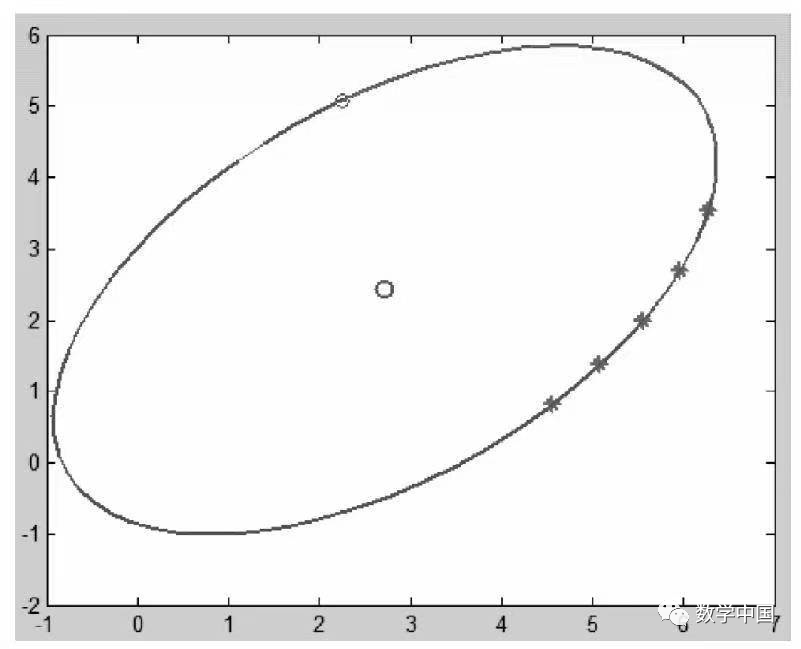
Restoring the coordinates of the original variables x and y, we can plot figure 5-3-1, where “*” indicates the positions of the 5 data points obtained from observations
The MATLAB program is as follows:
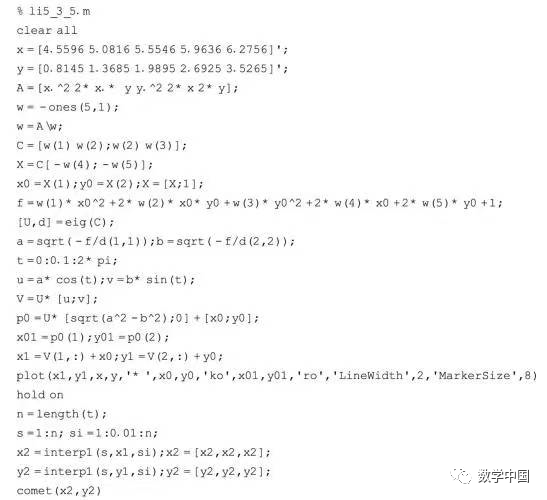
After running the program, it will plot the dynamic graph simulating the movement of the asteroid.