
Welcome to the 【Ultimate Programming】 WeChat public account 【Knowledge Repository】, specially customized for everyone《Qt C++ Architect》 Series – Project Practice Episode 138:This issue will focus on a practical and challenging technical topic –【C++17 and Qt6 Network Programming: Building a High-Performance Server Architecture from TCP Protocol to SQLite3】.Whether you are a beginner who has just mastered the Qt cross-platform framework and Linux C/C++ backend server development, or a developer who wants to delve into the research of C/C++ system architecture, this technology will open a door to deep learning for you.
【Development Environment】: Win10 x64, Qt version 6.8;
【Daily sharing of high-quality projects and cutting-edge technical programming content!】
【Follow the UP master and join the QQ group】: 【895876809 Download project source code (for research and study)】.
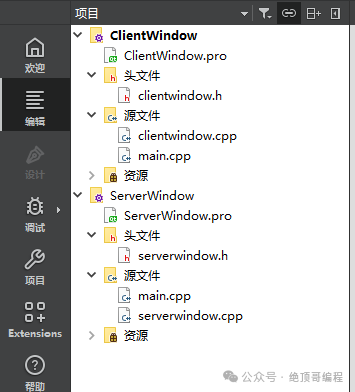
1: 【Project】📁 Source Structure
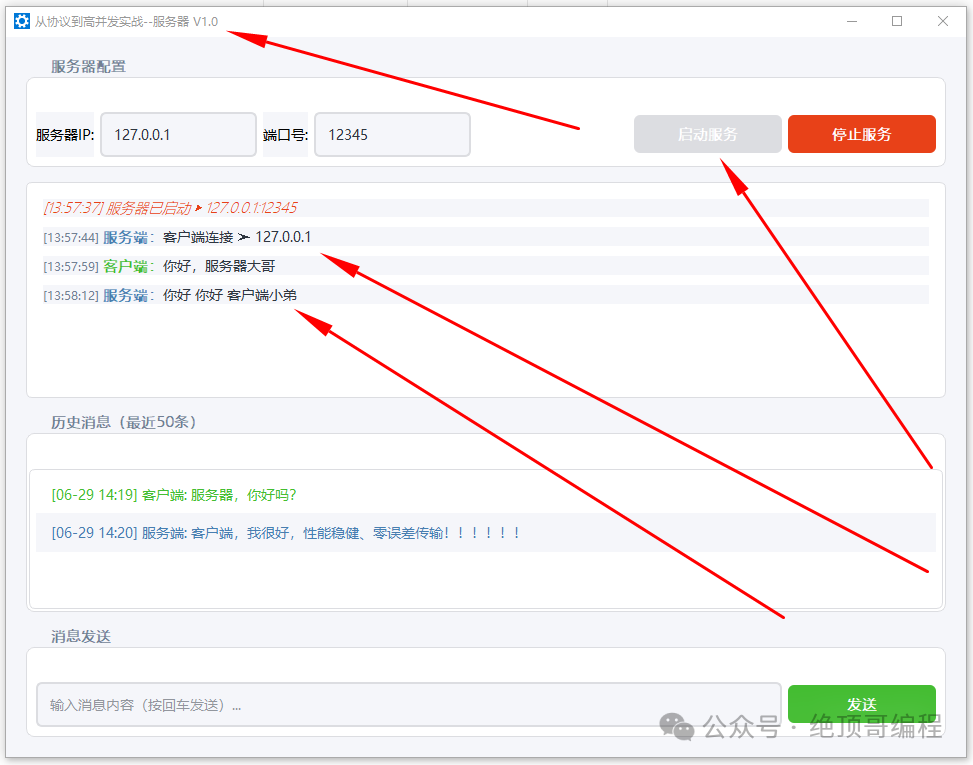
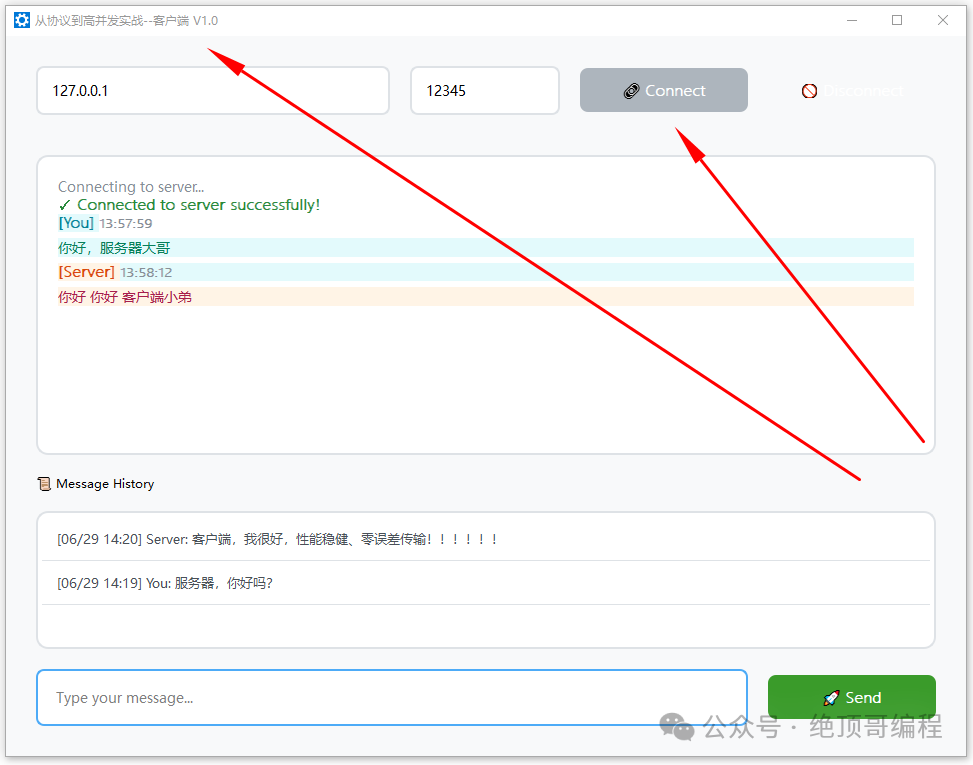
2: 【Project】🚀 Running Results
1: Server – Start
2: Client – Connect
3: 【Project】🏗️ Project Overview and Features
1: Project Overview
-
Language/Framework:C++17, Qt Widgets, Qt Network, Qt SQL
-
Running End: Desktop Client (ClientWindow) and Desktop Server (ServerWindow)
-
Communication Protocol: TCP (UTF-8 text)
-
Data Storage: SQLite (local files: client_history.db, chat_history.db)
-
Verified Environment: Windows 10, Qt 6.5.3 MinGW 64-bit (also compatible with Qt 5.15+)
2: Features
2.1 Client (ClientWindow)
-
Connect and Disconnect: Input server IP/port, one-click connect/disconnect
-
Real-time Communication: Send messages, receive server messages, rich text beautification display
-
History: SQLite automatic persistence, loads the last 50 entries on startup, clicking history can refill the input box
-
Robustness: Network and database error prompts, status change prompts
2.2 Server (ServerWindow)
-
Service Management: Specify IP/port to start/stop listening
-
Connection Management: Accept multiple client connections, automatically clean up disconnections
-
Message Distribution: Broadcast to all connected clients
-
History: SQLite automatic persistence, displays the last 50 system/send/receive messages
-
User-friendly UI: Unified style, grouped layout, automatic scrolling
4: 【Project】📋 Source Code Analysis
1: clientwindow.h file
// ClientWindow.h (unchanged)#ifndef CLIENTWINDOW_H#define CLIENTWINDOW_H
#include <QWidget>
#include <QTcpSocket>
#include <QSqlDatabase>
#include <QSqlQuery>
#include <QDateTime>
class QTextEdit;class QLineEdit;class QListWidget;class QPushButton;
class ClientWindow : public QWidget{    Q_OBJECT
public:    explicit ClientWindow(QWidget *parent = nullptr);    ~ClientWindow();
private slots:    void connectServer();    void disconnectServer();    void sendMessage();    void socketConnected();    void socketDisconnected();    void socketReadyRead();    void loadHistory();    void handleError(QAbstractSocket::SocketError error);
private:    void setupUI();    void setupDatabase();    void saveMessage(const QString &message, bool isOutgoing);
    QTcpSocket *tcpSocket;    QSqlDatabase db;
    QLineEdit *ipEdit;    QLineEdit *portEdit;    QPushButton *connectBtn;    QPushButton *disconnectBtn;    QTextEdit *msgDisplay;    QLineEdit *msgInput;    QListWidget *historyList;};
#endif // CLIENTWINDOW_H
2: clientwindow.cpp file
// ClientWindow.cpp (beautified full version)#include "ClientWindow.h"#include <QVBoxLayout>#include <QHBoxLayout>#include <QLabel>#include <QMessageBox>#include <QScrollBar>#include <QDateTime>#include <QFont>#include <QDebug>
#include <QApplication>#include <QLineEdit>#include <QPushButton>#include <QTextEdit>#include <QListWidget>#include <QSqlError>

ClientWindow::ClientWindow(QWidget *parent)    : QWidget(parent), tcpSocket(nullptr){    setMinimumSize(960, 720);
    setupUI();    setupDatabase();    loadHistory();}
ClientWindow::~ClientWindow(){    if(tcpSocket) tcpSocket->close();    db.close();}
void ClientWindow::setupUI(){    // Basic window settings    setWindowTitle("Chat Client Pro");    //  setMinimumSize(1000, 200);    setStyleSheet("background-color: #f8f9fa;");
    // Set global font    QFont font("Microsoft YaHei", 10);    QApplication::setFont(font);
    // ================= Connection Area =================    ipEdit = new QLineEdit();    ipEdit->setPlaceholderText("Server IP");    ipEdit->setText("127.0.0.1");    ipEdit->setStyleSheet(R"(
        QLineEdit {
            padding: 12px;
            border: 2px solid #dee2e6;
            border-radius: 8px;
            background: white;
            font-size: 14px;
        }
        QLineEdit:focus {
            border-color: #4dabf7;
            outline: none;
        }
    )");
    portEdit = new QLineEdit();    portEdit->setPlaceholderText("Port");    portEdit->setText("12345");    portEdit->setFixedWidth(150);    portEdit->setStyleSheet(ipEdit->styleSheet());
    // Button styles    QString btnStyle = R"(
        QPushButton {
            padding: 12px 24px;
            border: none;
            border-radius: 8px;
            color: white;
            font-weight: 500;
            font-size: 14px;
            min-width: 120px;
            transition: all 0.3s;
        }
        QPushButton:hover {
            opacity: 0.9;
            transform: translateY(-1px);
        }
        QPushButton:pressed {
            opacity: 0.8;
            transform: translateY(0);
        }
        QPushButton:disabled {
            background: #adb5bd !important;
        }
    )";
    connectBtn = new QPushButton("🔗 Connect");    disconnectBtn = new QPushButton("🚫 Disconnect");    connectBtn->setStyleSheet(btnStyle + "background: #4dabf7;");    disconnectBtn->setStyleSheet(btnStyle + "background: #ff6b6b;");    disconnectBtn->setEnabled(false);
    QHBoxLayout *connLayout = new QHBoxLayout();    connLayout->addWidget(ipEdit);    connLayout->addWidget(portEdit);    connLayout->addWidget(connectBtn);    connLayout->addWidget(disconnectBtn);    connLayout->setSpacing(20);    connLayout->setContentsMargins(0, 0, 0, 20);
    // ================= Message Display Area =================    msgDisplay = new QTextEdit;    msgDisplay->setPlaceholderText("Message history will appear here...");    msgDisplay->setStyleSheet(R"(
        QTextEdit {
            background: white;
            border: 2px solid #dee2e6;
            border-radius: 12px;
            padding: 16px;
            font-size: 14px;
            color: #495057;
        }
        QScrollBar:vertical {
            width: 12px;
            background: #f1f3f5;
            border-radius: 6px;
        }
        QScrollBar::handle:vertical {
            background: #ced4da;
            border-radius: 6px;
            min-height: 30px;
        }
        QScrollBar::add-line:vertical, QScrollBar::sub-line:vertical {
            height: 0;
        }
    )");    msgDisplay->setMinimumHeight(300);
    // ================= History =================    historyList = new QListWidget;    historyList->setStyleSheet(R"(
        QListWidget {
            background: white;
            border: 2px solid #dee2e6;
            border-radius: 12px;
            padding: 4px;
        }
        QListWidget::item {
            padding: 12px;
            border-bottom: 1px solid #dee2e6;
            color: #495057;
            font-size: 13px;
        }
        QListWidget::item:hover {
            background: #e9ecef;
        }
        QListWidget::item:selected {
            background: #4dabf7;
            color: white;
        }
    )");    historyList->setMaximumHeight(180);    connect(historyList, &QListWidget::itemClicked, [this](QListWidgetItem *item){        msgInput->setText(item->data(Qt::UserRole).toString());    });
    // ================= Message Input Area =================    msgInput = new QLineEdit;    msgInput->setPlaceholderText("Type your message...");    msgInput->setStyleSheet(R"(
        QLineEdit {
            padding: 16px;
            border: 2px solid #4dabf7;
            border-radius: 8px;
            background: white;
            font-size: 14px;
        }
        QLineEdit:focus {
            border-color: #339af0;
            outline: none;
        }
    )");
    QPushButton *sendBtn = new QPushButton("🚀 Send");    sendBtn->setFixedWidth(150);    sendBtn->setStyleSheet(btnStyle + "background-color: #44bd32;"                                      "color: white;"                                      "background-color: #3a9b2a;");

    QHBoxLayout *inputLayout = new QHBoxLayout;    inputLayout->addWidget(msgInput);    inputLayout->addWidget(sendBtn);    inputLayout->setSpacing(20);
    // ================= Main Layout =================    QVBoxLayout *mainLayout = new QVBoxLayout(this);    mainLayout->addLayout(connLayout);    mainLayout->addWidget(msgDisplay, 1);    mainLayout->addWidget(new QLabel("📜 Message History"));    mainLayout->addWidget(historyList);    mainLayout->addLayout(inputLayout);    mainLayout->setSpacing(20);    mainLayout->setContentsMargins(30, 30, 30, 30);
    // Signal connections    connect(connectBtn, &QPushButton::clicked, this, &ClientWindow::connectServer);    connect(disconnectBtn, &QPushButton::clicked, this, &ClientWindow::disconnectServer);    connect(sendBtn, &QPushButton::clicked, this, &ClientWindow::sendMessage);    connect(msgInput, &QLineEdit::returnPressed, this, &ClientWindow::sendMessage);}
void ClientWindow::setupDatabase(){    db = QSqlDatabase::addDatabase("QSQLITE", "client_connection");    db.setDatabaseName("client_history.db");
    if(!db.open()){        QMessageBox::critical(this, "Database Error",                              "Failed to open database!\nError: " + db.lastError().text());        return;
    }
    QSqlQuery query(db);    QString createTable = R"(
        CREATE TABLE IF NOT EXISTS messages (
            id INTEGER PRIMARY KEY AUTOINCREMENT,
            timestamp DATETIME NOT NULL,
            content TEXT NOT NULL,
            direction INTEGER NOT NULL
        )
    )";
    if(!query.exec(createTable)){        QMessageBox::critical(this, "Database Error",                              "Create table failed: " + query.lastError().text());    }}
void ClientWindow::connectServer(){    if(tcpSocket) return;
    tcpSocket = new QTcpSocket(this);    connect(tcpSocket, &QTcpSocket::connected, this, &ClientWindow::socketConnected);    connect(tcpSocket, &QTcpSocket::disconnected, this, &ClientWindow::socketDisconnected);    connect(tcpSocket, &QTcpSocket::readyRead, this, &ClientWindow::socketReadyRead);    connect(tcpSocket, QOverload<QAbstractSocket::SocketError>::of(&QTcpSocket::errorOccurred),            this, &ClientWindow::handleError);
    QString ip = ipEdit->text().trimmed();    int port = portEdit->text().toInt();
    if(ip.isEmpty() || port <= 0){        QMessageBox::warning(this, "Error", "Invalid server address or port!");        return;
    }
    tcpSocket->connectToHost(ip, port);    msgDisplay->append("<div style='color:#868e96;'>Connecting to server...</div>");}
void ClientWindow::disconnectServer(){    if(tcpSocket){        tcpSocket->disconnectFromHost();        tcpSocket->deleteLater();        tcpSocket = nullptr;
    }    connectBtn->setEnabled(true);    disconnectBtn->setEnabled(false);    msgDisplay->append("<div style='color:#868e96;'>Disconnected from server</div>");}
void ClientWindow::sendMessage(){    if(!tcpSocket || tcpSocket->state() != QAbstractSocket::ConnectedState){        QMessageBox::warning(this, "Error", "Not connected to server!");        return;
    }
    QString message = msgInput->text().trimmed();    if(message.isEmpty()) return;
    QByteArray data = message.toUtf8();    tcpSocket->write(data);
    // Beautify message display    QString time = QDateTime::currentDateTime().toString("hh:mm:ss");    msgDisplay->append(QString(R"(
        <div style="margin:12px 0; padding:12px;                   background:#e3fafc;                   border-radius:8px;                   border:1px solid #99e9f2;">            <div style="color:#0c8599; font-weight:500;">[You]                <span style="color:#868e96; font-size:12px;">%1</span>            </div>            <div style="margin-top:6px; color:#087f5b;">%2</div>        </div>    )").arg(time).arg(message.toHtmlEscaped()));
    saveMessage(message, true);    msgInput->clear();
    // Auto-scroll to bottom    QScrollBar *scrollBar = msgDisplay->verticalScrollBar();    scrollBar->setValue(scrollBar->maximum());}
void ClientWindow::socketConnected(){    connectBtn->setEnabled(false);    disconnectBtn->setEnabled(true);    msgDisplay->append(R"(
        <div style="color:#2b8a3e; font-weight:500;">            ✓ Connected to server successfully!        </div>    )");}
void ClientWindow::socketDisconnected(){    disconnectServer();}
void ClientWindow::socketReadyRead(){    QByteArray data = tcpSocket->readAll();    QString message = QString::fromUtf8(data);
    // Beautify server message display    QString time = QDateTime::currentDateTime().toString("hh:mm:ss");    msgDisplay->append(QString(R"(
        <div style="margin:12px 0; padding:12px;                   background:#fff4e6;                   border-radius:8px;                   border:1px solid #ffd8a8;">            <div style="color:#d9480f; font-weight:500;">[Server]                <span style="color:#868e96; font-size:12px;">%1</span>            </div>            <div style="margin-top:6px; color:#a61e4d;">%2</div>        </div>    )").arg(time).arg(message.toHtmlEscaped()));
    saveMessage(message, false);
    // Auto-scroll    QScrollBar *scrollBar = msgDisplay->verticalScrollBar();    scrollBar->setValue(scrollBar->maximum());}
3: serverwindow.h file
// ServerWindow.h#ifndef SERVERWINDOW_H#define SERVERWINDOW_H
#include <QWidget>
#include <QTcpServer>
#include <QTcpSocket>
#include <QSqlDatabase>
#include <QSqlQuery>
#include <QDateTime>
#include <QGroupBox>
class QTextEdit;class QLineEdit;class QListWidget;class QPushButton;
class ServerWindow : public QWidget{    Q_OBJECT
public:    explicit ServerWindow(QWidget *parent = nullptr);    ~ServerWindow();
private slots:    void startServer();    void stopServer();    void sendMessage();    void newConnection();    void readData();    void clientDisconnected();    void loadHistory();
private:    void setupUI();    void setupDatabase();    void saveMessage(const QString &message, bool isOutgoing);    void appendMessage(const QString &message, bool isOutgoing);
    QTcpServer *tcpServer;    QList<QTcpSocket*> clients;    QSqlDatabase db;
    // UI components    QLineEdit *ipEdit;    QLineEdit *portEdit;    QPushButton *startBtn;    QPushButton *stopBtn;    QTextEdit *msgDisplay;    QLineEdit *msgInput;    QListWidget *historyList;};
#endif // SERVERWINDOW_H
4: ServerWindow.cpp file
// ServerWindow.cpp#include "ServerWindow.h"#include <QVBoxLayout>#include <QHBoxLayout>#include <QGroupBox>#include <QLabel>#include <QMessageBox>#include <QScrollBar>#include <QLineEdit>#include <QPushButton>#include <QTextEdit>#include <QListWidget>#include <QFontDatabase>#include <QDateTime>
// Modified global stylesheet definitionconst QString appStyleSheet = R"(
    /* Main window style */    QWidget {
        background-color: #f5f6fa;
        font-family: 'Microsoft YaHei';
        font-size: 14px;
    }
    /* Group box style */    QGroupBox {
        border: 1px solid #dcdde1;
        border-radius: 8px;
        margin-top: 20px;
        padding-top: 25px;
        color: #2f3640;
        font-weight: 500;
        background-color: white;
    }
    QGroupBox::title {
        subcontrol-origin: margin;
        left: 15px;
        padding: 0 8px;
        color: #718093;
    }
    /* Message display area */    QTextEdit {
        background-color: white;
        border: 1px solid #dcdde1;
        border-radius: 6px;
        padding: 12px;
        color: #2f3640;
        selection-background-color: #a4b0be;
    }
    /* History list */    QListWidget {
        background-color: white;
        border: 1px solid #dcdde1;
        border-radius: 6px;
        padding: 6px;
        color: #2f3640;
        alternate-background-color: #f5f6fa;
    }
    QListWidget::item {
        padding: 8px 12px;
        border-bottom: 1px solid #f5f6fa;
    }
    QListWidget::item:hover {
        background-color: #eef0f3;
    }
    /* Input box style */    QLineEdit {
        border: 2px solid #dcdde1;
        border-radius: 6px;
        padding: 10px;
        color: #2f3640;
        font-size: 14px;
    }
    QLineEdit:focus {
        border-color: #487eb0;
        outline: none;
    }
    /* Button common style */    QPushButton {
        border: none;
        padding: 10px 24px;
        border-radius: 6px;
        font-weight: 500;
        min-width: 100px;
        transition: all 0.2s ease;
    }
    /* Start button */    #startBtn {
        background-color: #487eb0;
        color: white;
    }
    #startBtn:hover {
        background-color: #40739e;
    }
    #startBtn:disabled {
        background-color: #dcdde1;
    }
    /* Stop button */    #stopBtn {
        background-color: #e84118;
        color: white;
    }
    #stopBtn:hover {
        background-color: #c23616;
    }
    /* Send button */    #sendBtn {
        background-color: #44bd32;
        color: white;
    }
    #sendBtn:hover {
        background-color: #3a9b2a;
    }
    /* Scrollbar style */    QScrollBar:vertical {
        width: 12px;
        background: #f5f6fa;
    }
    QScrollBar::handle:vertical {
        background: #a4b0be;
        border-radius: 6px;
        min-height: 30px;
    }
)";
ServerWindow::ServerWindow(QWidget *parent)    : QWidget(parent), tcpServer(nullptr){    setStyleSheet(appStyleSheet);   // setWindowTitle("Chat Server - Professional Edition");    setMinimumSize(960, 720);
    setupUI();    setupDatabase();    loadHistory();}
ServerWindow::~ServerWindow(){    if(tcpServer) tcpServer->close();    db.close();}
void ServerWindow::setupUI(){    // Server configuration group    QGroupBox *serverGroup = new QGroupBox("Server Configuration");    ipEdit = new QLineEdit("127.0.0.1");    portEdit = new QLineEdit("12345");    startBtn = new QPushButton("Start Service");    stopBtn = new QPushButton("Stop Service");
    startBtn->setObjectName("startBtn");    stopBtn->setObjectName("stopBtn");    stopBtn->setEnabled(false);
    // Server layout    QHBoxLayout *serverLayout = new QHBoxLayout;    serverLayout->addWidget(new QLabel("Server IP:" ));    serverLayout->addWidget(ipEdit);    serverLayout->addWidget(new QLabel("Port:" ));    serverLayout->addWidget(portEdit);    serverLayout->addStretch();    serverLayout->addWidget(startBtn);    serverLayout->addWidget(stopBtn);    serverGroup->setLayout(serverLayout);
    // Message display area    msgDisplay = new QTextEdit;    msgDisplay->setReadOnly(true);    msgDisplay->document()->setDefaultStyleSheet(R"(
        .message {
            margin: 10px 0;
            padding: 8px 12px;
            border-radius: 6px;
            background: #f5f6fa;
        }
        .server {
            color: #487eb0;
            font-weight: 500;
        }
        .client {
            color: #44bd32;
            font-weight: 500;
        }
        .timestamp {
            color: #718093;
            font-size: 12px;
        }
        .system {
            color: #e84118;
            font-style: italic;
        }
    )");
    // History group    QGroupBox *historyGroup = new QGroupBox("History Messages (Last 50)");    historyList = new QListWidget;    historyList->setAlternatingRowColors(true);    historyList->setMaximumHeight(140);
    QVBoxLayout *historyLayout = new QVBoxLayout;    historyLayout->setContentsMargins(2, 10, 2, 2);    historyLayout->addWidget(historyList);    historyGroup->setLayout(historyLayout);
    // Message input group    QGroupBox *inputGroup = new QGroupBox("Message Sending");    msgInput = new QLineEdit;    msgInput->setPlaceholderText("Enter message content (press Enter to send)...");    QPushButton *sendBtn = new QPushButton("Send");    sendBtn->setObjectName("sendBtn");
    QHBoxLayout *inputLayout = new QHBoxLayout;    inputLayout->addWidget(msgInput, 1);    inputLayout->addWidget(sendBtn);    inputGroup->setLayout(inputLayout);
    // Main layout    QVBoxLayout *mainLayout = new QVBoxLayout(this);    mainLayout->setContentsMargins(20, 20, 20, 20);    mainLayout->setSpacing(15);    mainLayout->addWidget(serverGroup);    mainLayout->addWidget(msgDisplay, 1);    mainLayout->addWidget(historyGroup);    mainLayout->addWidget(inputGroup);
    // Signal connections    connect(startBtn, &QPushButton::clicked, this, &ServerWindow::startServer);    connect(stopBtn, &QPushButton::clicked, this, &ServerWindow::stopServer);    connect(sendBtn, &QPushButton::clicked, this, &ServerWindow::sendMessage);    connect(msgInput, &QLineEdit::returnPressed, this, &ServerWindow::sendMessage);}
Due to space limitations, follow the UP master to join the group and download the project source code for research and study.