Welcome to follow and continuously share insights on learning C++
Selected Articles from Previous Issues
C++ Modifiers and Specifiers: Precise Controllers of Type and Behavior
C++ Stack and Queue Containers: Tools for Adapting LIFO/FIFO Scenarios
In-depth Understanding of C++ Class Constructors: From Default Functions to Compiler Optimizations

Last time we learned about the two containers set and unordered_set in STL, which are associative containers that allow for fast lookups. However, these containers only store single key values without corresponding values. This time we will learn about two new containers: map and unordered_map. They are similar to set, also associative containers, but they store complete key-value pairs, making them very useful in scenarios that require handling key-value mappings. Let’s take a closer look at these two containers.
Overall Differences
map is an ordered key-value pair container where keys are unique and implemented using a red-black tree, while <span>unordered_map</span> does not guarantee element order and is implemented using a hash table, providing faster lookup speeds. The differences between them are essentially the same as those between set and unordered_set, with identical underlying implementations. We won’t elaborate further here; interested readers can check out this article:
C++ set and unordered_set containers: Dual Core of Ordered Storage and Unordered Speed
map has the following characteristics:
- map stores key-value pairs, where each key is unique.
- Elements in map are automatically sorted in the order of keys, usually in ascending order.
- Each key can only appear once in map.
<span>map</span>provides bidirectional iterators, allowing traversal of elements both forward and backward.
<span>In contrast, unordered_map does not guarantee element order and only supports single-direction iterators, but offers the fastest O(1) query performance.</span>
Common Basic Usage of map/unordered_map
Whether it is map or unordered_map, the core operations are “insert, delete, modify, and query,” with nearly identical syntax.
(1) Inserting Elements
// Header file for map
#include <map>
// Header file for unordered_map
#include <unordered_map>
using namespace std;

int main() {
    map<int, string> m;
    unordered_map<int, string> um;
    // Method 1: [] operator (inserts if key does not exist, modifies value if it does)
    m[1] = "苹果";
    um[1] = "苹果";
    // Key 1 exists, modify value
    m[1] = "红苹果";
    um[1] = "红苹果";
    // Method 2: insert() function (does not overwrite existing keys)
    // Returns pair<iterator, true> on success, pair<iterator, false> on failure
    auto ret1 = m.insert({2, "香蕉"});
    auto ret2 = um.insert({2, "香蕉"});
    // Key 2 exists, insertion fails, value remains unchanged
    auto ret3 = m.insert({2, "黄香蕉"});
    cout << "map插入键2是否成功:" << boolalpha << ret3.second << endl; // Outputs false
    // Method 3: emplace() function (in-place construction, more efficient, does not overwrite existing keys)
    m.emplace(3, "橙子");
    um.emplace(3, "橙子");
    return 0;
}
emplace() is more efficient than insert() because insert() requires constructing the key-value pair first and then copying/moving it, while emplace() constructs it directly in the container, reducing memory copies. This is true for many other containers as well.
C++17 introduced try_emplace(), which only inserts if the value does not exist.
#include <map>
#include <iostream>
#include <string>
using namespace std;

int main() {
    map<int, string> m;
    auto ret1 = m.insert({1, "香蕉"});
    // Key 1 exists, insertion fails, value remains unchanged
    auto ret2 = m.try_emplace(1, "黄香蕉");
    cout << "map插入键1是否成功:" << boolalpha << ret2.second << endl; // Outputs false
    // Key 2 does not exist, can insert
    auto ret3 = m.try_emplace(2, "水蜜桃");
    cout << "map插入键2是否成功:" << boolalpha << ret3.second << endl;
    return 0;
}
Output

(2) Finding Elements
#include <map>
#include <unordered_map>
#include <iostream>
#include <string>
using namespace std;

int main() {
    map<int, string> m{{1, "苹果"}, {2, "香蕉"}};
    unordered_map<int, string> um{{1, "苹果"}, {2, "香蕉"}};
    // Method 1: find() function (returns iterator, returns end() if not found)
    auto it1 = m.find(1);
    if (it1 != m.end()) {
        cout << "map找到键1:" << it1->second << endl; // Outputs 红苹果
    }
    auto it2 = um.find(3);
    if (it2 == um.end()) {
        cout << "unordered_map未找到键3" << endl;
    }
    // Method 2: [] operator (not recommended for finding! Automatically inserts the key with a default value if not found)
    // For example, the following line will insert key 3 into m with an empty string value
    // cout << m[3] << endl;
    // Method 3: count() function (returns the number of keys, since keys are unique in map/unordered_map, it returns 0 or 1)
    if (m.count(2)) {
        cout << "map存在键2" << endl;
    }
    return 0;
}
(3) Traversing Elements
#include <map>
#include <unordered_map>
#include <iostream>
#include <string>
using namespace std;
int main() {
map<int, string> m{{1, "苹果"}, {2, "香蕉"}, {3, "橙子"}};
unordered_map<int, string> um{{1, "苹果"}, {2, "香蕉"}, {3, "橙子"}};
// Method 1: Range for loop (supported since C++11)
cout << "map遍历(有序):" << endl;
for (auto& p : m) {
cout << p.first << ":" << p.second << endl;
} // Outputs: 1:苹果 2:香蕉 3:橙子
cout << "unordered_map遍历(无序):" << endl;
for (auto& p : um) {
cout << p.first << ":" << p.second << endl;
} // Output order is uncertain, e.g., it could be 2:香蕉 1:苹果 3:橙子
// Method 2: Iterator traversal
cout << "map迭代器遍历:" << endl;
for (auto it = m.begin(); it != m.end(); ++it) {
cout << it->first << ":" << it->second << endl;
}
return 0;
}(4) Range Queries
set supports lower_bound/upper_bound for range queries
#include <iostream>
#include <map>
#include <iomanip> // For formatting monetary output
using namespace std;

int main() {
    // Initialize order data: keys (order numbers) are sorted
    map<int, double> order_map = {
        {50, 99.9},
        {100, 199.9},
        {120, 299.9},
        {150, 399.9},
        {180, 499.9},
        {200, 599.9},
        {250, 699.9},
        {300, 799.9}
    };
    // ========== Example 1: Find orders in the range [100, 200] ==========
    cout << "【示例1】订单编号≥100且≤200的订单:" << endl;
    // lower_bound(100): first element ≥ 100 (key 100)
    auto left = order_map.lower_bound(100);
    // upper_bound(200): first element > 200 (key 250), left-closed right-open interval
    auto right = order_map.upper_bound(200);
    // Traverse [left, right) interval, i.e., 100 ≤ order number ≤ 200
    for (auto it = left; it != right; ++it) {
        cout << "订单编号:" << it->first              << ",金额:" << fixed << setprecision(1) << it->second << "元" << endl;
    }
    // ========== Example 2: Find the first order number > 150 ==========
    cout << "\n【示例2】第一个订单编号>150的订单:" << endl;
    auto first_gt_150 = order_map.upper_bound(150);
    if (first_gt_150 != order_map.end()) {
        cout << "订单编号:" << first_gt_150->first              << ",金额:" << fixed << setprecision(1) << first_gt_150->second << "元" << endl;
    }
    // ========== Example 3: Count the number of orders in the range [50, 300) ==========
    cout << "\n【示例3】订单编号在[50, 300)范围内的数量:" << endl;
    auto start = order_map.lower_bound(50);
    auto end = order_map.lower_bound(300); // lower_bound(300) = first element ≥ 300 (key 300)
    int count = 0;
    for (auto it = start; it != end; ++it) {
        count++;
    }
    cout << "数量:" << count << endl;
    // ========== Extension: Find the last order with order number ≤ 180 ==========
    cout << "\n【扩展】订单编号≤180的最后一个订单:" << endl;
    auto upper_180 = order_map.upper_bound(180); // first element > 180 (key 200)
    if (upper_180 != order_map.begin()) {
        auto last_lte_180 = prev(upper_180); // Move iterator back one position, pointing to 180
        cout << "订单编号:" << last_lte_180->first              << ",金额:" << fixed << setprecision(1) << last_lte_180->second << "元" << endl;
    }
    return 0;
}- Output Result:
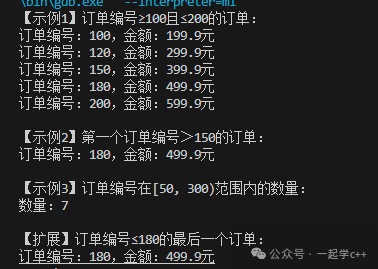 lower_bound(key) returns an iterator pointing to the first element ≥ key; if all elements are < key, it returns end();upper_bound(key) returns an iterator pointing to the first element > key; if all elements are ≤ key, it returns end();
The range query in the above code for map follows the “left-closed right-open” principle, i.e.,<span>[lower_bound(a), upper_bound(b)]</span>, corresponding to<span>a ≤ key < b.</span>If you want to include b, you need to use<span>lower_bound(b)</span>as the right boundary.
Core Difference Summary
| Feature | map | unordered_map |
|---|---|---|
| Underlying Implementation | Red-Black Tree | Hash Table (Chaining) |
| Order | Sorted in ascending order by key (customizable comparison) | Unordered (stored by hash value) |
| Lookup Time Complexity | O(log n) (lookup in Red-Black Tree) | Average O(1), Worst O(n) (hash collisions) |
| Insertion/Deletion Time Complexity | O(log n) (Red-Black Tree adjustments) | Average O(1), Worst O(n) (rehashing) |
| Memory Usage | Higher (Red-Black Tree nodes contain extra pointers) | Lower (hash table structure is more compact) |
| Key Requirements | Must support comparison operators (<) | Must support hash functions and == operator |
| Iterator Stability | Insertion/Deletion does not invalidate (except for deleted elements) | All iterators become invalid during rehashing |
| Supported Operations | Ordered traversal, lower_bound/upper_bound | Fast lookup, bucket operations (e.g., bucket_count) |
Common Pitfalls and Precautionsmap and unordered_map also have some common pitfalls, let’s take a look one by one.
-
Do not use [] operator for lookup
Unlike set, map and unordered_map support [] for random access. However, there is a major pitfall here: accessing a non-existent element will automatically create a default value!
#include <map>
#include <string>
#include <iostream>
using namespace std;

int main() {
    map<int, string> m{{1, "苹果"}};
    // Trying to find key 2, but accidentally inserted key 2 with an empty string value
    if (m[2] == "香蕉") { // Here m now has an additional key 2!
        cout << "找到香蕉" << endl;
    }
    cout << "map的大小:" << m.size() << endl; // Outputs 2, not 1!
    return 0;
}
The correct approach: use find() or count() for lookup, only use [] when you want to modify the value.
-
Iterator Invalidity Issues
map and unordered_map have significant differences in iterator invalidity:
Iterator Invalidity in map:
When inserting elements, all existing iterators remain valid.
When deleting elements, only the iterators pointing to the deleted elements become invalid.
// Example of iterator invalidity in map
std::map<int, int> m;
// Insert some elements...
auto it = m.find(5);
m.erase(it);  // it is now invalid and cannot be used
// But other iterators are unaffected
Iterator Invalidity in unordered_map:
When inserting elements, if rehashing occurs, all iterators become invalid.
When deleting elements, only the iterators pointing to the deleted elements become invalid.
// Example of iterator invalidity in unordered_map
std::unordered_map<int, int> um;
// Insert some elements...
auto it = um.find(5);
um.insert({10, 20});  // If rehashing occurs, it may become invalid
You can reduce the probability of triggering rehashing by reserving the number of buckets in advance using reserve():
int main() {
    unordered_map<int, string> um;
    um.reserve(1000); // Reserve 1000 buckets in advance to avoid subsequent rehashing
    // Subsequent insertions will not trigger rehashing, making iterators more stable
    return 0;
}-
Errors When Using Custom Types as Keys/Values
To customize the map type, you must overload the < operator
#include <map>
#include <string>
#include <iostream>
using namespace std;
struct Point {
int x;
int y;
// Must overload <, otherwise compilation error
bool operator<(const Point& other) const {
// Compare x first, if equal compare y
return x < other.x || (x == other.x && y < other.y);
}
};
int main() {
map<Point, int> m{{{1,2}, 10}, {{1,3}, 20}};
return 0;
}To customize the unordered_map type, you must provide a hash function and overload ==
#include <unordered_map>
#include <map>
#include <string>
#include <iostream>
using namespace std;
struct Student {
int id;
string name;
// Overloaded ==
bool operator==(const Student& other) const {
return id == other.id;
}
};
// Custom hash function
namespace std {
template<>
struct hash<Student> {
size_t operator()(const Student& s) const {
return hash<int>()(s.id); // Use id as the hash basis
}
};
}
int main() {
unordered_map<Student, int> um{{{1, "张三"}, 90}};
return 0;
}Summary
map and unordered_map are commonly used associative containers in C++, each with its unique advantages and applicable scenarios:
The Core Advantages of map:
-
Elements are sorted by key
-
Stable O(log n) time complexity
-
Iterators do not become invalid during insertion
-
Suitable for range queries and ordered traversal
The Core Advantages of unordered_map:
-
Average O(1) insertion and lookup performance
-
Higher cache efficiency (contiguous storage buckets)
-
Suitable for scenarios with a lot of random access
Choosing between map and unordered_map essentially involves a trade-off betweenorder and raw performance. Understanding their underlying implementations and characteristics is key to making the optimal choice in practical development.