

Introduction:
Code generation occurs during configuration, as CMake can detect the operating system and available libraries. Based on this information, the source code for the build can be customized. In this article, we will explore how to generate a simple source file that defines a function to report the configuration of the build system.
✦
Project Structure
✦
.
├── CMakeLists.txt
└── print_info.c.in
Project Address:
https://gitee.com/jiangli01/tutorials/tree/master/cmake-tutorial/chapter6/01
✦
Related Source Code
✦
CMakeLists.txt
cmake_minimum_required(VERSION 3.10 FATAL_ERROR)

project(config_generator LANGUAGES C)

execute_process(
  COMMAND
      whoami
  TIMEOUT
      1
  OUTPUT_VARIABLE
      _user_name
  OUTPUT_STRIP_TRAILING_WHITESPACE
)

# host name information
cmake_host_system_information(RESULT _host_name QUERY HOSTNAME)
cmake_host_system_information(RESULT _fqdn QUERY FQDN)
# processor information
cmake_host_system_information(RESULT _processor_name QUERY PROCESSOR_NAME)
cmake_host_system_information(RESULT _processor_description QUERY PROCESSOR_DESCRIPTION)
# os information
cmake_host_system_information(RESULT _os_name QUERY OS_NAME)
cmake_host_system_information(RESULT _os_release QUERY OS_RELEASE)
cmake_host_system_information(RESULT _os_version QUERY OS_VERSION)
cmake_host_system_information(RESULT _os_platform QUERY OS_PLATFORM)

string(TIMESTAMP _configuration_time "%Y-%m-%d %H:%M:%S [UTC]" UTC)

configure_file(print_info.c.in print_info.c @ONLY)
execute_process(
  COMMAND
      whoami
  TIMEOUT
      1
  OUTPUT_VARIABLE
      _user_name
  OUTPUT_STRIP_TRAILING_WHITESPACE
)
Use execute_process to get the current user’s information for the project.
# host name information
cmake_host_system_information(RESULT _host_name QUERY HOSTNAME)
cmake_host_system_information(RESULT _fqdn QUERY FQDN)
# processor information
cmake_host_system_information(RESULT _processor_name QUERY PROCESSOR_NAME)
cmake_host_system_information(RESULT _processor_description QUERY PROCESSOR_DESCRIPTION)
# os information
cmake_host_system_information(RESULT _os_name QUERY OS_NAME)
cmake_host_system_information(RESULT _os_release QUERY OS_RELEASE)
cmake_host_system_information(RESULT _os_version QUERY OS_VERSION)
cmake_host_system_information(RESULT _os_platform QUERY OS_PLATFORM)
Use cmake_host_system_information() function to query system information.
string(TIMESTAMP _configuration_time "%Y-%m-%d %H:%M:%S [UTC]" UTC)
Capture the timestamp during configuration using the string operation function.
configure_file(print_info.c.in print_info.c @ONLY)
Generate code using the configure_file function. Note that only strings starting and ending with @ will be replaced.
print_info.c.in
#include <stdio.h>
#include <unistd.h>

void print_info(void) {
  printf("\n");
  printf("Configuration and build information\n");
  printf("-----------------------------------\n");
  printf("\n");
  printf("Who compiled | %s\n", "@_user_name@");
  printf("Compilation hostname | %s\n", "@_host_name@");
  printf("Fully qualified domain name | %s\n", "@_fqdn@");
  printf("Operating system | %s\n",
         "@_os_name@, @_os_release@, @_os_version@");
  printf("Platform | %s\n", "@_os_platform@");
  printf("Processor info | %s\n",
         "@_processor_name@, @_processor_description@");
  printf("CMake version | %s\n", "@CMAKE_VERSION@");
  printf("CMake generator | %s\n", "@CMAKE_GENERATOR@");
  printf("Configuration time | %s\n", "@_configuration_time@");
  printf("Fortran compiler | %s\n", "@CMAKE_Fortran_COMPILER@");
  printf("C compiler | %s\n", "@CMAKE_C_COMPILER@");
  printf("\n");
  fflush(stdout);
}
✦
Result Display
✦
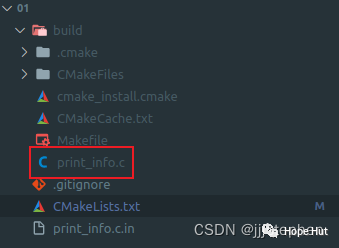 print_info.c
#include <stdio.h>
#include <unistd.h>

void print_info(void) {
  printf("\n");
  printf("Configuration and build information\n");
  printf("-----------------------------------\n");
  printf("\n");
  printf("Who compiled | %s\n", "jiangli");
  printf("Compilation hostname | %s\n", "jiangli-virtual-machine");
  printf("Fully qualified domain name | %s\n", "jiangli-virtual-machine.lan");
  printf("Operating system | %s\n",
         "Linux, 5.15.0-89-generic, #99~20.04.1-Ubuntu SMP Thu Nov 2 15:16:47 UTC 2023");
  printf("Platform | %s\n", "x86_64");
  printf("Processor info | %s\n",
         "Unknown AMD family, 16 core AMD Ryzen 7 4800H with Radeon Graphics");
  printf("CMake version | %s\n", "3.16.3");
  printf("CMake generator | %s\n", "Unix Makefiles");
  printf("Configuration time | %s\n", "2023-11-24 01:01:31 [UTC]");
  printf("Fortran compiler | %s\n", "");
  printf("C compiler | %s\n", "/usr/bin/gcc");
  printf("\n");
  fflush(stdout);
}
✦
Additional Information
✦
When replacing placeholders with values, the variable names in CMake should exactly match the variable names used in the file to be configured, and they should be enclosed in @. Any CMake variables defined during the call to configure_file can be used.
Finally, wish everyone to become stronger!!!