Code auditing is a critical step in ensuring software security and quality. Automated auditing tools can greatly enhance efficiency, helping developers identify potential issues before code submission.
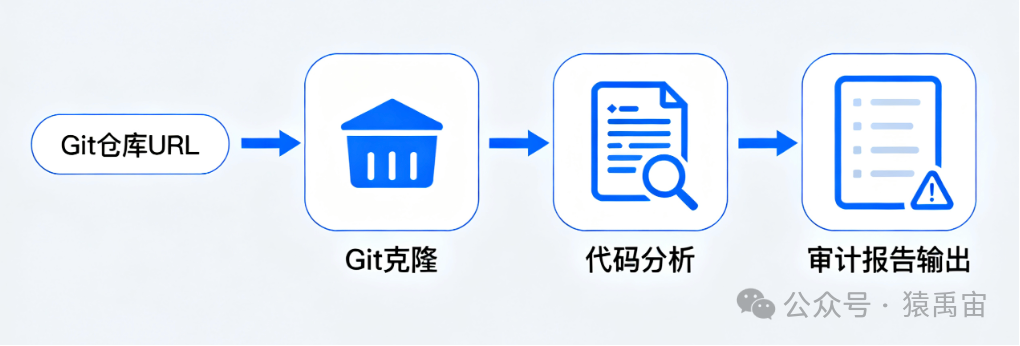
This article will guide you step by step in building a static auditing tool from scratch using Rust, which can clone Git repositories and scan code based on predefined rules.
You will learn:
- • How to use clap to build a powerful command-line interface.
- • How to use the git2 crate to manipulate Git repositories in Rust.
- • How to efficiently traverse files and match code patterns using walkdir and regex.
- • How to combine various modules into a complete application.
1. Project Setup and Dependency Introduction
First, let’s create a new Rust project and configure the required dependencies.
cargo new audit-rs
cd audit-rs
Next, open the Cargo.toml file and add the following dependencies. They are core to building our tool:
[dependencies]
clap = { version = "4.5.4", features = ["derive"] } # Command line argument parsing
git2 = "0.18.3" # Git operation library
regex = "1.10.4" # Regular expression engine
walkdir = "2.5.0" # Directory traversal tool
tempfile = "3.10.1" # For creating temporary directories- • clap: Allows us to easily define and parse command line arguments, such as the Git repository address to audit.
- • git2: Rust bindings for libgit2, powerful for cloning, checking out, and querying Git repositories.
- • regex: The official Rust-maintained regular expression library, high performance for defining and matching dangerous patterns in code.
- • walkdir: A very convenient library for recursively traversing directory trees, better than the standard library std::fs::read_dir.
- • tempfile: Helps us safely create a temporary directory to store the cloned code, which will be automatically cleaned up when the program ends.
2. Core Module Design
To keep the code structure clear, we will split the project into several core modules:
- • main.rs: The main entry point of the program, responsible for parsing command line arguments and calling other modules to complete the entire auditing process.
- • git.rs: Encapsulates Git-related operations, currently mainly for cloning remote repositories to local.
- • analyzer.rs: The core analysis engine, responsible for defining auditing rules, traversing code files, and executing matches.
3. Cloning a Git Repository (git.rs)
Our tool needs to obtain the code before analysis. The git.rs module is specifically responsible for this task. We will implement a function clone_repo that takes a remote repository URL and a local path, then clones the code into that path.
In the src/git.rs file, we write the following code:
use git2::Repository;
use std::path::Path;

/// Clone a Git repository to the specified local path
pub fn clone_repo(url: &str, into: &Path) -> Result<Repository, git2::Error> {
    println!("Cloning repository from {} into {:?}...", url, into);
    let repo = Repository::clone(url, into)?;
    println!("Successfully cloned repository.");
    Ok(repo)
}
This code is quite straightforward. It calls the git2::Repository::clone method, which handles all the complex details of communicating with the Git server. We also added some print statements to provide user feedback.
4. Implementing the Core Analysis Engine (analyzer.rs)
This is the core part of our tool. The analysis engine needs to accomplish three things:
- 1. Define the data structures for auditing rules (Rule) and findings (Finding).
- 2. Traverse all files in the specified directory.
- 3. Apply all rules to the content of each file and record the matched issues.
In the src/analyzer.rs file, we write the following code:
use regex::Regex;
use std::fs;
use std::path::Path;
use walkdir::WalkDir;

/// Auditing rules
pub struct Rule {
    pub name: String,
    pub pattern: Regex,
    pub description: String,
}

/// Discovered issues
#[derive(Debug)]
pub struct Finding {
    pub rule_name: String,
    pub file_path: String,
    pub line_content: String,
}

/// Perform code analysis in the specified directory
pub fn analyze_directory(path: &Path) -> Vec<Finding> {
    let rules = vec![
        Rule {
            name: "Use of unwrap()".to_string(),
            pattern: Regex::new(r"\.unwrap\("").unwrap(),
            description: "The use of .unwrap() can cause panics.".to_string(),
        },
        Rule {
            name: "Use of expect()".to_string(),
            pattern: Regex::new(r"\.expect\(").unwrap(),
            description: "The use of .expect() can cause panics.".to_string(),
        },
        // More rules can be added here
    ];

    let mut findings = Vec::new();

    println!("Starting analysis in {:?}...", path);

    // Use walkdir to traverse the directory
    for entry in WalkDir::new(path).into_iter().filter_map(|e| e.ok()) {
        let file_path = entry.path();
        // Only check files that are .rs files
        if file_path.is_file() && file_path.extension().map_or(false, |ext| ext == "rs") {
            if let Ok(content) = fs::read_to_string(file_path) {
                for line in content.lines() {
                    for rule in &rules {
                        if rule.pattern.is_match(line) {
                            let finding = Finding {
                                rule_name: rule.name.clone(),
                                file_path: file_path.to_string_lossy().to_string(),
                                line_content: line.trim().to_string(),
                            };
                            findings.push(finding);
                        }
                    }
                }
            }
        }
    }

    println!("Analysis finished. Found {} issues.", findings.len());
    findings
}
Code explanation:
- •
<span>Rule</span>struct: Defines an auditing rule, including the rule name, regex for matching, and a description of the issue. - •
<span>Finding</span>struct: Represents a discovered issue, recording the rule it violates, the file it is in, and the specific line of code. - •
<span>analyze_directory</span>function: - • We hardcoded some simple rules, such as detecting the use of .unwrap() and .expect(), which are generally not recommended in production code.
- • Used WalkDir to traverse all files and subdirectories.
- • Filtered by file extension to ensure we only analyze Rust (.rs) source files.
- • Read the file content line by line and applied all rules’ regex to each line.
- • If a match is found, a Finding is created and stored in the results list.
5. Connecting Everything: Main Program Entry (main.rs)
Now that we have the Git module and analysis module, it’s time to connect them in main.rs. The main program needs to:
- 1. Use clap to define and parse command line arguments to get the Git repository URL the user wants to audit.
- 2. Use tempfile to create a temporary directory.
- 3. Call git::clone_repo to clone the code into the temporary directory.
- 4. Call analyzer::analyze_directory to audit the cloned code.
- 5. Format and print the audit results.
In the src/main.rs file, write the following code:
mod analyzer;
mod git;

use clap::Parser;
use tempfile::Builder;

/// A simple Rust code auditing tool
#[derive(Parser, Debug)]
#[command(author, version, about, long_about = None)]
struct Args {
    /// The remote Git repository URL to audit
    #[arg(short, long)]
    repo_url: String,
}

fn main() {
    let args = Args::parse();

    // Create a temporary directory
    let temp_dir = Builder::new().prefix("audit-rs-").tempdir().expect("Failed to create temp dir");
    let repo_path = temp_dir.path();

    // 1. Clone the repository
    match git::clone_repo(&args.repo_url, repo_path) {
        Ok(_) => {
            // 2. Analyze the code
            let findings = analyzer::analyze_directory(repo_path);

            // 3. Print the report
            if findings.is_empty() {
                println!("No issues found. Great job!");
            } else {
                println!("\n--- Audit Report ---");
                for finding in findings {
                    println!(
                        "[!] Rule: {}\n    File: {}\n    Code: `{}`\n",
                        finding.rule_name,
                        finding.file_path,
                        finding.line_content
                    );
                }
                println!("--- End of Report ---");
            }
        }
        Err(e) => {
            eprintln!("Failed to clone repository: {}", e);
        }
    }
}
Code explanation:
- • We use the mod keyword to declare and import the analyzer and git modules.
- • The derive macro of clap allows us to define the command line interface through a simple struct Args.
- • tempfile::Builder is used to create a temporary directory with a specific prefix, which will be automatically deleted when the temp_dir variable goes out of scope, making it very safe and convenient.
- • The entire process is clearly divided into three stages: cloning, analyzing, and reporting, with appropriate error handling.
6. How to Run
Everything is ready! Now you can compile and run your code auditing tool in the project root directory.
# Compile and run, replacing <repo_url> with a real Git address of a Rust project
cargo run -- --repo-url <repo_url>

# For example, audit a well-known Rust project
cargo run -- --repo-url https://github.com/BurntSushi/ripgrep.git
The program will output the cloning progress, analysis process, and finally print a formatted audit report.
7. Conclusion and Future Prospects
Congratulations! You have successfully built a simple yet complete code auditing tool. We started from project setup, implemented Git cloning and regex-based code analysis, and finally integrated them into an elegant command-line application.
Of course, this is just a starting point. You can expand and enhance this tool in several ways:
- • A more powerful rule engine: Use tools like tree-sitter for AST (abstract syntax tree) parsing instead of simple regex matching, allowing for more precise and complex rules.
- • Support for more languages: Modify the file filters and rule sets to enable auditing of other programming languages.
- • Configuration files: Allow users to customize auditing rules through a configuration file (like audit.toml).
- • Multiple output formats: Support outputting audit reports in JSON, HTML, or other formats for easier integration with CI/CD systems.
We hope this article helps you get started with Rust project development and inspires your interest in code security and tool building.