Bitwise operators operate on integers sequentially, performing logical operations on their individual bits. The result of the operation is equal to the result of the logical operator. Bit value 1 corresponds to TRUE. Bit value 0 corresponds to FALSE.
| Operator | Number of Operands | Description |
| B_NOT | 1 | Bitwise NOT |
| B_AND | 2 | Bitwise AND |
| B_OR | 2 | Bitwise OR |
| B_EXOR | 2 | Bitwise XOR |
Bitwise operators can be applied to INT and CHAR data types. INT in KRL has 32 bits and must specify the sign. CHAR has 8 bits and does not require a sign.To understand the results of bitwise operations, it must be considered that the robot control system interprets signed binary numbers as two’s complement. Here, the highest bit determines whether the number is positive or negative. Therefore, all bits must be taken into account.For the following examples of B_AND, B_OR, and B_EXOR with integer values, positive numbers are obtained (highest bit = 0). Similar to unsigned values, the results can be directly converted to decimal. The operation is represented by “0 0 […]” indicating 28 zeros preceding the operands.B_AND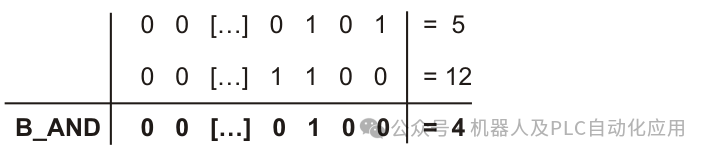 Example: Operations with integer values 5 and 12B_OR
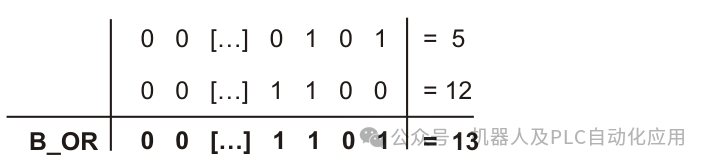 Example: Operations with integer values 5 and 12B_EXOR
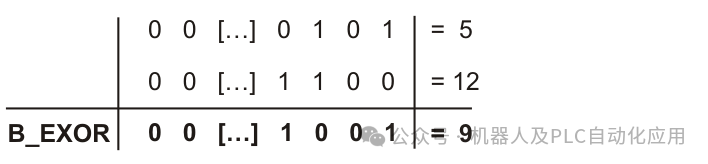 Example: Operations with integer values 5 and 12B_NOT For this integer example, the operation yields a negative number (highest bit = 1). Therefore, the result cannot be converted to decimal in the same way as unsigned numbers.To help users understand the decimal results converted by the robot control system, they must be familiar with the rules of interpreting two’s complement. These rules are not the subject of this article.
 Example: B_NOT with integer value 10The decimal result of the B_NOT operation with signed operands can be determined as follows:1. Decimal value of the operand plus 12. Change the signOther examples…DECL INT A…A = 10 B_AND 9 ;A=8A = 10 B_OR 9 ;A=11A = 10 B_EXOR 9 ;A=3A = B_NOT 197 ;A=-198A = B_NOT ‘HC5’ ;A=-198A = B_NOT ‘B11000101’ ;A=-198A = B_NOT “E” ;A=154Setting and Checking Bits: Using B_AND and B_OR, individual bits of a bit sequence can be specifically set to 1 or 0. The remaining bits remain unchanged. Using B_AND, a single bit can be set to 0. Using B_OR, a single bit can be set to 1.Additionally, individual bits can be checked to see if they are 1 or 0.Example: There is an 8-bit wide digital output. This output can respond through the INT variable DIG.Set bits 1, 2, and 6 to 0:DIG = DIG B_AND ‘B10111001’Set bits 0, 2, 3, and 7 to 1:DIG = DIG B_OR ‘B10001101’Check if bits 0 and 7 have been set to 1. If so, my_result becomes TRUE:DECL BOOL my_result…my_result = DIG B_AND (‘B10000001’) == ‘B10000001’Check if either of the bits 0 and 7 has been set to 1. If so, my_result becomesTRUEDECL BOOL my_result…my_result = DIG B_AND (‘B10000001’) > 0