Applying AI in Audit Work, Starting with Small Scenarios. There are many methods to achieve the same goal, including direct Q&A, using Coze, n8n, Yingdao, or calling locally deployed or online large models with Python.
Today, I will demonstrate the method of extracting specified information from images in audit work using Python and Ollama.
1. Addressing Pain Points: The “Nightmare of Image Information Extraction” in Audit Work
Those involved in auditing, finance, or project management will surely understand this pain:
-
A pile of acceptance forms, scanned contracts, and reimbursement vouchers require manual entry of fields such as “contract number, acceptor, quantity”.
-
Images are blurry and inconsistent in format, OCR recognition misses characters and makes errors, checking each image is time-consuming and labor-intensive.
-
Urgent projects require speed, manually processing dozens or hundreds of images often leads to working late into the night.
I have tried various tools before:
-
Online OCR tools: Limited upload per session, sensitive data risks exposure.
-
Paid software: Costly per use, weak batch processing capabilities.
-
Traditional Python scripts: Dependence on third-party APIs, unstable and costly.
Until the explosion of local large models, deploying qwen3-vl:8b multimodal large model with Ollama, combined with Python to achieve local batch extraction of image fields, running entirely offline, ensuring data security and improving efficiency!
2. Technology Selection: Why Ollama + qwen3-vl:8b?
1. Core Tool Combination
| Tool / Model | Function | Core Advantages |
|---|---|---|
| Ollama | Local large model deployment platform | Lightweight, one-click deployment, supports visual models |
| qwen3-vl:8b | Qwen multimodal visual and language large model | 8 billion parameters, strong image understanding, supports Chinese OCR |
| Python | Batch processing + Excel output | Flexible expansion, adaptable to various folders/formats |
| Pillow | Image preprocessing | Improves recognition accuracy of blurry images |
| Pandas | Data structuring | Quickly generates standard Excel reports |
2. Why Abandon Traditional Solutions?
-
Online APIs: Dependence on the internet, risk of sensitive audit data exposure.
-
Commercial software: High costs, weak customization capabilities.
-
Small parameter models: Local deployment is stress-free, even a laptop can run (8GB RAM is sufficient).
3. Core Logic: 3 Steps to Achieve Batch Extraction of Image Fields
1. Overall Process Breakdown
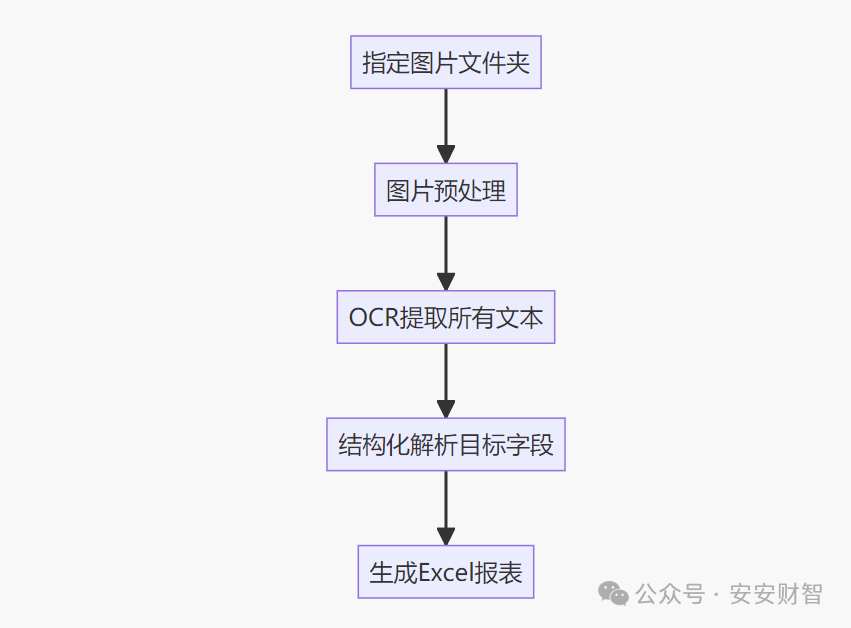
2. Key Technical Details (Core Highlights of the Code)
(1) Image Preprocessing: Accurate Recognition of Blurry Images
To address common issues in audit images such as “scanned blur, insufficient brightness”, enhancement logic is added:
-
Automatically convert image mode (RGBA→RGB) to solve transparent background recognition issues.
-
Contrast + 50%, Brightness + 20%, to enhance text clarity.
-
Lanczos algorithm Resize, maintaining aspect ratio without distortion.
-
Supports various formats such as JPG/PNG/BMP/GIF.
(2) Dual-Prompt Strategy: Doubling Accuracy
-
First round: Full OCR extraction, leaving no text behind (temperature 0.0, ensuring objectivity).
-
Second round: Structured parsing, strictly outputting target fields in JSON format.
-
Fallback backup plan: Directly ask questions about the image to avoid OCR failure.
(3) Fault Tolerance Mechanism: Maximizing Stability
-
Automatically detect if the Ollama service is running.
-
Automatically pull missing models (qwen3-vl:8b).
-
Automatically clean up extra characters on JSON parsing failure.
-
Return empty strings for missing fields, ensuring Excel generation is unaffected.
4. Practical Steps
1. Environment Preparation (3 Steps to Complete)
(1) Install Ollama
-
Download from the official website: https://ollama.com/
-
Start the service: Enter the command
<span>ollama serve</span>(keep the window open).
(2) Deploy the Visual Model
Execute in the command line:
ollama pull qwen3-vl:8b # Recommended 8G RAM, 16G RAM can try qwen3-vl:14b
(3) Install Python Dependencies
pip install pandas pillow openpyxl ollama
2. Code Configuration (2 Modifications Required)
# Only need to change these 2 lines!

IMAGE_FOLDER = "path_to_your_image_folder"  # e.g., "D:/audit_images/2024_acceptance_forms"

OUTPUT_FILE = "extraction_results.xlsx"  # Output Excel file name
3. Running Effect Demonstration
(1) Processing Log
Testing Ollama connection...

✓ Successfully connected to Ollama service

✓ Found model: qwen3-vl:8b

Validating model capabilities...

✓ Model visual capability validation passed

Found 28 images, starting processing...

=== Processing image 1/28: acceptance_form_001.jpg ===

Text content in the image:

Project: XX Park Renovation Project

Name: LED Display

Contract Number: JY-2024-0328

Model Specification: P2.55m×3m

Quantity: 2 units

Situation Description: Equipment operates normally, meets acceptance standards

Acceptance Unit: XX Construction Engineering Co., Ltd.

Acceptor: Zhang San

Acceptance Date: May 18, 2024

Structured extraction result: {"Project":"XX Park Renovation Project","Name":"LED Display","Contract Number":"JY-2024-0328","Model Specification":"P2.55m×3m","Quantity":"2 units","Situation Description":"Equipment operates normally, meets acceptance standards","Acceptance Unit":"XX Construction Engineering Co., Ltd.","Acceptor":"Zhang San","Acceptance Date":"May 18, 2024"}

Processing complete! Results saved to extraction_results.xlsx

Successfully extracted information from images: 28/28
(2) Excel Output Effect
| Image File Name | Project | Name | Contract Number | Model Specification | Quantity | Acceptor | Acceptance Date |
|---|---|---|---|---|---|---|---|
| acceptance_form_001.jpg | XX Park Renovation Project | LED Display | JY-2024-0328 | P2.55m×3m | 2 units | Zhang San | May 18, 2024 |
| acceptance_form_002.jpg | Office Equipment Procurement | Laptop | CG-2024-0415 | ThinkPad X1 | 10 units | Li Si | June 2, 2024 |
5. Code Optimization Highlights (Advanced Techniques)
1. Image Enhancement: Solving Blurry Image Recognition Issues
def enhance_image(image):

   # Contrast +50%, Brightness +20%, slight sharpening

   enhancer = ImageEnhance.Contrast(image)
   image = enhancer.enhance(1.5)

   enhancer = ImageEnhance.Brightness(image)
   image = enhancer.enhance(1.2)

   image = image.filter(ImageFilter.SHARPEN)

   return image
2. Dual-Prompt: Improving Structured Extraction Accuracy
-
First round: Full OCR, leaving no text behind.
-
Second round: Based on OCR results, enforce JSON format output.
-
Fault tolerance: Automatically clean up extra characters in JSON to avoid parsing failures.
3. Batch Processing + Retry on Failure
-
Automatically traverse all images in the folder (supports multiple formats).
-
Main strategy failure automatically switches to backup plan.
-
Detailed log output for easy troubleshooting.
4. Data Security: Entirely Local Operation
-
No image uploads to the cloud, sensitive data remains secure.
-
Supports offline use, can work without internet.
6. Common Problem Troubleshooting
1. Ollama Connection Failed?
-
Check if the service is running: Enter the command
<span>ollama serve</span> -
Ensure the model has been pulled:
<span>ollama pull qwen3-vl:8b</span> -
Disable VPN, ensure local network is normal.
2. Low Recognition Accuracy?
-
Image preprocessing: Ensure images are clear, manually crop irrelevant areas if necessary.
-
Adjust prompts: Clearly specify field formats in structured prompts (e.g., acceptance date must be in YYYY-MM-DD format).
-
Upgrade model: 16GB RAM can try qwen3-vl:14b.
3. Excel Save Failed?
-
Install dependencies:
<span>pip install openpyxl</span> -
Close any open Excel files.
-
Check if the output path has write permissions.
7. Extended Scenarios: Beyond Auditing
This solution can also be used for:
-
Financial reimbursements: Extract invoice information (amount, invoice date, seller).
-
Human resources: Extract key information from resumes (name, phone, work experience).
-
Education: Extract exam questions, student scores.
-
Administrative office: Extract key contract terms (party A, party B, validity period).
Simply modify the <span>structured_prompt</span><span> fields to adapt to different scenarios!</span>
8. Complete Code
import os
import json
import pandas as pd
from PIL import Image, ImageEnhance, ImageFilter
import io
import ollama
import traceback

def enhance_image(image):
    """Enhance image clarity, improve recognition effect"""
    # Adjust contrast and brightness
    enhancer = ImageEnhance.Contrast(image)
    image = enhancer.enhance(1.5)

    enhancer = ImageEnhance.Brightness(image)
    image = enhancer.enhance(1.2)

    # Slight sharpening
    image = image.filter(ImageFilter.SHARPEN)

    return image

def process_image_for_model(image_path):
    """Preprocess image and return binary data"""
    try:
        with Image.open(image_path) as img:
            # Convert to RGB mode
            if img.mode in ('RGBA', 'LA'):
                background = Image.new(img.mode[:-1], img.size, (255, 255, 255))
                background.paste(img, mask=img.split()[-1])
                img = background
            elif img.mode == 'P':
                img = img.convert('RGB')
            else:
                img = img.convert('RGB')

            # Image enhancement
            img = enhance_image(img)

            # Resize (maintaining aspect ratio, fixed width of 1200px)
            width, height = img.size
            new_width = 1200
            new_height = int(height * (new_width / width))
            img = img.resize((new_width, new_height), Image.Resampling.LANCZOS)

            # Save as high-quality JPEG
            buffer = io.BytesIO()
            img.save(buffer, format='JPEG', quality=95, optimize=True)
            return buffer.getvalue()
    except Exception as e:
        print(f"Image preprocessing failed {image_path}: {str(e)}")
        return None

def extract_info_with_multiple_prompts(image_path, model="qwen3-vl:8b"):
    """Multi-round prompt strategy for information extraction"""
    image_data = process_image_for_model(image_path)
    if not image_data:
        return None

    # First round: Extract all text content (OCR mode)
    ocr_prompt = """Please recognize all text content in the image, output line by line, do not omit any information."""

    try:
        # Step 1: Get all text in the image
        ocr_response = ollama.generate(
            model=model,
            prompt=ocr_prompt,
            images=[image_data],
            stream=False,
            options={"temperature": 0.0}
        )

        all_text = ocr_response.get("response", "").strip()
        print(f"\nText content in the image:\n{all_text}\n")

        # Second round: Structured parsing based on extracted text
        structured_prompt = f"""The following is the text content in the image:\n{all_text}\n\nPlease extract the following field information from the above text, strictly return in JSON format:\n- Project\n- Name\n- Contract Number\n- Model Specification\n- Quantity\n- Situation Description\n- Acceptance Unit\n- Acceptor\n- Acceptance Date\n\nIf a field does not exist or cannot be recognized, return an empty string for the corresponding value. Only return JSON, do not add any other content.\nExample output: {{"Project":"","Name":"","Contract Number":"","Model Specification":"","Quantity":"","Situation Description":"","Acceptance Unit":"","Acceptor":"","Acceptance Date":""}}"""

        structured_response = ollama.generate(
            model=model,
            prompt=structured_prompt,
            stream=False,
            options={"temperature": 0.0}
        )

        raw_result = structured_response.get("response", "").strip()
        print(f"Structured extraction result: {raw_result}")

        # Parse JSON
        if raw_result:
            # Clean up possible extra characters
            if not raw_result.startswith('{'):
                raw_result = '{' + raw_result.split('{')[-1]
            if not raw_result.endswith('}'):
                raw_result = raw_result.split('}')[0] + '}'

            result = json.loads(raw_result)
            result["Image File Name"] = os.path.basename(image_path)
            result["Original Text"] = all_text[:500]  # Save part of the original text for debugging
            return result

    except json.JSONDecodeError as e:
        print(f"JSON parsing failed: {str(e)}")
        print(f"Original response: {raw_result}")
    except Exception as e:
        print(f"Extraction failed: {str(e)}")
        traceback.print_exc()

    return None

def fallback_extract(image_path, model="qwen3-vl:8b"):
    """Backup extraction strategy: directly use detailed prompts"""
    image_data = process_image_for_model(image_path)
    if not image_data:
        return None

    detailed_prompt = """Please carefully examine the image and extract the following structured information:\n\n1. Project: The project name or number displayed in the image\n2. Name: Product/service name\n3. Contract Number: Contract number in letter+number combination, usually contains keywords like "contract", "number", "No."\n4. Model Specification: Model and specification parameters of the product\n5. Quantity: Quantity information in numerical form, may include units like "units", "pieces", "sets"\n6. Situation Description: Description of the acceptance situation\n7. Acceptance Unit: Name of the unit conducting the acceptance\n8. Acceptor: Name of the acceptor\n9. Acceptance Date: Date format (e.g., YYYY-MM-DD, YYYY年MM月DD日, etc.)\n\nPlease strictly return in JSON format, use empty strings for field values when empty, do not add any explanations:\n{"Project":"","Name":"","Contract Number":"","Model Specification":"","Quantity":"","Situation Description":"","Acceptance Unit":"","Acceptor":"","Acceptance Date":""}"""

    try:
        response = ollama.generate(
            model=model,
            prompt=detailed_prompt,
            images=[image_data],
            format="json",
            stream=False,
            options={"temperature": 0.0}
        )

        result = json.loads(response["response"].strip())
        result["Image File Name"] = os.path.basename(image_path)
        result["Extraction Strategy"] = "Backup Strategy"
        return result
    except:
        return None

def batch_process_with_fallback(folder_path, output_excel="extracted_info.xlsx"):
    """Batch processing with backup strategy"""
    supported_formats = ('.jpg', '.jpeg', '.png', '.bmp', '.tiff', '.gif')
    image_files = []

    # Collect all image files
    for filename in os.listdir(folder_path):
        if filename.lower().endswith(supported_formats):
            image_files.append(os.path.join(folder_path, filename))

    if not image_files:
        print("No image files found!")
        return

    print(f"Found {len(image_files)} images, starting processing...")
    results = []

    for i, image_path in enumerate(image_files):
        filename = os.path.basename(image_path)
        print(f"\n=== Processing image {i+1}/{len(image_files)}: {filename} ===")

        # Main strategy extraction
        info = extract_info_with_multiple_prompts(image_path)

        # If main strategy fails, use backup strategy
        if not info or all(v == "" for k, v in info.items() if k not in ["Image File Name", "Original Text", "Extraction Strategy"]):
            print("Main strategy extraction failed, trying backup strategy...")
            info = fallback_extract(image_path)

        # If both fail, fill with default values
        if not info:
            info = {
                "Project": "", "Name": "", "Contract Number": "", "Model Specification": "",
                "Quantity": "", "Situation Description": "", "Acceptance Unit": "", "Acceptor": "",
                "Acceptance Date": "", "Image File Name": filename,
                "Extraction Strategy": "Extraction Failed", "Original Text": ""
            }

        results.append(info)

    # Save results
    if results:
        df = pd.DataFrame(results)

        # Organize column order
        columns = ["Image File Name", "Project", "Name", "Contract Number", "Model Specification",
                  "Quantity", "Situation Description", "Acceptance Unit", "Acceptor", "Acceptance Date",
                  "Extraction Strategy", "Original Text"]
        df = df.reindex(columns=columns, fill_value="")

        # Save to Excel
        df.to_excel(output_excel, index=False, engine="openpyxl")
        print(f"\nProcessing complete! Results saved to {output_excel}")

        # Count results
        success = sum(1 for r in results if r.get("Project") or r.get("Name") or r.get("Contract Number"))
        print(f"Successfully extracted information from images: {success}/{len(results)}")

def verify_model_capability():
    """Verify the model's visual capabilities (not dependent on test images)"""
    print("Verifying model capabilities...")
    try:
        # Create a simple test image (pure text)
        from PIL import ImageDraw, ImageFont

        # Create test image
        test_img = Image.new('RGB', (500, 200), color='white')
        d = ImageDraw.Draw(test_img)

        # Try to load font
        try:
            font = ImageFont.truetype("arial.ttf", 20)
        except:
            font = ImageFont.load_default(size=20)

        # Draw test text
        test_text = """Project: Test Project\nName: Test Product\nContract Number: TEST-2024-001\nModel Specification: V1.0\nQuantity: 10\nAcceptance Date: 2024-01-01"""

        d.text((20, 20), test_text, fill='black', font=font)

        # Save to memory
        buffer = io.BytesIO()
        test_img.save(buffer, format='JPEG')
        buffer.seek(0)

        # Test model
        prompt = "Please recognize the text content in the image"
        response = ollama.generate(
            model="qwen3-vl:8b",
            prompt=prompt,
            images=[buffer.getvalue()],
            stream=False
        )

        if "Test Project" in response.get("response", ""):
            print("✓ Model visual capability validation passed")
            return True
        else:
            print("⚠️ Model response may not meet expectations")
            print(f"Response content: {response.get('response', 'No response')}")
            return True  # Continue execution even if recognition is inaccurate

    except Exception as e:
        print(f"Model capability verification warning: {str(e)}")
        print("Continuing with image processing...")
        return True

def test_ollama_connection():
    """Test Ollama connection and model"""
    print("Testing Ollama connection...")
    try:
        # Check service connection
        models = ollama.list()
        print("✓ Successfully connected to Ollama service")

        # Check qwen3-vl model
        model_found = False
        for model in models.get('models', []):
            if 'qwen3-vl' in model.get('name', ''):
                model_found = True
                print(f"✓ Found model: {model.get('name')}")
                break

        if not model_found:
            print("⚠️ qwen3-vl model not found, pulling...")
            for progress in ollama.pull("qwen3-vl:8b", stream=True):
                if 'status' in progress:
                    print(f"  {progress['status']} ({progress.get('completed', 0)}/{progress.get('total', 0)})", end='\r')
            print("\n✓ Model pull complete")

        return True

    except Exception as e:
        print(f"✗ Ollama connection failed: {str(e)}")
        print("\nPlease ensure:")
        print("1. Ollama service is running (ollama serve)")
        print("2. qwen3-vl model is installed (ollama pull qwen3-vl:8b)")
        return False

if __name__ == "__main__":
    # Configuration
    IMAGE_FOLDER = "your_folder_path"  # Replace with your image folder path
    OUTPUT_FILE =  "extraction_results.xlsx"  # Replace with your result output path

    # First test connection
    if test_ollama_connection():
        # Verify model capability
        verify_model_capability()

        # Batch process images
        batch_process_with_fallback(IMAGE_FOLDER, OUTPUT_FILE)
This concludes today's sharing, thank you for your attention and reading.