In the previous article, it was mentioned that in assembly, the content of registers is modified through assembly instructions to control the CPU’s operation. Several classifications of registers were also discussed.Understanding the concepts can be a bit dry, so today we will look at several registers through debugging on a PC, and also modify the values of some general-purpose registers using assembly instructions.I am using DosBox for debugging.Steps: Download DosBox -> Download debug and place it in a location (e.g., F:\asm) -> Run DosBox -> Execute mount c f:\asm -> Execute c: (switch to C) -> Execute debug -> r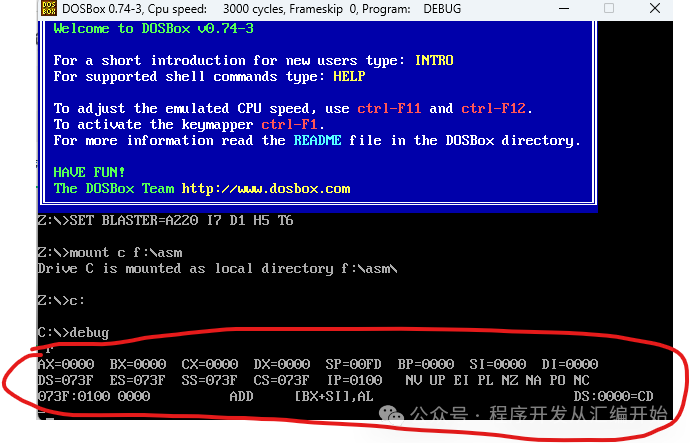 The items circled in the image above are all registers.Among them, AX, BX, CX, and DX are general-purpose registers, which are generally used to hold data. From the image, it is clear that these registers are all 16-bit, 2-byte registers. Under the X86 architecture, these registers can also be divided into high and low parts, meaning:AX = AH + AL; BX = BH + BL; CX = CH + CL; DX = DH + DL.In a previous article, we looked at an assembly instruction, so let’s examine this assembly instruction.MOV AX, 3503What does this statement mean? It means to place 03H 35H into the AX register.Next, we will actually type this in debug mode. First, we need to type ‘a’ (Assemble) + Enter to inform the debugger that we are going to input assembly instructions; otherwise, the debugger will not recognize the input assembly instructions.
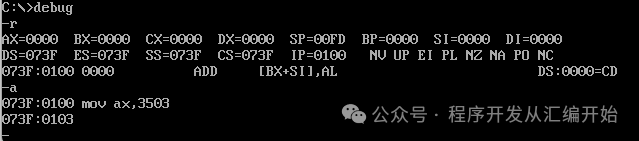 Then, type ‘t’ to run.
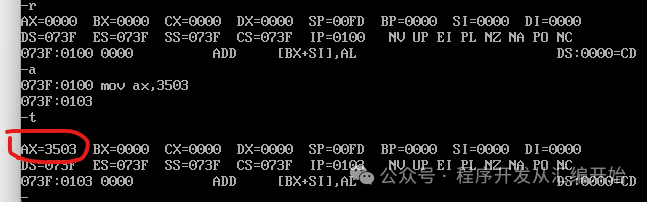 Then you can see that the AX register has been filled with 3503.Next, let’s try the following instructions:mov ah, bh and mov al, dl to see what the results are.
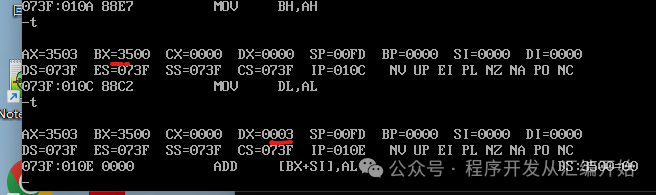 By running each instruction, we can see that the high part of BX has been filled with 35, and the low part of DX has been filled with 03.It is worth noting that the naming of registers in X86 and ARM is different, and the assembly code is also written differently.Finally, here is a comparison of ARM and X86 registers:
| Feature | X86 (16/32-bit) | ARM (32-bit) | ARM64 |
|---|---|---|---|
| General-purpose Registers | AX, BX, CX, DX | R0-R12 | X0-X30 |
| Stack Pointer | ESP (32-bit) | R13 (SP) | SP (X31) |
| Program Counter | EIP | R15 (PC) | PC |
| High/Low 8 Bits | AH, AL | None | None |
| Assembly Example | <span>mov ax, 3503</span> |
<span>mov r0, #5</span> |
<span>mov x0, #10</span> |