Introduction
The payloads for the path traversal CVE-2024-38816 are primarily debugged and analyzed on the Windows platform. However, when it comes to the Linux platform, there are some differences in path handling that can lead to traversal failures.
Vulnerability Location
It is primarily located under the routing configuration of the website.
WebConfig.class
// Source code recreated from a .class file by IntelliJ IDEA
// (powered by FernFlower decompiler)

package org.ota.config;

import org.springframework.context.annotation.Bean;
import org.springframework.context.annotation.Configuration;
import org.springframework.core.io.FileSystemResource;
import org.springframework.web.reactive.function.server.RouterFunction;
import org.springframework.web.reactive.function.server.RouterFunctions;
import org.springframework.web.reactive.function.server.ServerResponse;

@Configuration
public class WebConfig {
    @Bean
    public RouterFunction<ServerResponse> route() {
        return RouterFunctions.resources("/static/**", new FileSystemResource("/app/static"));
    }
}
In summary, its function is to map resource requests under the /static route to the local folder directory /app/static for processing.
Path Handling Analysis on Windows
Vulnerability Analysis
Here we have two ways to locate the key processing class for the path.
- Hindsight, directly diffing the fixed code can quickly locate the processing class.
- Using backtrace frames, printing debug information, and other means to find the processing function.
Here, I hope to locate this vulnerability point from the perspective of vulnerability discovery.
Set a breakpoint in <span>RouterFunctions.resources</span> and proceed.

Next, request a file that actually exists under <span>/app/static</span> to hit the breakpoint (the path I used is in the format of E:// Windows).
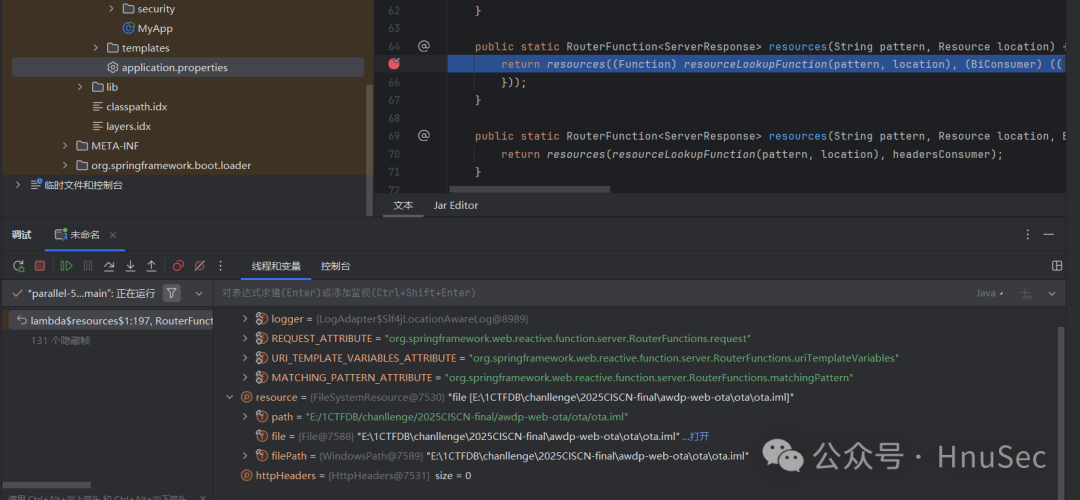
Backtrace frames locate the URL processing related class <span>PathResourceLookupFunction</span>
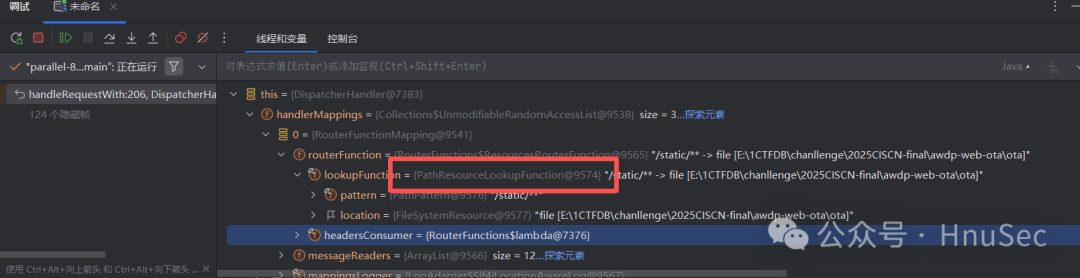
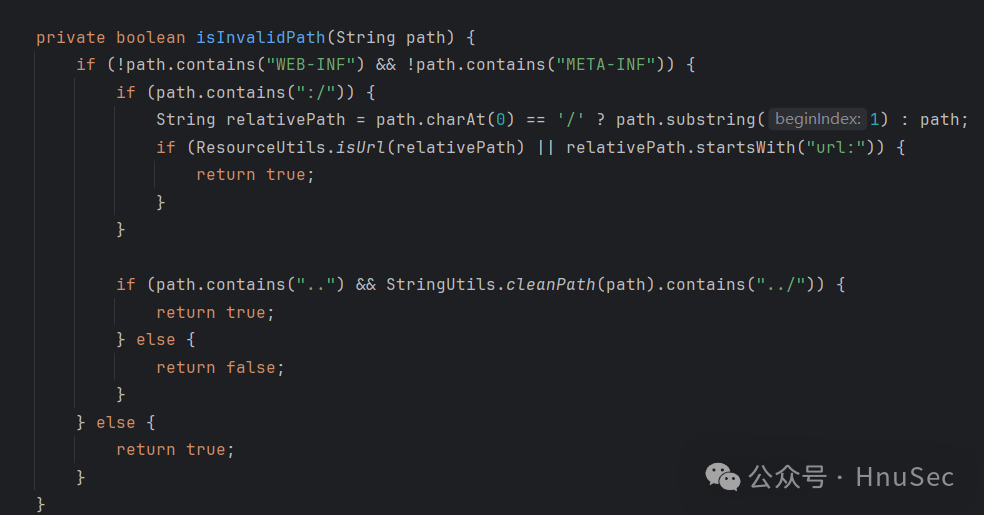
There is a clear handling of the path here, such as checking for the existence of <span>..</span> or <span>WEB-INF</span>, etc.
Then set breakpoints on each method to see where the first request will go.
After the request, we can see that it reaches our apply function, and the parameter is our request, carrying the routing information we accessed.
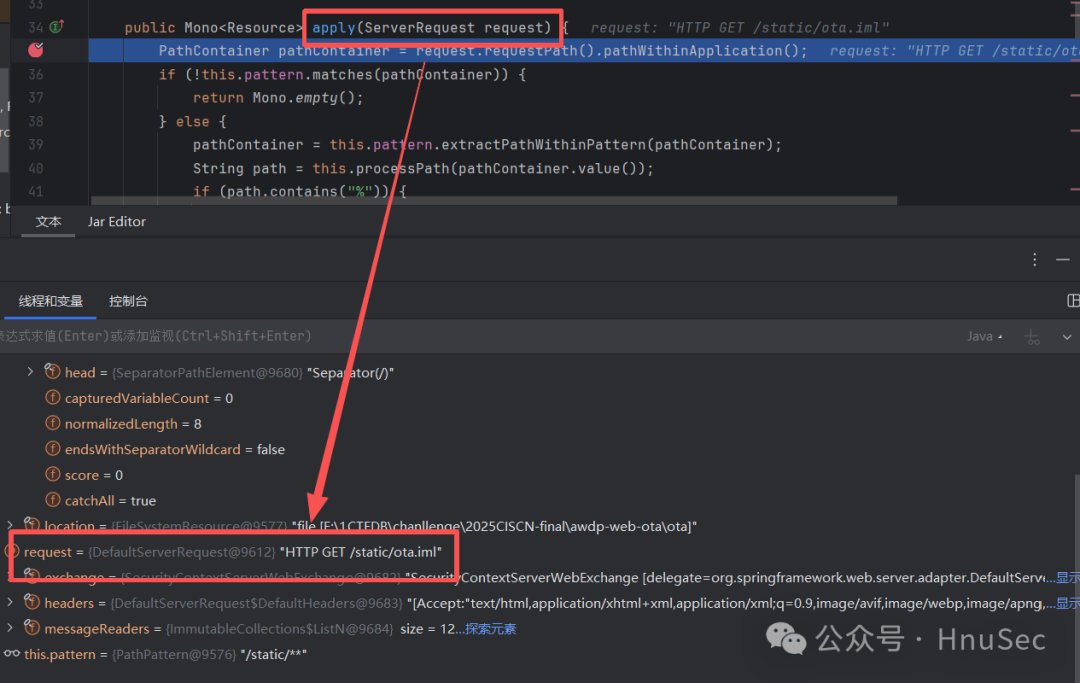
First, look at the first part.
        PathContainer pathContainer = request.requestPath().pathWithinApplication();
        if (!this.pattern.matches(pathContainer)) {
            return Mono.empty();
        } else {
            pathContainer = this.pattern.extractPathWithinPattern(pathContainer);
            String path = this.processPath(pathContainer.value());
We extract the string after <span>/static/1.txt</span> to get <span>/static/</span> and then process it using <span>processPath</span>.
    private String processPath(String path) {
        boolean slash = false;

        for(int i = 0; i < path.length(); ++i) {
            if (path.charAt(i) == '/') {
                slash = true;
            } elseif (path.charAt(i) > ' ' && path.charAt(i) != 127) {
                if (i != 0 && (i != 1 || !slash)) {
                    path = slash ? "/" + path.substring(i) : path.substring(i);
                    return path;
                }

                return path;
            }
        }

        return slash ? "/" : "";
    }
This <span>processPath(String path)</span> method can be summarized as: removing a string of invalid characters at the beginning of the path, keeping only the part starting from the first “valid character”, and adding a slash <span>/</span> in front (if there was a slash in the original path).
Logical Breakdown
- Initialize
<span>slash = false</span>. → Mark whether a slash has been encountered.- Iterate through each character of the string:
- Case A: This character is not the first character, and the previous character is not a “single slash”. → If a slash has appeared before, prepend a slash to the result and then truncate the invalid part. → Otherwise, just truncate the invalid part directly.
- Case B: This character is the first (or only one leading
<span>/</span>). → Return the original string directly.
- If a
<span>'/'</span>is encountered → set<span>slash = true</span>(mark that a slash has appeared).- If a non-control character is encountered (
<span>> ' '</span>and not<span>127</span>), it indicates this is the first “meaningful” character:If the loop ends without finding a valid character:
- If a slash has appeared, return
<span>"/"</span>; otherwise return an empty string<span>""</span>.
After processing, we move to the second part, which is if our URL contains %, we perform url encoding on it.
            if (path.contains("%")) {
                path = StringUtils.uriDecode(path, StandardCharsets.UTF_8);
            }
Next, we look at the third part, which is the validation and reading part, meaning if it passes the <span>StringUtils.hasLength(path) && !this.isInvalidPath(path)</span> check, we associate it with our local file.
if (StringUtils.hasLength(path) && !this.isInvalidPath(path)) {
    try {
        Resource resource = this.location.createRelative(path);
        return resource.isReadable() && this.isResourceUnderLocation(resource) ? Mono.just(resource) : Mono.empty();
    } catch (IOException ex) {
        throw new UncheckedIOException(ex);
    }
}
First, let’s see how these two checks pass. First, <span>hasLength</span> can definitely pass, mainly the <span>isInvalidPath</span>, we want it to return false here.
    private boolean isInvalidPath(String path) {
        if (!path.contains("WEB-INF") && !path.contains("META-INF")) {
            if (path.contains(":/")) {
                String relativePath = path.charAt(0) == '/' ? path.substring(1) : path;
                if (ResourceUtils.isUrl(relativePath) || relativePath.startsWith("url:")) {
                    return true;
                }
            }
First, the string after <span>/static/</span> cannot contain <span>WEB-INF</span> and <span>META-INF</span>, and then check if the first character is <span>/</span>, if so, remove it, or if it starts with various protocols like <span>file://</span>, <span>http://</span>, it gets banned, and there’s also a special case of <span>url://</span>
if (path.contains("..") && StringUtils.cleanPath(path).contains("../")) {
                return true;
            } else {
                return false;
            }
Finally, we check for directory traversal with <span>..</span> and <span>../</span>, but here the <span>../</span> check is done after a <span>cleanPath</span> processing, and the problem arises in this function.
    public static String cleanPath(String path) {
        if (!hasLength(path)) {
            return path;
        } else {
            String normalizedPath;
            if (path.indexOf(92) != -1) {
                normalizedPath = replace(path, "\\", "/");
                normalizedPath = replace(normalizedPath, "\\", "/");
            } else {
                normalizedPath = path;
            }

            String pathToUse = normalizedPath;
            if (normalizedPath.indexOf(46) == -1) {
                return normalizedPath;
            } else {
                int prefixIndex = normalizedPath.indexOf(58);
                String prefix = "";
                if (prefixIndex != -1) {
                    prefix = normalizedPath.substring(0, prefixIndex + 1);
                    if (prefix.contains("/")) {
                        prefix = "";
                    } else {
                        pathToUse = normalizedPath.substring(prefixIndex + 1);
                    }
                }

                if (pathToUse.startsWith("/")) {
                    prefix = prefix + "/";
                    pathToUse = pathToUse.substring(1);
                }

                String[] pathArray = delimitedListToStringArray(pathToUse, "/");
                Deque<String> pathElements = new ArrayDeque(pathArray.length);
                int tops = 0;

                for(int i = pathArray.length - 1; i >= 0; --i) {
                    String element = pathArray[i];
                    if (!".".equals(element)) {
                        if ("..".equals(element)) {
                            ++tops;
                        } elseif (tops > 0) {
                            --tops;
                        } else {
                            pathElements.addFirst(element);
                        }
                    }
                }

                if (pathArray.length == pathElements.size()) {
                    return normalizedPath;
                } else {
                    for(int i = 0; i < tops; ++i) {
                        pathElements.addFirst("..");
                    }

                    if (pathElements.size() == 1 && ((String)pathElements.getLast()).isEmpty() && !prefix.endsWith("/")) {
                        pathElements.addFirst(".");
                    }

                    String joined = collectionToDelimitedString(pathElements, "/");
                    return prefix.isEmpty() ? joined : prefix + joined;
                }
            }
        }
    }
Our main goal is to input a traversal path like <span>../</span> but after <span>cleanPath</span> it does not contain <span>../</span>, and since this check is connected by <span>&&</span>, as long as the latter string processed by <span>cleanPath</span> does not contain <span>../</span>, it can bypass.
The two main processing parts are:
The first part:
If <span>\</span> or <span>"</span> is detected, it will be converted to <span>/</span>
            if (path.indexOf(92) != -1) {
                normalizedPath = replace(path, "\\", "/");
                normalizedPath = replace(normalizedPath, "\\", "/");
            } else {
                normalizedPath = path;
            }
The second part:
The main function is to deduplicate our path. For example, a path <span>dog/cat/../aj</span> actually represents <span>dog/aj</span>.
This part does exactly that.
String[] pathArray = delimitedListToStringArray(pathToUse, "/");
...
int prefixIndex = normalizedPath.indexOf(58);
                String prefix = "";
                if (prefixIndex != -1) {
                    prefix = normalizedPath.substring(0, prefixIndex + 1);
                    if (prefix.contains("/")) {
                        prefix = "";
                    } else {
                        pathToUse = normalizedPath.substring(prefixIndex + 1);
                    }
                }

                if (pathToUse.startsWith("/")) {
                    prefix = prefix + "/";
                    pathToUse = pathToUse.substring(1);
                }

                String[] pathArray = delimitedListToStringArray(pathToUse, "/");
                Deque<String> pathElements = new ArrayDeque(pathArray.length);
                int tops = 0;

                for(int i = pathArray.length - 1; i >= 0; --i) {
                    String element = pathArray[i];
                    if (!".".equals(element)) {
                        if ("..".equals(element)) {
                            ++tops;
                        } elseif (tops > 0) {
                            --tops;
                        } else {
                            pathElements.addFirst(element);
                        }
                    }
                }

                if (pathArray.length == pathElements.size()) {
                    return normalizedPath;
                } else {
                    for(int i = 0; i < tops; ++i) {
                        pathElements.addFirst("..");
                    }

                    if (pathElements.size() == 1 && ((String)pathElements.getLast()).isEmpty() && !prefix.endsWith("/")) {
                        pathElements.addFirst(".");
                    }
                }
...
String joined = collectionToDelimitedString(pathElements, "/");
First Bypass Method
Since <span>dog/cat/../aj</span> can be transformed into <span>dog/aj</span>, it means we have bypassed the <span>../</span>, so the second condition will be judged as false, thus bypassing.
So how do we construct multiple <span>..</span>?
Because this function <span>delimitedListToStringArray</span> will split our string by <span>/</span>, but empty characters will also be counted.
That is to say, <span>a///</span> will be split into <span>['a','','','']</span>, so we want to construct <span>dog////cat/../../aj</span> to make it become <span>dog/aj</span>, but due to the initial <span>processPath</span> processing, it will still not traverse out.
So we need to leverage the first part to convert <span>\</span>