<span>Enum</span> (enumeration) is a standard library module introduced in Python 3.4 (<span>enum</span>) used to create enumeration types with named constants. Additionally, <span>Python</span> has added several extensions based on <span>enum</span>.
<span>IntEnum</span>is a special enumeration type provided by the<span>enum</span>module that inherits from<span>int</span>, allowing enumeration members to be directly compared with integers.<span>StrEnum</span>is a new enumeration type added in Python 3.11, inheriting from<span>str</span>, making enumeration members also strings.<span>Flag</span>or<span>IntFlag</span>is a special enumeration type provided by Python’s<span>enum</span>module that combines the features of<span>Enum</span>and bitwise operations, making it ideal for representing combinable flags.
Basic Operations
Creating enumeration types, obtaining enumeration names, values, and enumeration comparison operations
from enum import Enum

class Color(Enum):
    RED = 1
    GREEN = 2
    BLUE = 3


print(Color.RED)  # Output: Color.RED
print(Color.RED.name)  # Output: 'RED'
print(Color.RED.value)  # Output: 1

# Looping through
for color in Color:
    print(color)

# Enumeration comparison, converting Color(1) to Color type
if Color.RED == Color(1):
    print(Color.RED.value)
Automatic assignment and uniqueness guarantee
from enum import Enum, auto

# Automatically assign values using the auto method
class Color(Enum):
    RED = auto()
    GREEN = auto()
    BLUE = auto()


for color in Color:
    print(color.value)  # Output: 1 2 3
Using <span>@unique</span> decorator to ensure all values are unique
from enum import Enum, unique

@unique
class Color(Enum):
    RED = 1
    GREEN = 2
    BLUE = 3
    # YELLOW = 1  # This will raise ValueError
IntEnum Enumeration Type
Since it inherits from <span>int</span>, it can perform arithmetic operations and logical comparisons with integers
Creating IntEnum enumeration type
# Old version, same as below IntEnum
class Priority(int, Enum):
 pass
class Priority(IntEnum):
    pass
Creating, comparing, and performing operations on <span>value</span> numeric operations
from enum import IntEnum


class Priority(IntEnum):
    MEDIUM = 2
    LOW = 1
    HIGH = 3

# Logical operations
print(Priority.HIGH == 3)
# Enum comparison, cannot be directly compared with integers
print(Priority.HIGH == Priority(3))
# Arithmetic operations
print(Priority.MEDIUM + 1)

# Sorting
pris = sorted(Priority, key=lambda x: x.value, reverse=True)

print(pris)
StrEnum Enumeration Type
Similar to <span>IntEnum</span>, <span>StrEnum</span> inherits from <span>str</span>, a new enumeration type added in Python 3.11. Therefore, for versions less than 3.11, it is defined as follows:
class enum_name(str, Enum):
It can also be operated like a string, such as comparing strings
from enum import StrEnum

class LogLevel(StrEnum):
    DEBUG = "debug"
    INFO = "info"
    WARNING = "warning"
    ERROR = "error"

print(LogLevel.INFO == "info")
Flag and IntFlag Enumeration Types
Enumerations used for bitwise operations:
from enum import Flag, auto

class Permissions(Flag):
    EXECUTE = auto()
    WRITE = auto()
    READ = auto()

# Combining permissions
rw = Permissions.READ | Permissions.WRITE
print(rw)  # Permissions.READ|WRITE

# Checking permissions
print(Permissions.READ in rw)  # True
print(Permissions.EXECUTE in rw)  # False

# Removing permissions
write_only = rw & ~Permissions.READ
print(write_only)  # Permissions.WRITE
<span>IntFlag</span> is similar to <span>IntEnum</span>, allowing integer comparisons and operations
class Permissions(IntFlag):
    EXECUTE = auto()
    WRITE = auto()
    READ = auto()
    ALL = EXECUTE | WRITE | READ
    RW = READ | WRITE

# Using predefined combinations
print(Permissions.RW)  # Permissions.READ|WRITE

print(rw == 6)  # True (4 + 2 = 6)
print(rw & 2 == 2)  # True

# Creating from an integer
combined = Permissions(5)  # READ (4) + EXECUTE (1)
print(combined)  # Permissions.READ|EXECUTE
Advanced Applications
Since classes defined based on <span>Enum</span> can also define member attributes, member methods, and class methods, as shown in the following example:
from enum import Enum, auto


class Priority(int,Enum):
    LOW = 1
    MEDIUM = 2
    HIGH = 3
    URGENT = auto()  # Automatically assigned to 4

    @property
    def is_high_priority(self):
        return self.value >= self.HIGH

    def is_low(self):
        return self < Priority.MEDIUM

    @classmethod
    def get_level(cls, level: int) -> list:
        return [status for status in cls if status <= level]


print(Priority.LOW.is_low())
print(Priority.URGENT.is_high_priority)
print(Priority.get_level(2))
Scenario Applications
When using <span>Enum</span> to define enumeration types, the data types are relatively singular, either <span>int</span> or <span>str</span>. We can define <span>value</span> as a tuple. For example, for HTTP request response statuses, we can put <span>code</span> and <span>message</span> into a tuple.
# status.py

from enum import Enum

from starlette import status


class HttpStatus(Enum):
    # Enumeration constants (must match constructor parameters)
    SUCCESS = (status.HTTP_200_OK, "Operation successful")
    ERROR = (status.HTTP_500_INTERNAL_SERVER_ERROR, "Server error")
    NOT_FOUND = (status.HTTP_404_NOT_FOUND, "Resource not found")

    @property
    def code(self) -> int:
        """Returns the status code"""
        return self.value[0]

    @property
    def message(self) -> str:
        """Returns the description"""
        return self.value[1]

    # Get enumeration instance by code (class method)
    @classmethod
    def get_by_code(cls, code: int) -> 'Status | None':
        for status in cls:
            if status.code == code:
                return status
        return None

    def __str__(self) -> str:
        return f"{self.name}(code={self.code}, message={self.message})"

if __name__ == "__main__":
    # Test class usage
    print(HttpStatus.SUCCESS)
    print(HttpStatus.SUCCESS.code)
    print(HttpStatus.SUCCESS.message)

    # Find enumeration by code
    print(HttpStatus.get_by_code(404))
    print(HttpStatus.get_by_code(999))

    # Iterate through all enumeration values
    for status in HttpStatus:
        print(f"{status.name}: code={status.code}, message={status.message}")
Reconstructing <span>fastapi</span>‘s <span>JSONResponse</span>
# response.py

from starlette.responses import JSONResponse
from status import HttpStatus

class SuccessResponse(JSONResponse):
    def __init__(self, data=None, message=HttpStatus.SUCCESS.message, code=HttpStatus.SUCCESS.code, **kwargs):
        self.data = {
            "code": code,
            "message": message,
            "data": data
        }
        self.data.update(kwargs)
        super().__init__(content=self.data, status_code=code)
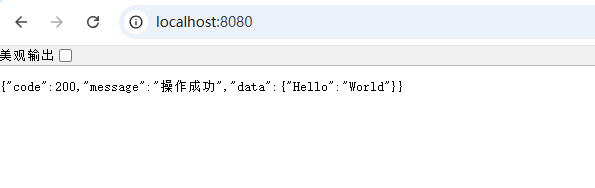
Creating a <span>web</span> service and starting it
from fastapi import FastAPI

import response

app = FastAPI()

@app.get("/")
def read_root():
    return response.SuccessResponse({"Hello": "World"})

if __name__ == "__main__":
    import uvicorn
    uvicorn.run('main:app', host='0.0.0.0', port=8080, reload=True)
View the effect: