★ Click the blue text above to follow us with one click ★
As the market demand and the automotive industry continue to advance towards electrification, connectivity, intelligence, and sharing, engineers will face an increasing number of software development projects, utilizing high-performance MCUs that meet automotive-grade and functional safety certifications to develop related applications. Matching the MCU development environment provided by MCU suppliers with industry-leading development tools will significantly enhance the development efficiency and performance outcomes for developers.
This article takes the S32K series 32-bit Arm Cortex automotive MCU, widely used in the automotive industry, as an example to introduce how to quickly develop high-performance automotive MCU applications by integrating its S32DS development environment with the IAR Embedded Workbench for Arm toolchain, which has been widely adopted in the industry.
Since its launch in 2017, the NXP S32K1 MCU has been widely used in the automotive electronics market. Based on this, NXP launched the S32K3 MCU in 2020, further expanding the S32K1 MCU product line based on Arm Cortex-M0+/M4F. The new S32K3 MCU is based on Arm Cortex-M7 and offers multicore and lockstep options, supporting functional safety ISO 26262 ASIL B/D. The S32K3 MCU is primarily used in automotive body electronic systems, battery management, and emerging domain controllers.
01
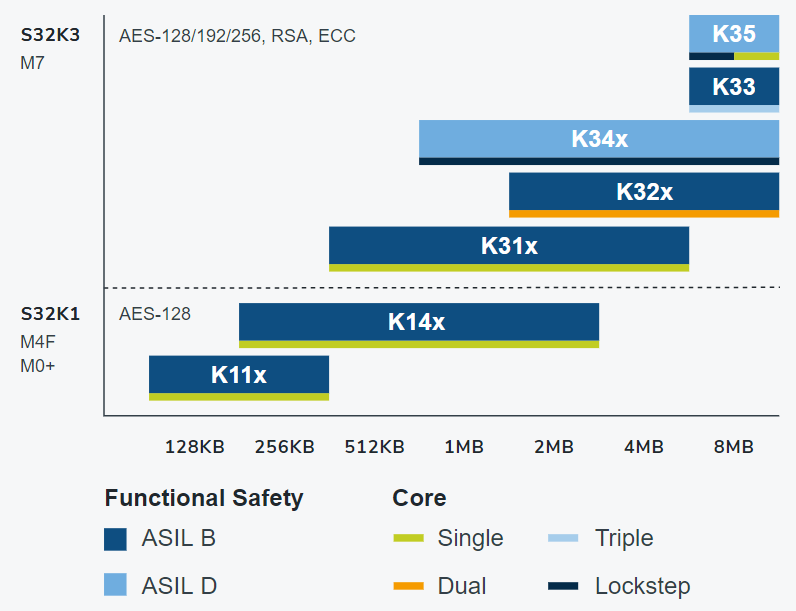
Figure 1: NXP S32K (Source: NXP)
To address the growing complexity of software, NXP has introduced Real-Time Drivers (RTD), which support real-time software for both AUTOSAR and non-AUTOSAR applications, primarily for Arm Cortex-M cores, ensuring that all software layers comply with ISO 26262 requirements. This allows for rapid completion of applications that meet relevant certification requirements.
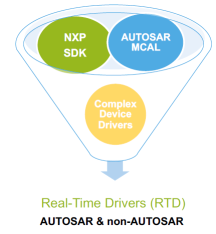
Figure 2: NXP Real-Time Drivers (RTD) (Source: NXP)
The NXP S32K3 MCU has a wide range of partners to assist customers in development. As an important partner of NXP, IAR Systems provides professional embedded software development tools. The latest IAR Embedded Workbench for Arm V9.20.1 officially supports the NXP S32K3 MCU (See Reference Material 1). The functional safety version of IAR Embedded Workbench for Arm V8.50.10 can be used for application development based on S32K3 Real-Time Drivers (RTD).
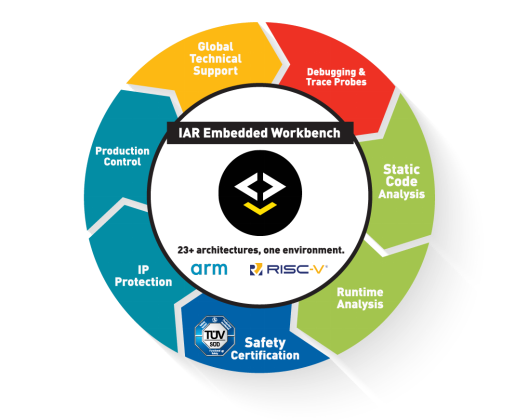
Figure 3: IAR Systems Embedded Software Development Tools
IAR Embedded Workbench for Arm is widely used in automotive electronic software development. Its highly optimized compiler generates highly efficient and compact executable code, maximizing MCU performance while minimizing FLASH and RAM usage. Meanwhile, IAR Embedded Workbench for Arm features powerful debuggers and code analysis tools that help developers improve development efficiency, enhance code quality, and ensure product reliability.
To facilitate customer application development, IAR Embedded Workbench for Arm has been integrated with the NXP S32DS tool, allowing customers to quickly initialize projects on IAR Embedded Workbench for Arm.
The S32 configuration tools in NXP’s S32 Design Studio can quickly configure pins, clocks, and peripherals, greatly simplifying the configuration work of the S32K3 MCU, accelerating the preparatory work before development. By initializing the project in S32DS and then importing it into IAR Embedded Workbench for Arm for project development, users of the S32K3 series chips can enjoy significant convenience.
02
Next, we will specifically introduce how to use NXP S32DS to establish a project and import it into IAR Embedded Workbench for Arm to accelerate automotive software development based on the NXP S32K3 MCU.
Installing IAR Eclipse Plugin in NXP S32DS
NXP S32DS supports the IAR Eclipse plugin, but the IAR Eclipse plugin is not included in the S32DS installation package and needs to be installed separately. The method can be found in (Reference Material 2). In practical applications, this applies to S32 Design Studio for ARM and also to S32 Design Studio for S32 Platform.
Creating a Project in NXP S32DS Studio
In NXP S32DS, create a project and select IAR Toolchain for Arm as the corresponding toolchain:
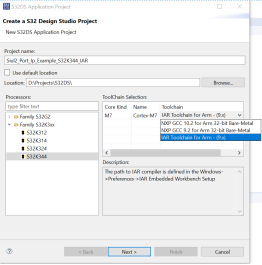
Then configure the corresponding pins, clocks, and peripherals through Configuration Tools and automatically generate the corresponding code:
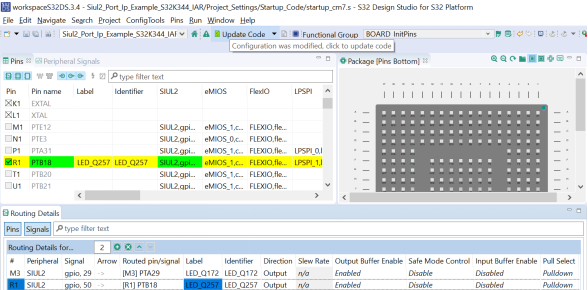
Exporting S32DS Project to IAR Embedded Workbench for Arm
When creating a project in S32DS, if IAR Toolchain for Arm is selected as the toolchain, the corresponding project can be exported and imported into IAR Embedded Workbench for Arm. The specific steps can be found in (Reference Material 3). The export operation applies to S32 Design Studio for ARM and S32K1, and is also applicable to S32 Design Studio for S32 Platform and S32K3.
However, after following the operations in the link, the directory structure of the IAR Embedded Workbench for Arm project folder and the original project folder in NXP S32DS are inconsistent:
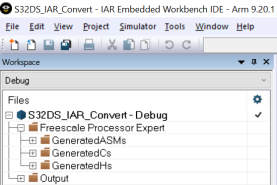
To address this, IAR provides a plugin called EWPtool, which can import the corresponding source file directory into the project. More details can be found in (Reference Material 4).
03
The following are the operations after exporting from NXP S32DS to Workbench for Arm:
1. Delete the corresponding Freescale Processor Expert folder (the corresponding project folder will be deleted):
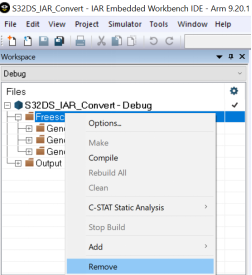
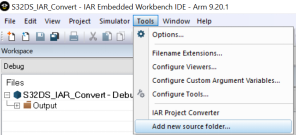
2. Add a new source file directory and select the corresponding project directory (pointing to the directory where the NXP S32DS project was created):
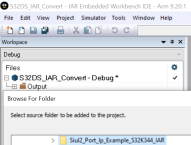
3. Ensure that the project folder directory of IAR Embedded Workbench for Arm matches the original project folder directory in NXP S32DS:
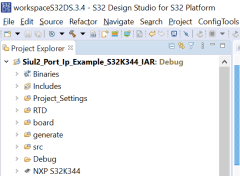
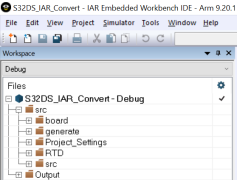
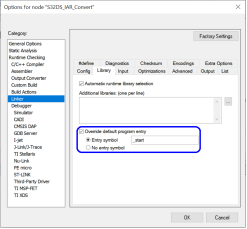
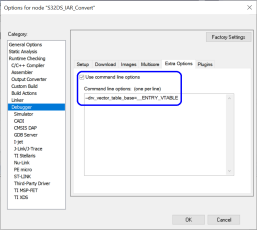
4. Since the entry function and interrupt vector table in the startup code of NXP S32DS differ from those used by IAR Embedded Workbench for Arm, the following configuration needs to be made (specify the corresponding entry function in the Linker options and the corresponding interrupt vector table address in the Debugger options: “–drv_vector_table_base=_ENTRY_VTABLE”):
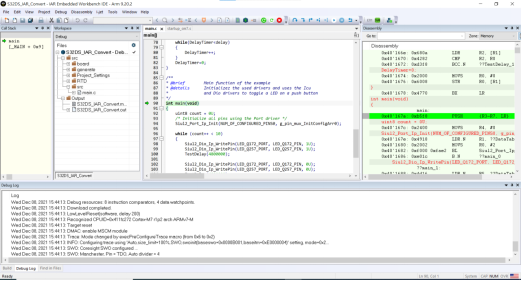
5. You can then compile, download, and debug in IAR Embedded Workbench for Arm:
Conclusion
This article uses the latest NXP S32K3 MCU and related software development resources as an example, demonstrating how to utilize the NXP factory-configured S32DS tool to establish a project based on the S32K3 MCU and choose the widely popular IAR Toolchain for Arm as the toolchain to enhance development efficiency for projects with high code quality requirements. By configuring the corresponding pins, clocks, and peripherals using the Configuration Tools in NXP S32DS and automatically generating the corresponding code, then exporting the NXP S32DS project to IAR Embedded Workbench for Arm for further development, we can accelerate automotive software development based on the NXP S32K3 MCU using the flexible configuration of NXP S32DS and the efficient compilation of IAR Embedded Workbench for Arm.
Of course, as more and more Chinese technology companies focus on industrial applications, medical devices, and other critical applications requiring high reliability and performance, there are opportunities in these fields to combine the advantages of MCU factory development tools with high-performance toolchains provided by third-party vendors like IAR Systems for application development. Engineers are encouraged to learn more and experiment.
Further Reading
Reference Material 1:
IAR Systems enables next generation automotive applications with NXP’s S32K3 MCU family
Reference Material 2:
HOWTO: Install IAR Eclipse plug-in into S32 Design Studio for ARM
Reference Material 3:
HOWTO: Export S32DS Project to IAR Embedded Workbench for Arm
Reference Material 4:
https://github.com/IARSystems/project-migration-tools
For more information about IAR Embedded Workbench for Arm, please refer to IAR Embedded Workbench for Arm
For more information about NXP S32K3, please refer toS32K3 Microcontrollers for General Purpose
If you wish to learn more about Beijing Huaxing Wanbang Management Consulting Co., Ltd., please follow and read the “Huaxing Wanbang Technical Economics” WeChat public account.