Introduction
In the process of embedded system development and debugging, it is often necessary to use host software to monitor device operating status, send control commands, and analyze communication data. The traditional approach is to develop a dedicated host program for each project, which, while precise in functionality, incurs high development costs, is difficult to maintain, and lacks reusability. As project complexity increases and development cycles shorten, this “one project, one host” model has become inadequate. Therefore, developing a comprehensive, flexibly configurable, and highly adaptable general-purpose measurement and control host has become an urgent need to improve development efficiency and reduce debugging costs.
Project Overview
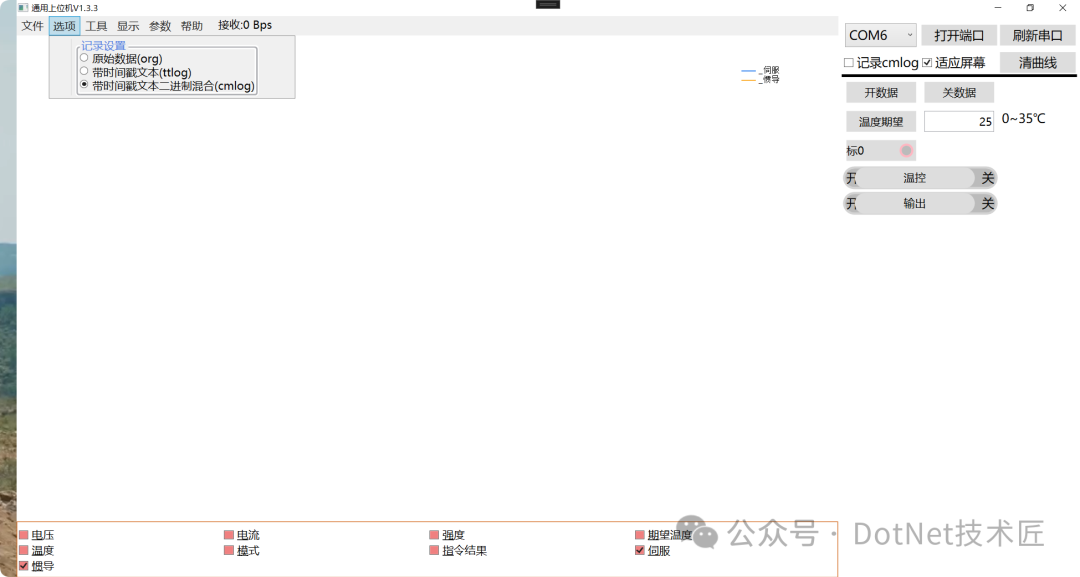
The general-purpose measurement and control host is designed to address the aforementioned issues as an open-source tool. It provides a highly configurable and feature-rich general platform for debugging embedded devices. Through a flexible configuration file mechanism, this host can adapt to various communication protocols, device types, and project requirements, avoiding the cumbersome process of repeatedly developing dedicated hosts.
Whether it is serial communication, network communication, or log playback, users can operate through a unified interface, greatly enhancing the flexibility and efficiency of debugging work.
Project Features
The host has complete measurement and control functions, mainly including the following aspects:
1. Status Monitoring and Command Issuance
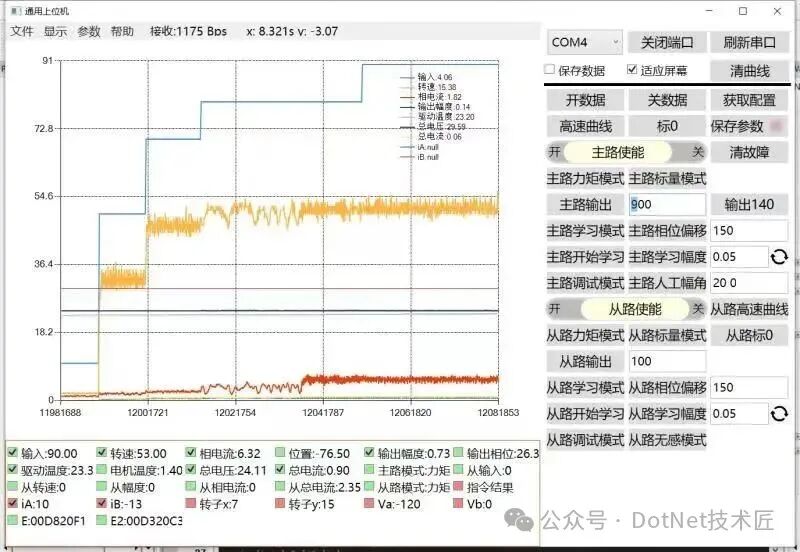
Supports real-time display of sensor data, control status, and other information uploaded by devices, and allows users to send control commands through the interface, such as switch control and parameter settings.
2. Curve Visualization
Supports real-time curve display of multi-channel data, allowing users to freely choose to display or hide specific curves, supports two horizontal coordinate modes: time axis and count axis, and features loop display and long-term recording.
3. Enhanced Interface Interaction
Not only displays values but also indicates whether the data is up-to-date and whether commands have been successfully responded to, enhancing the intuitiveness of operational feedback.
4. Data Recording and Playback
Automatically records communication data as log files and supports playback functionality to reproduce historical data, facilitating problem reproduction and analysis. Supports variable-speed playback and single-frame stepping to meet detailed debugging needs.
5. Multi-Data Source Support
Compatible with various data input methods such as serial ports, networks (TCP/UDP), and log files, allowing users to switch freely for use in different debugging scenarios.
6. Configurable Protocol Parsing
Defines communication protocol formats through configuration files, supporting NMEA-like text protocols and binary data packets, allowing adaptation to new protocols without modifying code.
Project Description
Project Modules
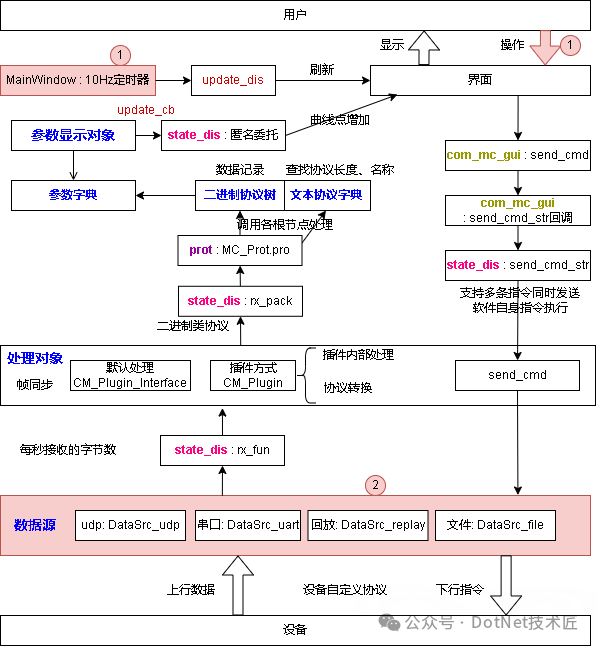
MainWindow: Organizes interface logic, implements curve control, outputs a 10Hz timer, and calls processing flows.
com_mc: Defines measurement classes in the measurement and control concept: DataDes (data description), implements data structure and protocol processing; defines control command classes: CmdDes (command description); defines a general measurement and control class MC_Prot, organizing measurement object dictionary (dset) and control object dictionary (cmds).
com_mc_gui: Defines the interface display class for control commands in the measurement and control concept, implementing various forms of control command interfaces; for measurement, uses general controls, so none are defined.
state_dis: Partially implements the logic of the measurement and control application as part of MainWindow:
Organizes objects in the measurement and control concept, including logs, curves in the interface, measurement controls, etc.; implements the construction of measurement controls; implements the construction of control controls; implements the construction of menu controls; constructs timers, queries plugins; implements software control commands; implements data transmission and reception processing.
Main Process
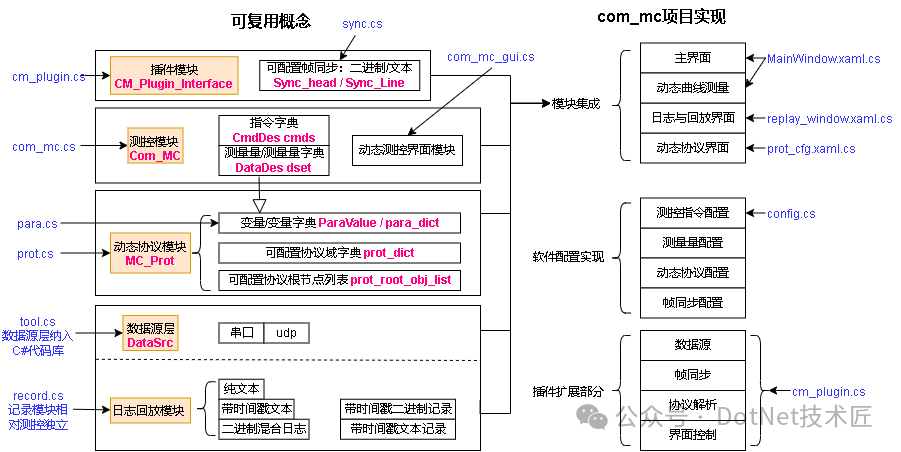
Measurement and Control Concept Structure
The measurement and control concept mainly consists of several large parts: measurement and control communication, dynamic protocols, data sources, log recording, and playback.
The conceptual diagram is as follows:
Overall Data Up and Down Flow Chart
Project Usage
The generated file is com_mc.exe, and the default configuration file is config.txt. Generally, only these two files are needed to execute, making it very portable.
Project Effect
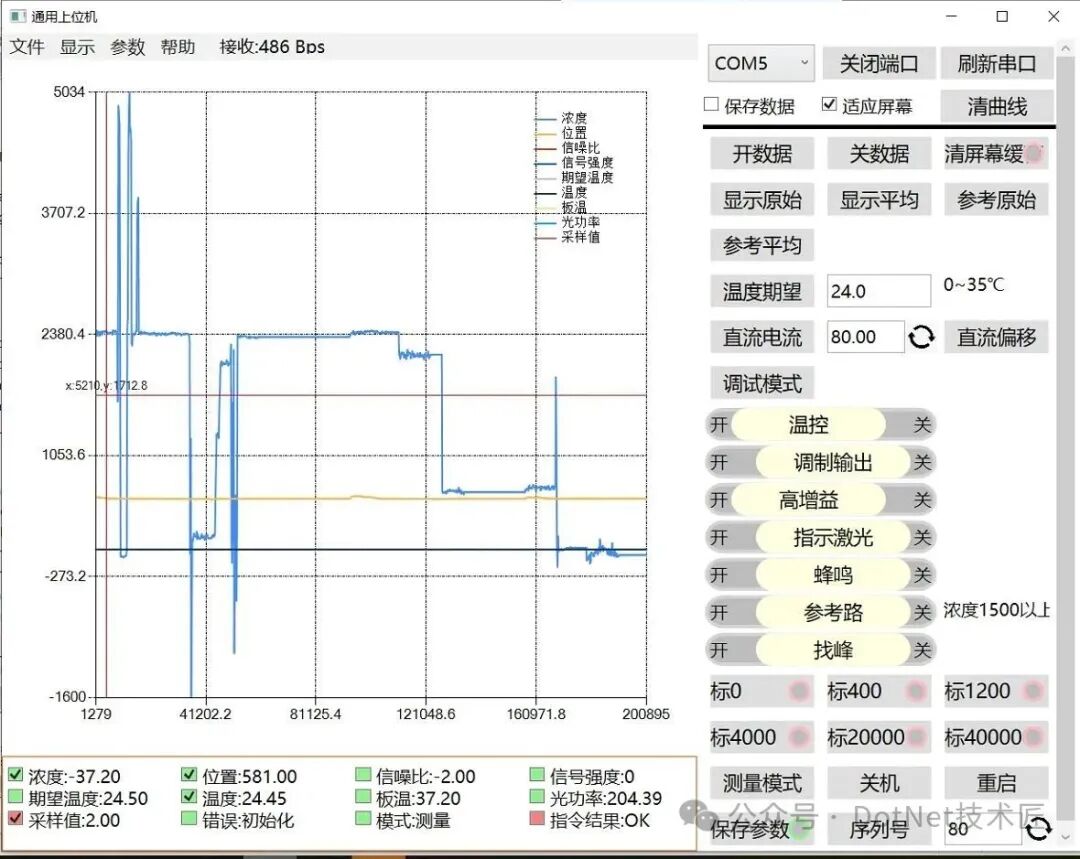
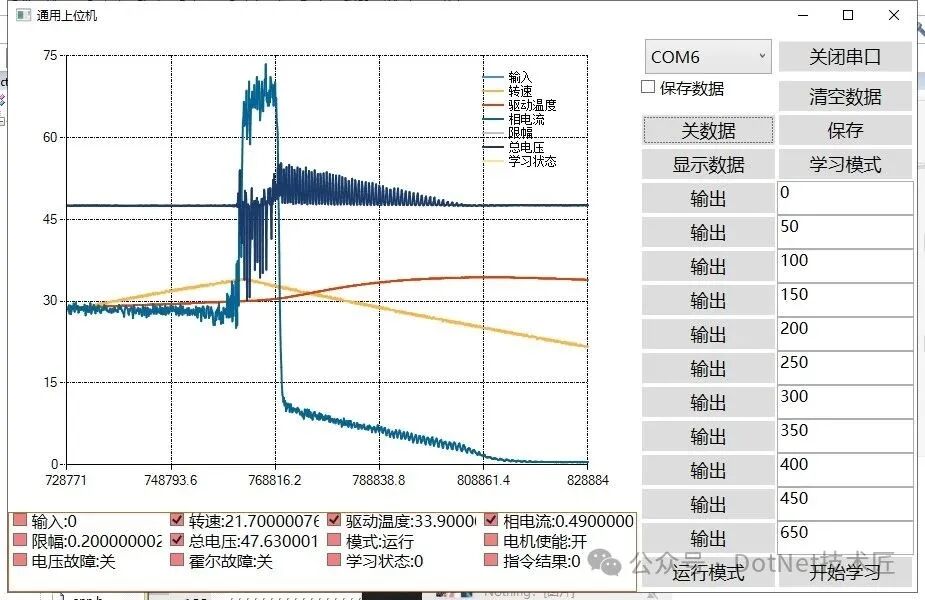
In practical applications, this general host has been successfully used in multiple embedded projects, such as motor control, sensor networks, and industrial automation. By changing the configuration file, the same software can achieve measurement and control for different devices, significantly reducing development and maintenance costs.
Project Source Code
The project is fully open-source and can be further developed or directly configured for use according to individual needs. The source code is hosted at the following addresses:
GitHub: https://github.com/yangzigy/com_mc
Gitee: https://gitee.com/yangzifb/com_mc
Conclusion
The general-purpose measurement and control host is an efficient debugging tool aimed at embedded development. It addresses the issues of repeated development and maintenance difficulties associated with traditional hosts through a highly configurable design concept. Its powerful features, flexible protocol support, and user-friendly interface make it an indispensable assistant for embedded engineers.
Keywords
#General Host, #Serial Debugging, #Curve Display, #Protocol Parsing, #Data Playback, #Configuration, #Embedded Debugging, C#, .NET, #Open Source Tool, #General Measurement and Control Host
FinallyIf you find this article helpful, please give it a thumbs up to support! Your support is my motivation to continue sharing knowledge. If you have any questions or need further assistance, feel free to leave a message. You can also join the WeChat public account[DotNet Technology Craftsman] community to exchange ideas with other technology enthusiasts and grow together!
Author: Little Code Craftsman
Source: gitee.com/smallcore/DotNetCoreDisclaimer: Online content is for learning purposes only, respecting copyright. Infringements will be deleted promptly, apologies and thanks!ENDFacilitating communication, resource sharing, and mutual growthPure technical exchange group, those who wish to join please scan the code and note【Join Group】

Recommended ReadingModular Industrial Vision General Image Processing Tool with C# + Halcon (Practical, Efficient, Full-Scene Coverage)Open Source Industrial WPF Data Dashboard: Practical Project Based on MVVM + HandyControlIs the Future of C# Avalonia?How to Create Beautiful Interfaces for Desktop Applications in C#?Free and Open Source! A Simple and Easy-to-Use Android Screen Projection Tool Based on WPF + ScrcpyHandwritten WinForm Chart Control: No Dependencies, Supports Curves, Pie Charts, Point Charts, and Object Line ChartsHow to Choose Enterprise-Level Desktop Architecture: MFC, WinForm, or WPF? A Clear ExplanationWinForm Control Auto-Scaling Algorithm: Simple Implementation for Adaptive Window SizeWPF vs. WinForm: The Future Battle on the .NET Platform, Who Will Win? (Vote)Recommended Content: Five Powerful .NET Open Source Workflow Systems, Ready to UseFull-Stack .NET Low-Code Engine: Permissions, Workflows, API Dynamic Generation, Open Source and Ready to UseA Lightweight ERP Inventory System Based on .NET: Scan for Storage, Order to Label, Direct to DeliverySmart Factory MES Rapid Development Framework Based on .NET 8 + Vue 3: Comprehensive Coverage of Device Monitoring and Data DashboardC# + OpenCvSharp for Low-Cost Open Source Monocular Structured Light 3D Scanning.NET 9 + React Dynamic Routing Based on DDD Architecture + RBAC Practical ImplementationEnterprise-Level WinForm Rapid Development Framework Based on SunnyUI, Ready to Use!No Hardware Solution! Camera Scanning Tool Based on .NET (Supports Enter/Continuous Scanning)Industrial MES System Development WPF + MVVM from Beginner to Practical (Full Source Code/Collection Edition)C# Commonly Used Control Libraries for Industrial ApplicationsHow to Easily Achieve Auto-Start for Industrial Host Programs in C#Should C# Industrial Vision Development Choose Halcon or OpenCV?How to Learn C# Host Development? Suggestions for Automation Engineers.NET Desktop Application (WPF/WinForm) Efficient Auto-Update SolutionQuickly Develop AntdUI Style WinForm General Backend Framework with One Line of CodeWinForm + SQL Server + Modbus to Implement Warehouse Temperature Control Host System DevelopmentMulti-Functional Tool Developed in WinForm: Serial Communication, Encryption/Decryption, Image Conversion, and MorePowerful Free and Open Source Chart Library ScottPlot (Universal for WinForm/WPF)C# + OpenCvSharp Common Image Processing Example Set for Industrial Vision (Ready to Use, Source Code Included)If you found it beneficial, please share it to benefit more people
Follow “DotNet Technology Craftsman“, to enhance technical strength together
 Collect
 Like
Like Share
Share View
View