Attention industrial control beginners! Want to understand the comparison instructions of Siemens PLC? Don’t worry, this article covers everything from the basics to practical applications, using simple language and examples to help you grasp the concepts easily. After reading, you’ll be ready to dive into programming!
1. What are Comparison Instructions? Simply put, they are the “Judge of Value Battles”
For example, you want the PLC to determine: “Is the current temperature value (IN1) exceeding the set alarm value (IN2)?” or “Is the motor speed (IN1) below the minimum requirement (IN2)?” This is where the comparison instructions come into play, allowing the two values to “compete” and determine the outcome. If the conditions are met, subsequent actions (like alarms, shutdowns, or device startups) will be triggered.
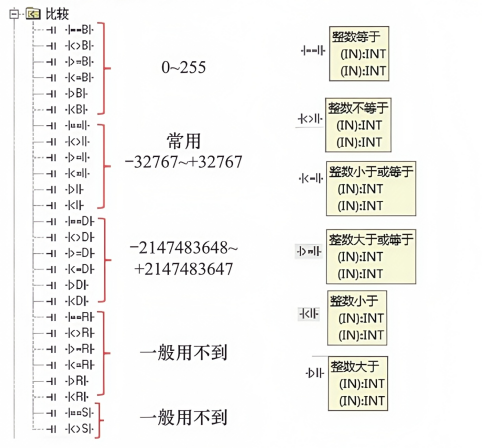
To put it more professionally: when comparing the two input values IN1 and IN2, if they meet the preset comparison relationship (greater than, less than, etc.), the corresponding circuit of the instruction will be “closed”, allowing the subsequent program to continue; if not, it will be “open”, causing the program to pause.
2. Six Comparison Methods Covering All “Value Duel” Scenarios
In the Siemens S7-200 PLC, there are six “dueling rules”. Can’t remember them? Check out these examples for clarity:
- Greater than (>): For instance, “Product quantity IN1 (100 produced) > Target quantity IN2 (80)”, if met, it triggers the “Completion Indicator Light”.
- Less than (<): “Water tank level IN1 (1 meter) < Minimum water level IN2 (1.5 meters)”, if met, it activates the “Water Supply Solenoid Valve”.
- Greater than or equal to (≥): “Temperature IN1 (30°C) ≥ Set temperature IN2 (30°C)”, if met, it activates the “Cooling Fan”.
- Less than or equal to (≤): “Pressure IN1 (5MPa) ≤ Safety pressure IN2 (5MPa)”, if met, it maintains “Normal Equipment Operation”.
- Equal to (=): “Count IN1 (10) = Packaging quantity IN2 (10)”, if met, it triggers the “Packing Action”.
- Not equal to (≠): “Measured value IN1 (5) ≠ Standard value IN2 (10)”, if met, it triggers the “Defective Product Alarm”.
3. What Practical Applications Correspond to Different Data Ranges?
Refer to this value range table, where different intervals correspond to different scenarios:
- 0 – 255: For example, “Device operation count (0 – 200 times)” and “Small light flashing count (0 – 100 times)”; this range is sufficient, simple and convenient.
- -32767~32767: In daily industrial control, “Temperature monitoring (-20°C~50°C corresponding conversion values)” and “Motor speed (0 – 3000 RPM)” can be adequately covered by this range.
- -2147483648~2147483647: This extremely large range is generally used for “Long-term cumulative production (hundreds of thousands, millions)” and “Complex counting in large systems”. Beginners may encounter this less frequently, but it’s good to be aware of it!
4. How to Understand the Operating Status? Look at These 4 Monitoring Situations
Many beginners stare blankly at the program, unsure how to interpret the operation of comparison instructions. Remember these four states:
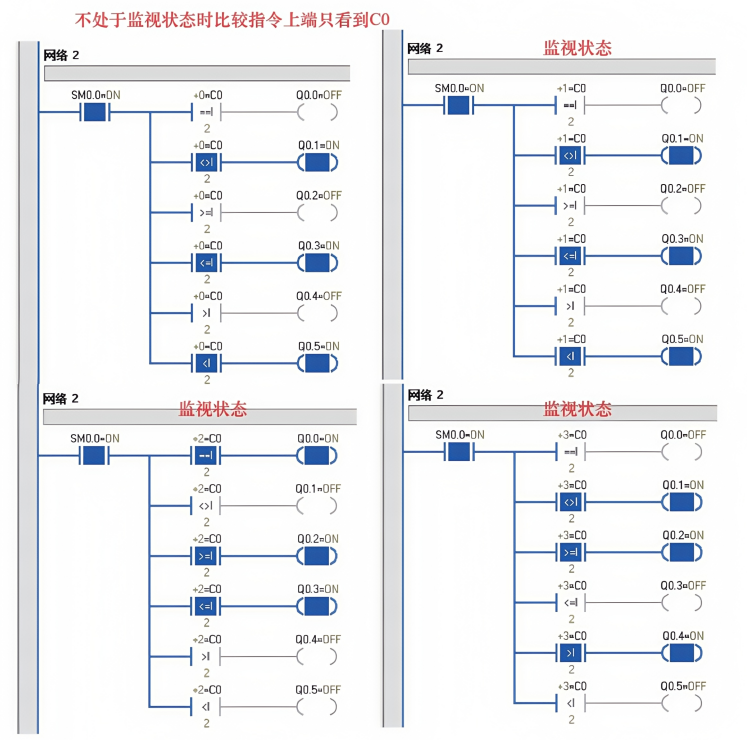
(1) When not monitoring: “Simplified to only CO”
It’s like not turning on the “monitoring camera”; in the program, the comparison instruction section will only show a CO marker, revealing nothing. At this point, the program runs silently, and if conditions are met, it will close the circuit; if not, it remains open.
(2) Monitoring State 1: Values meet, circuit is closed!
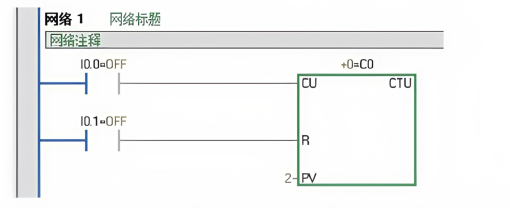
For example, “IN1=10, IN2=5, comparison instruction selected ‘greater than (>)'”; during monitoring, you can see the circuit “closed”, and subsequent outputs (like Q0.0 lighting up, Q0.1 starting the motor) will execute, like “the value won, giving the following program a green light”.
(3) Monitoring State 2: Values do not meet, circuit is open!
If “IN1=3, IN2=5, selected ‘greater than (>)'”, during monitoring, the circuit is “open”, and subsequent outputs will not execute, equivalent to “the value did not win, the program is stuck here”.
(4) In complex programs: How do multiple comparison instructions interact?
For example, in an “automatic batching system”, it must simultaneously meet: “Material A weight (IN1) ≥ Recipe value (IN2)” AND “Material B weight (IN3) ≤ Upper limit value (IN4)”. During monitoring, you need to check the status of both comparison instructions; only when both are satisfied will the action “Start Mixing” be triggered. This is the interaction of multiple instructions, turning simple comparisons into a “combination punch”!
5. Practical Tips: Avoid These Pitfalls!
- Don’t use two fixed values for hard comparisons: For example, writing “5 > 3” as a fixed value comparison in the program is not practical. In actual projects, values are generally collected from sensors (like temperature, pressure) or counters, timers, and should use “variables” (like AIW0, C0 current values) for comparison, which is more flexible and practical!
- Don’t mix data types: For example, if the temperature you collect is “integer type”, don’t write the set value as “floating point” (with decimal points), as this can easily cause errors, like “comparing apples and oranges”; types must be unified to compare!
- Test monitoring states multiple times: After writing the program, don’t run it directly on the device. First, use the software to “simulate monitoring” to see how the comparison instructions work, whether the values are correct, and whether the circuit is closed. This helps identify potential issues in advance, saving trouble when fixing problems on the device!
#Siemens PLC #Industrial Control Knowledge #Comparison Instructions #Beginner Learning #Programming Insights