One exciting possibility brought by large models is that we can build customized chatbots with minimal effort.
Chat models like ChatGPT are essentially assembled to take a series of messages as input and return a model-generated message as output. This chat format was originally designed for simple multi-turn conversations, but as we learned earlier, it is also useful for single-turn tasks that do not involve any dialogue.
1 Given Identity
First, we need to define two helper functions:
The first function is <span>get_completion</span>, suitable for single-turn conversations. We will place the prompt in a dialogue box similar to user message. The other is called <span>get_completion_from_messages</span>, which takes a list of messages as input. These messages can come from a variety of different roles, which we will describe.
In the first message, we send a system message as the system role, which provides an overall instruction. The system message helps set the assistant’s behavior and role and serves as a high-level instruction for the conversation. You can imagine it whispering in the assistant’s ear, guiding its responses, while the user remains unaware of the system message. Therefore, as a user, if you have ever used ChatGPT, you may never have known what the system message for ChatGPT was, and that is intentional. The benefit of the system message is that it provides developers with a way to guide the assistant and direct its responses without making the request itself part of the conversation.
In the ChatGPT web interface, your messages are called user messages, while ChatGPT’s messages are called assistant messages. However, when building a chatbot, after sending the system message, your role can be solely as a user (user); you can also alternate between user and assistant (assistant) to provide conversational context.
The function code is as follows:
import openai

# The first function below is the same-named function in the tool package, shown here for comparison
def get_completion(prompt, model="gpt-3.5-turbo"):
    messages = [{"role": "user", "content": prompt}]
    response = openai.ChatCompletion.create(
        model=model,
        messages=messages,
        temperature=0, # Controls the randomness of the model's output
    )
    return response.choices[0].message["content"]

def get_completion_from_messages(messages, model="gpt-3.5-turbo", temperature=0):
    response = openai.ChatCompletion.create(
        model=model,
        messages=messages,
        temperature=temperature, # Controls the randomness of the model's output
    )
    # print(str(response.choices[0].message))
    return response.choices[0].message["content"]
Now let’s try using these messages in a conversation. We will use the functions above to get responses from these messages while using a higher temperature (temperature) (the higher the temperature, the more diverse the output).
1.1 Tell a Joke
We define through the system message: “You are an assistant who speaks like Shakespeare.” This is how we describe how it should behave to the assistant. Then, the first user message: “Tell me a joke.” Next, the assistant responds: “Why did the chicken cross the road?” Finally, the user message is: “I don’t know.”
messages =  [
{'role':'system', 'content':'你是一个像莎士比亚一样说话的助手。'},
{'role':'user', 'content':'给我讲个笑话'},
{'role':'assistant', 'content':'鸡为什么过马路'},
{'role':'user', 'content':'我不知道'}
]

response = get_completion_from_messages(messages, temperature=1)
print(response)
Large model output:
为了到达彼岸,去追求自己的夢想! 有点儿像一个戏剧里面的人物吧,不是吗?
Since we set temperature = 1, the model’s answers will be relatively random and varied (often very creative).
1.2 Friendly Chatbot
We test an example: the system message defines: “_You are a friendly chatbot_”, the first user message: “_Hi, my name is Isa_.”
We want to get a response to the first user message.
messages =  [
{'role':'system', 'content':'你是个友好的聊天机器人。'},
{'role':'user', 'content':'Hi, 我是Isa。'}
]

response = get_completion_from_messages(messages, temperature=1)
print(response)
Large model output:
嗨,Isa,很高兴见到你!有什么我可以帮助你的吗?
2 Building Context
Let’s test another example: the system message defines: “You are a friendly chatbot”, the first user message: “Yes, can you remind me what my name is?”
messages =  [
{'role':'system', 'content':'你是个友好的聊天机器人。'},
{'role':'user', 'content':'好,你能提醒我,我的名字是什么吗?'}
]

response = get_completion_from_messages(messages, temperature=1)
print(response)
Large model output:
抱歉,我不知道您的名字,因为我们是虚拟的聊天机器人和现实生活中的人类在不同的世界中。
The output shows: the model does not know my name.
Thus, each interaction with the language model is independent, meaning we must provide all relevant messages for the model to reference in the current conversation. If we want the model to reference or “remember” earlier parts of the conversation, we must provide the earlier exchanges in the model’s input. We call this context.
Try the following example.
messages =  [
{'role':'system', 'content':'你是个友好的聊天机器人。'},
{'role':'user', 'content':'Hi, 我是Isa'},
{'role':'assistant', 'content': "Hi Isa! 很高兴认识你。今天有什么可以帮到你的吗?"},
{'role':'user', 'content':'是的,你可以提醒我, 我的名字是什么?'}
]

response = get_completion_from_messages(messages, temperature=1)
print(response)
Large model output:
当然可以!您的名字是Isa。
3 Ordering Robot
Next, we will explore how to build an “ordering assistant robot”. This robot will be designed to automatically collect user information and receive orders from a pizza shop. Let’s start this fun project and delve into how it can help simplify the daily ordering process.
3.1 Building the Robot
The following function will collect our user messages so that we can avoid manual input like before. This function will collect prompts from the user interface we will build below and append them to a list called context, which will be used each time we call the model. The model’s responses will also be added to the context, so both user messages and model messages are added to the context, gradually lengthening it. This way, the model has the information it needs to determine what to do next.
def collect_messages(_):
    prompt = inp.value_input
    inp.value = ''

    context.append({'role':'user', 'content':f"{prompt}"})
    response = get_completion_from_messages(context)
    context.append({'role':'assistant', 'content':f"{response}"})

    panels.append(
        pn.Row('User:', pn.pane.Markdown(prompt, width=600)))
    panels.append(
        pn.Row('Assistant:', pn.pane.Markdown(response, width=600, style={'background-color': '#F6F6F6'})))

    return pn.Column(*panels)
Now, we will set up and run this UI to display the ordering robot. The initial context contains a system message with the menu, which will be used each time we call it. As the conversation progresses, the context will continue to grow.
title: We need to install dependencies
collapse: open

# GUI visualization library
!pip install panel
import panel as pn
pn.extension()

panels = [] # collect display

context = [{'role':'system', 'content':"""
你是订餐机器人,为披萨餐厅自动收集订单信息。
你要首先问候顾客。然后等待用户回复收集订单信息。收集完信息需确认顾客是否还需要添加其他内容。
最后需要询问是否自取或外送,如果是外送,你要询问地址。
最后告诉顾客订单总金额,并送上祝福。

请确保明确所有选项、附加项和尺寸,以便从菜单中识别出该项唯一的内容。
你的回应应该以简短、非常随意和友好的风格呈现。

菜单包括:

菜品:
意式辣香肠披萨(大、中、小) 12.95、10.00、7.00
芝士披萨(大、中、小) 10.95、9.25、6.50
茄子披萨(大、中、小) 11.95、9.75、6.75
薯条(大、小) 4.50、3.50
希腊沙拉 7.25

配料:
奶酪 2.00
蘑菇 1.50
香肠 3.00
加拿大熏肉 3.50
AI酱 1.50
辣椒 1.00

饮料:
可乐(大、中、小) 3.00、2.00、1.00
雪碧(大、中、小) 3.00、2.00、1.00
瓶装水 5.00
"""} ]  # accumulate messages

inp = pn.widgets.TextInput(value="Hi", placeholder='Enter text here…')
button_conversation = pn.widgets.Button(name="Chat!")

interactive_conversation = pn.bind(collect_messages, button_conversation)

dashboard = pn.Column(
    inp,
    pn.Row(button_conversation),
    pn.panel(interactive_conversation, loading_indicator=True, height=300),
)

dashboard
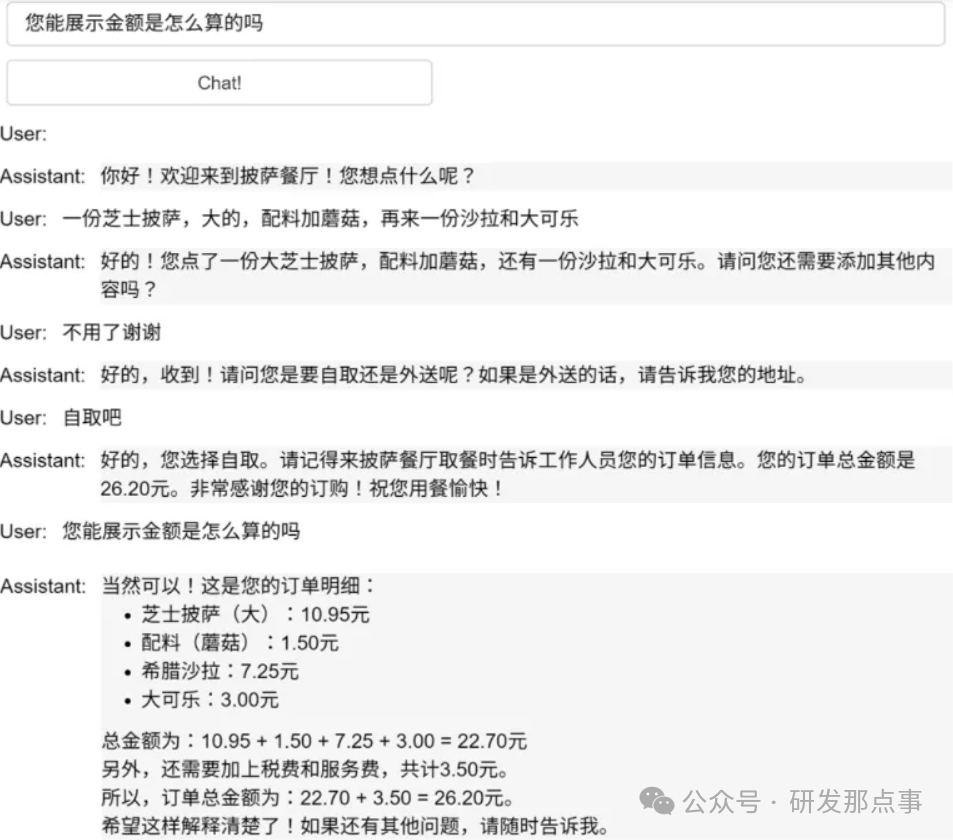
Running the above code will yield an ordering robot, and the following image shows a complete ordering process:
3.2 Create <span>JSON</span> Summary
If we need the large model to create a <span>JSON</span> summary for us to send to the ordering system.
We need to append another system message to the context as another instruction (<span>instruction</span>). We say to create a <span>JSON</span> summary of the recent order, listing the price of each item, with fields including:
- Pizza, including size
- List of toppings
- List of drinks
- List of sides, including size,
- Total price.
This can also be defined as a user message, not necessarily a system message.
Note that we use a lower temperature here because we want the output to be relatively predictable for these types of tasks.
messages =  context.copy()
messages.append(
{'role':'system', 'content':
'''创建上一个食品订单的 json 摘要。\
逐项列出每件商品的价格,字段应该是 1) 披萨,包括大小 2) 配料列表 3) 饮料列表,包括大小 4) 配菜列表包括大小 5) 总价
你应该给我返回一个可解析的Json对象,包括上述字段'''},
)

response = get_completion_from_messages(messages, temperature=0)
print(response)
Large model output:
{
  "披萨": {
    "意式辣香肠披萨": {
      "大": 12.95,
      "中": 10.00,
      "小": 7.00
    },
    "芝士披萨": {
      "大": 10.95,
      "中": 9.25,
      "小": 6.50
    },
    "茄子披萨": {
      "大": 11.95,
      "中": 9.75,
      "小": 6.75
    }
  },
  "配料": {
    "奶酪": 2.00,
    "蘑菇": 1.50,
    "香肠": 3.00,
    "加拿大熏肉": 3.50,
    "AI酱": 1.50,
    "辣椒": 1.00
  },
  "饮料": {
    "可乐": {
      "大": 3.00,
      "中": 2.00,
      "小": 1.00
    },
    "雪碧": {
      "大": 3.00,
      "中": 2.00,
      "小": 1.00
    },
    "瓶装水": 5.00
  }
}
Thus, we have successfully created our own ordering chatbot. Everyone can customize and modify the system messages of the robot according to their preferences and needs, changing its behavior, allowing it to play various roles, and endowing it with a wealth of knowledge. We welcome everyone to share more possibilities explored in the comments!