1. Design Requirements for PLC ProgramsPLC
A complete PLC program is not just about making the system operational; it also requires comprehensive comments, a well-structured architecture, good scalability, a complete alarm protection system, and a simulation system before operation.
1. Simplicity
Keep the PLC program as simple as possible. Simplicity means using standardized program frameworks and simple instructions whenever possible.
To achieve simplicity, optimize the program structure on a larger scale by simplifying the program with flow control instructions, and on a smaller scale, replace single-function instructions with more powerful ones, while also paying attention to the order of instructions.
2. Readability
The designed program should have good readability. This not only helps the programmer deepen their understanding of the program for debugging but also makes it easier for others to read and maintain the program. If necessary, it can also facilitate program promotion.
To enhance readability, the program should be as clear as possible. Pay attention to hierarchy, implement modular design, and use object-oriented methods. Utilize standard designs as much as possible.
In special cases where language programming is used, ladder diagram programming is preferred for ease of reading.
Moreover, I/O allocation should be systematic for easier memorization and understanding. If necessary, add comments. The use of internal components should also follow a pattern; do not use them arbitrarily.
Readability should be considered from the beginning of program design. This is not easy to achieve completely, as changes in instructions and internal components during debugging may make a previously clear program somewhat chaotic. Therefore, leave some room for adjustments during debugging, and tidy up the program afterward to ensure higher quality.
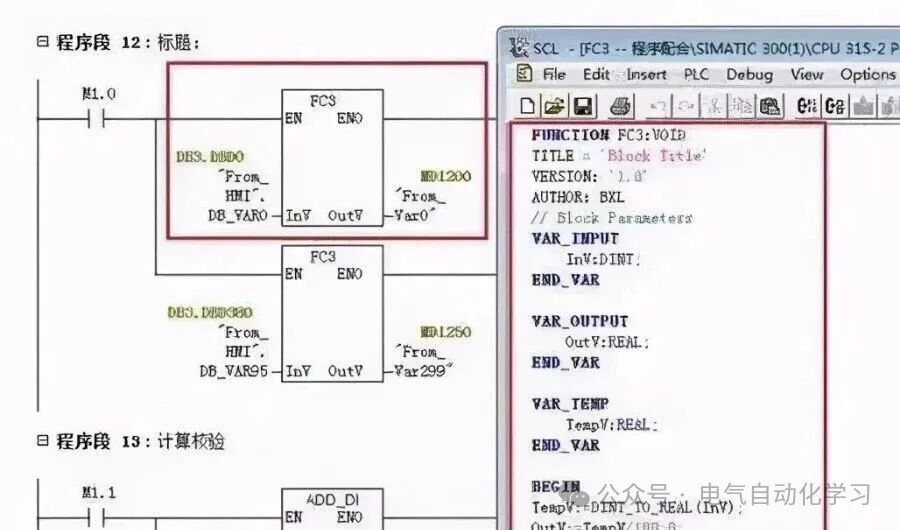
Program comments should at least cover the following aspects:
A. System comments: Copyright company of the entire program and its purpose;
B. Program block comments: Main purpose of this program block and its author;
C. Segment comments: Purpose of this segment of code;
D. Variable comments: Importance is self-evident, including I/O comments and intermediate variable comments.
As for confidentiality considerations, I believe it should be addressed through encryption algorithms or block encryption, rather than by reducing comments as a clever trick.
3. Correctness
The PLC program must be correct and verified through actual work to prove its functionality. This is the fundamental requirement for PLC programs; if this cannot be achieved, nothing else matters.
To ensure correctness, instructions must be used accurately, and internal components must be used correctly. Accurate use of instructions is linked to a clear understanding of their meanings and usage conditions. If necessary, write small programs to test unclear instructions.
Some instructions may vary in details due to different production batches or series models of PLCs, so refer carefully to the programming manual.
Correct use of internal components is also crucial. For instance, some PLCs have power-off protection while others do not. Ensure that power-off protection components are used where required, and vice versa.
In summary, accurate use of instructions and correct use of internal components are fundamental requirements for ensuring that the programmed PLC operates correctly.
For example, Siemens’ rising and falling edges require the use of memory-capable variables as intermediate variables, such as M points or DB points; using the FC’s temp variable would cause issues.
4. Reliability
The program must not only be correct but also reliable. Reliability reflects the stability of the PLC program, which is a basic requirement.
Some PLC programs may work correctly under normal working conditions or legal operations, but fail under abnormal conditions (such as temporary power outages followed by quick reconnection) or illegal operations (such as pressing buttons out of order or simultaneously pressing multiple buttons). Such programs are unreliable or unstable, indicating poor quality.
A good PLC program can recognize abnormal working conditions and adapt to normal conditions, making it suitable for various situations. It should reject illegal operations without leaving any “traces” and only accept legal operations.
Interlocking is a common method to reject illegal operations, often used in relay circuits, and can also be inherited by PLCs.
5. Modifiability
The program should be easy to modify, meaning it should be convenient to change. One of the characteristics of PLCs is their flexibility to adapt to various situations, which relies on modifying or redesigning the program.
Redesigning the program is necessary when changing the PLC’s process requirements, which involves not only reprogramming but also reallocating I/O. In most cases, minor modifications are sufficient, which requires the program to be easily modifiable.
Modifiability also implies elasticity, requiring only minimal changes to achieve parameter adjustments or action modifications.
6. Scalability
Many programs may be written before arriving on-site, but additional programs may need to be added once on-site. To avoid disrupting the overall system structure, reserve some space in each functional area as a backup.
Leave sufficient margins in hardware, and consider manual, automatic, and semi-automatic operations when writing software, ensuring space is allocated.
7. Complete Alarm System
PLC systems are often used in industrial environments, where every incident can cause varying degrees of loss. To minimize losses during accidents or to handle them effectively, it is essential to prioritize PLC alarms and protections, making them a crucial component of the system.
8. Program Simulation
To ensure the progress of on-site debugging or to demonstrate to clients, it is often necessary to conduct full automatic simulations of the program before arriving on-site. This requires incorporating a simulation portion into the program, which can be disconnected after normal on-site operation. To enable simulation functionality, the following tasks must be completed:
(1) Convert the actual PLC I/O points into intermediate variables or data block variables;
(2) Write simulation programs for each device according to process requirements;
Meeting the above requirements during the design process qualifies the program as a good one.
2. Design Specifications for PLC ProgramsPLC
1. Select the appropriate PLC model and I/O point count, and choose special function modules when specific functional requirements exist.
2. Familiarize yourself with the selected PLC programming instructions and compilation software.
3. Plan soft components, including internal relays, holding relays, data registers, timers, counters, etc.
4. Plan the program, generally in the order of fault extraction, fault handling, manual handling, automatic handling, and output handling. For larger projects or equipment, process the program in segments or blocks according to functional units, such as in an automated production line with lifts, transfers, and rotating devices, programming should be done in segments according to these units.
5. Add brief segment comments before the programs written in segments or blocks, explaining the function of this segment, and if necessary, indicate the corresponding process flow. The order of segmented or block programs in the overall program should generally follow the process flow for better readability.
6. Before program design, abstract the equipment to extract common factors such as stop, emergency stop, overload, limits, timeout, safety light curtain, collision stop, door switches, etc., and place them in the start loop or main control, interlocking loop, as a prerequisite for the entire program structure. Based on this, divide the program into two main functional areas: automatic and manual.
7. Extract common factors in the manual functional area of the program structure, such as manual control and factors that endanger equipment and personnel safety, and place them in the manual main control and interlocking loop to protect, shield, and alarm manual control.
8. Extract common factors in the automatic functional area of the program structure, such as automatic, limits, timeout, etc., and place them in the automatic main control and interlocking loop to protect, shield, and alarm equipment under automatic control. A general principle is to strictly limit equipment access while ensuring safety and to allow more lenient restrictions on equipment output.
9. The program design should include a total reset function, allowing users to quickly restore normal operation in case of equipment failure. The total reset should fully consider the safety of equipment and personnel during the reset process.
10. When switching from automatic mode to manual mode, the program should clear outputs and intermediate states from the automatic mode. Especially when using the SET instruction in automatic mode, it must be cleared with the RESET instruction in manual mode.
11. It is strictly prohibited to use double outputs in program compilation, meaning the same output statement or output coil should not appear two or more times in the program. For outputs of the same point under different mode conditions, use intermediate relays for transfer, and finally consolidate them to the output point.
12. When using touch screens, do not program other functional aspects in the control and status areas shared by the touch screen and PLC.
13. For special modules of the PLC, check whether their control and status areas occupy working words before use. If they do, do not program these working words for other purposes.
14. Add Chinese comments to PLC inputs, outputs, intermediate relays, timers, counters, data registers, etc. Inputs and outputs should also include component names and positions. For corresponding input points, it is generally assumed that peripheral switches are connected to NO contacts; those requiring NC contacts must be indicated in the comments. All comments should be clear and unambiguous, minimizing the use of vague terms.
15. After project debugging is completed, the final software program must be retained, and the saved file name should include project number/author/date information/version number, etc.
16. Regarding program encryption: passwords for encrypted programs must be saved in a dedicated file, indicating the corresponding username + password + permissions, and distributed to at least two people to prevent loss of the password leading to inability to open the program.
3. Programming Suggestions for PLC ProgramsPLC
1. When PLC and the upper computer (or touch screen) form a monitoring system, the screen often requires control modes such as “manual” and “automatic” (generally only one can be active at a time). In the program, you can use the “MOV” instruction. For example, when selecting “manual,” move constant 1 to register VB10; when selecting “automatic,” move 2 to the same register VB10. By checking the data in the register, you can determine the control mode of the system. This approach is easy to understand and avoids the complexity of interlocking programs.
2. When controlling analog quantities in the program, if the read analog quantity has minimal error, a time filter can be applied to delay for a period. If the read data has significant errors, other filtering methods, such as averaging, should be employed. Relevant materials can be consulted.
3. During program debugging (especially when modifying equipment, and your program is added to the original program), if conditions are met in the program statement but the output coil does not activate, check whether your segment of the program is between statements like JUMP or go to. Another possibility is that after interrupting the program, conditions are met but the output does not activate, which usually means this segment of the program is not being scanned.
4. In sequential control programs, where one action completes before moving to the next, I find the +10+10 control mode very convenient. The idea is to preset a register initialized to 0; when the system starts, add 10 to it, making the register 10, which allows the first action to be performed. After completing the first action, add another 10, making the register 20, which allows the second action to be performed, and so on. This way, by checking the data in the register, you can determine which action to complete. When a jump action is needed, you can add +20, +30, etc., depending on the actual needs.
Why add 10 instead of 1? Because after adding 10, if you need to insert a segment, you can choose any position among those 10 available spaces.
5. When designing the program, if a process fault occurs (not controlled by the control system), it is best to maintain the fault phenomenon and have visual and audible alarms until the operator resets it, so they are aware of the system fault. Otherwise, if the system stops, others may think your program has issues, which should be considered when designing a new system.
6. For frequently called subprograms, they can be made into sub-modules for frequent invocation.
7. Since the movements of production machinery during the working cycle require a certain amount of time, and these times have limits, you can use these times as a reference. When the action of the step to be detected begins, start a timer with a preset value that is 20% to 30% longer than the normal duration of that action. The timer’s output signal can be used for alarms or automatic shutdown. If the action of a certain step exceeds the specified time and does not transition to the next step, the timer will issue a fault signal, stopping the normal working cycle program and initiating the alarm or shutdown program, which is commonly referred to as over-timing protection.
8. Some safety detection switches (such as emergency stop buttons, safety light curtains, limit switches, etc.) should use normally closed (NC) inputs.
9. For safety and energy-saving considerations, design outputs to activate only when needed, stopping output once in position, rather than designing them to output continuously and only stopping when required.
10. The principle of action for executing components should be to avoid unnecessary movements!
11. For single device control: each device must have a soft manual/automatic switch, and during soft manual operation, it should have start/stop functionality. When switching from automatic to soft manual, the device must not stop; when switching from soft manual to automatic, the device’s start/stop depends on the automatic program.
12. Single devices (pumps, fans, and other large equipment) must rotate after running for 24 hours, and running time must be accumulated, except when the start/stop sequence is set by the upper computer, in which case the operator can set it themselves.
4. General Naming Rules for PLC ProgramsPLC
1. CamelCase
Also known as camel case naming, this method capitalizes the first letter of each word that forms a unique identifier when variable names or function names are connected together, such as “myName”. This naming style resembles the humps of a camel, hence the name. Camel case is divided into lower camel case and upper camel case. (1) Lower camel case: the first word starts with a lowercase letter, and the first letters of the remaining words are capitalized. Variables generally use lower camel case naming, e.g., “myName”. (2) Upper camel case: also known as Pascal case, where the first letter of every word is capitalized. Functions and classes generally use upper camel case naming, e.g., “MyName”.
2. Hungarian Notation
The first letter is an abbreviation of the variable type, and the rest of the name uses the variable’s English or its abbreviation, with the first letter of each word capitalized. The basic principle is: variable name = attribute + type + object description. For example: Int iMyAge; “i” is the abbreviation for “int” type; char cMyName[10]; “c” is the abbreviation for “char” type; float fManHeight; “f” is the abbreviation for “float” type.
3. PascalCase
This is the upper camel case naming method mentioned earlier. The first letter of each word is capitalized. For example: “MyName”.
4. UnderScoreCase
Each logical breakpoint in variable names or function names is marked with an underscore. For example: “my_name”.